


 ビデオコンバーター究極
 スクリーンレコーダー
 ビデオ修復
ビデオ修復2つの比類のないアプローチでMTVをFLVに変換する方法

パート1。MTVをFLVオフラインに変換する方法
Video Converter Ultimate is one of the best MTV to FLV converters. You can change your video format from MTV to FLV in just a few clicks. It allows you to edit and compress MTV videos with the help of this software. This MTV-to-FLV converter is available for use on both Windows and Mac computers, and it is completely free. You can easily convert MTV files to FLV format by downloading and installing the converter app, then importing the videos you want to be converted. For a more in-depth explanation, please refer to the following guide.
Step 1: To start downloading the software, click the Free Download button below this step. After you click it, prepare to install it after a while.
無料ダウンロードWindows 7 以降に対応安全なダウンロード
無料ダウンロードMacOS 10.7 以降に対応安全なダウンロード
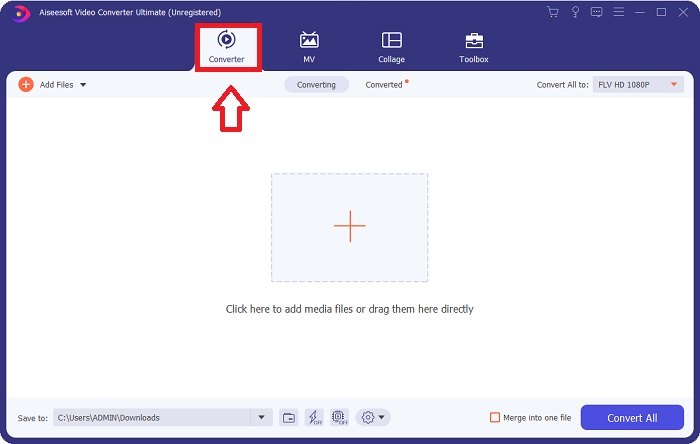
Step 2: After installing the software on your computer, run the software and a window will pop on your screen. The software displays the Converter interface on your screen, ready to import a file.
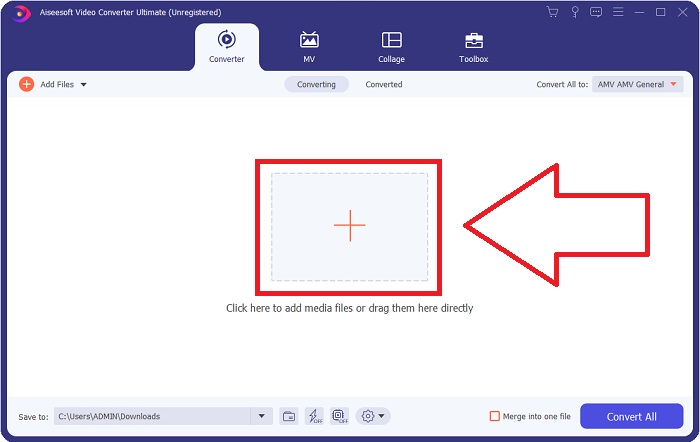
Step 3: To import a file to the software, you must click the + button in the middle of the software's window, or you can simply drag any video files.
Step 4: It's time for you to choose the FLV video format, located at the right corner of the window near the video output. Click it and navigate the FLV video format and determine which quality you prefer.
![[フォーマットと品質]をクリックします](/images/2021/12/click-format-and-quality.jpg)
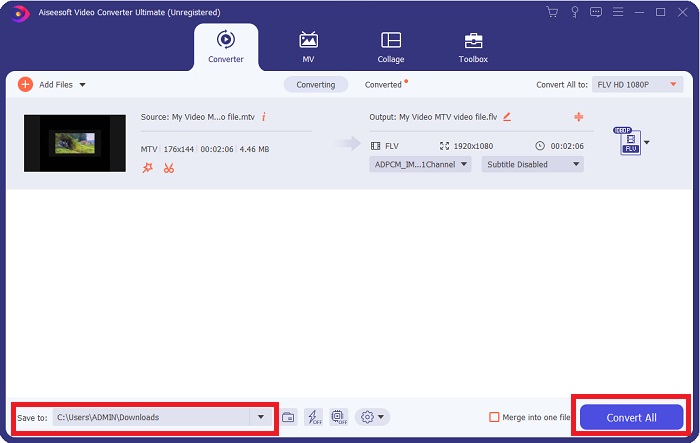
Step 5: You can now convert your file by clicking the Convert All button located at the bottom right corner of the window. And browse the location where you will transfer the converted file by clicking the drop down button near the Save to.
パート2。MTVをFLVオンラインに変換する方法
Here's a free online tool for you to learn about that can convert MTV to FLV. The Free Video Converter Online can convert video and audio formats such as MP4, WMV, and ASF to various formats. You can restore your high-definition videos to popular file types in just a few clicks while maintaining their original visual quality. Converting multiple videos or audio files at once does not compromise quality. Here are the steps you need to take:
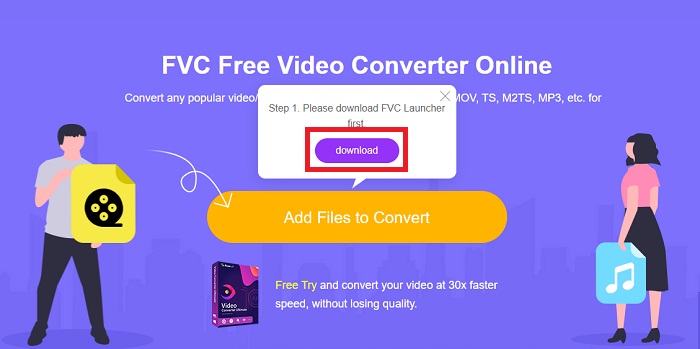
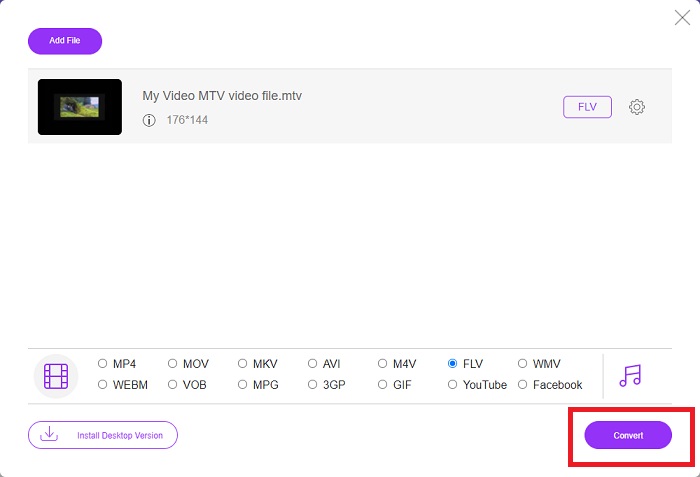
Step 1: Gain access to the main webpage of Free Video Converter Online by clicking this link. After that, you must click the Add Files to Convert button displayed on the main screen to download the launcher that will allow you to operate this online tool. After downloading, click it again to import files from your computer.
Step 2: Choose the FLV video format from the video format selection located at the bottom part of the window. If you want to know all the specifications of the output video, click the gear icon. Adjust it to your preferred settings and once you finish adjusting, click OK.
![調整して[OK]をクリックします](/images/2021/12/adjust-and-click-ok.jpg)
Step 3: Now that you are satisfied with all the adjustments, you can convert your MTV video format to FLV by clicking the Convert button.
関連記事:
パート3。MTVとFLVに関する拡張知識
一部の中国のポータブルMP4ビデオプレーヤーは、MTVおよびFLVビデオファイルに関する膨大な知識をMTV形式で使用してビデオを保存します。毎秒12フレームの速度で、MP3オーディオと多数の画像を組み合わせます。 MTVファイルとAMVファイルにはいくつかの類似点がありますが、フォーマットは少し異なります。いくつかの安価な中国のポータブルMP4プレーヤーは、MP4ビデオを保存または再生しません。一方、MTVビデオが表示されます。低解像度(128x128ピクセル)および小さなフォーマットのビデオがMTVの標準です(1分間のビデオは約24 MBのデータです)。メディアプレーヤーは、多くのストレージスペースや処理能力を必要としません。多くのMTVビデオを保存して再生します。 MTV形式は中国のポータブルメディアプレーヤーでも使用されているAMV形式に似ていますが、形式が十分に異なるため、すべてのAMV互換デバイスまたはメディアプレーヤーがMTVファイルを再生できるわけではありません。
ただし、AdobeSystemsのFlashVideo Formatは、YouTube、Hulu、Vevo、およびその他の多くのストリーミングビデオサービスのオンラインビデオに使用できます。 iOSを除いて、ほとんどすべてのオペレーティングシステムは、Adobe Flash Player(ブラウザープラグインを含む)およびサードパーティソフトウェアを使用してFLVファイルを読み取って表示できます。 FLVは、オープンソースソフトウェアと特定のブラウザを介してiPhoneおよびAndroidデバイスで再生できます。 FlashはまだiOSで問題を引き起こしています。 Android版JellybeanのユーザーはFLVファイルを使用できます。 FLVプレーヤープログラムのみがFLV拡張子のファイルを表示できます。 FLVビデオ画面記録は、画面キャプチャおよび記録ソフトウェアを使用して可能です。
| ファイル拡張子 | MTV | FLV |
| ファイルタイプ | 中国のMP4/MTVプレーヤー | Flashビデオファイル |
| によって開発された | ロバート・W・ピットマン | アドビシステム |
| 長所 | MTVフォーマットの最も重要な利点の1つは、世界中のほとんどのコンピューターで再生できることです。 | FLV形式はインターネットで普及しています。何千ものウェブサイトがそれを利用しています。他のビデオファイル拡張子よりもはるかに多くの機能を提供し、他のほとんどのビデオ形式よりもはるかに小さいファイルを生成します。 FLVビデオは、まともな品質を表示し、すばやく読み込むのに適しています。 |
| 短所 | サウンドエンハンスメント機能が不十分なため、画像の解像度が制限され、フルスクリーンおよびフルモーションビデオを表示できません。 | フラッシュファイルファイルをオンラインで再生するには、フラッシュプラグインをインストールする必要があります。 |
| サポート/オープンするプログラム | ◆VLCメディアプレーヤー ◆AVSメディアプレーヤー | ◆VLCメディアプレーヤー ◆AdobeFlashPlayer |
パート4。MTVからFLVへの変換に関するFAQ
MacでMTVをFLVに変換するにはどうすればよいですか?
上記のVideoConverterUltimateを利用して、MTVファイルをFLVに変換できます。まず、Macにソフトウェアをダウンロードし、インストール後に起動する必要があります。次に、ファイルをプログラムに追加し、目的のFLV形式を選択します。最後に、[すべて変換]ボタンをクリックして、MTVからFLVへの変換を開始します。
MTVファイルを開くにはどうすればよいですか?
一部のMTVファイルは、クロスプラットフォームのVideoLANまたはVLCメディアプレーヤー、あるいはWindows専用のOnline MediaTechnologiesAVSメディアプレーヤーでは再生されない場合があります。たとえば、一部のMTVファイルのオーディオ部分は、VLCを使用してのみ再生できます。 MTVビデオは、すべてのクロスプラットフォームアプリケーション(Windows)であるOnline Media TechnologiesのFFmpeg、AnyMP4 Video Converter、またはAVS Video Converterを使用して、AVIまたはMP4に変換できます。
VLCはビデオをFLVに変換できますか?
VLCMediaPlayerを使用してビデオを再生します。 [メディア]タブのドロップダウンメニューから[変換/保存]オプションを選択します。システムからの.flvビデオファイルは、[メディアを開く]ページの[追加]ボタンをクリックして追加できます。
結論
Given all the points stated in this entire article, there are two recommended converters you should consider using, its Free Video Converter Online and the Video Converter Ultimate. As stated above, these two have shown their full potential, and it's better than another converter available online.
-
 [オンライン&無料]MTVをAVIに変換する3つの方法手間のかからない
 MTVのようなビデオフォーマットについて聞いたことがありますか?この形式についてすべてを知っているわけではなく、MTVビデオをAVIに変換したいので、この問題の詳細については、この記事を注意深く読んでください。
-
 AVIをFLVに無料で変換するのに役立つ具体的なガイド
 AVIをFLVに変換するには、強力なビデオコンバーターが必要です。幸いなことに、この1つの記事から、2つとそのステップバイステップガイドを学ぶことができます。
-
 PC / MacでWMVファイルをFLVに変換する2つの最も簡単な方法
 WMVをFLVに変換するにはどうすればよいですか?まず、私たちの推奨事項を読んでお気に入りの方法を見つけてから、ガイドに従ってすばやく作業を行う必要があります。
