


 ビデオコンバーター究極
 スクリーンレコーダー
 ビデオ修復
ビデオ修復MKVをFLVに無料で変換する5つの迅速で簡単な方法[オンラインおよびオフライン]
ファイルサイズが大きすぎて、MKVファイルをインターネットで共有できないとお困りですか?画質を落としてまでファイルを圧縮するのではなく、変換してみてはいかがでしょうか。送信する前に、以下の内容を読めばこの問題は解決します。この記事を1時間かけて読む必要はありません。では早速、MKVをFLVに変換するために使える6つのコンバーターを見ていきましょう。

パート1。ダウンロードする最高のMKVからFLVへのコンバーター
FVC Video Converter Ultimate を使えば、汗をかくことなく簡単かつ効率的にMKVをFLVに変換できます。この優れたコンバーターは、本記事で紹介するほかのコンバーターや、すでに使ったことのある(あるいは使ったことのない)コンバーターとは一線を画しています。PCやMacにダウンロードできる最高レベルのエンコーダー/デコーダーであり、ハイスペックなデスクトップ環境でなくても、オフラインで問題なく動作します。

FVCビデオコンバーターアルティメット
4,987,355以上のダウンロード- MKVをFLV、AVI、MP4、MOV、またはWindowsとMacで利用可能な200以上の形式に変換します。
- MKVフォーマットをすべてのデスクトップとデバイスと互換性のあるものにします。
- それはあなたのMKVフォーマットまたは他のフォーマットのためにバッチ変換を実行することができます。
- 誰でも使用できる絶対確実なコンバーター。
- 高解像度出力と最大4kのビデオ品質をサポートします。
無料ダウンロードWindows 7 以降に対応安全なダウンロード
無料ダウンロードMacOS 10.7 以降に対応安全なダウンロード
FVC Video Converter Ultimateを使ってMKVをFLVに変換する手順
ステップ1. アプリケーションをドライブにダウンロードし、インストール手順に従ってセットアップします。
無料ダウンロードWindows 7 以降に対応安全なダウンロード
無料ダウンロードMacOS 10.7 以降に対応安全なダウンロード
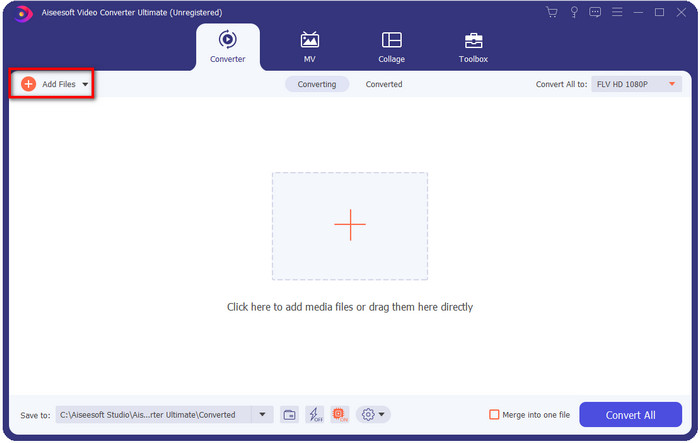
ステップ2. インストールが完了したらアプリケーションを起動し、MKVファイルを追加します。ファイルをインターフェース上にドラッグ&ドロップするか、Add Filesボタンをクリックします。
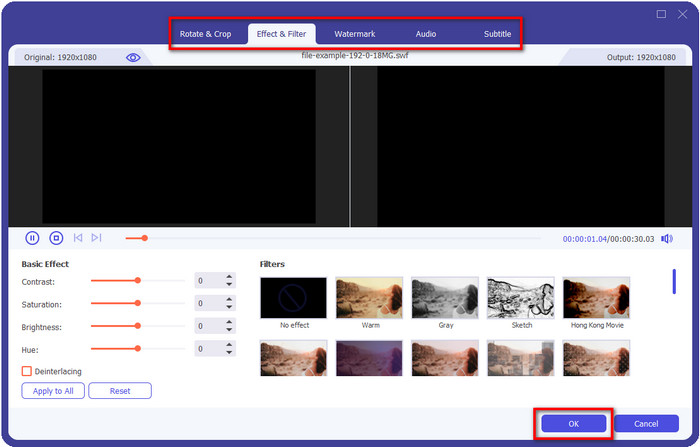
変換前にMKVファイルを編集したい場合は、魔法の杖(wand)ボタンをクリックすると、エフェクトの追加、トリミング(クロップ)、字幕追加など、さまざまな編集が行えます。編集内容を動画に反映して保存するには、OKをクリックします。
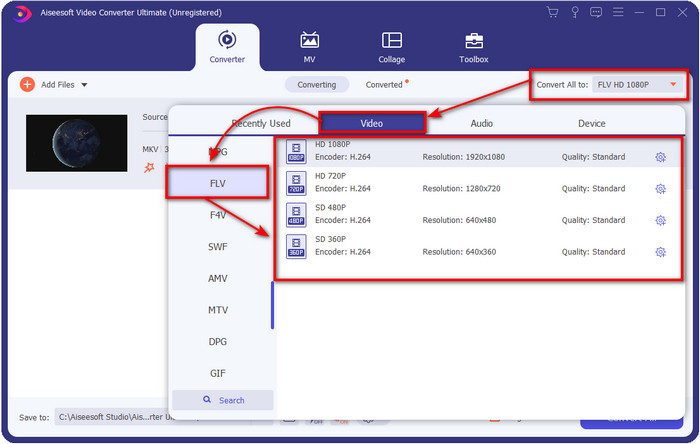
ステップ3. ドロップダウンボタンをクリックし、一覧からFLV形式を選択します。
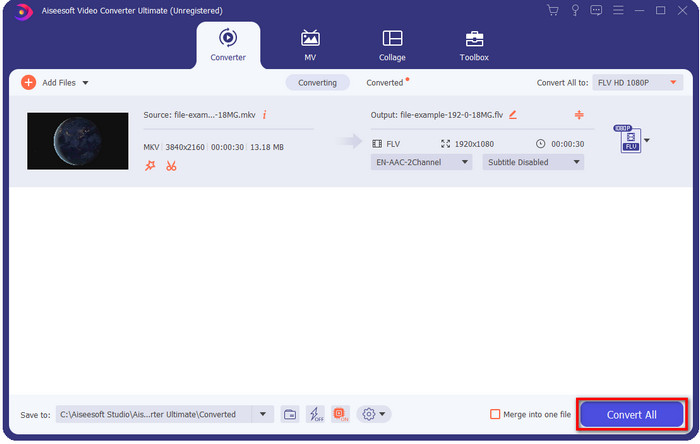
ステップ4. Convert Allボタンをクリックして、無料でMKVをFLVに変換し始めます。処理が完了すると、新しいFLVファイルが保存されたフォルダが自動的に表示されます。
パート2。4最高のWebベースのMKVからFLVへのコンバーター
1.FVC無料ビデオコンバーターオンライン
FVC Free Video Converter Onlineには、あらゆるブラウザで利用できる、シンプルながら優秀な無料オンラインMKV to FLVコンバーターが搭載されています。中規模のさまざまな形式にも対応しており、アップロード先として選択可能です。オンラインツールのためインターネット接続は必須ですが、ここでの変換とアップロードは手軽かつ高速です。使い方を知りたい方は、以下の手順に従ってください。
長所
- インターネットをお持ちの方ならどなたでもご利用いただけます。
- ユーザーフレンドリーでわかりやすいインターフェース。
- ファイルサイズの制限はありません。
- ビデオとオーディオの事前設定。
短所
- 中規模フォーマット。
ステップ1. オンラインコンバーターを開くには、このリンクをクリックします。
ステップ2. Add Files to Convertボタンを押してパソコン内のフォルダーからファイルを追加し、Openをクリックします。
ファイルを一括変換するには、デスクトップ版をダウンロードしてください。
ここでは動画編集はできませんが、歯車(gear)ボタンをクリックすると、動画と音声の設定を変更できます。
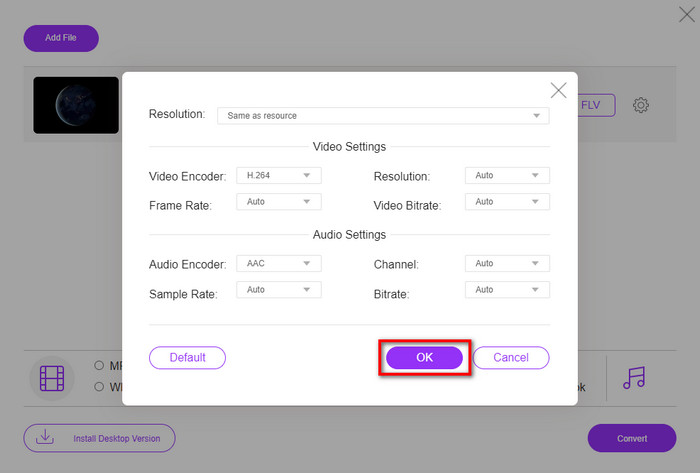
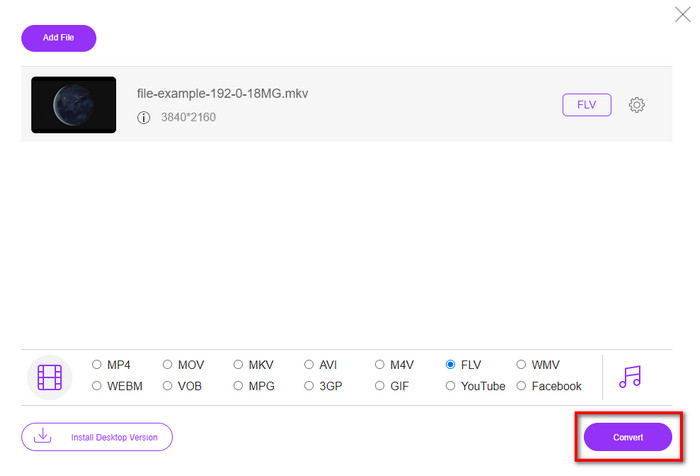
ステップ3. 一覧からFLV形式を選択します。
![[下のFLV]を選択します](/images/2021/12/select-flv-under.jpg)
ステップ4. Convertをクリックして変換処理を開始します。
2.Mconverter
オンラインで使えるMKV to FLVコンバーターの中でも特に安全性が高いのがMconverterです。動画や音声形式の変換に加えて、画像、アーカイブ、ドキュメントなど、さまざまなメディア形式の変換にも対応しています。無料で利用できますが、アップロードできるファイルサイズには制限があります。
長所
- ビデオ、オーディオ、ドキュメントなどをオンラインで変換します。
- 複数の変換をサポートします。
- 使いやすい。
短所
- ファイルサイズは200MBを超えてはなりません。
- ファイルの変換中にいくつかの広告。
ステップ1. ブラウザでMconverterを開き、.mkvファイルをボックス内へドラッグ&ドロップします。
ステップ2. FLV形式をクリックすると、自動的に変換処理が開始されます。
ステップ3. 完了すると、ファイルは自動的にドライブへダウンロードされます。
3. Freeconvert.com
Freeconvert.comを使えば、MKVをFLVにオンラインで無料変換できます。このWebコンバーターは、誰にでもわかりやすいシンプルなインターフェースを備えています。ただし、対応しているのは小規模な形式が中心で、Web画面上には多くの広告が表示されます。
ステップ1. 検索エンジンでFreeconvert.comを検索します。
ステップ2. Choose Fileをクリックしてパソコンのフォルダーから.mkvファイルをアップロードし、ドロップダウンボタンを押してFLV形式を選択します。
ステップ3. Convert FLVをクリックして変換を開始し、ダウンロードするにはDownload FLVをクリックします。
長所
- 使用できる無料のオンラインコンバーター。
- 安全でシンプルなウェブコンバーター。
- 変換する1GBのファイルをサポートしています。
短所
- 小規模フォーマットに対応しています。
- 変換とダウンロードのプロセスには多くの時間がかかります。
4.Movaviオンラインビデオコンバーター
Movavi Online Video Converterは、MKVをFLVにオンラインで変換したいときにおすすめのコンバーターのひとつです。多くのユーザーに利用されているMovavi Video Converterの無料Web版であり、高い効率性とプロフェッショナルなデザインが評価されています。
ステップ1. お好みのブラウザを開き、MovaviのWebサイトを検索します。
ステップ2. 変換したいファイルを追加するには+Add Your Mediaをクリックします。ドロップダウンボタンをクリックしてVideoを選択し、FLV形式を探してクリックします。
ステップ3. Convertを押して変換処理を開始します。
長所
- 広告なしのウェブインターフェース。
- 誰でも使用できる簡単なコンバーター。
- 中規模フォーマットに対応しています。
短所
- フォーマットを変換するプロセスには、より時間がかかります。
- 他のWebコンバーターと同様にインターネットに依存します。
パート3。比較チャート
| 特徴 | FVCビデオコンバーターアルティメット | FVC無料ビデオコンバーターオンライン | Mconverter | Freeconvert.com | Movaviオンラインビデオコンバーター |
| フォーマット機能の変換 |  | | | | |
| インターネットに依存 |  | | | | |
| バッチ変換 | | | | | |
| 高度な編集機能 | | | | | |
| 利用可能なプラットフォーム | デスクトップベースのツール | Webベースのツール | Webベースのツール | Webベースのツール | Webベースのツール |
MKVとFLV
2002年にリリースされたMatroskaマルチメディアコンテナ形式は、多数のビデオ、オーディオ、画像、および字幕トラックを含めることができるオープンソース形式です。そのため、短いビデオクリップ、テレビ番組、および映画を簡単に保存するために使用できます。アニメファンサブで大人気。
Adobe Flash Playerは、FLVを使用して、映画やテレビ番組などのビデオコンテンツを配信しました。現在、アドビはプレーヤーを開発しておらず、セキュリティ上の理由からユーザーにアンインストールすることを推奨しています。ただし、Adobe/Macromedia以外の多くのプログラムでは引き続きFLV形式を使用できます。
パート4。MKVからFLVへの変換に関するFAQ
MKVファイルが大きすぎるのはなぜですか?
MKVファイルのサイズが非常に大きくなってしまう主な理由は2つあります。1つ目は、この形式が動画・音声・メタデータなど、無制限のコンテンツや要素を1つのファイルに格納できるためです。2つ目は、動画が長尺であればあるほど、ファイルサイズも大きくなるためです。ただし、このMKV圧縮ツールを使えばMKVファイルを圧縮することもできます。しかし、より簡単な方法を求めるのであれば、MKVファイルをMP4、AVI、MOV、FLVなどの形式へ変換することを検討すべきでしょう。
MKVはAVIよりも優れていますか?
MKVとAVIは、どちらも高解像度の動画と大きなファイルサイズを扱えるという点でよく似た形式です。しかし、これらのコンテナは目的や構造が異なるため、それぞれに独自の特徴があります。たとえばAVI形式は非圧縮形式で、生の動画コンテンツを格納できるため、再生用途に非常に適しています。また、MKVファイル開発のベースとなった形式でもあります。一方、MKVには圧縮機能があるものの、格納できるコンテンツや要素の量はAVIをはるかに上回ります。そのため、高画質を維持したいのであればMKV形式がおすすめです。互換性を重視したい場合はAVIを選ぶとよいでしょう。MKVをAVIに変換する方法を知りたい方は、このリンクをクリックしてください。
ハンドブレーキはMKVからFLVへの変換を処理しますか?
Handbrakeはこのジョブを処理できますが、このコンバーターは上記の10以外のmacOSおよびWindowsプログラムをサポートしていません。
結論
まとめると、これでオンライン・オフラインの両方でMKVをFLVに変換する方法がわかりました。ここで紹介したツールは、ランダムに選んだものではなく、ユーザーの好みに基づいて厳選したものです。調査の結果、これら6つのツールはいずれもコンバーターとして非常に優れた性能を発揮していることがわかりました。その中でもFVC Video Converter Ultimateは、コンバーターとしての期待を大きく上回る働きを見せてくれました。この優れたコンバーターのほかの実力も知りたいと思いませんか?それなら、今すぐダウンロードして試してみてください。
-
 MKVからMOVへ–MKVをMOVに変換する方法
 MacでMKVをMOVに変換するにはどうすればよいですか? iMovieはMKVを読み取ることができますか? MOV形式とはどういう意味ですか?この投稿では、無料のオンラインおよびプロのビデオコンバーターを使用してMKVをMOVに変換するのに役立つ2つの簡単な方法を説明しています。
-
 Photoshop / FFmpegを使用せずにMKVビデオをアニメーションGIFに変換する方法
 コンピューターにMKVムービーをダウンロードして視聴した後、友人やインターネットでGIFとして素晴らしい瞬間を共有したい場合があります。この記事では、MKVをGIFに変換する2つの最も簡単な方法について学ぶことができます。
-
 MKV ファイルを MP3 に変換する方法に関するヒントとコツ [2025]
 MKVからMP3への適切なコンバーターの選択に問題がありますか?次に、1つの問題についてさまざまな解決策を提示したので、この投稿を読み続けてください。

