


 ビデオコンバーター究極
 スクリーンレコーダー
 ビデオ修復
ビデオ修復Windows / Mac / Android / iOS用の6つの最高のビデオスピードコントローラー
エフェクトを使い飽きてしまった場合でも、動画を早送りまたはスロー再生することで、驚くような錯覚効果を生み出せます。この動画編集テクニックはシンプルですが、とても効果的です。インターネットで検索すると、市場にはさまざまなスピードコントローラーのオプションがあり、どれを選べばよいか迷ってしまうことでしょう。そこで本記事では、再生速度を変更するために使えるスピードコントローラー系アプリをレビューしていきます。最高のスピードコントローラーアプリに興味がありますか? それなら、お使いのプラットフォームで利用できる動画スピードコントローラーについて、続きを読み進めて確認していきましょう。

パート1。Windows、Mac、Chrome、iOS、Android向けの上位6つのビデオスピードコントローラー
トップ1.ビデオコンバーターアルティメット(Windows&Mac)
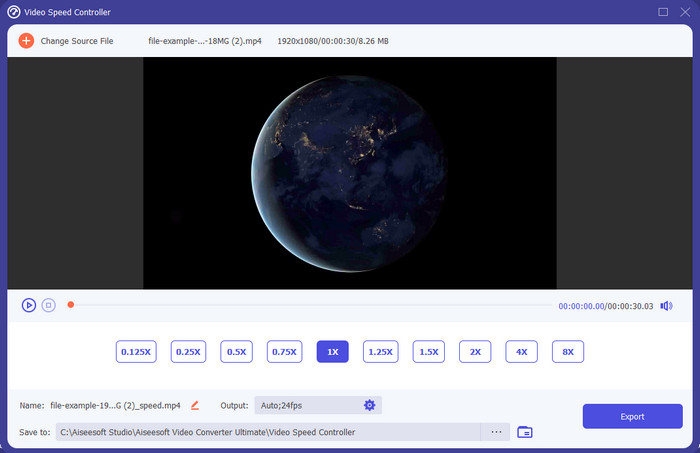
動画を素早く、かつ効率よく早送り・スロー再生できる動画スピードコントローラーが必要ですか? その場合は、Video Converter Ultimateがこの問題の強力な助っ人になります。これは、動画の速度を簡単に変更できる最も扱いやすいツールのひとつで、高速再生でもスローモーションでも手軽に対応できます。速度を変更しても元の動画の画質はそのまま維持されますが、スピードを変える以上、映像の動き自体は当然変化します。
それ以外にも、変換、マージ、カットなど、さまざまなことができます。基本的に、それはオールインワンツールです。このスピードアップビデオアプリであなたが持つことができる他のオファーを知りたいですか?その場合は、ツールの機能を読んで詳細を確認するか、今すぐデスクトップにソフトウェアをダウンロードしてテストしてください。

ビデオコンバーター究極
5,689,200以上のダウンロード- MP4などの任意のビデオ形式でビデオフレームをすばやく上下に正確に変更できます。
- 豊富なビデオ編集機能とエフェクトが利用可能です。
- WindowsやmacOSなどのすべてのプラットフォームで柔軟性があります。
- 超高速プロセスにより、ダウンロードまたはエクスポートプロセスが一瞬で完了します。
- 編集したビデオをエクスポートまたはダウンロードしても、透かしはありません。
無料ダウンロードWindows 7 以降に対応安全なダウンロード
無料ダウンロードMacOS 10.7 以降に対応安全なダウンロード
長所
- あなたがプロであろうとなかろうと、ビデオのフレームごとにフレームを変更します。
- わかりやすいビデオ再生オプション。
- 優れたソーシャルメディア共有機能。
- ダウンロードは無料ですが、アプリ内購入を提供しています。
短所
- ツールの全機能を使用したい場合は、購入する必要があります。
トップ2.Clipchamp(Windows)
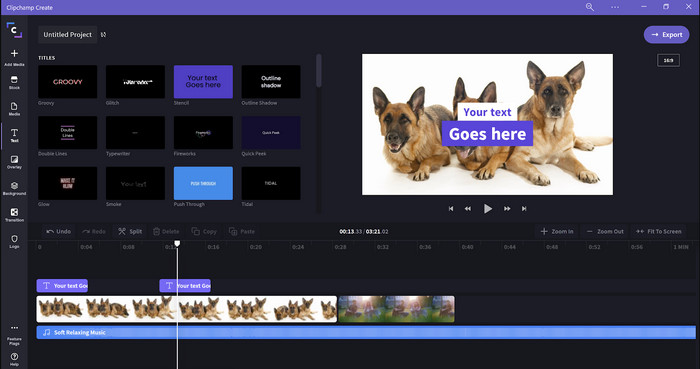
Clipchampは、Windowsで使える動画スピード編集ソフトです。このツールは学習コストが低く、編集初心者の方でも試しやすいでしょう。また、便利な機能もいくつか搭載されています。ただし、大きな欠点は出力できる動画の画質です。無料版では480pでしか書き出せず、他の無料ツールと比べると低画質です。720pや1080pで書き出したい場合は、サブスクリプションに加入し、料金を支払う必要があります。総合的には優れたツールですが、最初に紹介した編集ソフトほどではありません。
長所
- シンプルなGUIと使いやすい。
- 編集のための追加機能を提供します。
- ビデオの再生を簡単に制御します。
短所
- 無料版の場合、最終出力は480です。
- 時々、ツールはタスクに対して柔軟性がなくなりました。
トップ3.ビデオスピードコントローラー(Chrome)

Chromeで使える動画スピードコントローラー拡張機能を利用したいですか? その場合は、Video Speed Controllerを使えます。このツールは、視聴中の動画を早送り・スロー再生するためのChrome拡張機能で、どのChromeブラウザでも利用可能です。誰でも簡単に使えるうえ、Chrome用拡張機能なので安全性の面でも安心です。ただし、動画を書き出しても、再生速度は元のままで、変更は反映されません。このツールは、あくまでChrome上で現在視聴している動画にのみ作用し、それ以外には影響しないためです。さらに補足すると、この拡張機能で一度速度を上げると、Chromeで再生するすべての動画が同じ速度で再生されます。
長所
- Chromeで使用できるオンポイントスピードコントローラー。
- Chromeで動画の再生速度を簡単に巻き戻したりリセットしたりできます。
- ショートキーコマンドをサポートします。
短所
- ビデオコントローラーパネルは表示されません。
- Chromeの外部で動画の速度を変更することはできません。
トップ4.Safari用に高速化(iOSおよびMac)
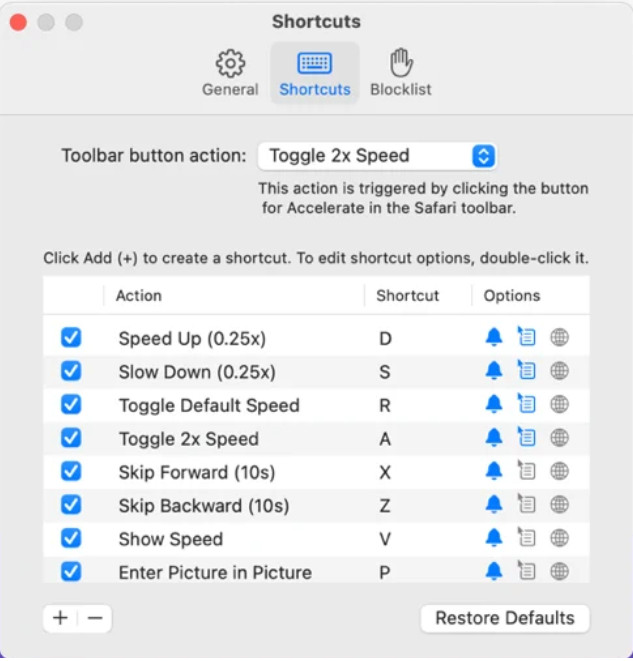
Safari用の動画スピードコントローラーが必要ですか? それなら、AppleデバイスのSafariで利用できるAccelerate for Safariがあります。このツールは、Safari上のあらゆるHTML5動画の再生速度を変更できます。先ほど紹介したChrome拡張機能と同様に、Appleデバイス上での利用に限定されます。そのため、Appleユーザーであれば、このスピードコントローラー拡張機能を使って、動画を早送りしたりスロー再生したりできます。さらに、キーボードのキーでコマンドを入力し、動画の再生速度を変更することも可能です。
長所
- すべてのSafariで安全に使用できます。
- Picture-in-PictureとAirPlayもサポートしています。
- ツールを制御するためのショートカットキーを使用できます。
短所
- Safari以外のWebブラウザはサポートしていません。
- HTML5ビデオに限定されます。
トップ5.Slow Fast Slow-ビデオの速度を制御する(iOS)
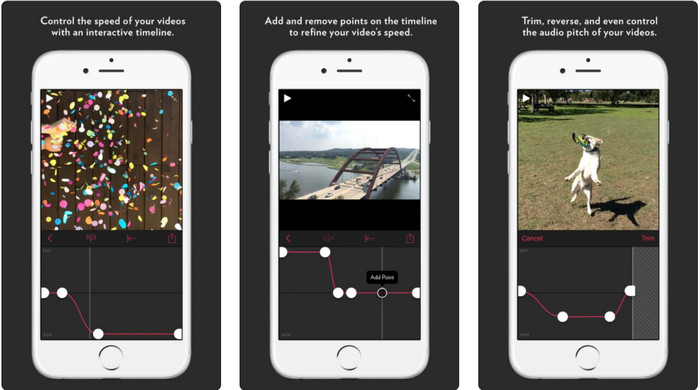
iPhone用の動画スピードコントローラーとしては、Slow Fast Slowを利用できます。このツールを使えば、iOSユーザーは動画の再生速度を瞬時に操作でき、とくにスローモーション編集で威力を発揮します。また、速度を調整しやすいインタラクティブなタイムラインを搭載しているのも特長です。さらに、ピッチの変化やクリップの逆再生といった機能にも対応しています。ただし、このツールはiOS 10以降が必須のため、システムが10未満の環境では利用できません。
長所
- それはあなたのビデオの他の機能をサポートします。
- 使いやすい。
- ビデオを1/16の速度まで遅くすることができます。
短所
- 4k出力とFPSの選択はサポートしていません。
- 一部の新しいiOSデバイスでは機能しません。
トップ6.ビデオスピードコントローラープロ(Android)
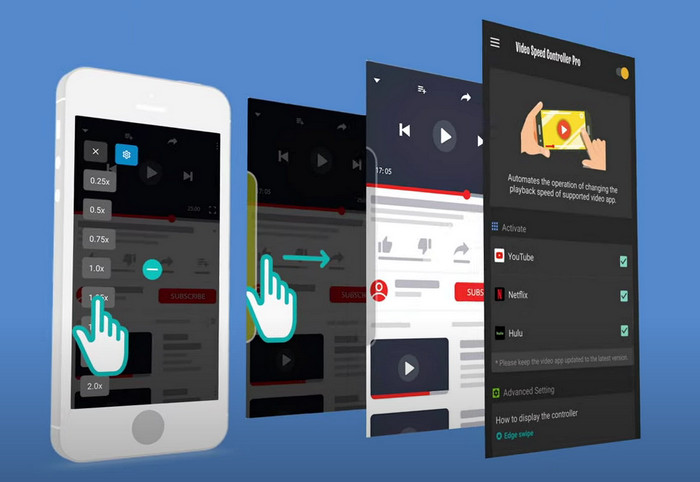
Android用の動画スピードコントローラーが必要なら、Video Speed Controller ProをPlayストアからインストールして使うことができます。このツールを使えば、Android上で再生しているあらゆる動画を簡単に高速再生できます。Android向けのスピードコントローラー拡張機能のような位置づけのツールです。ただし、動画の再生速度を上げられるとはいえ、最大で2倍速までに制限されています。それでも、動画を早く視聴したい場合、YouTube、Netflix、その他の動画プラットフォーム上で活用することができます。
長所
- 使い方は簡単です。
- ツール自体は適切です。
- メニューバーを使用して、再生のオプションを表示できます。
短所
- 再生速度のオプションは制限されています。
- 時々それはうまくいきません。
パート2。比較チャート
| 特徴 | ビデオコンバーターアルティメット(WindowsおよびMac) | Clipchamp(Windows) | ビデオスピードコントローラー(Chrome) | Safari用に高速化(iOSおよびMac) | Slow Fast Slow –ビデオの速度を制御する(iOS) | ビデオスピードコントローラープロ(Android) |
| 速度制御 |  | | | | | |
| 高品質ビデオ出力 | |  | | | | |
| 編集機能 | | | | | | |
| 超高速エクスポートプロセス | | | | | | |
パート3。ビデオスピードコントローラーに関するFAQ
なぜスピードコントローラーを使用する必要があるのですか?
場合によっては、ビデオを高速または低速で視聴する必要があります。スピードアップビデオを視聴する良い例は、視聴しているビデオをすぐに終了することです。ビデオのスピードアップは、これらのユーザーにとって大きな助けになります。スローモーションでは、これは通常、レース、バスケットボール、バレーボールなどの速いペースのスポーツのインスタントリプレイで使用されます。 2つのうちどちらであっても、手動で通常の速度を必要に応じてオーバーライドするには、効果的な速度コントローラーが必要になります。
Tiktokのビデオをスピードアップできますか?
TikTokでは、撮影時に速度を変えた動画を撮ることはできますが、視聴時に動画を高速再生することはできません。そのため、適切なスピードアップ用ツールを探しているなら、この記事をクリックして読み、TikTok動画を早送りする方法を確認してみてください。
ビデオを遅くする方法は?
動画を早送りするのとは逆に、市場に出回っている各種編集ソフトを使えば、動画をスローモーションにすることも可能です。では、どのツールを選ぶべきでしょうか。心配はいりません。ここでは、スローモーション効果の作成に役立つ、優れたスローモーション動画ソフトを厳選して紹介します。さらに詳しく知りたい場合は、このリンクをクリックしてください。
結論
本記事を読み終えた今、さまざまなプラットフォームで動画を倍速再生できる有料・無料アプリについて理解が深まったはずです。これらのスピードコントローラーは、それぞれ異なるユーザーのニーズに応える多彩な機能を備えています。内容をじっくり読むと、FVC Video Converter Ultimateが、支援を必要とするユーザーにとってあらゆる機能を網羅していることがわかります。デスクトップにこの究極のツールをダウンロードしたい場合は、ダウンロードボタンをクリックして、すべての機能を存分に体験してみてください。
-
 利用可能な上位5つのソフトウェアを使用してビデオを高速化する方法[Windows / Mac / Linux]
 ビデオを簡単にスピードアップする方法を知りたいですか?次に、Windows、Mac、およびLinuxで効果的に高速化する方法を説明するときに、この記事を読んでください。
-
 Androidデバイスでビデオを高速化する最も簡単な方法[2021]
 Androidでビデオを高速化できることをご存知ですか?したがって、Androidスマートフォンでビデオを高速化する方法を知りたい場合は、この記事を読んでください。
-
 2021年の優れたヒント:iMovieでビデオを高速化する方法
 あなたの友人は、iOSオペレーティングシステムを使用してビデオを高速化する方法の問題を解決するためにiMovieを提案していますが、どうしたらよいかわかりませんか?この記事を読んで、これについてもっと見てください。
