


 ビデオコンバーター究極
 スクリーンレコーダー
 ビデオ修復
ビデオ修復ファイルをすばやく変換できる最高の無料MKVからWMVへのコンバーター
MKV(Matroska)は、豊富な音声・動画ファイルを格納できる標準コンテナ形式です。一般的なファイル形式ではありますが、依然として、より広くサポートされているWMVのような動画形式に変換する必要があります。もし無料のMKV WMV変換ソフトをお探しなら、本記事が役立ちます。

パート 1. MKV を WMV に変換する必要がある理由
MKV(Matroska)は、無料の標準コンテナ形式であるため、非常に多くの映像・音声およびマルチメディアファイルを格納できます。しかし一般的なファイル形式である一方で、業界標準とは言えません。そのため、一部のメディアプレーヤーではこの形式を再生できない場合があります。対照的に、WMV(Windows Media Video)は、あらゆるデバイスで利用できる多くのメディアプレーヤーに広く対応したファイル形式です。さらに、ファイルサイズを圧縮するコーデックでもあるため、多くのメディアプレーヤーで最も一般的で扱いやすいファイル形式のひとつとなっています。
パート 2. 超高速コンバーターを使用して MKV を WMV に変換する
MKV を WMV ファイルに変換する場合、FVC Video Converter Ultimate が最適なツールであることは間違いありません。この無料の超高速コンバーターを使用すると、品質を損なうことなく MKV を WMV に変換できます。このコンバーターには、複数のファイルを編集、強化、さらには 1 つにマージできる優れた機能もあります。さらに、MKV などのさまざまなファイル形式を WMV、MP4、M4V、AVI、MOV などに変換できます。

FVCビデオコンバーターアルティメット
5,689,200以上のダウンロード- 複数のファイルを同時に変換するバッチ変換をサポートします。
- MKVファイルを超高速に変換できる機能があります。
- MKV、WMV、MP4、AVI、MPG、MOV、VOB など 200 以上をサポートします。
- Windows や Mac など、さまざまなプラットフォームで利用できます。
無料ダウンロードWindows 7 以降に対応安全なダウンロード
無料ダウンロードMacOS 10.7 以降に対応安全なダウンロード
FVC Video Converter Ultimateを使ってファイルを変換する方法
ステップ1. FVC Video Converter Ultimateをインストールするには、下のダウンロードボタンをクリックします。その後、インストール手順に従い、アプリを起動します。
無料ダウンロードWindows 7 以降に対応安全なダウンロード
無料ダウンロードMacOS 10.7 以降に対応安全なダウンロード
ステップ2. アプリケーションを開いたら、ファイルを追加または+ボタンをクリックして、変換したいファイルをキューに追加します。
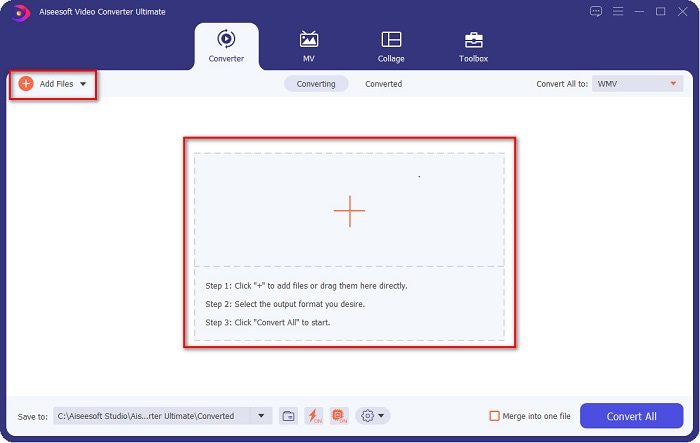
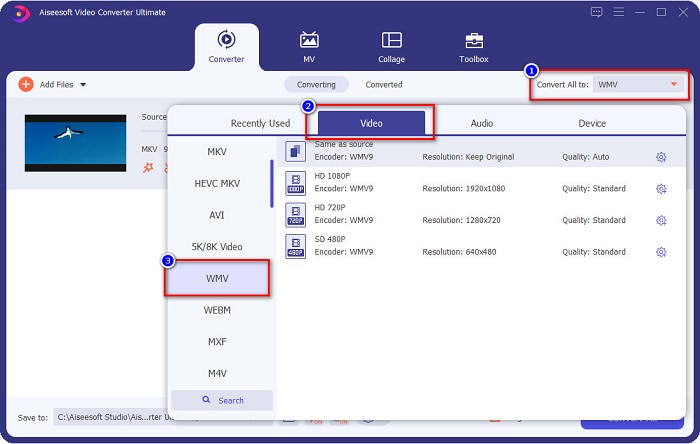
ステップ3. 次に、ソフトウェア画面右上にあるすべて変換ボタンをクリックします。ファイル形式の一覧が表示されるので、WMVを選択します。
ステップ4. 変換したいファイル形式を選択したら、すべて変換ボタンをクリックしてMKVファイルをWMV形式に変換します。数秒待てば、WMVファイルの準備完了です。
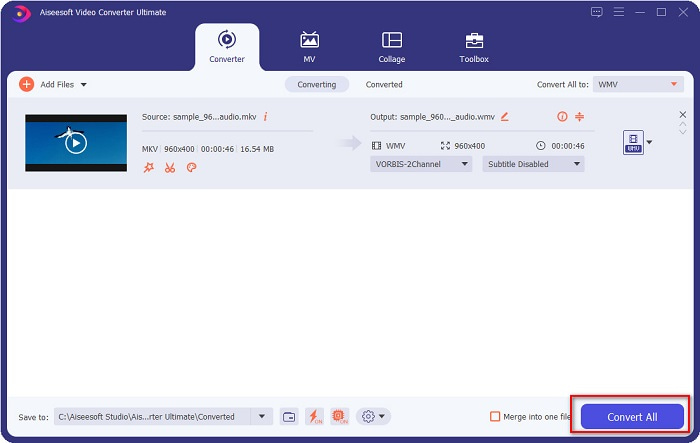
FVC Video Converter Ultimate を使用してこれらの簡単な手順に従うことで、この MKV を WMV コンバーターにすばやく変換できます。
パート 3. VLC Media Player Converter を使用して MKV を WMV に変換する
MKV ファイルを WMV ファイルに変換するもう 1 つの方法は、フリーウェア コンバーターを使用することです。 VLC Media Player は単なるビデオ プレーヤーではありません。また、MKV のようなファイルを WMV、WebM、MP4 などに変換することもできます。ただし、そのインターフェイスは少しわかりにくいです。それにもかかわらず、このコンバーターは多くのユーザーによって使用されています。
VLC Media Player Converter の使用方法に関するクイックガイド:
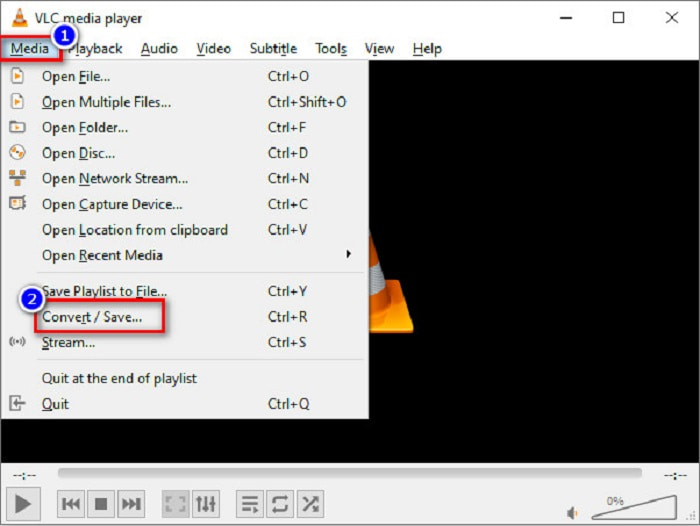
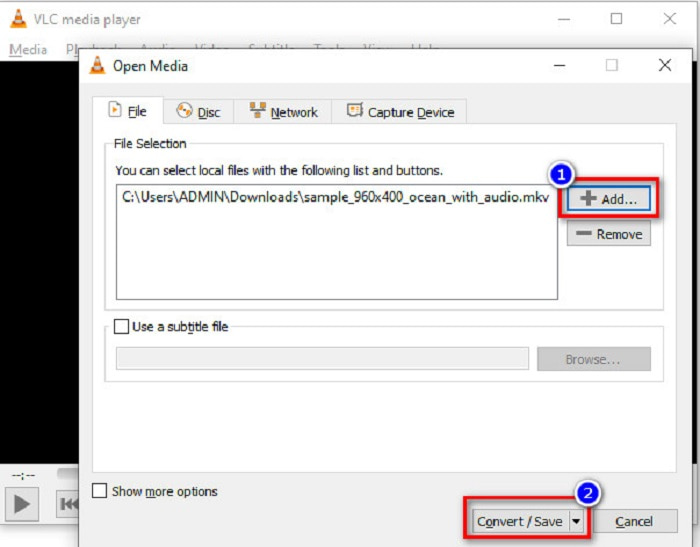
ステップ1. VLCメディアプレーヤーを開きます。まだPCにインストールしていない場合は、VLCメディアプレーヤーを検索してインストール手順に従ってください。その後、画面左上にあるメディアメニューをクリックし、変換/保存ボタンをクリックします。
ステップ2. 変換/保存ボタンをクリックすると、新しい画面が表示され、アップロードしたローカルファイルの一覧が見られます。MKVファイルを追加するには、追加ボタンをクリックします。続いて、画面下部の変換/保存ボタンを押して次のステップへ進みます。
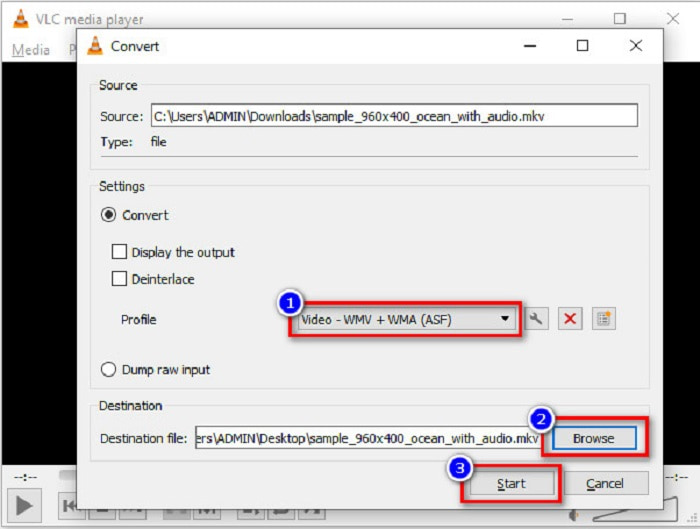
ステップ3. 最後に、ファイル形式としてWMVを選択します。参照ボタンをクリックして、変換後ファイルの保存先を指定します。準備ができたら、開始ボタンにチェックを入れてクリックし、MKVファイルをWMVファイルに変換し始めます。
パート 4. 無料のオンライン コンバーターを使用して MKV を WMV に変換する
FVC Free Video Converter Onlineは、MKVをWMVに無料で変換できるオンラインコンバーターで、MKVからWMV、AVI、MPG、MOV、MP4、MP3など、数多くの音声・動画形式に対応しています。このコンバーターには、ビデオビットレートやフレームレート、解像度などを編集できる機能も搭載されています。非常に優れたオンラインコンバーターですが、インターネット接続に依存しているため、回線状況によっては変換が遅くなる場合があります。それでもなお、高いパフォーマンスを発揮し、多くのユーザーから最高クラスのコンバーターのひとつと評価されています。
以下は、FVC Free Video Converter Onlineを使ってMKVファイルをWMVに変換する手順です。
ステップ1. ブラウザでFVC Free Video Converter Onlineを検索し、公式サイトを開きます。
ステップ2. サイトにアクセスしたら、ファイルを追加して変換ボタンをクリックして起動します。PC上のファイル一覧が表示されるので、変換したいMKVファイルを選択します。
ファイルを一括変換するには、デスクトップ版をダウンロードしてください。
ステップ3. 2つ目の画面下部にファイル形式の一覧が表示されます。WMVの横にある丸印にチェックを入れます。
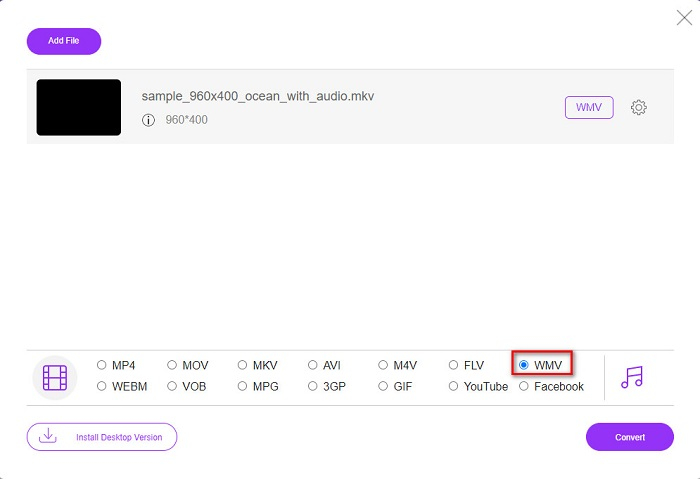
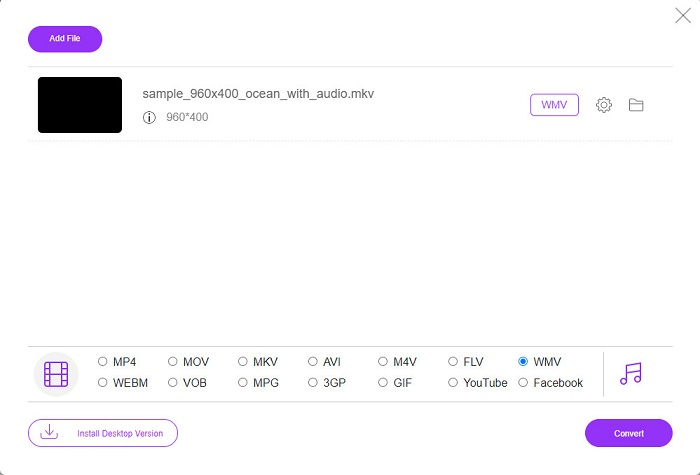
ステップ4. 最後に、ソフトウェア画面右下にある変換ボタンをクリックします。するとMKVファイルの変換が開始されます。
MKVとWMV
2002年にリリースされたMatroskaマルチメディアコンテナ形式は、多数のビデオ、オーディオ、画像、および字幕トラックを含めることができるオープンソース形式です。そのため、短いビデオクリップ、テレビ番組、および映画を簡単に保存するために使用できます。アニメファンサブで大人気。
Microsoftによって作成されたWMVは、2000年代に最も一般的なビデオ形式の1つでした。 Webで表示したり、Windowsのさまざまなメディアプレーヤーで再生したりできます。また、WindowsMediaPlayerのデフォルトのビデオファイル形式でもあります。しかし、最近は他のフォーマットに引き継がれています。
パート 5. MKV から WMV への変換に関する FAQ
ファイルの品質を損なうことなく MKV を WMV に変換できますか?
絶対。 FVC Video Converter Ultimate を使用すると、ファイルの品質を損なうことなく MKV ファイルを WMV に変換できます。
MKVファイルを変換するのに最適なファイル形式は何ですか?
先述のとおり、一部のメディアプレーヤーはこのファイル形式に対応していません。そのため、多くのメディアプレーヤーで広くサポートされている形式に変換する必要があります。そのひとつがMP4形式です。このトピックについて詳しく知りたい場合は、こちらの記事【オンライン&無料】MKVをMP4に変換する方法(Windows/Mac)をご覧ください。
Windows Media Player は MKV ファイルを再生できますか?
Windows Media PlayerはMKV形式をサポートしていません。そのため、Windows Media PlayerでMKVファイルを再生しようとすると、音声だけが再生されます。自分に合ったプレーヤーを見つけるには、おすすめのMKVプレーヤーをお読みください。
結論
MKV ファイルを WMV に変換する方法はたくさんあります。上記のコンバーターには、それぞれを区別する明確な機能があります。
数あるMKV WMV変換ソフトの中でも、FVC Video Converter Ultimateの利用をおすすめします。このコンバーターは、効率的で使いやすいだけでなく、ファイルをより良く仕上げるためのユニークな機能も備えています。まだ迷っている方は、ぜひダウンロードして、この超高速コンバーターを体験してみてください。
-
 MKVからMOVへ–MKVをMOVに変換する方法
 MacでMKVをMOVに変換するにはどうすればよいですか? iMovieはMKVを読み取ることができますか? MOV形式とはどういう意味ですか?この投稿では、無料のオンラインおよびプロのビデオコンバーターを使用してMKVをMOVに変換するのに役立つ2つの簡単な方法を説明しています。
-
 Photoshop / FFmpegを使用せずにMKVビデオをアニメーションGIFに変換する方法
 コンピューターにMKVムービーをダウンロードして視聴した後、友人やインターネットでGIFとして素晴らしい瞬間を共有したい場合があります。この記事では、MKVをGIFに変換する2つの最も簡単な方法について学ぶことができます。
-
 MKVファイルをMP3に変換する方法に関するヒントとコツ[2021]
 MKVからMP3への適切なコンバーターの選択に問題がありますか?次に、1つの問題についてさまざまな解決策を提示したので、この投稿を読み続けてください。

