


 ビデオコンバーター究極
 スクリーンレコーダー
 ビデオ修復
ビデオ修復最高のコンバーターを使用してMPGをMKVに変換する最も簡単な方法[無料]
Sadly, MPG files do not contain subtitle tracks; however, you can convert your file to a file format that stores numerous subtitle tracks in different languages. And if you are looking for a way to convert your MPG file to MKV easily, we provide the simple steps to convert MPG to MKV online and offline; read this article until the end.

パート1。MPGをMKVに変換する理由
MPGファイル形式は、Webで最も一般的に使用されているファイル形式の1つです。このファイル形式は、MPEGまたはMoving PicturesExpertGroupsによって開発されています。さらに、このタイプのファイルには、ビデオ、オーディオ、およびメタデータを保存できます。さらに、ほとんどすべてのメディアプレーヤーがこれらのタイプのファイルを広くサポートしています。対照的に、MKVまたはMatroskaファイルは、ビデオ、オーディオ、および字幕トラックを1つのファイルに格納するメディアファイルコンテナです。このファイルタイプは、さまざまな言語のオーディオトラックを処理できるため、映画愛好家にも有名です。
パート2。MPGをMKVにオフラインで変換する最も簡単な方法
There are a lot of converters in the market that can convert MPG to MKV. However, if you want a converter that can do an ultra-fast conversion, FVC Video Converter Ultimate is the best tool. And if you want to remove watermark from your videos, this converter has the feature to do so. Moreover, it can also do a batch conversion to merge multiple file-formats into one. Want to know the advantages of using this MPG to MKV Converter? Then read the details below.

FVCビデオコンバーターアルティメット
5,689,200以上のダウンロード- ビデオを明示的に編集および強化します。
- このコンバーターでは、超高速変換プロセスを利用できます。
- MPGファイルをMKV、WMV、AVI、MP4、およびその他の1000以上のファイル形式に変換できます。
- WindowsやmacOSなどのすべてのオペレーティングシステムで利用できます。
無料ダウンロードWindows 7 以降に対応安全なダウンロード
無料ダウンロードMacOS 10.7 以降に対応安全なダウンロード
以下の手順に従って、MPGファイルをMKVに変換します。
Step 1. Download FVC Converter Ultimate by clicking the Download button below for Windows or macOS. Then follow the installation process, and run the app.
無料ダウンロードWindows 7 以降に対応安全なダウンロード
無料ダウンロードMacOS 10.7 以降に対応安全なダウンロード
Step 2. For the next step, click the Add Files or the + sign button to upload your MPG file on the software's main interface.
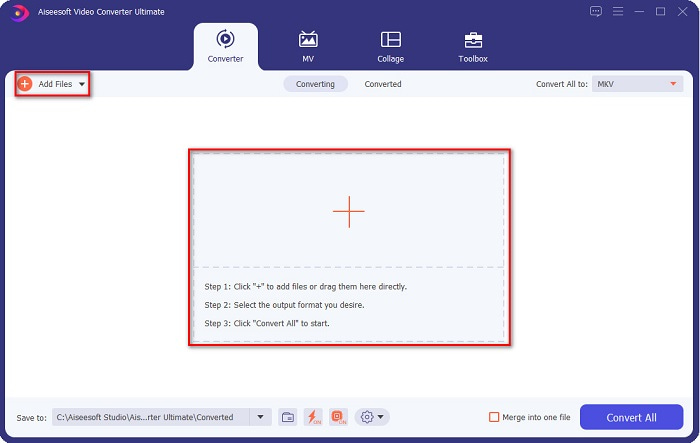
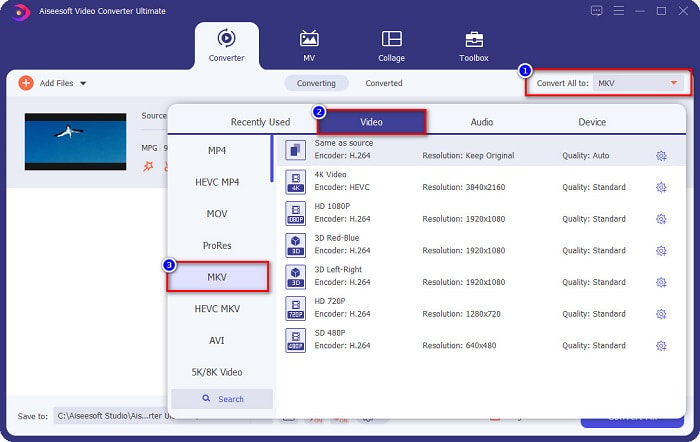
Step 3. After uploading your MPG file, select the output format by clicking the Convert All to button. In your case, choose the MKV file format.
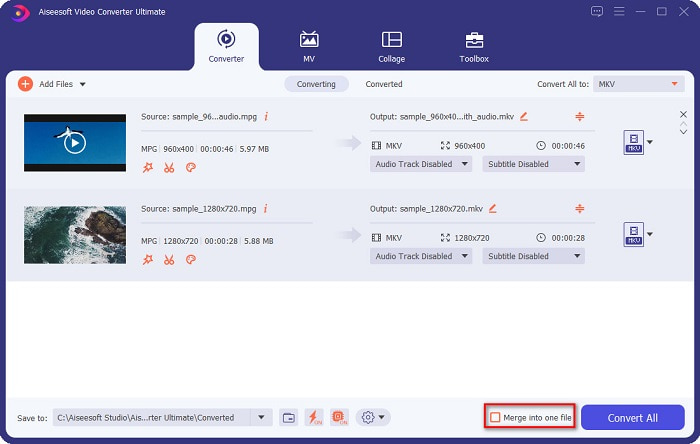
Optional. If you want to convert multiple MPG files into one, tick the Merge into one file box. If not, proceed to the next step.
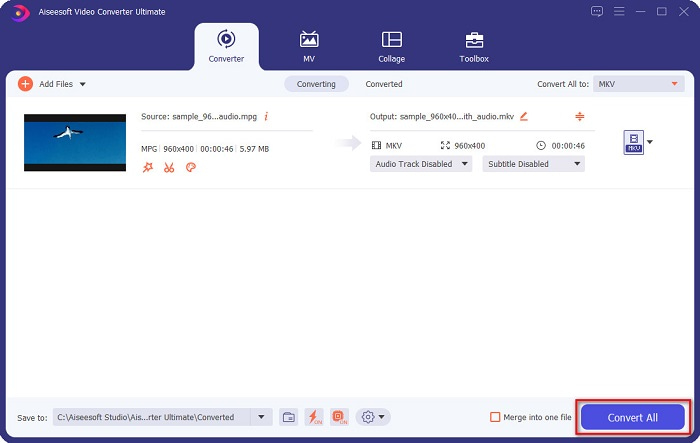
Step 4. To finish, click the Convert All button to convert your MPG file to an MKV file. Wait for a few seconds, and that’s it! As easy as that, you can easily convert MPG to MKV.
パート3。フリーウェアツールを使用してMPGをMKVに変換する
Ever wonder what the best freeware tool to convert MPG to MKV is? We observed that many users use HandBrake as the first line of choice. This freeware can convert MPG to MKV, WebM, and MP4 files. In addition, it has an easy-to-use interface, which is a good thing if you are a beginner. However, it can only convert limited file formats. Nonetheless, it is still an effective tool for converting MPG to MKV.
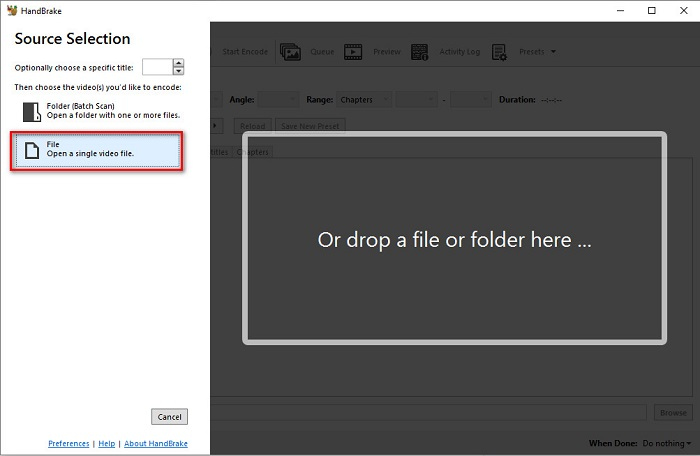
Step 1. Download HandBrake on your device, then run the application. After opening the app, click the File option on the right side of the software’s interface. When your computer files appear, select your MPG file.
Step 2. Then select the output file format that you want on the drop-down button beside Format. And then, by clicking the Browse button, choose where your file destination will be.
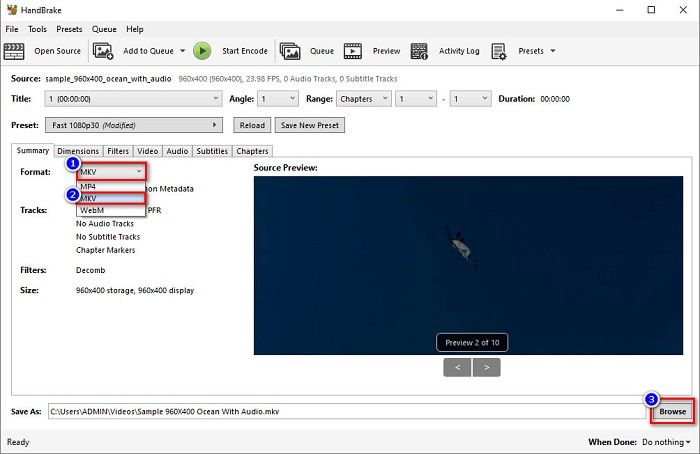
Step 3. Finally, click the Start Encode button to convert your MPG file to MKV file format.
上記の簡単な手順に従って、フリーウェアコンバーターを使用してMPGをMKVに変換できます。
パート4。2MPGをMKVオンラインに変換する方法
オンラインコンバーターを介した変換は、最も便利なオプションです。さらに、オンラインコンバーターを使用する場合は、何もダウンロードする必要はありません。ただし、代わりに、オンラインで直接変換できます。ただし、変換速度はインターネット接続の速度によって異なります。それでも、MPGファイルをMKVに変換するための2つの最良の方法を以下に示します。
方法1.FVC無料オンラインビデオコンバーターを使用する
FVC Free Online Video Converter is a free online converter that conveniently converts various file formats. It supports file formats like MPG to MKV, AVI, MP4, MOV, MP3, and more. It also has a beginner-friendly converter because it has an easy-to-use GUI. Moreover, it has a feature that allows you to change your file's video and audio bitrate. So, if you are interested in this MPG to MKV converter online, follow the steps below.
Step 1. In your browser, search FVC Free Online Video Converter, or go directly to the webpage by clicking this link. And then launch the software application.
Step 2. After launching the app, click the Add Files to Convert button. Your computer files will appear, then select your MPG file.
ファイルを一括変換するには、デスクトップ版をダウンロードしてください。
Step 3. And then choose MKV as your output format.
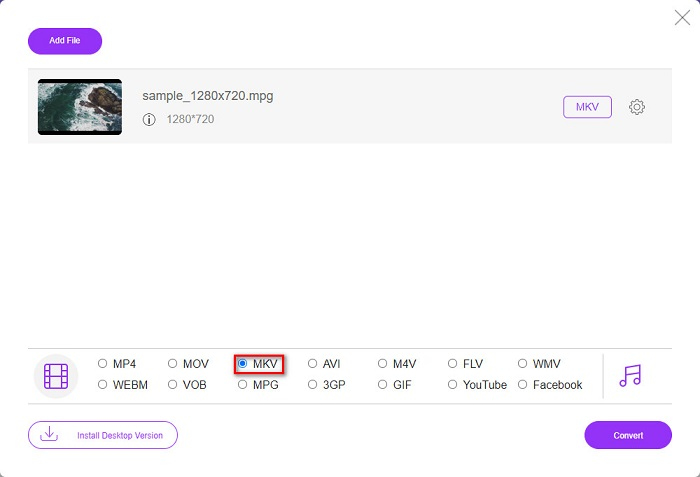
Step 4. For the last step, click the Convert button. Then your MPG to MKV conversion will begin.
方法2.CloudConvertを使用する
Another online converter that you can use is CloudConvert. This converter is very efficient to use because of its simple interface. Moreover, you can also compress your files when using it. However, it only supports limited file formats. Despite that, many still use this converter for convenience purposes.
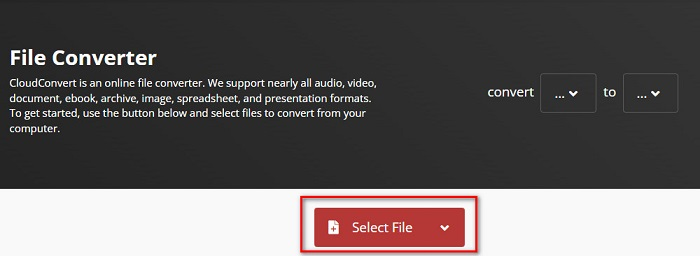
Step 1. In your browser, search CloudConvert. When you are already on the webpage, click the Select Files button. Then select your MPG file when your computer files appear.
Step 2. Then, choose the MKV file as your output format on the drop-down button.
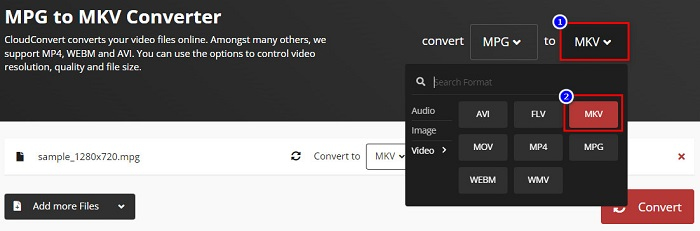
Step 3. Lastly, click the Convert button. Then wait for your file to be converted, and voila! With those three easy steps, you can change MPG to MKV.
MPGとMKV
Moving Picture Experts Group(MPEG)によって作成されたMPGは、ビデオ、オーディオ、およびメタデータ情報を保存するための一般的なデジタルビデオ形式です。インターネットで共有するためのムービーを作成するときに非常に便利です。 MPGのこれらのファイルには、通常、MPEG-1またはMPEG-2ビデオ/オーディオ圧縮が含まれています。
2002年にリリースされたMatroskaマルチメディアコンテナ形式は、多数のビデオ、オーディオ、画像、および字幕トラックを含めることができるオープンソース形式です。そのため、短いビデオクリップ、テレビ番組、および映画を簡単に保存するために使用できます。アニメファンサブで大人気。
パート5。MPGからMKVへの変換に関するFAQ
MPGをMKVに変換すると、ファイルサイズに影響しますか?
はい、MPGをMKVファイルに変換してもそれほど影響はありませんが、ファイルサイズが大きくなります。
ファイルサイズが大きいのはどれですか?
MKVファイルには、ビデオ、オーディオ、および複数の字幕トラックが1つのファイルに含まれているため、MKVファイルのファイルサイズはMPGファイルに比べて大きくなります。
MKVファイルを圧縮できますか?
You can compress MKV files by using a file compressing tool. FVC Video Converter Ultimate has a feature that allows you to compress your large video files.
結論
MPGをMKVファイルに変換する最良の方法を探しているなら、この記事はあなたを取り戻しました。上記のすべてのコンバーターは、ファイルを変換するときに有望なパフォーマンスを示します。ただし、多くの優れた機能を備えたコンバーターをお探しの場合は、FVC VideoConverterUltimateを最初の選択肢として使用してみてください。まだ確信が持てない場合は、ダウンロードして、使用できる最高のコンバーターを試してください。
-
 Mac / Windows / OnlineでMPGをMOVに変換する3つの簡単な方法
 MPGファイルを変換して、後でiOS、iPod、iPad、またはMacに転送しますか?この記事は、ステップを使用してMPGをMOVに変換する方法を理解するのに役立ちます。
-
 品質を損なうことなくMPGをFLVに変換する方法[実証済み]
 このメディアプレーヤーでお気に入りの映画を見る必要がありますが、MPGはサポートされていません。この記事で紹介するこれらのコンバーターを使用して、MPGファイルをFLVに変換してみてください。
-
 MPGをWMVに無料で変換する2つの究極のMPGコンバーター
 MPGを無料でWMVに変換しますか?その場合、MPGファイルの変換に使用できるツールが2つあることがわかったので、幸運です。

