


 ビデオコンバーター究極
 スクリーンレコーダー
 ビデオ修復
ビデオ修復Bigjpgの徹底レビュー:その機能を理解する
信頼できる画像アップスケーラーを探していると、Bigjpgというツールを目にすることが多いでしょう。細部を損なうことなく画質を向上させられることで知られており、拡大処理を簡単かつ効果的に行うためのさまざまな機能を備えています。もし画像アップスケーリングのためにこのツールに興味をお持ちなら、ご安心ください。本記事では、このツールでどのようなことができるのか、とくに画像のアップスケーリング機能、料金、安全性、他ツールとの違い、そしてBigjpgでは物足りない場合におすすめの最良の代替ツールについて解説します。参考になる内容ですので、ぜひ読み進めてください。

パート 1. Bigjpg レビュー: 何ができるのか?
Bigjpgは、写真、アートワーク、イラストなどの画像を元の画像の完全性を保ちながらアップスケールするAI搭載の画像アップスケールツールです。さらに、このツールはディープ・コンボリューション・ニューラル・ネットワーク(DNN)を活用し、線や色などのディテールを保ちながらノイズを低減し、画像をインテリジェントに補正します。BigjpgはWebベースのアプリケーションとデスクトップ用のダウンロードソフトウェアの両方で提供されており、ユーザーは様々なデバイスで簡単に画像のアップスケールと画質向上を行うことができます。高度なAI処理により、アニメ風のアートワークや一般的な画像ファイルの画質向上に特に効果的です。また、ツールのインターフェースは非常にシンプルで直感的なため、初心者にも最適です。
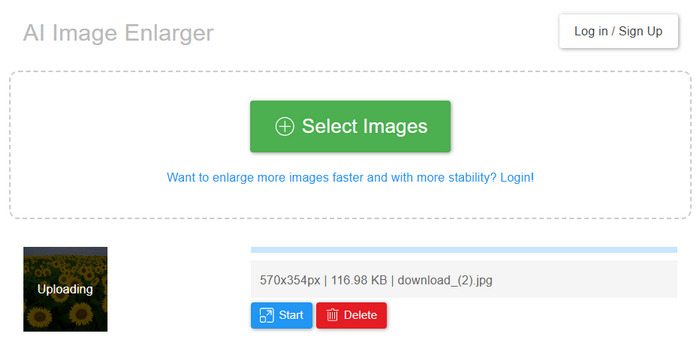
主な特徴:
長所
- シンプルで操作しやすいインターフェース。
- オンラインで利用できる無料バージョンがあります。
- 幅広い画像形式をサポートします。
- モバイル用に Google Play で APK バージョンを提供しています。
- 開発者向けの API サポート。
短所
- 特にファイルが大きい場合、画像処理が遅くなる可能性があります。
- 無料版には多くの制限があります。
パート 2. Bigjpg の価格: いくらかかりますか?
Bigjpgは、ユーザーのニーズに合わせて柔軟な料金プランをご用意しています。無料プランから始めることも、より高速な処理速度、より高いアップロード容量、より高度な機能など、様々な機能をご利用いただける有料プランにアップグレードすることもできます。料金プランについては、以下の表をご覧ください。
パート3. Bigjpg は安全ですか?
はい、Bigjpgは安全にご利用いただけます。アップロードして拡大した画像は、ソースによって異なりますが、3日から15日後に自動的に削除されます。画像リンクは暗号化されているため、共有を選択しない限り、誰もファイルにアクセスできません。Bigjpgは、オンラインだけでなく、デスクトップアプリやモバイルアプリでも安全に画像を拡大できる信頼できるツールです。
パート4. Bigjpg vs. Waifu2x
BigjpgとWaifu2xはどちらもAIを活用した画像アップスケーラーツールです。どちらも画質の向上を目的としており、特にアニメ風やイラスト画像に効果を発揮しますが、動作原理や機能に若干の違いがあります。違いは以下のとおりです。
Bigjpgは有料プランで最大16倍の拡大が可能で、JPG、PNG、BMP、GIFなどのフォーマットに対応しています。複数のノイズ低減レベル、編集履歴、一括処理機能に加え、デスクトップアプリとモバイルアプリも利用できます。より高度な制御、柔軟性、そして高品質な拡大を求めるユーザーに最適です。一方、Waifu2xはブラウザベースの無料ツールで、画像をサーバーにアップロードすることなく、デバイス上で直接処理できます。自動ノイズ低減機能を備え、最大4倍の拡大に対応し、迅速な結果が得られます。高度な機能は備えていませんが、シンプルでプライバシーが確保され、使いやすいのが特徴です。では、どちらが優れているのでしょうか?それはユーザーの好みとニーズによって異なります。どちらもそれぞれに優れた点があります。
パート5. Bigjpgの代替:FVC無料画像アップスケーラー
Bigjpgの無料で使える最良の代替画像アップスケーラーを探しているなら、FVC Free Image Upscalerを試してみる価値があります。AI搭載のこのツールは、拡大したい画像をアップロードするだけで、簡単に写真をアップスケールできます。数秒待つと、自動的に画像が拡大されます。その後、画質を落とさずに2倍、4倍、6倍、8倍のいずれかにサイズ変更することが可能です。さらに、この画像アップスケーラーは、ぼやけた部分を補正し、失われたディテールを復元し、JPG、JPEG、PNG、BMPといった一般的な形式をサポートしています。処理が高速で、結果をリアルタイムでプレビューでき、何よりアップスケール後の画像にウォーターマークが入らないため、素早く高品質な拡大を行いたい人にとって、非常に優れた無料オプションとなっています。
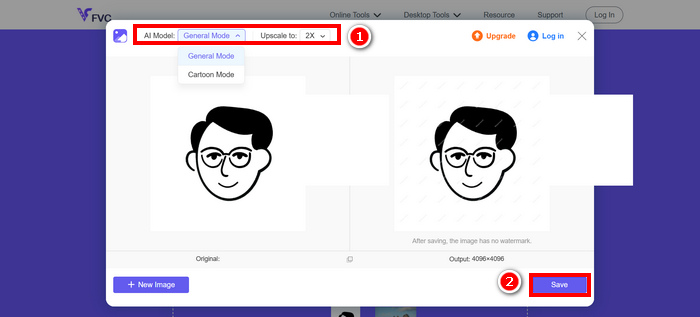
パート6. Bigjpgに関するよくある質問
Bigjpg を使用するにはソフトウェアをダウンロードする必要がありますか?
必ずしもそうではありません。Bigjpg は Web ベースのツールとして機能しますが、オフラインアクセスやバッチ処理機能をご希望の場合は、デスクトップアプリまたはモバイル版をダウンロードすることもできます。
Bigjpg の無料プランの制限は何ですか?
Bigjpgの無料プランでは、月間20枚まで、ファイルサイズは最大5MB、拡大率は最大4倍に制限されています。また、共有サーバーを使用しているため、有料プランに比べて処理速度が遅くなる場合があります。
Bigjpg はどんな種類の画像でも拡大できますか?
Bigjpgは、写真、イラスト、アニメ風画像など、さまざまなタイプの画像に対応できる写真拡大ツールとして良好に機能します。JPG、PNG、GIF、BMP、ICOといった一般的な形式をサポートしており、幅広いユーザーにとって使いやすい汎用性の高いツールです。
結論
Bigjpgは、現在利用できる画像アップスケーラーの中でも確かに優れたツールの一つです。AI技術を活用して、ノイズを抑えつつディテールを維持したまま効果的に画像を拡大できるため、初心者から上級者まで幅広いユーザーにとって魅力的な選択肢となります。ただし、この画像アップスケーラーは完全無料ではないため、プラン内容には注意が必要です。一部の機能をフルに利用するには、プレミアム版を購入してロックを解除する必要があります。一方で、Bigjpgと同等の使い勝手で無料の代替ツールを探しているなら、FVC Free Image Upscalerをぜひお試しください。
-
 Imglarger の完全ガイド – フォト デザイナー向けのソリューション
 Imglarger は、最も優れた画像ソリューション ツールの 1 つです。このページをクリックして、Imglarger の完全な説明、長所と短所、価格、および代替品を確認してください。
-
 PicResizeツールの徹底レビュー【2025年更新】
 PicResizeツールについてもっと知りたいですか?このレビュー記事全文を読んで、主な機能、価格、長所と短所、そして最適な代替ツールについて学んでください。
-
 FastStone Photo Resizer – 画像のサイズを変更するための強力なアプリ
 FastStone Photo Resizer は、画像のサイズを変更するための優れたアプリです。この投稿をクリックして、FastStone Photo Resizer とツールの最良の代替手段の詳細を確認してください。
