


 ビデオコンバーター究極
 スクリーンレコーダー
 ビデオ修復
ビデオ修復
 安全なダウンロード
TRPをMKVに簡単に変換する3つの方法
Are you having a hard time with your TRP file because you can’t play it on your media player or other programs? If you are one of those users that encounter this kind of problem, then it is highly recommended for you to read this article. You can convert your TRP file into MKV because most programs support MKV format. This article will show uncomplicated methods to convert TRP to MKV using your Windows, Mac, and online. What are you waiting for? Don’t waste your time and start reading this article!

パート 1: TRP と MKV の定義
TRPとは?
TRP is a high-definition media file encoded into MPEG-2 part 1 transport format. It is often used in digital video broadcasting. Also, it is used for audio streams, synchronizing the output, and digital multiplexing video, and it includes excellent features to correct errors. TRP also contains AC3 audio data and H.264 video. It can be played with several video playback programs.
MKVとは何ですか?
MKV, or Matroska, is a multimedia container that manages numerous audio, subtitle files, and video in a single file format. MKV is also different from other multimedia standards like MP4 and AVI because it is open-source and can be customized by people with open-source software implementation. Lastly, the MKV file format is most commonly used for HD videos and online video streaming.
パート 2: TRP をオフラインで MKV に変換する最も簡単な方法
Video Converter Ultimate の使用
TRP をロスレスで MKV に変換するには、Video Converter Ultimate をダウンロードして使用する必要があります。このアプリケーションを使用すると、TRP や MKV など、必要なビデオ ファイル形式を変換できます。このツールには一括変換機能があるため、複数のビデオ ファイルを 1 つのプロセスで変換できます。さらに、変換プロセスが 30 倍高速であるため、さまざまなファイルを変換するために時間を費やす必要がありません。このアプリケーションは、5K/8K ビデオ、ProRes、DV、ASF、M4V、MXF、MP4、MOV など、TRP と MKV 以外のいくつかの形式をサポートしています。最良の部分は、Windows と Mac を使用してこのアプリケーションを利用できることです。これは、すべてのユーザーにとって朗報です。さらに、ビデオの速度を変更したい場合は、ビデオ スピード コントローラー機能を使用できます。ビデオの速度を 0.125x から遅くし、元の速度より最大 8 倍速くすることができます。また、ビデオをトリミングしたい場合は、それを行うことができます。このツールは、ビデオ クロッパー機能も提供します。
この優れたソフトウェアについて詳しく知るには、ダウンロードして自分で試してみる必要があります。
主な機能:
◆ 多数のファイル形式を変換します。
◆ クリエイティブなコラージュが作れます。
◆ Music Video Creator を提供しています。
◆ ビデオを強化するためのツールボックスを提供します。
長所
- 他のソフトウェア コンバーターよりも 30 倍高速です。
- プロではないユーザーに適した、使いやすいユーザー インターフェイスを備えています。
- 変換以外のさまざまな機能があります。
- Windows と Mac の両方で利用できます。
- FLV、MP4、MOV、WBM、GIF、AMV などのさまざまなファイル形式を変換します。
- 日付の詳細を個別または一括で変更できます。
短所
- より高度な機能を使用するには、サブスクリプションを購入してください。
TRP を MKV に変換したい場合は、以下の簡単な手順に従ってください。
Step 1: Using your Windows or Mac, download the Video Converter Ultimate by clicking the Download button below. Open the application after downloading and installing it.
無料ダウンロードWindows 7 以降に対応安全なダウンロード
無料ダウンロードMacOS 10.7 以降に対応安全なダウンロード
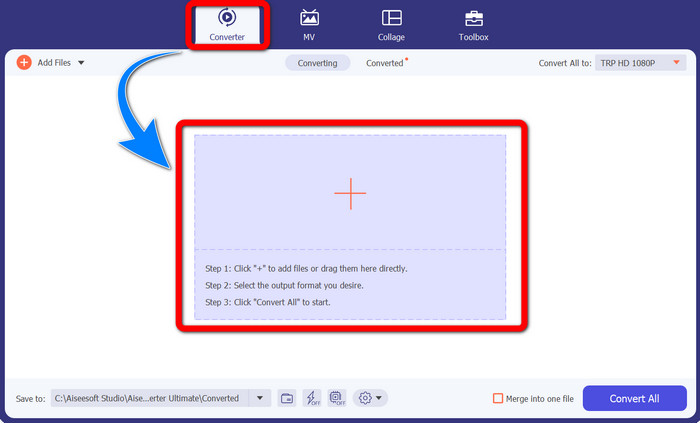
Step 2: When you already launch the Video Converter Ultimate, select the Converter panel. Then, click the + sign to import your video with the TRP format.
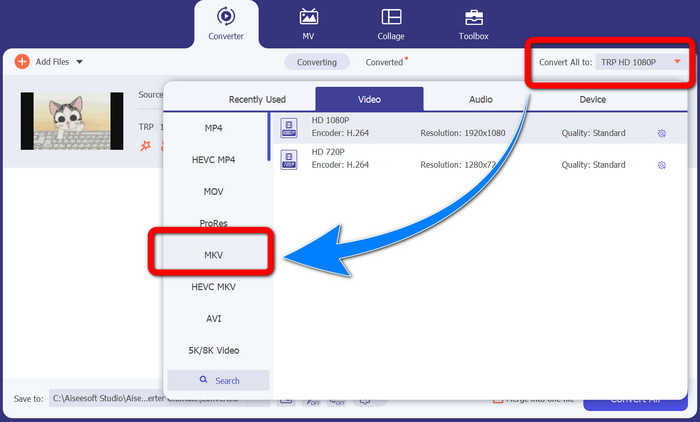
Step 3: After you import your video, click the Convert all to icon. Find the MKV format from the format options and click it.
Step 4: Then, click the Convert All button to convert your TRP to MKV format.
![[すべてに変換] ボタンをクリックします](/images/2022/10/click-convert-all-button.jpg)
Prism Video Converter の使用
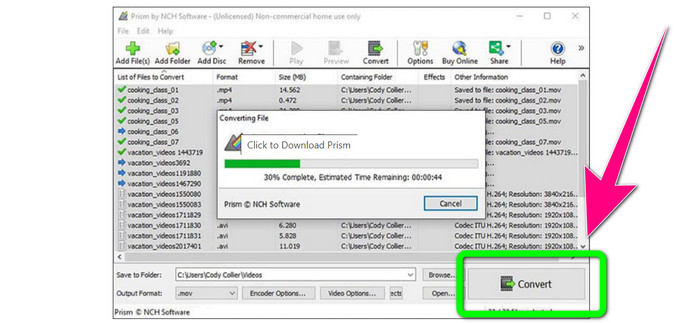
Prism is another application you can download on your Windows and Mac. This application can help you to convert TRP to MKV easily. Also, it supports different file formats, such as AMV, MP4, DVD, VOB, MOV, DIVX, AVI, 3GP, and more. However, this application is very slow when installed on Windows or Mac. Also, the conversion process takes a while. And it has a complicated interface, which will confuse beginners, so you must look for some tutorials or seek help from advanced users. If you want to download and use this application, follow the simple steps below.
Step 1: Download the Prism Video Converter on your Mac or Windows.
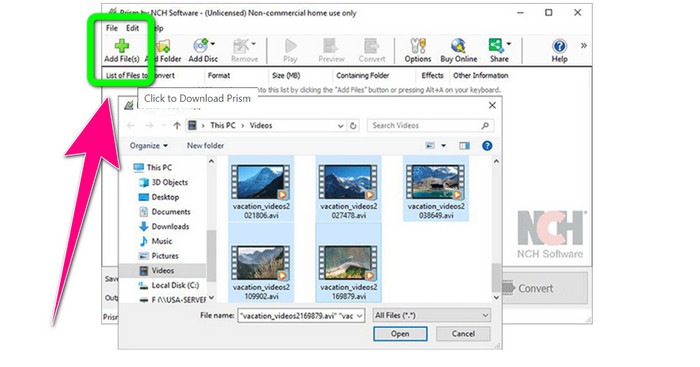
Step 2: Click the green Add Files button and insert your TRP file.
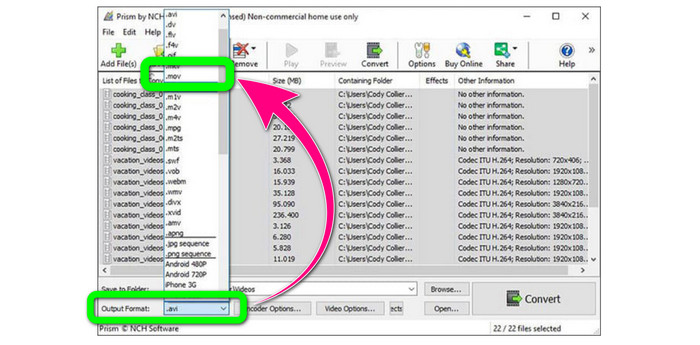
Step 3: Set the output format. Click the MKV file from the format options.
Step 4: Lastly, select the Convert button to convert your TRP file into MKV format.
パート 3: TRP を MKV に変換するためのオンライン アプリケーション
Are you interested in converting TRP to MKV online? Then, you can use Media.io. With the assistance of this application, you can convert TRP to MKV. In addition, it has more supported formats, like MP4, AVI, WMV, MOV FLV, DIVX, XVID, 3GP, etc. It is also an audio and image converter.
さらに、動画編集にも対応。動画のクロップ、トリミング、マージ、ループなどを行うことができます。ただし、変換プロセスに関しては遅いです。プロセスが完了するまで、もう少し待つ必要があります。また、画面に表示される不穏な広告もあります。また、パフォーマンスを向上させるには高速インターネット接続が必要です。 Media.io を使用して TRP を MKV に変換する場合は、次の手順に従います。
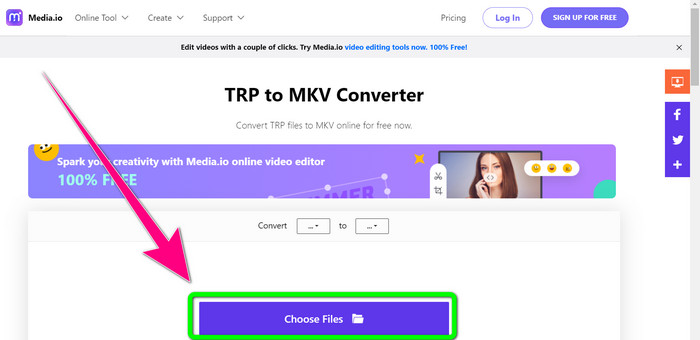
Step 1: Go to the website of Media.io. Then, click the Choose Files button to add your video with the TRP file format.
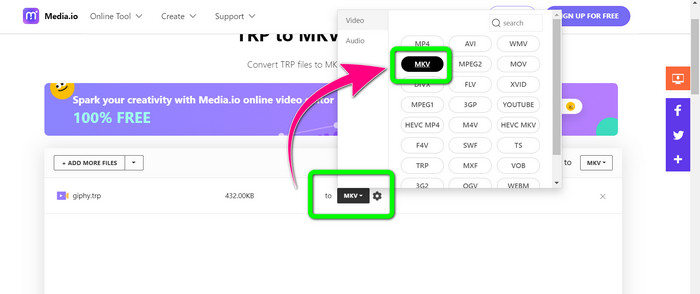
Step 2: After adding your video, go to the format options, look for the MKV file, and select it.
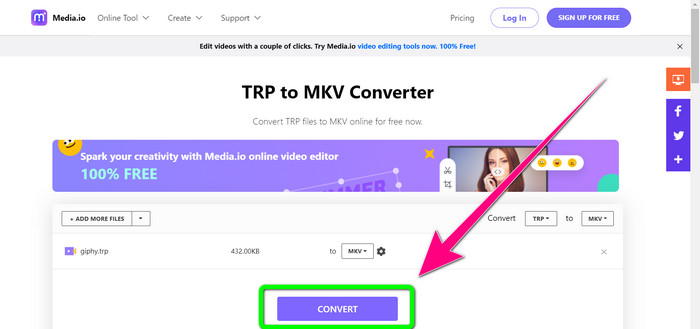
Step 3: For the final step, click the Convert button. Wait for the conversion process and save your video in MKV file format.
関連記事
Best Procedures about How to Convert AMV to MKV for Free
Easily Convert MTV to MKV Using These Ultimate Converters
パート 4: TRP から MKV への変換に関するよくある質問
MKV ファイルがテレビでサポートされていないのはなぜですか?
MKV ファイルは、HEVC、MPEG-4、VP9 などの多くのコーデックでエンコードできる単なるビデオ コンテナです。TV はこれらのコーデックとの互換性が低いため、TV で MKV を再生することはできません。
MKVファイルの品質は良好ですか?
MKV ファイル形式は、高品質のビデオで人気があります。また、ファイルサイズも大きくなります。これは、MKV がコンテナーであり、品質に影響を与えないことを意味します。
私のコンピュータで使用できる高速コンバータはありますか?
絶対そうです!高速なソフトウェア コンバーターを探しているなら、Video Converter Ultimate が最適なアプリケーションです。ファイルを何倍も速く簡単に変換できます。
結論
With all the applications and ways of converting TRP to MKV above, we highly suggest using Video Converter Ultimate. This can convert numerous files instantly with an ultra-fast conversion speed. So, what are you waiting for? Try it yourself to discover more.
-
 TRPをMOVに変換するために利用できる最も印象的なソフトウェアの2つ
 TRPファイルをMOVに変換できませんでしたか?次に、この記事で提供されているガイドに従ってください。 TRPファイルの変換に使用できる最適なツールを選択します。
- TRPをMOVに変換するために利用できる最も印象的なソフトウェアの2つ
TRP ファイルを MOV に変換できませんでしたか?次に、この記事に記載されているガイドに従ってください。 TRPファイルを変換するために使用できる最良のツールを選択します
-
 TRPをWMV形式に変換する2つのプロフェッショナルコンバーター[ガイド]
 あなたはTRPファイルに苦労している人ですか?もしそうなら、この記事を読み続けてTRPをWMVに変換する方法と詳細を知りましょう
