


 ビデオコンバーター究極
 スクリーンレコーダー
 ビデオ修復
ビデオ修復
 安全なダウンロード
MXF を MKV に変換するためのテスト済みで実証済みの方法
VLCメディアプレーヤーやその他のプログラムでMXFファイルを再生できずにお困りですか?それは、VLCがそのファイルをほとんど認識できていないということです。その場合、MXFファイルを別のファイル形式に変換する必要があります。VLCメディアプレーヤーや他のプログラムで再生できるように、MKVファイルへ変換することができます。そこで本記事では、MXFをMKVに素早く変換する方法の中でも、特に優れたものをご紹介します。必要な重要情報を知るために、この記事を読み進めてください。

パート 1: MXF を MKV に変換する最も優れた方法
最高レベルのビデオコンバーターをお探しなら、Video Converter Ultimateを試してみてください。これを使えば、MXFをMKV形式に変換できます。また、M4V、SWF、MTS、MP4、WMV、FLV、AVI、3GP など、100種類以上の多くのファイル形式に対応しています。このツールの最大の魅力は、他のコンバーターに比べて最大30倍の高速でMXFファイルを変換できることです。さらに、バッチ変換機能があるため、複数の動画ファイルを一度に変換できます。しかし、それだけではありません。もしMXF動画にウォーターマーク(透かし)が入っていても、変換前にツールボックス機能から削除できます。ツールボックスパネルの中に「動画ウォーターマーク除去」機能があります。また、動画を逆再生したい場合でも、Video Converter Ultimateにお任せください。このツールには動画を簡単に逆再生できる「動画リバーサー」機能も搭載されています。
機能
◆ さまざまなビデオ ファイル形式を変換します。
◆ ミュージック ビデオの作成に適しています。
◆ ビデオや写真のコラージュを作成するのに最適です。
◆ JPG、PNG、GIF などの画像形式を変換できます。
◆ ビデオを改善するためのツールボックス オプションを提供します。
◆ 動画や音声の圧縮が可能。
◆ 動画の速度を通常の 0.125 倍に遅くし、最大 8 倍に高速化できます。
長所
- 他のアプリケーションよりも 30 倍高速な超高速変換プロセスを備えています。
- ワンクリックで複数のファイルを変換できます。
- ユーザーが画像や動画から GIF をカスタマイズできるようにします。
- 初心者に適しており、シンプルなインターフェースを備えています。
- MP4、AVI、FLV、WMV、WEBM、MOV など、1000 以上のファイル形式を変換できます。
短所
- 有料版では、より優れた機能を体験できます。
以下の簡単な手順に従って、MXF ファイルを MKV 形式に変換します。
ステップ1: 下のダウンロードボタンをクリックして、WindowsまたはMacにVideo Converter Ultimateをダウンロードします。インストールを完了させ、アプリケーションを起動します。
無料ダウンロードWindows 7 以降に対応安全なダウンロード
無料ダウンロードMacOS 10.7 以降に対応安全なダウンロード
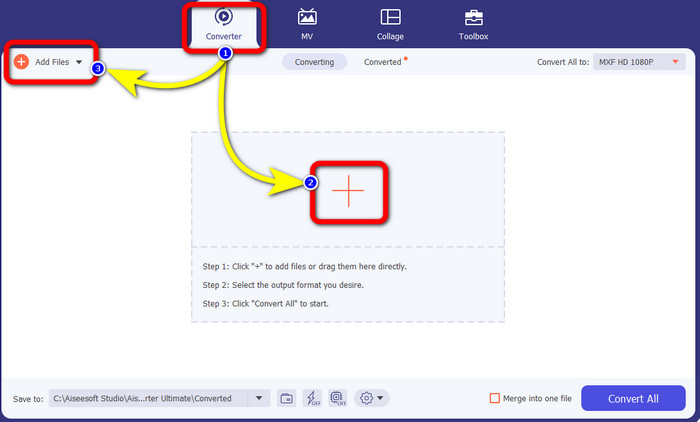
ステップ2: インターフェースが表示されたら、変換パネルを選択します。プラスアイコンを押して、変換したいMXFファイルの動画を追加します。あるいは、ファイルを追加ボタンから動画を選択することもできます。
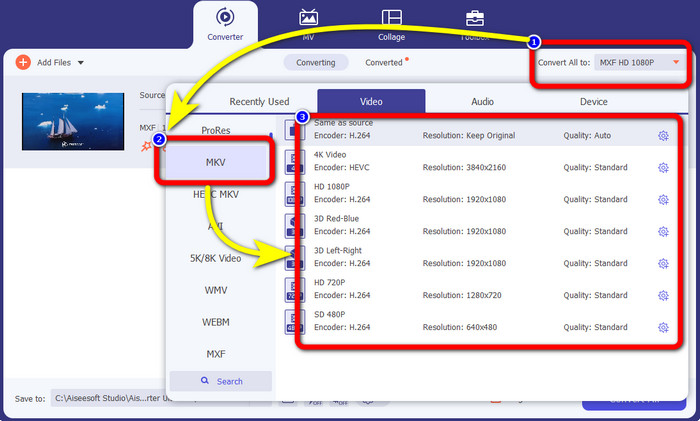
ステップ3: ファイルを追加したら、すべて変換の形式欄をクリックします。フォーマットの一覧が表示されるので、MKV形式を選択します。
ステップ4: 最後にすべて変換ボタンをクリックすれば、MXFファイルをMKV形式へ変換できます。
![[すべて変換] ボタンをクリックします](/images/2022/11/click-convert-all-button.jpg)
パート 2: MXF を MKV にオンラインで変換する方法
FVC Free Video Converterをオンラインで使用する
オンラインでMXFをMKV形式に変換したいなら、FVC Free Video Converter Onlineがおすすめです。このオンラインツールは、MP4、MOV、FLV、GIF、MPG、3GP、MKV、VOB、WEBM など、さまざまなファイルを変換できます。操作はたった3ステップと非常に簡単で、特に初心者を含むあらゆるユーザーに向いています。さらに、このオンラインツールは最大1080pの高画質に対応しています。Google Chrome、Mozilla Firefox、Microsoft Edge など多くのブラウザーから利用可能です。加えて、動画形式だけでなく、MP3、M4A、AAC、AC3、WMA、FLAC などの音声形式の変換にも対応しています。
FVC Free Video Converter Online を使用して MXF ファイルを MKV に変換しましょう。
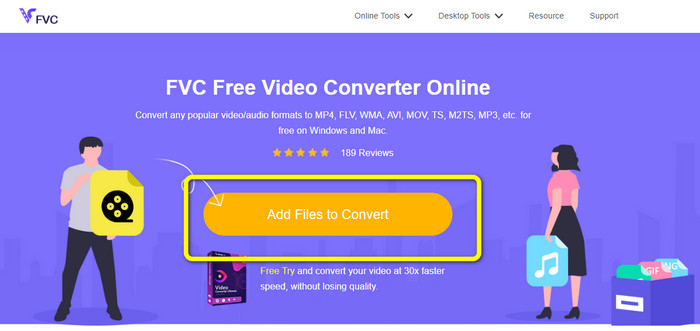
ステップ1: FVC Free Video Converter Onlineの公式サイトにアクセスします。中央にある変換するファイルを追加ボタンをクリックし、MXFファイルの動画をアップロードします。
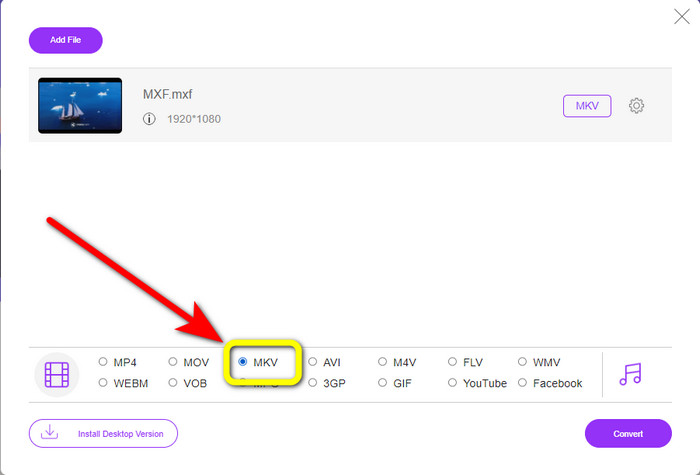
ステップ2: MXFファイルのアップロード後、画面に小さなウィンドウが表示されます。画面下部にあるフォーマットの選択欄から、目的の形式であるMKVを選択します。
ステップ3: 最後に変換ボタンを押して、MXFファイルをMKVに変換します。変換処理が完了するまで待ち、動画を保存します。また、このツールを使えば、MXFをWMVに変換することも可能です。
![[変換]ボタンをクリックします](/images/2022/11/click-convert-button.jpg)
Convertio の使用
Convertioも、MXFをMKV形式に変換できるオンラインツールのひとつです。このオンラインソフトは、MP4、MOV、WEBM、AVI、MTS、MPEG、XVID、DIVX など、全部で37種類の動画形式に変換できます。さらに、GIF、MP3、AAC、FLAC、M4R などの画像・音声形式にも対応しています。変換機能に加えて、Convertioでは動画の圧縮、字幕の追加、ミーム画像の作成、動画編集なども行えます。ただし、便利な機能が多い一方で、無料版には制限があります。残念ながら、最大100MBまでのファイルしか変換できません。つまり、無制限に変換し、より多くの機能を利用するには、サブスクリプションの購入が必要です。MXFファイルをMKV形式に変換するには、以下の簡単な手順に従ってください。
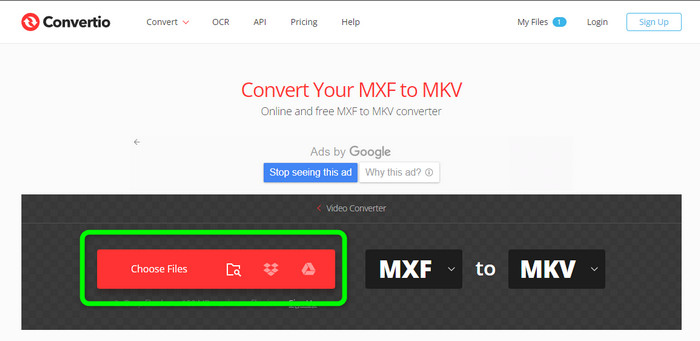
ステップ1: Convertioのサイトにアクセスします。ファイルを選択ボタンをクリックして、MXFファイルを追加します。
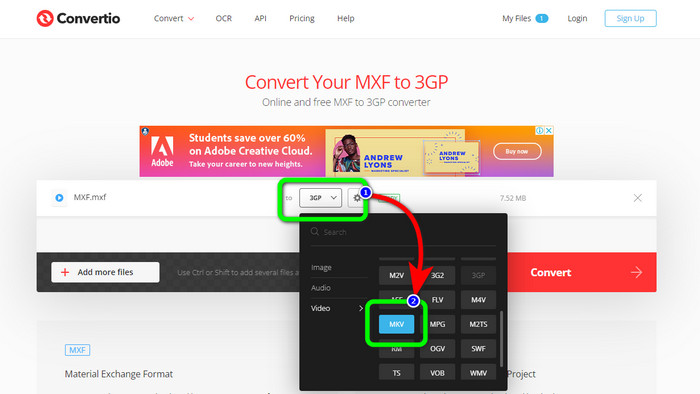
ステップ2: ファイルのアップロードが完了したら、形式オプションをクリックし、MKV形式を選択します。
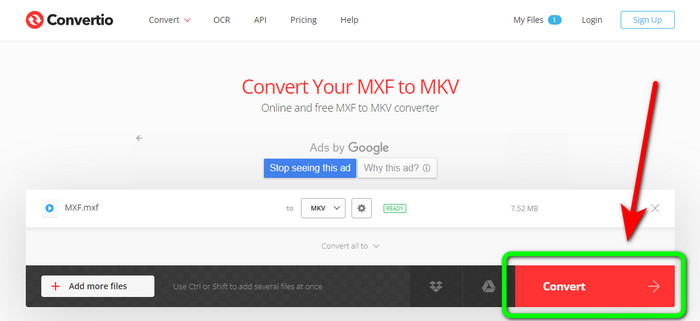
ステップ3: 目的の形式であるMKVを選択したら、変換ボタンをクリックします。変換処理が終わるまで待ち、端末に保存します。
Cloudconvert の使用
MXFをMKVに変換できるオンラインコンバーターをさらにお探しの場合は、Cloudconvertを利用してみてください。このオンラインツールは、MKV、FLV、AVI、WEBM、WMV など、さまざまなファイル形式の変換に適しています。さらに、多くのファイルを変換しても動画の画質を維持できます。ただし、無料版では1日に変換できるファイル数が25件までに制限されています。そのため、より多くのファイルを変換したい場合は、有料プランの購入が必要です。また、インターネット回線の速度によっては、変換処理が遅くなることもあります。加えて、Cloudconvertで対応している出力形式は8種類のみのため、ユーザーによっては物足りないかもしれません。MXFファイルをMKV形式に変換する準備ができたら、以下の手順に従ってください。
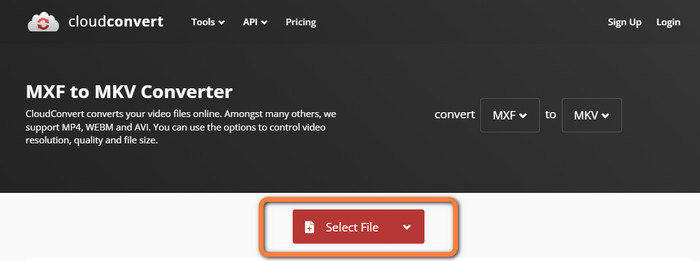
ステップ1: Cloudconvertの公式サイトにアクセスします。ファイルを選択ボタンをクリックし、MKVに変換したいMXFファイルを挿入します。
ステップ2: MXFファイルを挿入したら、形式オプションに進み、出力形式としてMKVを選択します。
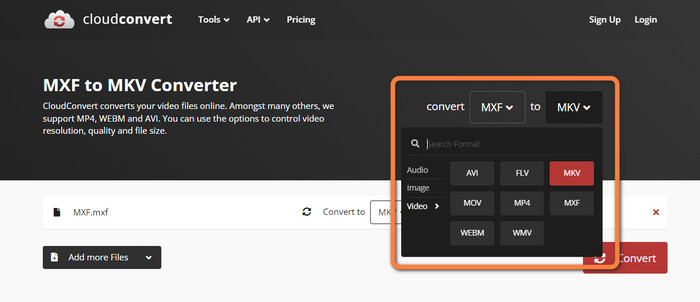
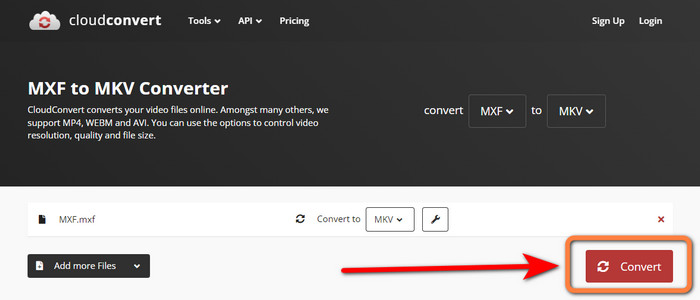
ステップ3: 最後に変換ボタンを押します。変換処理が終わるまで待ち、完成した動画を保存します。このツールは、TRPをMKVに変換する際にも役立ちます。
パート 3: MXF と MKV の比較
| MXF | MKV | |
| ファイル拡張子 | .mxf | mkv |
| 説明 | MXF と呼ばれるマルチメディア コンテナー形式は、ビデオ、オーディオ、およびメタデータを保持して、さまざまなコンピューター間でのビデオの交換を高速化します。 MXF ファイルは、劇場で上映される映画やテレビ コマーシャルによく使用されます。 | Matroska マルチメディア コンテナー フォーマット (MKV) は、他のタイプのビデオ、オーディオ、字幕トラック (USF や SRT など) を 1 つのファイルに結合します。短編映画や音声サンプルのオンライン配信では、MKV ファイルが頻繁に使用されます。 |
| 開発者 | 映画テレビ技術者協会 | 株式会社コアコーデック |
| MIME タイプ | アプリケーション/mxf | ビデオ/x-マトロスカ |
| ビデオコーデック | MPEG-4 AVC/H.264、MPEG-1、MPEG-2、MPEG-4 Visualなど | MPEG-1、Theora、Real Video、Microsoft MPEG4 V2、VP8、MVC など |
| 関連プログラム | ファイル ビューアー プラス Adobe Premiere Pro Windows Media Player | VLC メディア プレーヤー DIVX プレーヤー MX プレーヤー GOM プレーヤー KMPlayer PotPlayer |
パート 4: MXF から MKV への変換に関する FAQ
1. MKV はコンテナですか、それともコーデックですか?
Matroska で使用されるビデオのマルチメディア コンテナー形式は、MKV ファイルとして知られています。 Extensible Binary Meta Language は、複数のビデオおよびオーディオ圧縮形式をサポートする MKV の基盤です。 MKV はコーデックではなくコンテナであり、それが他のビデオ形式との主な違いです。
2. MKV は MP4 より優れていますか?
どちらも素晴らしいです。ブラウザーでビデオを再生する場合は、MP4 がより広くサポートされており、ファイルのオーバーヘッドが低くなります。 MKV コンテナは、Blu-Ray ディスクや DVD をビデオ ファイルに変換するために広く使用されています。
3. MXF は動画ファイルですか?
絶対そうです。 MXF は、オーディオとビデオのファイル形式です。 MXF ファイルは、内部のメディアに関する情報で構成されています。フレームサイズ、フレームレート、作成日などの情報は、メタデータとも呼ばれます。
結論
本記事では、デスクトップツールとオンラインアプリケーションを使ってMXFをMKVに変換する、優れた実績ある方法をご紹介しました。無制限のファイルを簡単かつすぐに変換したい場合は、FVC Free Video Converter Onlineを利用してみてください。
-
 MKVをオンラインおよびオフラインで無料でDivXに変換する方法
 MKV を DivX 形式に無料で変換する最良の方法をお探しですか。 MKVからDivXへの最高のオンラインおよびオフラインコンバーターを知るために読み続けてください
-
 無料でAMVをMKVに変換する最良の手順
 無料で簡単にAMVをMKVに変換したいですか?十分な情報と、使用できるコンバーターを使用した最適なアプリケーションを提供します。進みましょう!
-
 これらの究極のコンバーターを使用して MTV を MKV に簡単に変換
 MTV を MKV に変換する優れた方法を知りたいですか?この投稿では、オンラインおよび Windows/Mac でファイルを簡単に変換する 3 つの方法を紹介します。
