


 ビデオコンバーター究極
 スクリーンレコーダー
 ビデオ修復
ビデオ修復
 安全なダウンロード
OGV を MKV に変換する簡単な手順
別のメディアプレーヤーで開けるようにOGV を MKV に変換する方法を知りたいですか?それなら運が良いと言えます。本記事では、さまざまなファイルを変換するための優れたアプリケーションと、その基本的な手順を紹介します。さらに、これらのツールは十分に使う価値があり、期待を裏切らないので心配はいりません。お待たせしたくありませんので、さっそく本題に入りましょう。ぜひこの記事を読み進めながら、これらの方法を確認してみてください。

パート 1: OGV および MKV 形式に関する情報
OGVファイルをMKV形式に変換する前に、まず貴重な情報を提供しましょう.
OGVとは?
Ogg Vorbis (OGV) は、無料でオープンソースの特許取得済みのマルチメディア コンテナー フォーマットおよびコーデックです。これは、非営利の Xiph.Org Foundation が特許取得済みのコーデックを扱うために作成した Ogg 形式およびコーデック ファミリに属しています。 OGV は、テキスト (字幕) とメタデータをタイム ダイレクト マルチプレックス (TDM) できます。さらに、非可逆および可逆圧縮には、ストリーミングをサポートします。
MKVとは何ですか?
MKV は、さまざまなコーデックを使用して圧縮されたメディア素材を保持できるオープンソースのコンテナーです。これには、再生を一時停止せずに切り替えることができるオーディオ トラックと字幕を多くの言語で含める機能や、ファイルのシークと巻き戻しをすばやく行う機能など、従来の AVI コンテナーよりも多くの利点があります。さらに、この形式は簡単に変更できるため、オーディオとビデオのデータを簡単に抽出できます。
パート 2: OGV をロスレスで MKV に変換する方法
ロスレスで OGV を MKV に変換する方法を知りたいのであれば、ここはまさに最適な場所です。ダウンロードして使える変換ソフトの中で特におすすめなのがVideo Converter Ultimateです。Windows と Mac の両方で利用できる、非常に信頼性の高いコンバーターのひとつです。また、このツールは FLV、MP4、M4V、MOV、SWF、AVI、MTS など、100 以上の形式をサポートしています。動画の変換だけにとどまらず、JPG、PNG、GIF、WEBP などの画像形式にも対応しているため、画像の変換も可能です。最大の特長は、通常の変換速度のツールとは異なり、最大 30 倍の高速変換ができる点です。さらに、一括変換にも対応しているので、複数の動画ファイルをまとめて追加し、ワンプロセスで変換できます。
さらに、OGV ファイルでできることは他にもあります。ファイルサイズが大きすぎるためにビデオのサイズを変更したい場合は、ビデオのサイズを変更できるビデオ圧縮機能を提供するこのアプリケーションを使用できます。 OGV ファイルを MKV 形式に変換する前または変換した後に、OGV ファイルを改善するために楽しめる機能が他にもあります。
機能
◆ MP4、M4V、AVI、FLV など、1000 以上のビデオ形式を変換します。
◆ ミュージック ビデオを作成するためのさまざまなテーマを提供します。
◆コラージュ作成が可能です。
◆ オーディオとビデオの結合が可能。
◆ ビデオ エンハンサー、ウォーターマーク リムーバー、ビデオ スピード コントローラーなど、ビデオを改善するためのさまざまな機能を提供します。
◆ ビデオの速度を変更できます。
長所
- 初心者に最適なわかりやすいインターフェースを備えています。
- 変換プロセスは 30 倍高速です。
- バッチ変換を提供します。
- 品質を損なうことなくファイルを変換します。
短所
- 並外れた機能を体験するには、プロ版を入手する必要があります。
Video Converter Ultimate を使用して OGV を MKV ファイル形式に変換するには、以下の詳細なガイドに従ってください。
ステップ1: Mac または Windows にVideo Converter Ultimateをダウンロードします。インストールが完了したら、アプリケーションを起動します。
無料ダウンロードWindows 7 以降に対応安全なダウンロード
無料ダウンロードMacOS 10.7 以降に対応安全なダウンロード
ステップ2: アプリケーションを起動したら、コンバーターパネルを選択します。OGV ファイルを追加する方法は 2 つあります。ファイルを追加ボタンをクリックするか、プラスアイコンをクリックしてください。
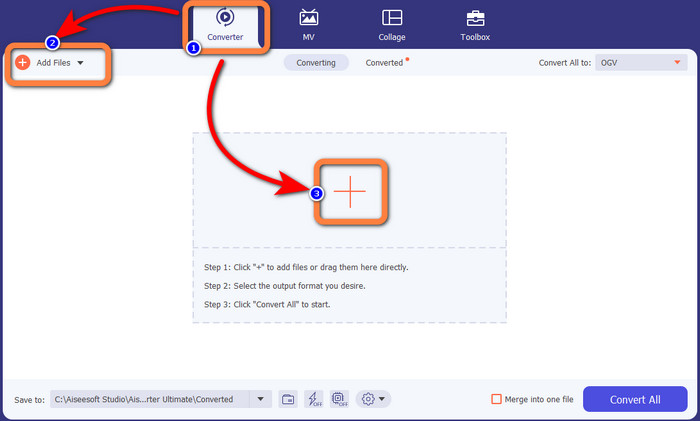
ステップ3: 次に進むため、すべて変換の横にあるドロップダウンアイコンをクリックして形式オプションを開き、MKV 形式を選択します。

ステップ4: 最後に、すべて変換ボタンをクリックしてファイルを変換します。その後、MKV ファイルとして動画を保存できます。
![[すべて変換] ボタンをクリックします](/images/2022/11/click-convert-all-button-1.jpg)
パート 3: OGV を MKV に変換する簡単なオンライン ソリューション
Converthelper の使用
Video Converter Ultimate に感心されたなら、Converthelperにもきっと満足できるでしょう。このオンラインツールを使えば、OGV を MKV に簡単かつ効率的に変換できます。また、WMA、FLV、AVI、MP4、3GP など、さまざまな形式にも対応しています。変換手順もごく基本的なものなので、初心者でも戸惑うことなくオンラインアプリケーションを利用できます。さらに、この無料動画コンバーターは、画質を落とさずに動画を変換することも可能です。そのため、変換後も元の動画と同等のクオリティを保つことができます。ただし、特にインターネット接続が遅い場合など、Converthelper の動作があまり良くないこともあります。また、変換速度が遅く、ユーザーにとって時間がかかりすぎる場合もあります。このソフトを使って OGV ファイルを MKV に変換してみてください。
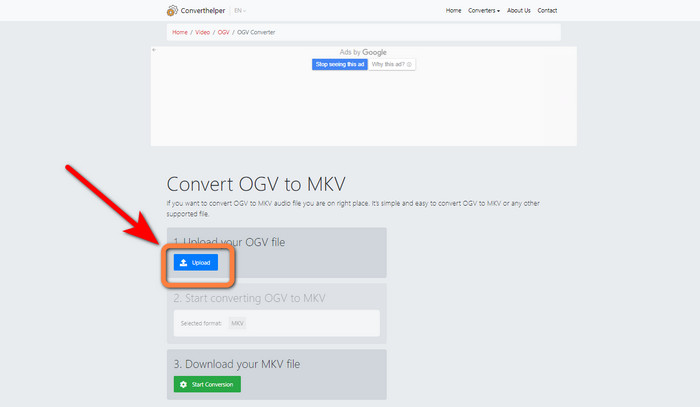
ステップ1: まず、Converthelperの公式サイトにアクセスします。その後、アップロードボタンをクリックし、OGV ファイルをインポートします。
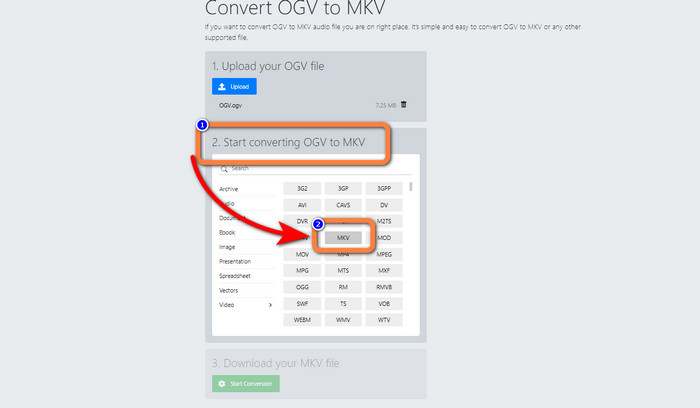
ステップ2: 「2」のステップに進みます。形式オプションから MKV 形式を選択します。
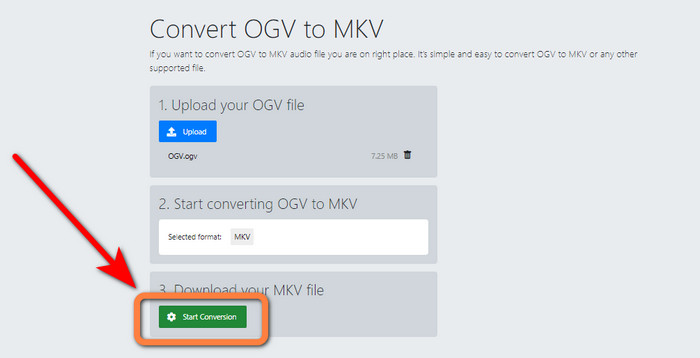
ステップ3: 最後のステップとして、変換開始ボタンをクリックし、変換処理が完了するまで待ちます。このツールを使えば、OGV を FLV に変換することも可能です。
FreeConvert の使用
FreeConvertを使えば、OGV を MKV に即座に変換できます。また、このツールは MP4、WMV、AVI、WEBM、3GP、MOV など、他のファイル形式への変換にも対応しています。変換の手順もシンプルなので、初心者にも最適です。変換以外にも、FreeConvert では動画、画像、音声、ドキュメントなどを圧縮することができます。さらに、動画クロッパーや動画トリマーといった編集ツールを使って動画を編集することも可能です。ただし、変換に関しては最大 1GB までしか対応していないため、大きなファイルは変換できません。より大きなファイルサイズに対応させるには、サブスクリプションを購入する必要があります。また、Web ベースのアプリケーションであるため、インターネット接続が必須です。以下の手順に従って OGV を MKV に変換してください。
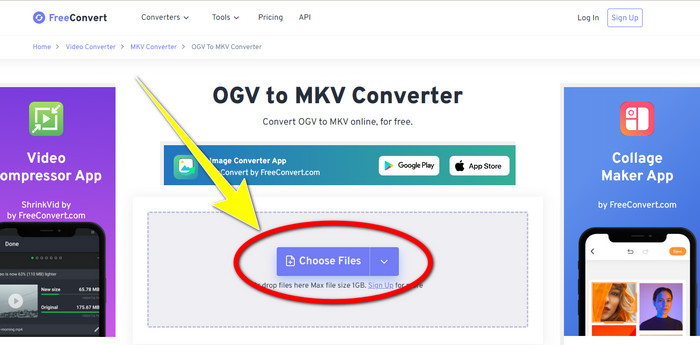
ステップ1: FreeConvertの公式サイトにアクセスします。ファイルを選択ボタンをクリックして OGV ファイルを追加します。
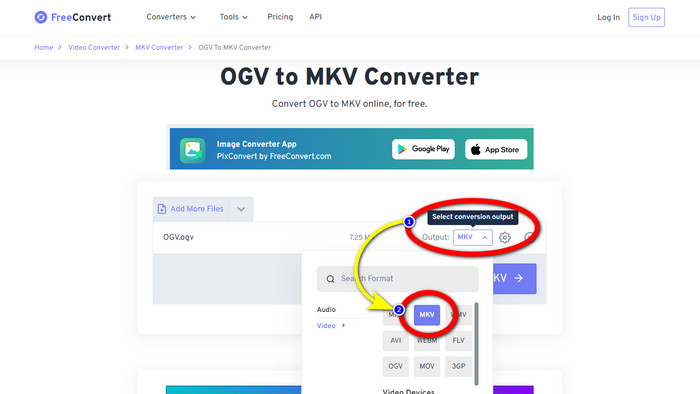
ステップ2: 次に、出力ボタンに進みます。クリックして形式オプションを表示し、MKV形式を選択します。
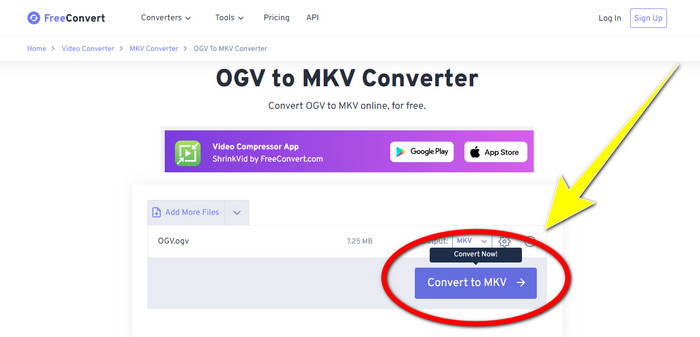
ステップ3: MKV 形式を選択したら、MKV に変換ボタンをクリックします。すると変換プロセスが開始され、最終的な動画が保存されます。
パート 4: OGV から MKV への変換に関する FAQ
1. FFmpeg を使用して OGV を MKV に変換できますか?
もちろん可能です。FFmpeg をダウンロードしてください。これはコマンドベースのツールで、OGV、MKV、MOV、MP4、AVI など、さまざまな動画ファイルを変換できます。
2. MKV は一般的なフォーマットですか?
現在のデバイスの大部分は、このフォーマットと互換性があります。 MKV または Matroska ビデオ形式を使用して、多数のオーディオおよび字幕トラックを 1 つのファイルに保存できます。映画を保存するのに非常に人気があります。非常に小さなファイル サイズと高品質のビデオ。
3. OGV は OGG ですか?
いいえ。OGG は、コンテナー OGV で使用されるオープンソース形式です。 OGG の開発の主な目的の 1 つは、ソフトウェアの特許制限をなくすことでした。 Opus、Vorbis、Theora、または Speex メソッドを使用して圧縮されたオーディオ付きまたはオーディオなしのビデオ ストリームは、OGV ファイル拡張子を使用して保存されます。
結論
オンラインツールを使ってOGV を MKV に変換するのは有効ですが、変換中に煩わしい広告が頻繁に表示されるという事実は無視できません。広告に邪魔されずにファイルを変換したい場合は、Video Converter Ultimateを利用することをおすすめします。
-
 MXF を MKV に変換するための 4 つの最高のソリューション [解決済み]
 MXF をオンラインでもオフラインでも簡単に MKV に変換する 4 つの優れた方法を理解してください。この投稿に含まれているアプリは、手間をかけずにファイルを変換するのに役立ちます.
-
 オンライン/オフラインコンバーターを使用してMPGをMKVに変換する4つの方法
 MPG ファイルを MKV に変換できる使いやすいコンバーターをお探しですか?この記事では、MPG を MKV ファイルにすばやく変換するための最良かつ最も簡単な方法を示します。
-
 Macで無料でMOVをMKVに変換する最も簡単な方法
 MacでMOVをMKVに無料で変換しますか?この記事を読んで、MOVファイルをMKVに変換する最も簡単で簡単な方法を知ってください。
