


 ビデオコンバーター究極
 スクリーンレコーダー
 ビデオ修復
ビデオ修復
 安全なダウンロード
TS を 3GP に変換する 4 つの効果的な方法
この記事では、TS を3GP に変換する方法に焦点を当てています。現在、携帯電話は広く普及しており、好きな動画を視聴する手段の一つになっています。しかし残念ながら、TS ファイルが携帯電話でサポートされない場合があります。携帯で動画を見る際によく使われる形式が 3GP ファイル形式です。そのため、TS ファイルを 3GP 形式に変換することが唯一の解決策となる場合があります。もしそうであれば、本記事が役に立ちます。TS を 3GP に変換する方法を知るために、続きをお読みください。

パート 1: TS を 3GP に変換する無料のダウンロード可能なアプリケーション
ビデオコンバーター究極
Windows と Mac で使える、TS を 3GP に簡単に変換できる無料ダウンロードアプリを探しているなら、Video Converter Ultimate がおすすめです。このソフトは TS を 3GP に手軽かつ高速に変換できます。また、ワンクリックで多数のファイルを一括変換することも可能です。さらに、Video Converter Ultimate には他のコンバーターとは異なり 30 倍高速な変換プロセスが搭載されているため、より素早くファイルを変換できます。ユーザーインターフェースも分かりやすく操作が簡単なので、誰でも利用できます。加えて、このコンバーターには想像以上に多くの機能があります。JPG、PNG、BMP、TIFF などの画像ファイル形式の変換にも対応しています。また、動画を回転させたい場合にもこのアプリに任せられます。動画を水平方向や垂直方向に反転させることも可能です。さらに多くの機能については、以下の詳細をご覧ください。
機能
◆ MP4、M4V、3GP、FLV、AVI、MOV、MKV などのビデオ形式を変換します。
◆ 素晴らしいコラージュの作成に信頼性があります。
◆ バッチ変換プロセスを提供します。
◆ミュージックビデオクリエーターが利用可能です。
◆ ビデオ速度を 0.125x から最大 8x まで調整できます。
◆ ビデオ エンハンサー、コンプレッサー、マージ、トリマーなどの編集ツールを提供します。
長所
- 画像ファイルの変換も得意。
- インターネット接続は必要ありません。
- 初心者に最適で、わかりやすいインターフェースを備えています。
- 2D から 3D ビデオをカスタマイズする機能があります。
短所
- 優れた機能を体験するには、プロ版を購入してください。
TS を 3GP ファイル形式に変換するために、ここでは Video Converter Ultimate を使った詳しい手順を紹介します。
ステップ 1: 下のダウンロードボタンをクリックして、Windows または Mac に Video Converter Ultimate を無料ダウンロードします。その後、インストールしてコンバーターを起動します。
無料ダウンロードWindows 7 以降に対応安全なダウンロード
無料ダウンロードMacOS 10.7 以降に対応安全なダウンロード
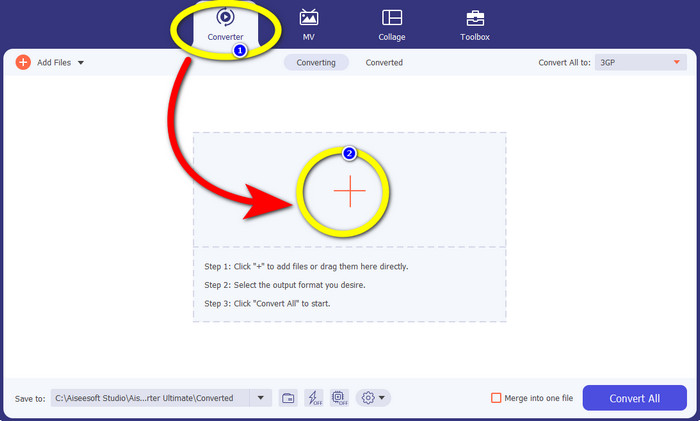
ステップ 2: Converter パネルを選択し、+ アイコンをクリックして、3GP 形式に変換したい TS ファイルを読み込みます。
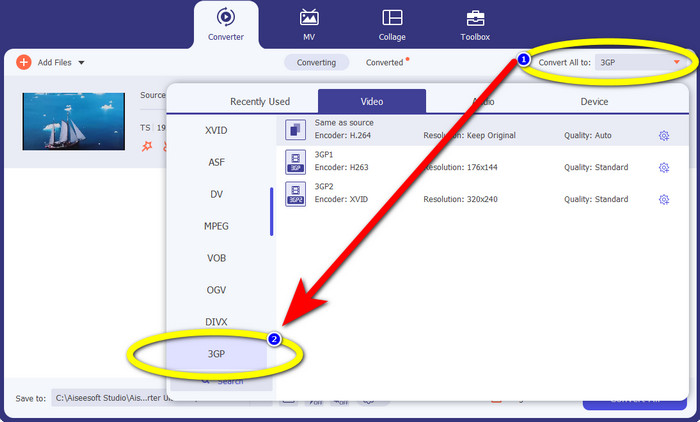
ステップ 3: TS ファイルをインポートしたら、Convert all to ボタンをクリックします。形式のオプションが表示されるので、3GP ファイル形式を選択します。
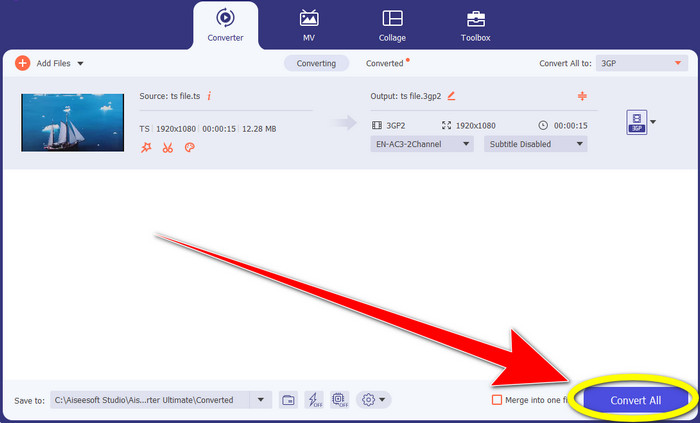
ステップ 4: 最後に、Convert All ボタンをクリックします。変換プロセスは数秒で完了し、Windows または Mac に変換後の動画を保存できます。
HitPaw 動画変換
TS を 3GP に変換できる、もう一つの無料ダウンロードツールが HitPaw Video Converter です。このコンバーターは、MKV、M4V、VOB、WEBM、FLV、XVID、M2TS、TS、3GP など、さまざまなファイル形式の変換に優れています。また、このツールを使えば音声形式の変換も簡単に行えます。さらに、カット、結合、トリミング&回転、ウォーターマーク、再生速度、フィルターなど、多彩な編集ツールも備えています。加えて、HitPaw Video Converter を使うと、YouTube、ビリビリ、Facebook など 1000 以上のサイトから動画をダウンロードできます。ただし、無料でダウンロードできるアプリではあるものの、利用できる機能には制限があるため、フル機能を使うには購入が必要です。また、Windows や Mac へのダウンロードとインストール手順がやや複雑で、多くの工程を踏む必要があります。HitPaw Video Converter を使って TS を 3GP に変換したい場合は、以下の手順に従ってください。
ステップ 1: Windows または Mac に HitPaw Video Converter をダウンロードします。インストール手順に従ってセットアップし、起動します。
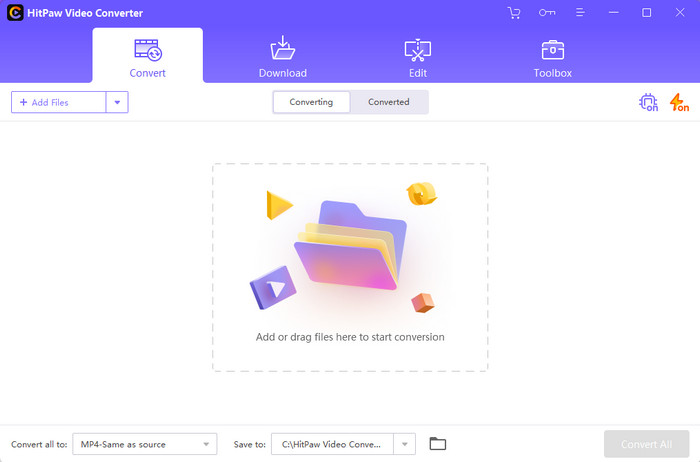
ステップ 2: Add Files ボタンをクリックして TS ファイルをアップロードします。
![[ファイルの追加] ボタンをクリックします](/images/2022/11/click-add-files-button.jpg)
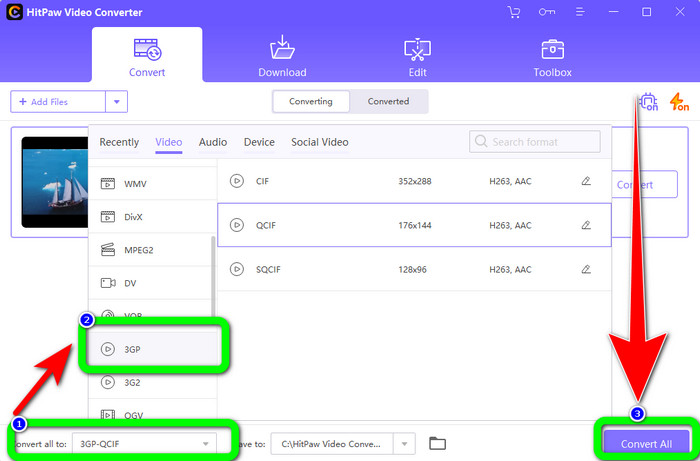
ステップ 3: Convert All to ボタンをクリックします。すると、形式のオプションが画面に表示されます。3GP ファイル形式を選択し、Convert All ボタンをクリックして変換を開始し、完了した動画を保存します。
パート 2: すばらしい TS から 3GP へのオンライン コンバーター
FVC無料ビデオコンバーターオンライン
オンラインコンバーターを利用する場合は、FVC Free Video Converter Online があります。このオンラインアプリは、TS を 3GP にスムーズかつ簡単に変換できます。また、MP4、AVI、WMA、TS、M2TS、XVID、FLV など、他の多くのファイルも変換可能です。さらに、このコンバーターは操作がシンプルで、どんなユーザーにも扱いやすい設計になっています。加えて、この無料オンラインソフトは Windows と Mac の両方で使用でき、Google、Mozilla Firefox、Microsoft Edge など、ほぼすべてのブラウザーで利用可能です。以下の簡単な手順に従って、FVC Free Video Converter Online を使い、TS を 3GP ファイル形式に変換しましょう。
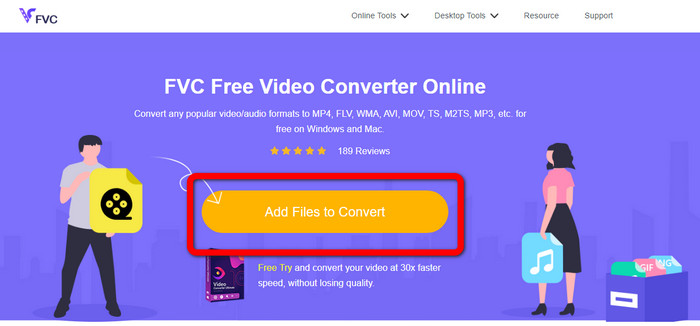
ステップ 1: FVC Free Video Converter Online の公式サイトにアクセスします。画面中央にあるオレンジ色のボックスをクリックして TS ファイルをアップロードします。
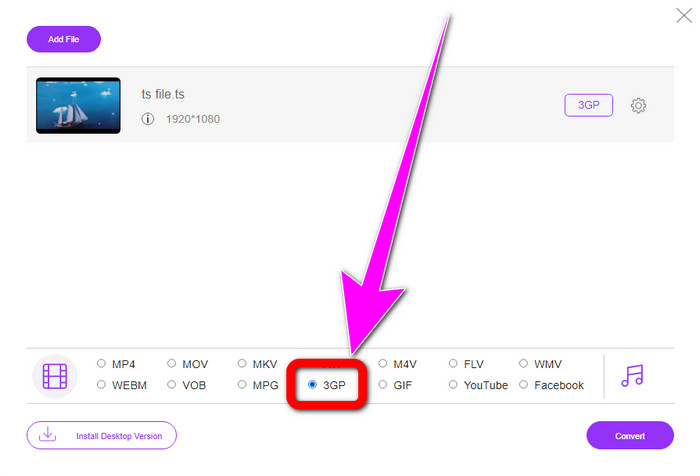
ステップ 2: TS ファイルをアップロードすると、インターフェース下部に多くの形式オプションが表示されます。そこで目的のファイル形式である 3GP を選択します。
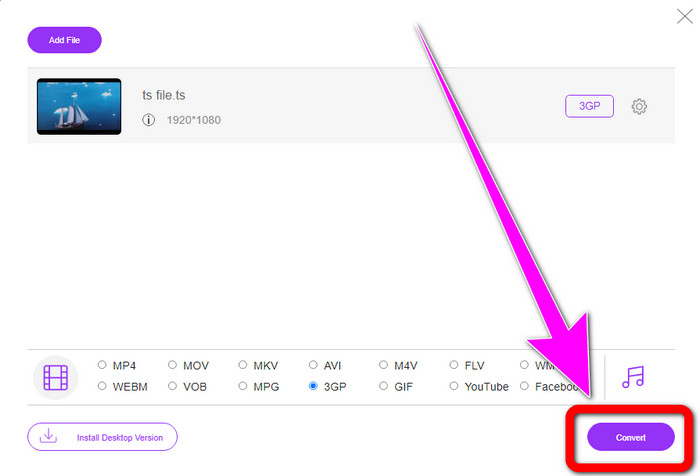
ステップ 3: 3GP 形式の選択が完了したら、Convert ボタンをクリックします。その後、変換された最終的な動画をダウンロードして保存します。
Convertio
Convertio も、TS を 3GP に変換できるオンラインツールの一つです。前述のアプリケーションと同様に、このコンバーターも操作が簡単で、MOV、AVI、FLV、MKV、MPG、MP4 など、さまざまなファイルを 3 クリックで変換できます。動画変換だけでなく、Convertio は音声、ドキュメント、プレゼンテーションのコンバーターとしても利用できます。しかし、このツールの無料版には欠点があります。最大ファイルサイズが 100MB に制限されており、無制限にファイル変換を行うことはできません。アプリケーションの性能を十分に引き出したい場合は、有料版を利用する必要があります。以下の手順に従って、TS を 3GP 形式に変換してください。
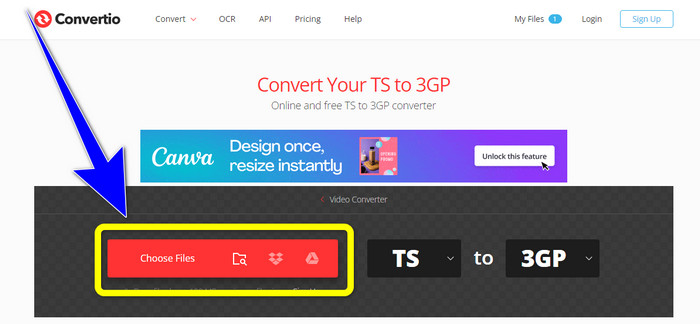
ステップ 1: Convertio のサイトにアクセスします。そして、Choose Files ボタンをクリックして TS ファイルを追加します。
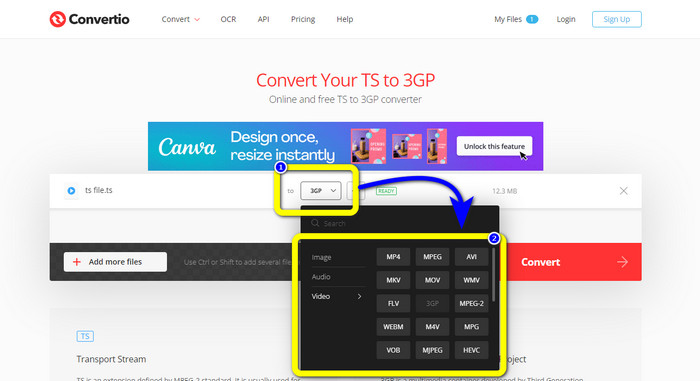
ステップ 2: 形式オプションをクリックし、3GP ファイル形式を選択します。
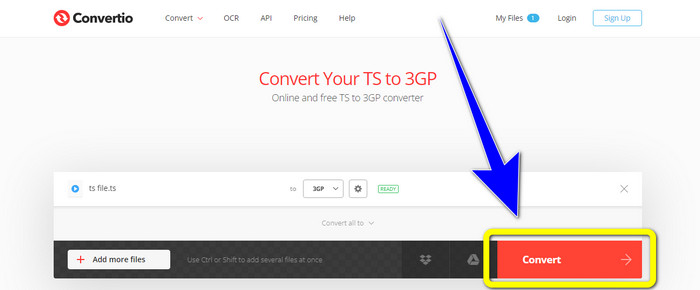
ステップ 3: 最後に、convert ボタンを押します。変換が完了するまで待ち、その後出力ファイルを保存します。また、このツールを使ってTS を FLV に変換することも可能です。
パート 3: TS 対 3GP
| ファイル | TS | 3GP |
| ファイル拡張子 | .ts | .3gp |
| 説明 | MPEG-2 仕様では、TS を拡張として定義しています。通常、ブロードキャスト、インターネット メディアのストリーミング、音楽やビデオの DVD への保存に使用されます。データ伝送障害が発生すると、このメディア コンテナのエレメンタリ ストリームは、迅速な再生とオーディオ/ビデオの同期を可能にする形式で保存されます。 | GSM ベース (Global System for Mobile Communications) 電話用に、Third Generation Partnership Project は 1998 年に 3GP マルチメディア コンテナを作成しました。このコンテナは、使用するデータ、帯域幅、ストレージが少ないため、携帯電話に最適です。これは、MMS ファイル (Multimedia Messaging Service) の一般的なコンテナーです。 |
| によって開発された | 動画専門家グループ | 第3世代パートナーシッププロジェクト |
| 関連プログラム | QuickTime Player、Windows ムービーおよび TV VLCメディアプレーヤー | Windows メディア プレーヤー、VLC メディア プレーヤー |
パート 4: TS から 3GP への変換に関する FAQ
TS は MP4 より優れていますか?
MP4 ファイルと TS ファイルの両方のビデオ品質は同じです。 TS ファイルと MP4 ファイルの主な違いは、TS ファイルはフラットですが、MP4 ファイルはインデックスで始まることです。一方、ファイル内のビデオ ビットは同一です。したがって、TS、M2TS、および MP4 ファイルのビデオ品質はすべて同じです。
TS ファイルを YouTube にアップロードできますか?
残念ながら、できません。TS ファイルを Facebook にアップロードすることはできますが、YouTube にはアップロードできません。 TS ファイルを開くのに最適なプログラムは、VLC Media Player です。
MPEG TS および PS とは何ですか?
TS は Transport Stream(トランスポートストリーム)の略で、通信および放送用途で使用されます。PS は Program Stream(プログラムストリーム)の略で、DVD などのストレージ用途に利用されます。
結論
以上が、TS を3GP に変換するための代表的で効果的な 4 つの方法です。ただし、一部のアプリケーションは有料版を購入して初めて全機能を利用できます。もし制限のない無料コンバーターを使いたい場合は、FVC Free Video Converter Online を利用してみてください。
-
 TSからGIFへ:TSファイルをアニメーションGIFに変換する方法
 この記事を参考にして、TSファイルをGIF形式に変更する方法を学びましょう。以下のリストは、TSとGIFに関するさまざまなアイデアと、TSをGIFに変換する方法を示しています。
-
 Windows、Mac、およびオンラインで DIVX を 3GP に変換する方法
 DIVX を 3GP に変換する方法は?答えを探しているなら、この記事を読んでください。さまざまなコンバーターの助けを借りて、優れた手順を紹介します。
-
 Windows、Mac、およびオンラインで SWF を 3GP に変換する 4 つの最良の方法
 SWF を 3GP に即座に変換するための最も便利な方法を次に示します。また、この投稿では、使用できる効果的な Windows およびオンライン ツールを紹介します。
