


 ビデオコンバーター究極
 スクリーンレコーダー
 ビデオ修復
ビデオ修復
 安全なダウンロード
WEBMをDIVXに変換する4つの簡単な方法
特定のプログラムで動画ファイルが対応していない場合、動画ファイルを変換するのが最善の対処方法です。本記事では、WEMBファイルをDIVX形式へ変換するための、最も簡単な方法を学ぶことができます。オンライン・オフラインともに数多くのWEBM から DIVX へのコンバーターが存在しますが、その中には使いにくかったり、あまり効果的でないものもあります。そこで私たちは、Mac や Windows、オンラインで利用でき、手順も分かりやすい、本当に役立つ優秀なコンバーターを厳選するため、多数のアプリケーションをテストしました。これらの優れた方法を知りたくありませんか? それでは、さっそくこの記事を読んでいきましょう。

パート 1: 最高の品質で WEBM を DIVX オフラインに変換する
さまざまなファイルを変換するのは、手順や使用すべきアプリケーションが分からないと、とても難しく感じるものです。高品質のまま WEBM ファイルを DIVX に変換したいですか? それなら、Windows と Mac にVideo Converter Ultimateをダウンロードしてみましょう。このアプリケーションは、基本的な操作方法と分かりやすいユーザーインターフェースを備えているため、複数のファイルを変換するときでも手順が複雑になりません。さらに、WEBM、DIVX、ASF、OGV、MTV、GIF、MPEG、DPG、MOV、M4V、MP4、FLV など、1000種類以上の形式をサポートしています。加えて、Video Converter Ultimate には優れた動画編集ツールが搭載されているので、動画の質を向上させることも可能です。WEBM 動画でさまざまな作業が行えます。動画を圧縮したい場合は、「ツールボックス」で「動画圧縮」を選択します。また、WEBM 動画にウォーターマークを追加したい場合は、「動画ウォーターマーク」ツールを選択してください。
機能
◆ 多くのビデオを最大 1000 以上のファイル形式に変換します。
◆ 他のコンバータよりも 30 倍速くファイルを変換します。
◆ 無料のフィルターとテーマを備えたコラージュ メーカーを提供します。
◆ミュージックビデオの作成が可能。
◆ ビデオ圧縮、色補正、オーディオ同期、エンハンサーなど、ビデオを改善するためのツールボックスを提供します。
長所
- 使いやすいインターフェースを備えており、初心者に適しています。
- 無料ダウンロードアプリです。
- バッチ変換が可能です。
- 品質を損なうことなくファイルを変換できます。
短所
- プロ版を使用するには、サブスクリプションを購入してください。
Video Converter Ultimate を使用して WEBM を DIVX に変換します。
ステップ1: パソコンにVideo Converter Ultimateをインストールし、起動します。
無料ダウンロードWindows 7 以降に対応安全なダウンロード
無料ダウンロードMacOS 10.7 以降に対応安全なダウンロード
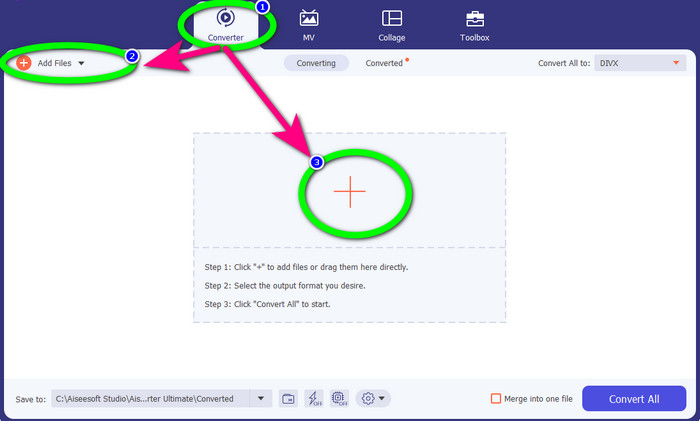
ステップ2: インターフェースが表示されたら、変換パネルを選択し、ファイルを追加ボタン、またはプラスアイコンをクリックして WEBM ファイルを追加します。
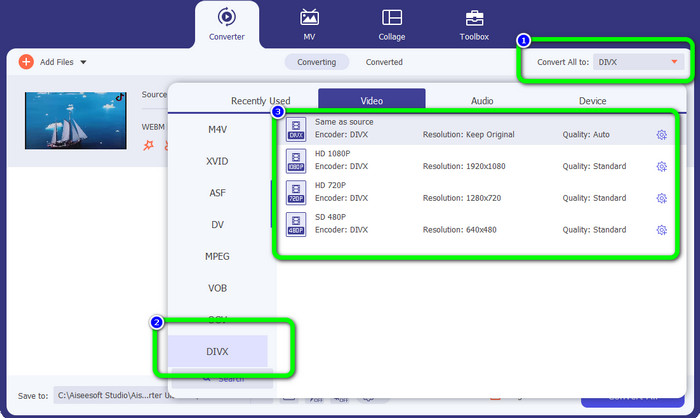
ステップ3: WEBM ファイルを追加したら、すべて変換の右側にあるボタンをクリックします。そこで目的の形式として DIVX ファイル形式を選択します。また、動画の画質も 480p から 1080p まで選択できます。
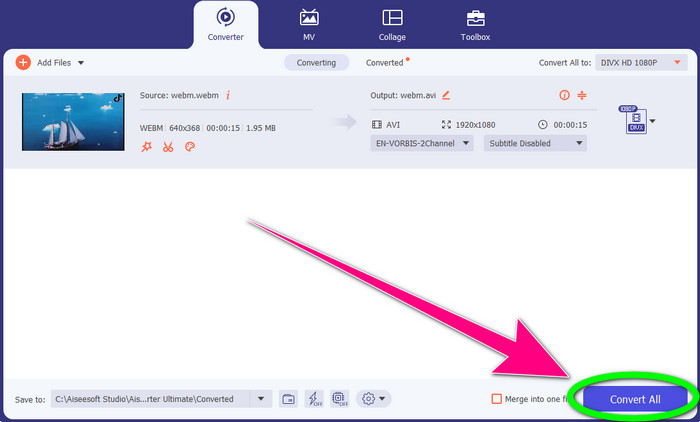
ステップ4: 最後に、すべて変換ボタンをクリックして、WEBM ファイルを DIVX 形式へ変換します。
パート 2: オンラインで WEBM を DIVX に変換する 3 つの方法
WEBM.toを利用する
WEBM から DIVX へのオンラインコンバーターをお探しですか? それなら、WEBM.toは見逃せないツールです。Google Chrome、Mozilla Firefox、Microsoft Edge などのブラウザから、さまざまなファイルを変換できます。MOV、FLV、M4V、TS、MT2S など、複数のファイル形式に対応しています。先ほど紹介したコンバーターと同様に、WEBM.to はファイル変換に特化しているため操作が簡単です。さらに、24時間後にはアップロードしたファイルが自動的に削除されるため、ファイルの安全性も確保されています。ただし、変換プロセスはやや遅めで、安定したインターネット接続がないと十分な性能を発揮できません。それでは、このオンラインツールを使って WEBM ファイルを DIVX に変換してみましょう。
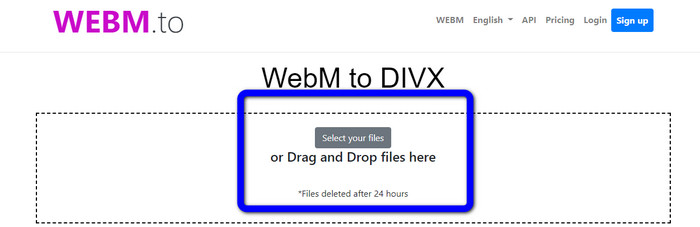
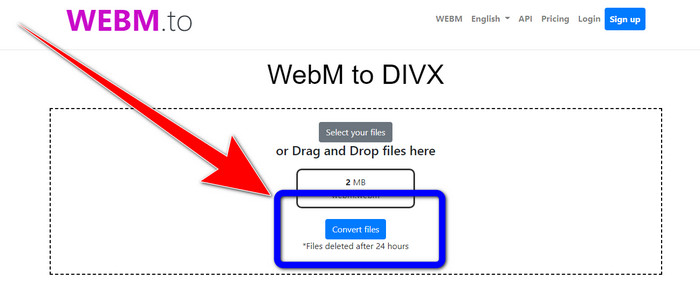
ステップ1: WEBM.toのサイトにアクセスします。Select your filesボタンをクリックして WEBM ファイルを読み込みます。ファイルをボックス内へドラッグ&ドロップすることもできます。
ステップ2: WEBM ファイルを追加したら、Convert Filesボタンをクリックします。変換処理が完了するまで待ち、仕上がった動画を保存します。
エバノの使用
WEBM を DIVX に変換するには、Evanoを利用することもできます。このオンラインツールも信頼性があります。MP4、AVI、DIVX、XVID、3GP、FLV、VOB、MOV など、さまざまなファイル形式に変換可能です。そのため、このツールを使ってWEBM から FLVへ変換することもできます。さらに、EVANO はコンバーター機能だけではなく、オーディオエディターや最適化ツールとしても使用できるため、より多くの作業をこのツールひとつで行えます。ただし、無料版には制限があり、最大 100MB までのファイルしか変換できません。無制限のファイルサイズで利用したい場合はサブスクリプションを購入する必要があります。また、Web ベースのアプリケーションであるため、高速かつ安定したインターネット接続が必須です。以下の手順に従って、Evano を使って WEBM を DIVX に変換してみましょう。
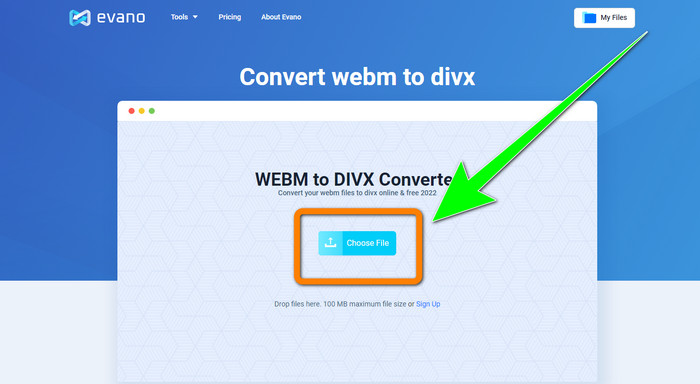
ステップ1: Evanoの公式サイトにアクセスします。Choose Fileボタンを押して WEBM ファイルを追加します。
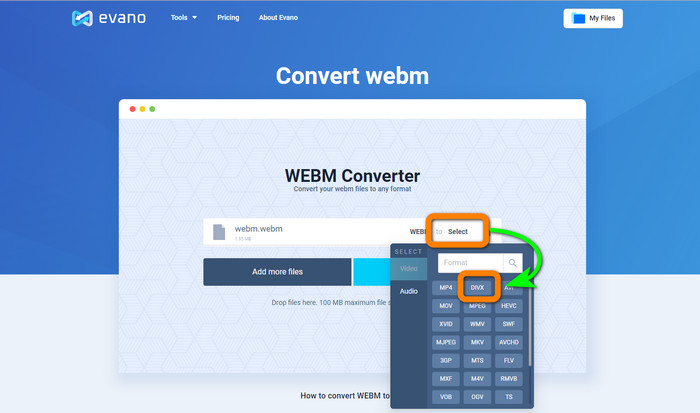
ステップ2: Selectボタンをクリックして形式の選択画面へ進み、DIVX ファイル形式を選びます。
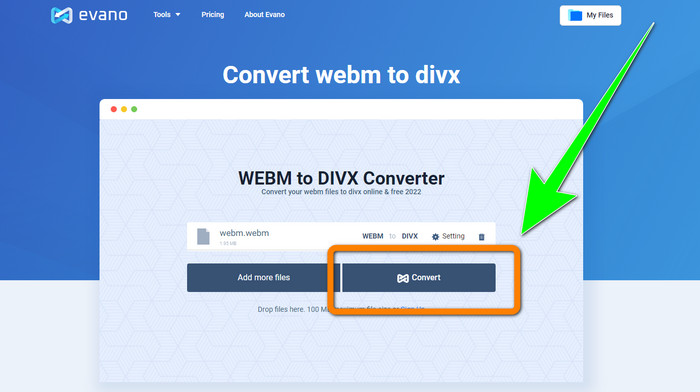
ステップ3: 最後に、Convertボタンをクリックします。変換プロセスが完了するまでしばらく待ち、DIVX 形式で動画を保存します。
FileProInfo の使用
FileProInfoは、WEBM から DIVX への変換を簡単に行えるオンラインコンバーターのひとつです。このオンラインツールを利用すれば、ファイルを別の形式へ変換する方法に悩む必要はありません。また、このツールを使ってWEBM を MKV に変換することも可能です。変換手順は非常にシンプルで、迷うことなく操作できます。さらに、ファイル変換以外にも、盗用チェック、Web サイトの総合レビュー、Web サイトのPingツールなど、さまざまな機能を備えています。ただし、FileProInfo が動作しないことがある点には注意が必要です。また、ファイル変換の処理速度もかなり遅い場合があります。他のオンラインコンバーターと同様に、最大 150MB までというファイルサイズ制限があります。それでは、このオンラインツールを使って WEBM ファイルを DIVX に変換してみましょう。
ステップ1: FileProInfo のサイトにアクセスします。青いボックスをクリックして WEBM ファイルを挿入します。
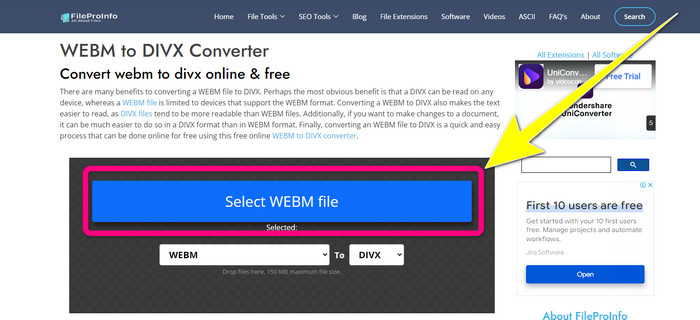
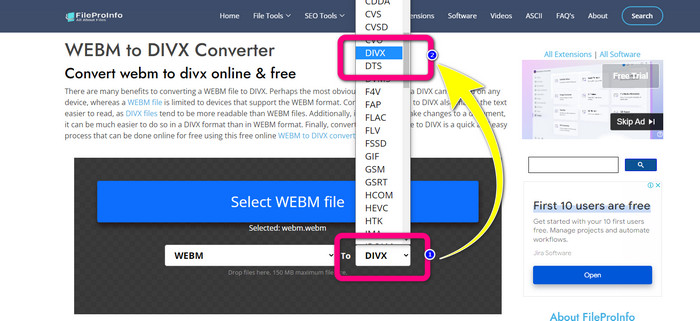
ステップ2: WEBM ファイルを挿入したら、形式の選択画面に進み、DIVX ファイル形式を選択します。
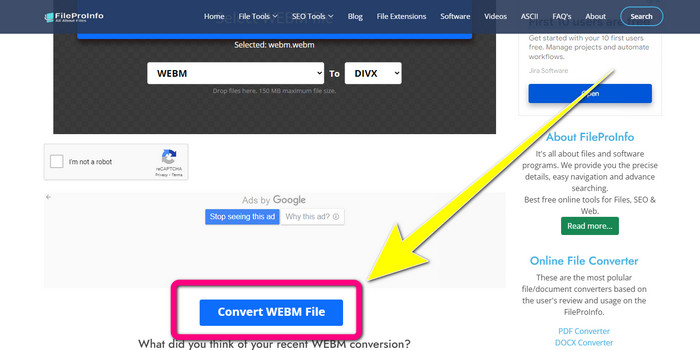
ステップ3: ページを下へスクロールし、Convert WEBM fileボタンをクリックします。
パート 3: WEBM と DIVX の比較
| WEBM | DIVX | |
| ビデオ ファイルの拡張子 | WebM と呼ばれるオープンソースの非ロイヤルティ マルチメディア フォーマットは、インターネット コンテンツ ストリーミングに使用されます。これには、Oupus または Vorbis コーデックを使用した圧縮オーディオ ストリームと、VP8 または VP9 のいずれかを使用した圧縮ビデオ ストリームが含まれます。軽量な設計とリアルタイムの配信機能により、ビデオをオンラインでストリーミングするための最も一般的なファイル形式の 1 つになりました。 | 最大 1080 HD の解像度をサポートし、品質を大幅に犠牲にすることなくビデオを標準サイズの数分の 1 に圧縮する、高品質、高圧縮のビデオ コーデック。 |
| によって開発された | グーグル株式会社 | DIVXネットワーク株式会社 |
| 長所 | ロイヤルティ フリーでオープン ソース、ほとんどのコーデックをサポート。 | 小さいサイズで、無料で使用できます |
| 短所 | インタラクティブ要素の欠如 | |
| 準プログラム | VLC メディア プレーヤー、Mozilla Firefox、Google Chrome、Windows Media Player | XBox 360、カー ステレオ、DVD プレーヤー、Blu-ray プレーヤー |
パート 4: WEBM から DIVX への変換に関する FAQ
1. WEBM を DIVX に変換する利点は何ですか?
DIVX ファイル形式は、WEBM ファイルよりも読みやすく、広く受け入れられています。また、DIVX ファイルに変換すると、セキュリティに役立ちます。
2. WEBM と MP4 のどちらが優れていますか?
動画のファイルサイズに関しては、WEBMの方がMP4よりも小さいです。ただし、品質と互換性に関しては、MP4 の方が優れています。
3. WEBMには音がありますか?
はい、もちろん。オープンソースの WebM プロジェクトは、オーディオとビデオの両方を保持できるデジタル マルチメディア コンテナー ファイル形式である WebM を推進しています。 WEBM は単なるコンテナ形式です。 Matroska マルチメディア コンテナ形式のサブセットが含まれています。
結論
以上が、効果的な方法でWEBM から DIVXへ変換できる、最も優れたアプリケーションです。さあ、何を待っているのでしょうか。今すぐVideo Converter Ultimateをダウンロードして使ってみてください。より速く、より簡単にファイルを変換することができます。
-
 Xvid を DivX に変換するための学習しやすい方法
 無料で Xvid を DivX に変換するための最良のソリューションをお探しですか?この記事は、問題を解決するのに役立ちます。だから、投稿を継続的に読んでください。
-
 品質を落とさずに MPG を DivX に変換する方法
 MPG を DivX に変換するために使用できるトラブルのないアプリケーションをお探しですか?この記事では、試してみるべきさまざまな効果的な方法を紹介します。
-
 Windows、Mac、およびオンラインで DIVX を 3GP に変換する方法
 DIVX を 3GP に変換する方法は?答えを探しているなら、この記事を読んでください。さまざまなコンバーターの助けを借りて、優れた手順を紹介します。
