


 ビデオコンバーター究極
 スクリーンレコーダー
 ビデオ修復
ビデオ修復品質を損なうことなくMKVファイルを圧縮する2つの簡単な方法
MKV ファイルのサイズを小さくしたいけれど、画質は落としたくないですか? MKV ファイルを圧縮する、特に無料で簡単な方法はあるのでしょうか。
MKV ファイルは高品質な映像と音声を保持できますが、そのぶんファイルサイズが大きくなりがちです。MKV 動画をアップロードして共有したいときには、圧縮することがほぼ必須になります。問題は、画質を落とさずに MKV ファイルを圧縮するにはどうすればよいかという点です。

実際には、市場には無料のオンラインツールを含め、MKV 動画のファイルサイズを小さくできる多数の動画圧縮ソフトがあります。この記事では、MKV を圧縮する 2 つの簡単な方法をご紹介します。
パート1。MKVファイルをオンラインで解放圧縮する方法
前述のとおり、多くの無料オンライン動画圧縮・編集ツールを使えば、MKV を圧縮してファイルサイズを小さくできます。まずは人気のオンラインFree Video Compressorを使った方法をおすすめします。
この無料のオンラインMKVファイルコンプレッサーは、ビデオ圧縮用に特別に設計されています。 MKV、MP4、MOV、FLV、AVIなどを含むほぼすべてのビデオフォーマットを高度にサポートします。品質を損なうことなく、4K、HD、またはSDビデオファイルのファイルサイズを縮小する機能があります。さらに、このMKV圧縮ツールにはバッチ圧縮機能が搭載されており、ビデオ圧縮をより高速に完了できます。
ステップ 1. ブラウザを開き、この MKV ファイル圧縮ツールの公式サイトにアクセスします。Google Chrome、IE、Firefox、Safari など、よく使われるブラウザならどれでも利用できます。

ステップ 2. Add Files to Compress ボタンをクリックして、MKV 圧縮用の小さなランチャーをダウンロード・インストールします。
ステップ 3. 圧縮したい MKV ファイルを選択して追加します。右上のコーナーに、MKV ファイルのサイズと動画の長さが表示されます。

ステップ 4. MKV 動画の解像度、フレームレート、ビットレートを調整できます。さらに、圧縮後の動画に適した出力形式も選択できます。すべての設定が完了したら、Compress ボタンをクリックして MKV の圧縮を開始します。

数回クリックするだけで、MKVファイルを手軽に圧縮してファイルサイズを縮小できます。さらに重要なことに、圧縮されたビデオに透かしが追加されることはありません。ほとんどのオンラインビデオコンプレッサーは、出力ファイルに透かしを挿入することを知っておく必要があります。
パート2。MKVファイルを圧縮する専門的な方法
上記の方法を使えば、オンラインで MKV ファイルを無料かつ簡単に圧縮できます。ただし、圧縮率を上げすぎると、画質が大きく劣化したファイルになってしまう可能性があります。そこで、不要な部分をカットしてファイルサイズを減らし、画質を落とさない方法を選ぶこともできます。ここでは、強力な動画変換・編集ツールである Video Converter Ultimate を使って、画質を保ったまま MKV ファイルを圧縮する方法をご紹介します。
Video Converter Ultimate は、さまざまな動画の変換・編集作業を行うために特別に設計されたソフトです。動画をトリミングして必要な部分だけを保存することができます。さらに、MKV ファイルを圧縮するためのVideo Compressor 機能も搭載されています。
無料ダウンロードWindows 7 以降に対応安全なダウンロード
無料ダウンロードMacOS 10.7 以降に対応安全なダウンロード
ステップ 1. 上のダウンロードボタンをダブルクリックして、この MKV 圧縮ソフトを無料でインストールし、起動します。この動画圧縮ツールは、Windows PC と Mac のどちらでも MKV ファイルを圧縮できます。
ステップ 2. メイン画面が表示されたら、Toolbox タブをクリックし、Video Compressor 機能を選択します。
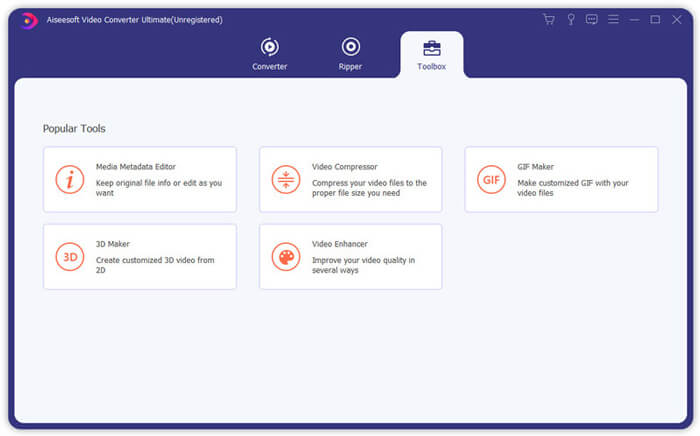
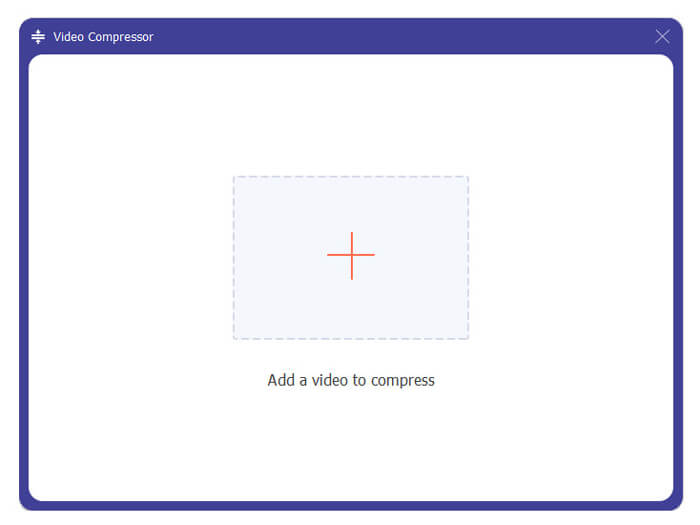
ステップ 3. + アイコンをクリックして、圧縮したい MKV ファイルを読み込みます。
これで、必要に応じてMKVファイルサイズを簡単に減らすことができます。このステップでは、ビデオの解像度、ビットレート、長さ、ファイル名を自由にカスタマイズすることもできます。さらに、圧縮されたビデオに適した出力形式を選択できます。
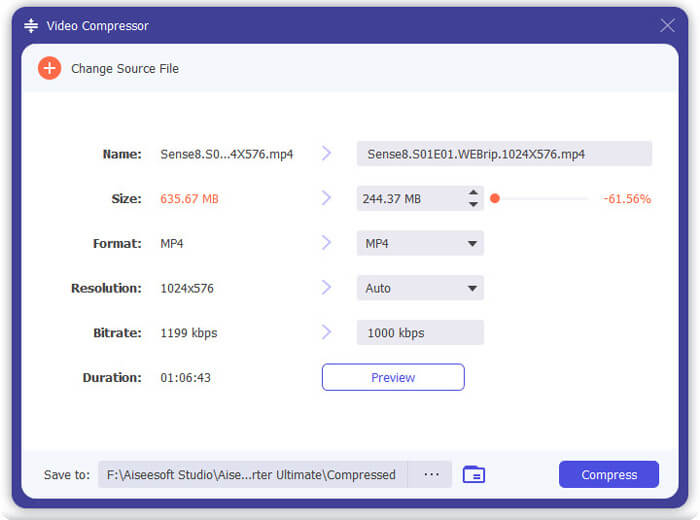
ステップ 4. Compress ボタンをクリックして、MKV 動画を小さいファイルサイズに圧縮し始めます。
ステップ 5. トリミング機能で MKV ファイルサイズを小さくしたい場合は、ホーム画面に戻り、Converter オプションを選択します。MKV 動画を読み込んだら、Cut アイコンをクリックして不要な部分を削除します。
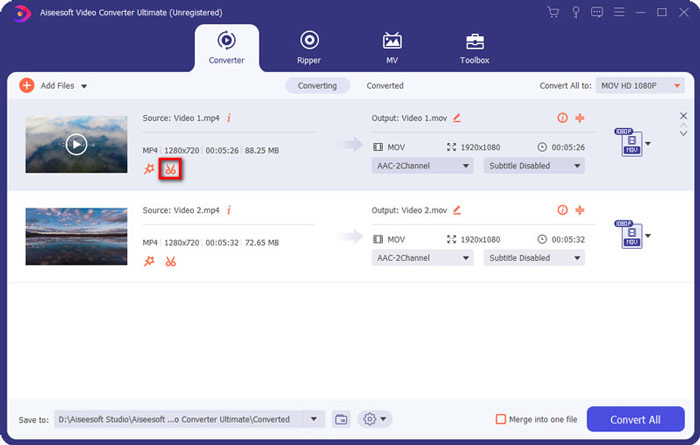
ステップ 6. 進行バー上のハンドルをドラッグするか、開始時間と終了時間を直接入力して MKV ファイルをトリミングします。その後、Save ボタンをクリックして操作を確定します。
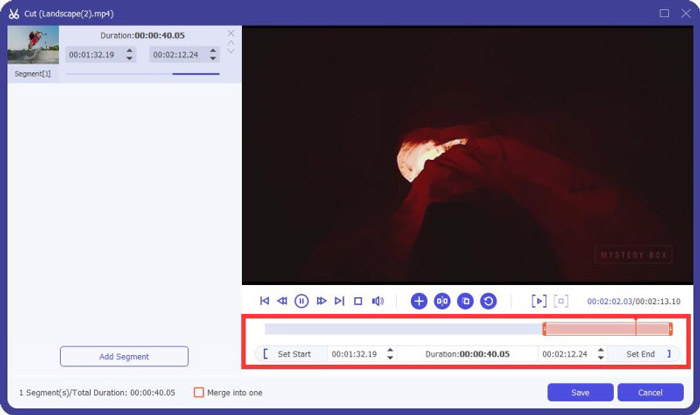
その後、ホーム画面に戻ります。ここで Convert All ボタンをクリックして、MKV 動画を書き出します。この MKV 圧縮ソフトにはメディアプレーヤーが内蔵されているため、圧縮結果をその場で確認できます。
このプログラムを使えば、メール用や WhatsApp 用など、送信目的に合わせて動画を簡単に圧縮できます。
パート3。MKVファイルの圧縮に関するFAQ
質問1.品質を損なうことなくビデオを圧縮するにはどうすればよいですか?
ビデオをトリミングしてファイルサイズを小さくすることを選択できます。そうすることで、品質を損なうことなくビデオを圧縮できます。無料のオンラインまたはプロのビデオコンプレッサーを選択した場合、ビデオは確かにある程度の画像または音質を失います。しかし、あなたはあなたの目で品質の低下に気付かないかもしれません。
質問2.MKVファイルをMP4フリーに変換する方法は?
MKV ファイルを MP4 に無料変換したい場合は、信頼できる Free Online Video Converter を利用できます。MKV から MP4 への変換はもちろん、その他さまざまな動画・音声形式への変換も簡単に行えます。
質問3.MKVファイルが非常に大きいのはなぜですか?
MKVは、より高い圧縮率でより優れたコーデックを使用したコンテナ形式です。 MKVファイルは通常Blu-Rayから取得され、より高い解像度を持っています。
結論
この記事を読めば、MKV ファイルを圧縮する 2 つの簡単な方法が分かります。おすすめした動画圧縮ツールを利用すれば、MKV ファイルの動画サイズを手軽に小さくできます。もし MKV を圧縮するよりよい方法をご存じであれば、ぜひコメント欄で他の読者と共有してください。
-
 iPhone / Android /オンラインで電子メール用のビデオを圧縮するためのチュートリアル
 大きすぎるビデオをメールで送信できませんか?この問題が発生した場合は、ここで電子メール用のビデオを圧縮するための実行可能な方法を入手できます。この記事では、大きなビデオファイルを無料で縮小する方法について詳しく説明します。
-
 GIFを圧縮し、高品質でファイルサイズを縮小するためのチュートリアル
 コンピューターまたは携帯電話でGIFを圧縮する2つの簡単な方法を次に示します。 FVC Free Online Video CompressorとPhotoshopを使用すると、さまざまな面でGIFファイルのサイズを縮小できます。
-
 AVCHDビデオを無料で小さなファイルサイズに圧縮する2つの方法
 eadとAVCHDビデオファイルを圧縮する2つの簡単な方法を取得します。オンラインおよびオフラインのビデオコンプレッサーを使用して、コンピューターでAVCHDビデオサイズを無料で縮小できます。
