


 ビデオコンバーター究極
 スクリーンレコーダー
 ビデオ修復
ビデオ修復
 安全なダウンロード
M4V を 3GP に簡単に変換する手っ取り早い方法
M4V を 3GP に変換したいですか?M4V は、主に Apple 製品向けに用いられるコンテナ形式の動画ファイルです。そのため、手元の M4V 動画ファイルを 3G 対応デバイスで再生したい場合は、変換するのが最適な方法です。この記事では、お使いのデバイスを使って、M4V ファイルを 3GP 形式に素早くかつ手軽に変換する簡単な手順を紹介します。ぜひ最後まで読んで、必要な情報を身につけてください。

パート 1: M4V を 3GP に変換する優れたソフトウェア
あなたに最適なオフライン変換ソフトは Video Converter Ultimate です。この便利なアプリケーションを使えば、M4V を 3GP に簡単かつ瞬時に変換できます。MP4、FLV、MTS、DIVX、XVID、VOB、MOV、MKV など、1000 種類以上の形式をサポートしています。このオフラインソフトを利用すると、ほかのコンバーターより最大 30 倍速くファイルを変換できます。さらに、インターフェースがシンプルで、M4V から 3GP への変換手順もわかりやすいため、あらゆるユーザーにとって使いやすいのが特長です。
さらに、Video Converter Ultimate は、Windows や Mac など、ほぼすべてのメディア プラットフォームで利用できます。さらに、お楽しみいただける機能がもう一つあります。変換前または変換後に M4V ビデオを強化する場合は、ツールボックス機能を選択できます。さまざまな方法でビデオを改善できます。ビデオの速度を変更したい場合は、ビデオ速度コントローラー機能をクリックします。ビデオの色を補正することに関心がある場合は、色補正機能を使用できます。
機能
◆ M4V、MP4、FLV、AVI、TS、SWF などのさまざまなビデオ ファイル形式を変換します。
◆ ミュージック ビデオの作成が得意で、多数のテーマが用意されています。
◆ ビデオを強化するためのツールボックスを提供します。
◆ コラージュの作成が可能です。
◆ JPG、PNG、WEBP、BMP、TIF などの画像形式を変換します。
◆ 多数のビデオ クリップを 1 つに結合します。
◆ ビデオのビデオ速度を調整することができます。
長所
- すべてのユーザーが利用できます。
- 2D からの 3D ビデオのパーソナライズに信頼性があります。
- Mac や Windows など、ほぼすべてのメディア プラットフォームでアクセスできます。
- 変換速度は 30 倍高速です。
- いくつかの方法でビデオを強化します。
- 1000以上のファイル形式をサポートしています。
短所
- より多くの優れた機能を楽しむには、サブスクリプションを購入してください。
以下の簡単な手順に従って、M4V を 3GP に即座に変換します。
ステップ 1: Windows または Mac に Video Converter Ultimate をダウンロードします。その後、インストール作業を進めて、アプリケーションを起動します。
無料ダウンロードWindows 7 以降に対応安全なダウンロード
無料ダウンロードMacOS 10.7 以降に対応安全なダウンロード
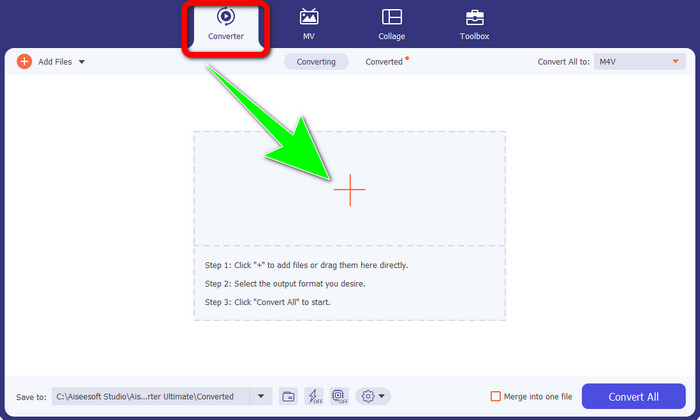
ステップ 2: Windows または Mac でソフトを起動したら、変換パネルを選択し、+ アイコンをクリックして、変換したい M4V ファイルを追加します。
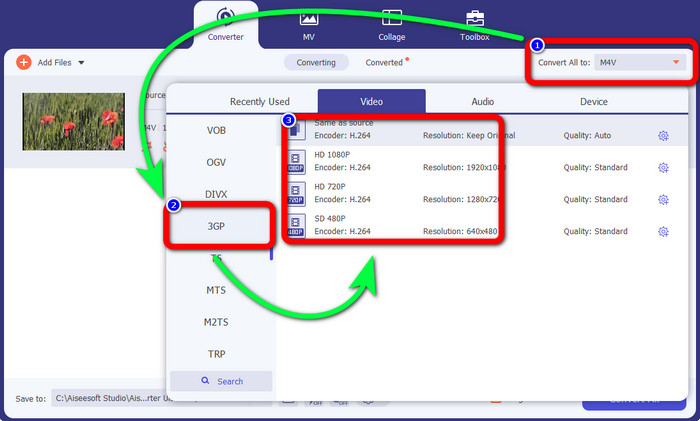
ステップ 3: M4V ファイルを追加したら、すべて変換 の項目をクリックします。形式の一覧が表示されるので、3GP を選択します。あわせて、お好みの解像度も選択できます。
ステップ 4: 3GP 形式の選択が完了したら、すべて変換 ボタンをクリックして、最終的な出力ファイルを保存します。このアプリケーションは一括変換にも対応しているため、複数のファイルを追加してまとめて変換することもできます。
![[すべて変換]ボタンをクリックします](/images/2022/12/click-convert-all-button-m4v-to-3gp.jpg)
パート 2: M4V を 3GP に変換するオンライン ツール
最適なオフラインコンバーターを理解したところで、次におすすめのオンラインコンバーターを紹介します。このオンラインアプリケーションが FVC Free Video Converter Online です。このツールを使えば、数回クリックするだけで M4V を 3GP に手軽に変換できます。さらに、MP4、WMA、MOV、FLV、TS、MP3 など、さまざまな動画・音声形式にも対応しています。加えて、このオンラインツールは無料で、Windows と Mac のどちらでも利用可能です。M4V ファイルを 3GP 形式に変換したい場合は、以下の詳しい手順に従ってください。
ステップ 1: FVC Free Video Converter Online の公式サイトにアクセスします。Add Files to Convert ボタンをクリックして、M4V ファイルを読み込みます。
![[変換するファイルを追加] をクリックします](/images/2022/12/click-add-files-to-convert.jpg)
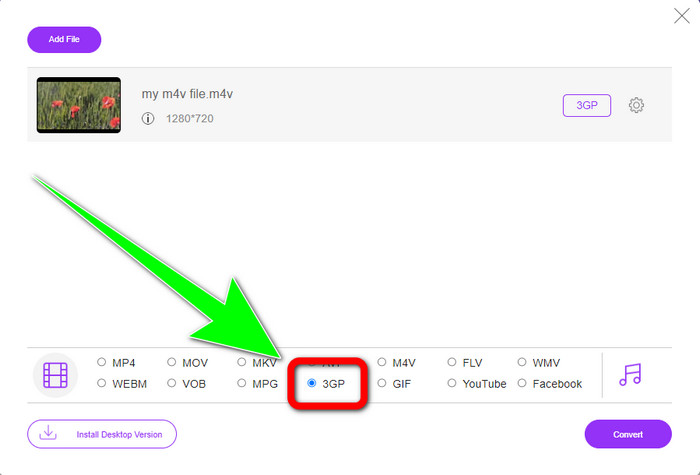
ステップ 2: 形式一覧から 3GP をクリックして選択します。
ステップ 3: 3GP 形式を選択したら、Convert ボタンをクリックして、M4V ファイルを 3GP 形式に変換します。変換処理が完了するまで待ち、完了後に動画を保存します。
![[変換]ボタンをクリックします](/images/2022/12/click-convert-button.jpg)
パート 3: どの M4V から 3GP へのコンバーターを選択するか
2 つのうち、どちらのアプリケーションが一番良いのか知りたいですか?結論から言うと、どちらも非常に優れています。高機能な動画変換ソフトをダウンロードして使いたい場合は、Video Converter Ultimate が最もおすすめです。一括変換機能を備えており、複数のファイルを 1 回の処理でまとめて変換できます。直感的なインターフェースで、初心者やプロでないユーザーにも扱いやすいのが魅力です。変換機能以外にも、動画編集、コラージュ作成、ミュージックビデオ作成など、楽しめる機能が豊富に搭載されています。一方、オンラインコンバーターを利用したい場合は、FVC Free Video Converter Online を使ってください。このソフトも一括変換に対応しており、初心者にも最適です。料金は一切かからず、このコンバーターは完全無料で利用できます。これらの点から、どちらのコンバーターも優秀で信頼できるツールだと言えるでしょう。
パート 4: M4V と 3GP の比較表
| M4V | 3GP | |
| ファイルタイプ | MPEG4 ビデオ | 3GP マルチメディア フォーマット |
| 説明 | M4V は、iTunes ファイルのオーディオとビデオの両方の情報を保存するために使用されるビデオ コンテナの一種です。 Apple FairPlay DRM を使用して、このタイプのファイルを不正な閲覧やコピーから保護することができます。この場合、オーディオまたはビデオ ファイルは iTunes ストアから購入する必要があります。フォーマットは MPEG-4 構造に基づいているため、現在のプレーヤーはほとんどの場合、保護されていないファイルを表示できます。 | 3GP として知られるマルチメディア コンテナは、1998 年に GSM ベースの (Global System for Mobile Communications) 電話用に作成されました。コンテナはデータ、帯域幅、ストレージをほとんど使用しないため、携帯電話に最適です。 MMS 経由で送信されるファイルの場合、標準のコンテナーとして機能します。 |
| によって開発された | アップル社。 | 第3世代パートナーシッププロジェクト |
| 長所 | Appleの保護に添付されています。 | ほとんどのデバイスと互換性があり、 |
| 短所 | ほとんどの Apple デバイスおよびプログラムとのみ互換性があります | ビデオを低解像度で保存します。 |
パート 5: M4V から 3GP への変換に関する FAQ
品質を落とさずに M4V を 3GP に変換するにはどうすればよいですか?
M4V ファイルを画質を落とさずに 3GP 形式へ変換したいのであれば、Video Converter Ultimate を利用する必要があります。このアプリケーションは、動画の画質が変わらないようしっかりと保護してくれます。また、このツールを使って M4V を DIVX に変換 することも可能です。
M4V ファイルは他のデバイス/システムと互換性がありますか?
もちろん可能です。さまざまな種類の M4V プレーヤー を利用すれば、この形式の動画を複数のデバイスで再生できます。M4V プレーヤーは、Android、Linux、iOS、Windows、Mac など、さまざまなシステムに対応しているといった大きな利点があります。
M4V は MP4 より小さいですか?
サイズは中身によって異なります。オーディオとビデオのコーデック、フレーム レート、解像度など。
結論
以上が、オフラインとオンラインの両方のツールを使って M4V を 3GP に変換 する方法です。Windows や Mac でさまざまな形式のファイルを変換したい場合は、Video Converter Ultimate を利用できます。また、優れたオンラインツールを探しているなら、FVC Free Video Converter Online が最適です。
-
 Windows、Mac、およびオンラインで DIVX を 3GP に変換する方法
 DIVX を 3GP に変換する方法は?答えを探しているなら、この記事を読んでください。さまざまなコンバーターの助けを借りて、優れた手順を紹介します。
-
 Windows、Mac、およびオンラインで SWF を 3GP に変換する 4 つの最良の方法
 SWF を 3GP に即座に変換するための最も便利な方法を次に示します。また、この投稿では、使用できる効果的な Windows およびオンライン ツールを紹介します。
-
 TS を 3GP に変換するための最適で簡単な方法を見つける
 この記事では、お使いのデバイスで試すことができる素晴らしい TS から 3GP へのコンバーターの無料ダウンロードを提供します。この記事を読んで、必要なより重要な詳細を確認してください。
