


 ビデオコンバーター究極
 スクリーンレコーダー
 ビデオ修復
ビデオ修復
 安全なダウンロード
AVI ファイルを M4V 形式に変換する詳細な手順
The multimedia container format AVI, which stands for Audio Video Interleaved, is a feature of the Windows video software. It allows simultaneous playback of audio and video data combined into a single file. With its unique capabilities, including synchronized control and real-time display, AVI quickly rose to the top of the most utilized video formats. But if you want to play your video on your Mac, you must convert AVI to M4V because M4V is an Apple format that can play on iTunes, Apple QuickTime Player, and iOS devices. You may occasionally want to convert.avi files on a Mac to a universal format like M4V. In this situation, converting AVI to M4V is advised to function correctly on the Mac OS. We will show you the best methods to convert AVI to M4V using online and offline applications.

パート 1: AVI と M4V の概要
| AVI | M4V | |
| ファイル名 | オーディオビデオインターリーブ | MPEG-4ビデオ |
| ファイル拡張子 | .avi | .m4v |
| 説明 | AVI ファイル形式は、これまで作成されたマルチメディア コンテナの中で最も人気のあるものの 1 つです。 Audio Video Interleaved の頭字語である AVI は、1992 年に Microsoft によってマルチメディア フレームワーク「video for Windows」のコンポーネントとして最初に公開されました。ファイル名拡張子が .avi の AVI ファイルは、コンテナ形式であるため、ビデオとオーディオの両方のコンテンツを同期させることができます。したがって、作成者は、この規格を使用して、オーディオ ビデオ シーケンスまたはビデオ シーケンスを編集およびエンコードできます。 | Apple は、iTunes ストアのコンテンツ用に、MP4 ファイル拡張子と非常によく似た M4V ファイル拡張子を作成しました。 M4V ファイルを再生できるのは Apple デバイスだけです。 Apple デバイスで再生するには、MP4 や MOV などの他のビデオ形式を M4V に変換できます。 M4V と MP4 ファイル形式の主な違いは、前者がメディア コンテンツの著作権侵害を禁止する DRM-Copyright Protection をサポートしていることです。 DRM で保護された M4V ファイルを再生するには、iTunes アカウントにログインしてメディア ファイルを購入する権限をコンピューターに付与する必要があります。ただし、ファイルが DRM で保護されていない場合、ユーザーは M4V ファイル拡張子の名前を MP4 に変更するだけで、Apple 以外のデバイスと互換性を持たせることができます。 |
| によって開発された | マイクロソフト | アップル社。 |
| 関連プログラム | VLCメディアプレーヤー Apple QuickTime プレーヤー アドビ プレミア プロ 2020 ウィンドウズメディアプレイヤー | KMPlayer メディア プレーヤー クラシック ズームプレーヤー \VLC メディア プレーヤー |
| ファイル カテゴリ | ビデオ | ビデオ |
| MIME タイプ | ビデオ/x ビデオ | ビデオ/x-m4v |
パート 2: AVI を M4V に変換する最良の方法
You want to convert AVI to M4V for free? You can use FVC Free Video Converter Online. This tool can easily convert your AVI file format to M4V. Also, it supports more video formats, such as FLV, MP4, MOV, WMA, and more. Also, if you plan to convert multiple AVI files into different file formats, you can use this application because it offers a batch conversion process. You can also edit your videos before converting, like changing their frame rate, resolution, and bit rate. In addition, FVC Free Video Converter Online can convert audio files like MP3, AAC, AC3, FLAC, etc.
特徴
◆ M4V、AVI、MP4、MOV、VOB、FLV、WMV などの多数のビデオ ファイル形式を変換します。
◆ ビデオの解像度、ビット レート、およびフレーム レートを変更できます。
◆ MP3、AAC、AC3、FLAC などのオーディオ ファイルを変換します。
以下の簡単なガイドに従って、AVI を M4V に簡単に変換します。
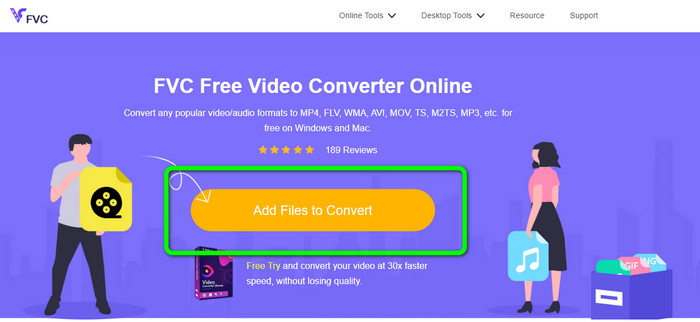
Step 1: First, open your browser and visit the FVC Free Video Converter Online website. Press the Add Files to Convert button to upload your AVI file.
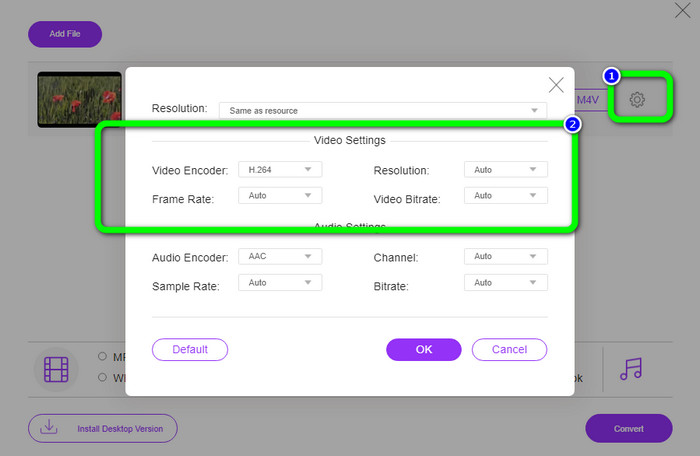
Step 2: If you desire to change your video’s resolution, frame rate, and bit rate, click the Settings icon on the left part of the interface. If you are done changing them, press OK.
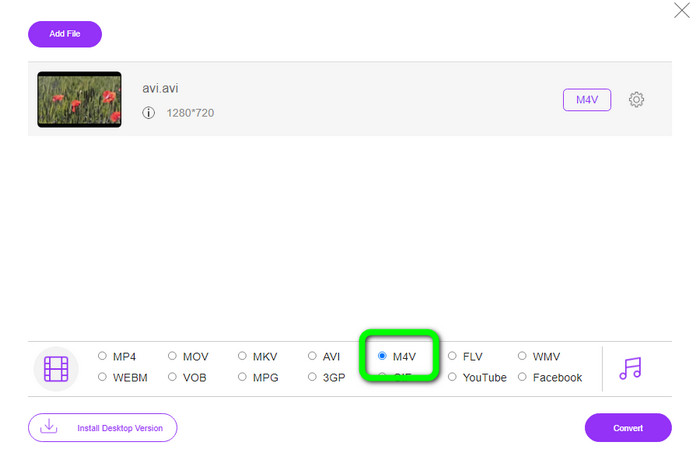
Step 3: Then, on the lower part of the interface, select the M4V file as your output format.
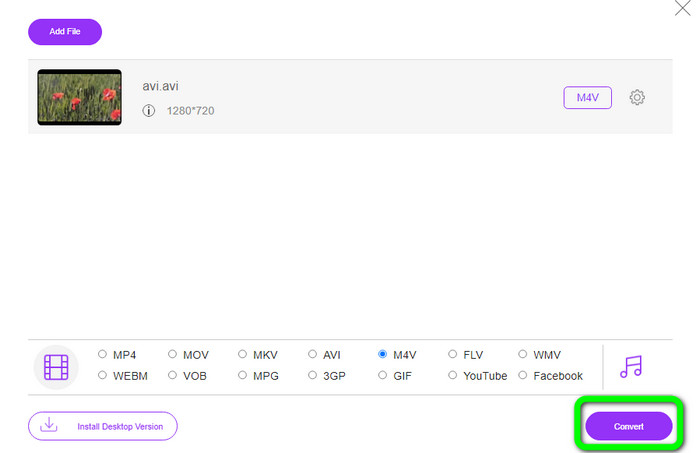
Step 4: Lastly, to save your video file, click the Convert button. Wait for the conversion process and download your final output.
パート 3: Windows と Mac で AVI を M4V に変換する簡単な方法
Another excellent converter you can use is FVC Video Converter Ultimate. This tool can convert AVI to M4V on Windows. It can convert your files instantly because it has an ultra-speed conversion process, which is 30x faster. Also, you can convert multiple files at once because it enables batch conversion. In addition, it has a basic method with an intuitive interface that is perfect for beginners. Moreover, this offline tool is not only accessible on Windows. It is also available on Mac. Furthermore, you can also make some changes to your videos while converting. You can edit your videos by enhancing them, cutting them, adding filters, and more.
機能
◆ M4V、MP4、AVI、FLV、MKV、MOV、VOB、WMV など、100 以上のビデオ ファイルを変換します。
◆ 無料のテンプレートとフィルターでコラージュを作成できます。
◆ミュージックビデオメーカーを提供しています。
◆ Edit videos using a video enhancer, trimmer, watermark remover, compressor, etc.
◆ BMP、JPG、PNG などの画像ファイル形式を変換します。
◆ ビデオのスピードアップとスローダウン。
FVC Video Converter Ultimate を使用して Windows および Mac で AVI を M4V に変換する方法については、以下の詳細なガイドを参照してください。 Windows版を使用します。
Step 1: Download the FVC Video Converter Ultimate on your Windows or Mac by clicking the download button.
無料ダウンロードWindows 7 以降に対応安全なダウンロード
無料ダウンロードMacOS 10.7 以降に対応安全なダウンロード
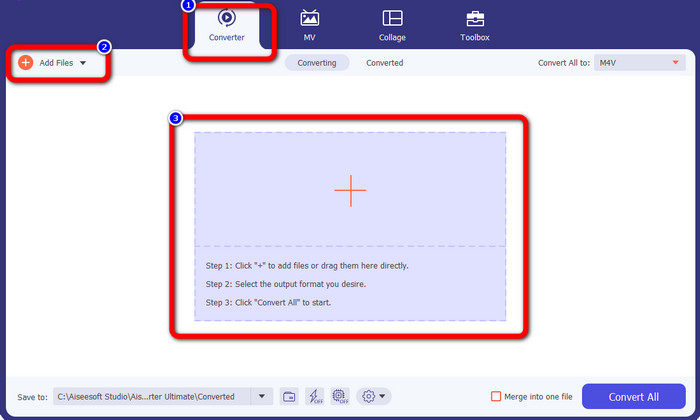
Step 2: Go to the Converter panel after opening the application. Then, you have three options to insert your AVI file. First, you can click the Add File button on the second box. The second option is to click the Plus sign on the third box. And lastly, drop the file directly into the center.
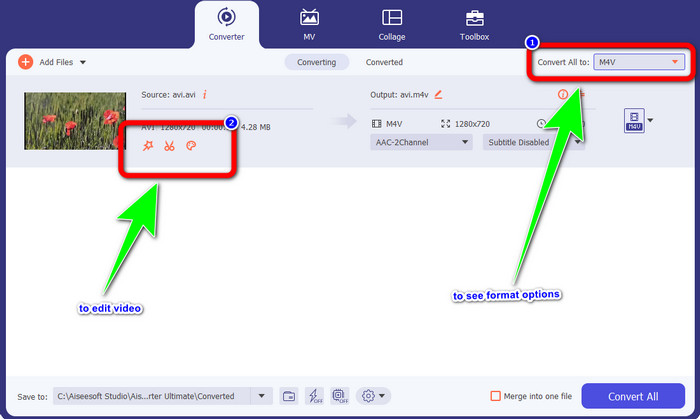
Step 3: After adding your AVI file, click the Convert All to button to see the format options, and select the M4V file format. Then, if you want to edit your video, you can go to the second box. You can use the tools to edit your video, like adding filters, rotating and cropping videos, cutting, and more.
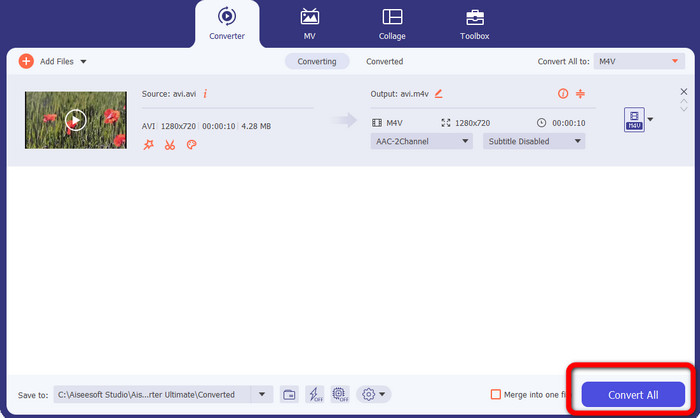
Step 4: For the final step, click the Convert button. Wait for the fast conversion process and save your converted video.
パート 4: Handbrake を使用して AVI を M4V に変換する方法
Handbrake is another converter to convert AVI to M4V for free. It can convert several files like WEBM, M4V, MP4, MKV, etc. With the guide of this tool, you can easily convert many files. However, Handbrake is complicated to use. You need to have enough knowledge about this converter. Also, its installation process is confusing. You must do many procedures before utilizing it, which is time-consuming for users.
Step 1: Download the Handbrake on your computer.
Step 2: Select the AVI file format you want to convert.
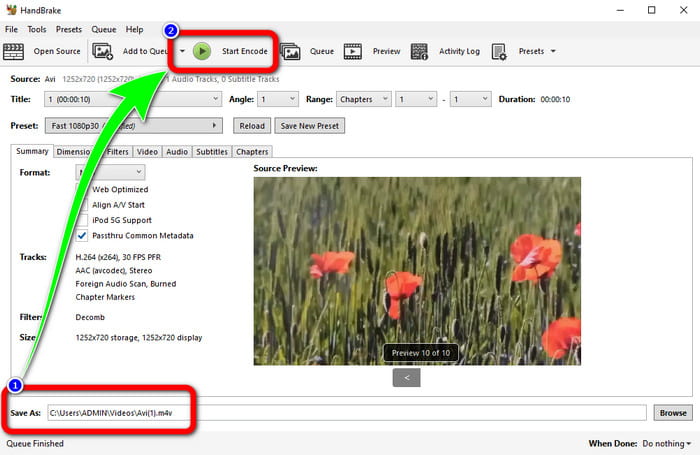
Step 3: Go to format and select the M4V. Then start the conversion process by clicking the Start button.
パート 5: AVI から M4V への変換に関する FAQ
1. MacでAVIをM4Vに変換する方法は?
FVC Video Converter Ultimate を使用できます。このコンバーターは、Mac を使用して AVI を M4V に簡単に変換できます。
2. AVI ファイルのサイズはどれくらいですか?
AVI ビデオは圧縮されていないため、より多くのハード ディスク領域を占有します。たとえば、352x288 の AVI ビデオ映像を 1 時間再生すると、最大 33GB (3300 MB) のハードディスク容量が使用される可能性があります。
3. AVI ファイルはユニバーサルですか?
Yes. Although more modern formats like MP4, MOV, or WMV have supplanted the AVI format, individuals still use AVI because of how portable it is. Almost any computer or gadget can play AVI files.
結論
This guidepost shows you the excellent methods to convert AVI files to M4V using the three converters. But, if you want an ultra-fast conversion process, use FVC Video Converter Ultimate. And if you want a more straightforward method, use the FVC Free Video Converter Online.
-
 あなたが知っておくべきWindows / Mac / Android / iOS用のトップ5M4Vプレーヤー
 QuickTime Player で M4V ビデオを再生できない場合は、この記事の Windows、Mac、Android、および iOS 用の 5 つの優れた M4V プレーヤーから詳細を学ぶ必要があります。
-
 AVI VS MP4 –AVI形式とMP4形式の相違点と類似点
 AVI と MP4 のどちらのビデオ形式が優れていますか?詳細な比較を取得したい場合は、この AVI VS MP4 記事を確認してください。多くの面で AVI と MP4 の相違点と類似点を知ることができます
-
 MacでiTunesM4VをAVIに変換するために使用される3ビデオコンバータプログラム
 MKV を AVI 形式に変換する方法がわかりませんか?この記事を読み続けると、このファイル形式の変換に役立つ 3 つのツールがわかります。
