


 ビデオコンバーター究極
 スクリーンレコーダー
 ビデオ修復
ビデオ修復
 安全なダウンロード
最も簡単な方法を使用して GIF を MKV に変換する
GIFはお使いのデバイスで利用できる最も一般的なファイル形式のひとつですが、状況によってはMKVのような別の動画ファイル形式に変換したい場合もあります。しかし、そのためのアプリケーションを探すのは大変な作業です。多くのコンバーターは変換処理に問題を抱えており、不具合のあるアプリも少なくありません。さらに、さまざまな動画形式に対応したツールを見つけるのも難しいのが現状です。ただし、この記事では、あなたが求める最適な解決策を紹介します。信頼できるアプリケーションを使って、WindowsとMacの両方で利用できる、GIFをMKVに変換する優れた方法をご紹介します。

パート1:GIFとMKVの紹介
変換する前に、まずこれら 2 つの形式に関する情報を学習します。以下の表の重要な詳細を参照してください。
| フォーマット | GIF | MKV |
| 名前 | グラフィック交換フォーマット | Matroska マルチメディア コンテナ |
| ファイル拡張子 | .gif | .mkv |
| 説明 | 画像交換のフォーマットはGIFです。これは、圧縮されたデータを品質のない形式で保存し、256 色以下を使用する、広く使用されているグラフィック形式です。 CompuServe は、1987 年にネットワーク上でラスター イメージを交換するための GIF 形式を作成しました (GIF87a)。ファイル形式は 1989 年に変更され (GIF89a)、アニメーションと透明度の機能が追加されました。 GIF は Twitter や Facebook にアップロードできます。動画ではないため、YouTube や Instagram に GIF をアップロードすることはできません。 GIF は、メディア プレーヤーでも再生できません。 Graphics Interchange Format は、GIF と呼ばれます。 GIF を「jiff」と発音するか「gif」と発音するか、「g」を「goat」の「g」のように発音するかどうかは、激しく争われてきました。複数のファイルを 1 つの GIF ファイルに格納することもできます。 | MKV は、さまざまなコーデックを使用して圧縮されたメディア素材を保持できるオープンソースのコンテナーです。これには、再生を一時停止せずに切り替えることができるオーディオ トラックと字幕を多くの言語で含める機能や、ファイルのシークと巻き戻しをすばやく行う機能など、従来の AVI コンテナーよりも多くの利点があります。さらに、この形式は簡単に変更できるため、オーディオとビデオのデータを簡単に抽出できます。 |
| によって開発された | コンピュサーブ | マトロスカ |
| カテゴリー | 画像ファイル形式 | ビデオ ファイル形式 |
| MIME タイプ | 画像/gif | ビデオ/x-マトロスカ |
パート 2: GIF を MKV に変換する詳細な手順
Video Converter Ultimateは、GIFをMKVファイル形式に素早く簡単に変換したいときに最適なアプリケーションです。このソフトを使用すれば、画質を損なうことなくGIFファイルを変換できます。また、このコンバーターは、他のコンバーターより最大30倍高速な超高速変換プロセスを提供します。さらに、このアプリケーションはバッチ変換に対応しているため、複数のGIFファイルを同時に1つのMKV形式へ変換することも可能です。これにより、ファイルを別形式へ変換する作業を簡単かつ迅速に行えます。加えて、Video Converter Ultimateは直感的なインターフェースを備えており、誰にとっても使いやすい設計です。対応環境の面では、WindowsユーザーもMacユーザーもこのコンバーターを利用できるため、とても便利です。
さらに、遭遇できる機能は他にもあります。誕生日パーティー、結婚式、クリスマス パーティーなどで再生する素晴らしいミュージック ビデオを作成したいとします。 Music Video Creator を提供するため、このアプリケーションは引き続き信頼できます。このクリエイターには、動画をよりクリエイティブでユニークにするための無料のテーマがあります。提供できるもう1つの機能は、色補正ツールです。このツールを使用すると、スライド バーを使用して、ビデオの明るさ、コントラスト、彩度、色相を簡単に調整できます。このようにして、あなたのビデオはより見やすくなります。このダウンロード可能なアプリケーションで体験できる機能は他にもあります。このツールの詳細については、以下の詳細を参照してください。
機能
◆ MP4、MKV、M4V、MOV、AVI、FLV、WMV、VOB、SWF、および 100 以上を含む幅広いビデオ形式を変換します。
◆一度に多くのファイルを変換します。
◆ 高速変換プロセスを提供します。
◆ ビデオを改善するためのビデオ エンハンサー機能を提供します。
長所
- 詳細なガイドを備えた使いやすいインターフェースを備えています。
- 初心者に適しています。
- 無料でダウンロードできます。
- Windows と Mac の両方でアクセスできます。
- 無制限のビデオ/画像ファイルを変換できます。
短所
- 有料版を入手して、より美しい機能を体験してください。
以下の詳しい手順に従って、WindowsまたはMacのコンピューター上でVideo Converter Ultimateを使い、GIFをMKVにすぐに変換しましょう。
ステップ1: Video Converter Ultimateを簡単にダウンロードしたい場合は、下のダウンロードボタンをクリックします。その後、インストールが完了したら起動します。
無料ダウンロードWindows 7 以降に対応安全なダウンロード
無料ダウンロードMacOS 10.7 以降に対応安全なダウンロード
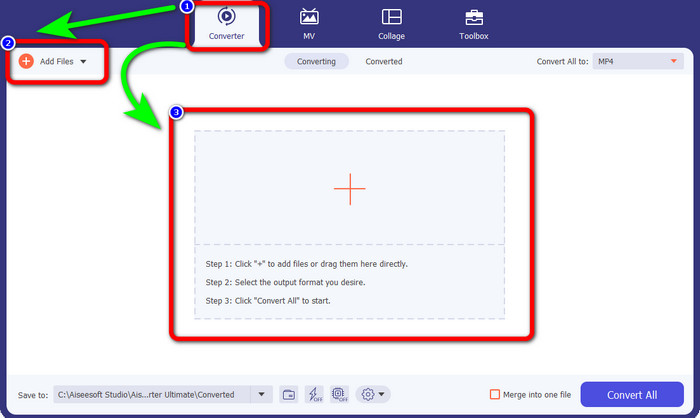
ステップ2: 画面にインターフェースが表示されたら、変換パネルに進みます。次に、ファイルを追加ボタンをクリックしてGIFファイルを読み込みます。中央のインターフェースにあるプラスアイコンをクリックしてファイルを追加することもできます。
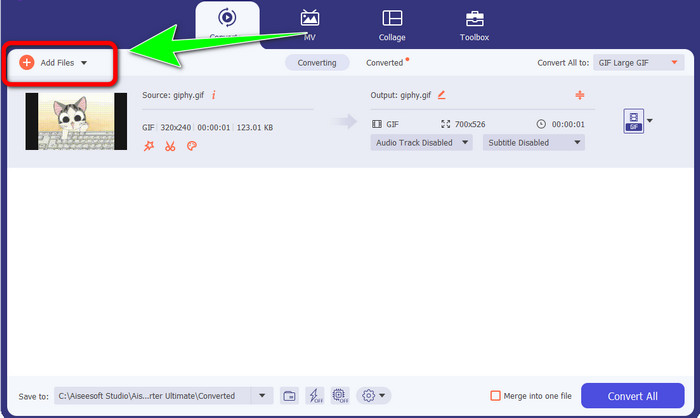
ステップ3: バッチ変換を行いたい場合は、ファイルを追加ボタンをクリックします。
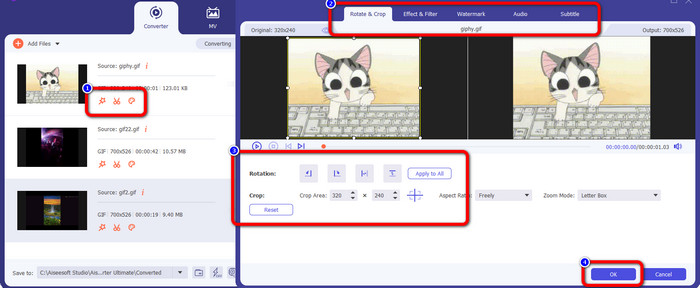
ステップ4: 変換前に動画を編集したい場合は、編集ツールのアイコンをクリックします。このツールを使うと、動画にフィルターやエフェクトを追加できます。また、動画の回転やトリミングも可能です。編集が終わったら、OKボタンをクリックします。
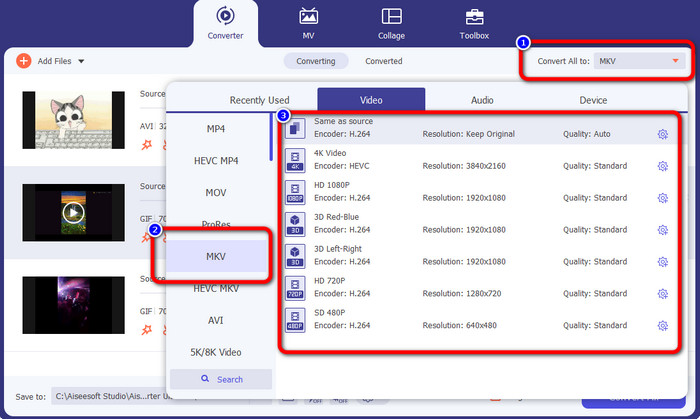
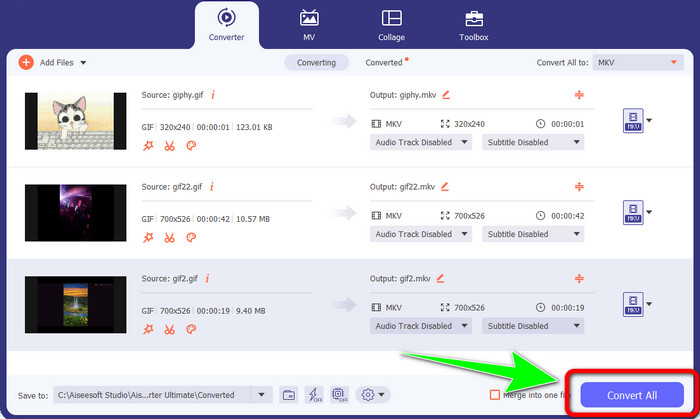
ステップ5: その後、すべて変換のボタンへ進み、すべてのファイルを変換します。形式オプションからMKVファイルを選択し、480pから4Kまでの中から希望する画質を選びます。
ステップ6: 最後に、インターフェース右下にあるすべて変換ボタンをクリックします。変換処理が完了するまで待ち、MKV動画をデスクトップに保存します。このソフトウェアは、GIFをM4Vに変換する際にも役立ちます。
パート 3: GIF から MKV への変換に関するよくある質問
1. MKV を変換するのに最適なファイル形式は何ですか?
MKVを変換する際に最適な形式はMP4形式です。MP4ファイル形式は、現代でもっとも一般的に使用されている形式です。互換性の面でも優れており、MP4ファイルはあらゆるプログラムやデバイスで再生できます。MKVをMP4に変換する方法については、こちらをクリックして確認してください。
2. MKV の品質は MP4 よりも優れていますか?
はい。 MP4 ファイルはすべてのデバイスと互換性がありますが、MKV ファイルの品質は MP4 ファイルよりも優れています。これは、追加機能、複数のオーディオ トラック、および字幕トラックのサポートにより、MKV ファイルは通常 MP4 ビデオよりも大きいためです。MKV ファイルは、さまざまな言語で使用できるさまざまな字幕ファイルもサポートしています。
3. GIF ファイルの長所と短所は何ですか?
GIF ファイルの利点は、ファイル サイズが小さいこと、読み込み時間が短いこと、アニメーションが可能であること、可逆圧縮であることです。次に、このファイルの欠点は、色の選択肢が限られていること、画像が平坦であり、幅広い色の写真には最適ではないことです。
4. MKV ファイルが遅延することがあるのはなぜですか?
理由の 1 つは、高品質または UHD MKV ビデオを処理するのに十分なメモリと CPU パワーがコンピュータにない可能性があることです。結局のところ、このファイル形式はファイル サイズが大きくなります。
5. MKV ファイルをサポートできるのはどのビデオ プレーヤーですか?
VLC Media Player、Media Player Classic、5KPlayer、Real Player、KMPlayer、Pot Player などで MKV ファイルを再生できます。これらのプログラムを使用すると、MKV ビデオ ファイルを確実に再生できます。
結論
この方法を使えば、GIFをMKVに簡単かつ素早く変換できます。そして、Video Converter Ultimateは、高性能なオフラインコンバーターとして最適な選択肢です。さあ、今すぐこのアプリケーションを試して、その豊富な機能を存分に体験してみてください!
-
 品質を落とさずにTRPをMKVに変換する方法
 TRPをMKVに変換する方法を見つけるのに苦労していますか?次に、あなたは正しいポストにいます。 TRPをMKVに簡単に変換する最良の方法を提供します。
-
 MXF を MKV に変換するための 4 つの最高のソリューション [解決済み]
 MXF をオンラインでもオフラインでも簡単に MKV に変換する 4 つの優れた方法を理解してください。この投稿に含まれているアプリは、手間をかけずにファイルを変換するのに役立ちます.
-
 OGV を MKV に効率的かつ簡単に変換する驚くべき方法
 このガイドポストでは、OGV をロスレスで MKV に変換する手間のかからない手順を説明します。これらの最も信頼性の高いコンバーターを試して、その優れた機能を体験してください
