


 ビデオコンバーター究極
 スクリーンレコーダー
 ビデオ修復
ビデオ修復
 安全なダウンロード
AVIF を GIF に簡単に変換して画像配信を最適化する方法
AVIF から GIF への変換は、Web パフォーマンスを向上させる画期的な方法です。画像の互換性と Web 速度が非常に重要であるデジタルの世界では、AVIF (AV1 画像ファイル形式) の機能を利用し、広くサポートされている GIF 形式に変換することで、Web サイトの外観に大きな違いをもたらすことができます。
By converting AVIF to GIF without any problems, you can make your images work better on more browsers and devices, ensuring that all your guests can see them perfectly. With this improvement, your website will run faster, users will interact with it more, and you will reap the benefits. Find out how converting AVIF to GIF can take your online presence to an entirely new level.

パート 1. オフラインで AVIF を GIF に変換する方法
FVC Video Converter Ultimate greets users with an intuitive and user-friendly interface, making the conversion process effortless. With its simple layout and intuitive controls, even novice users can quickly grasp the conversion procedure. Apart from AVIF to GIF conversion, FVC Video Converter Ultimate supports an extensive range of multimedia formats. Users can convert videos, audio files, and images to various popular formats, ensuring compatibility with diverse platforms and devices.
何よりも、ユーザーはさまざまな編集ツールにアクセスできます。ユーザーは、トリミング、クロップ、透かしの追加、フィルターの適用、明るさ、コントラスト、彩度などのパラメーターの調整を行うことができます。これらの編集オプションを使用すると、ユーザーは好みや要件に応じて GIF ファイルをカスタマイズできます。
Step 1. Proceed with the installation and initiation of the software
Commence the process by selecting the Free Download option to obtain the installer for the program. Next, adhere to the instructions displayed on the screen to install and initiate the software on your personal computer.
無料ダウンロードWindows 7 以降対応安全なダウンロード
無料ダウンロードMacOS 10.7 以降に対応安全なダウンロード
Step 2. Drop in an AVIF file(s)
Select GIF Maker from the Toolbox menu to create a GIF. Then, choose the AVIF file from your hard drive before clicking the Photo to GIF button. To create a GIF, you can include as many AVIF files as you would like.
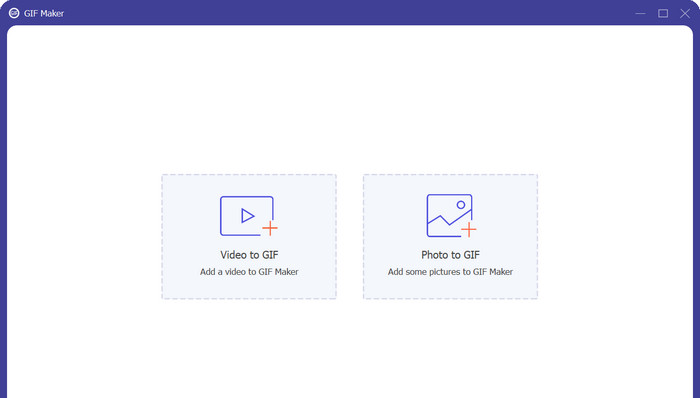
Step 3. Transform an AVIF into a GIF
The final step in converting AVIF to GIF is to hit the Export button in the lower right corner. In just a few seconds, the conversion process should be done, and GIF should be ready for use.
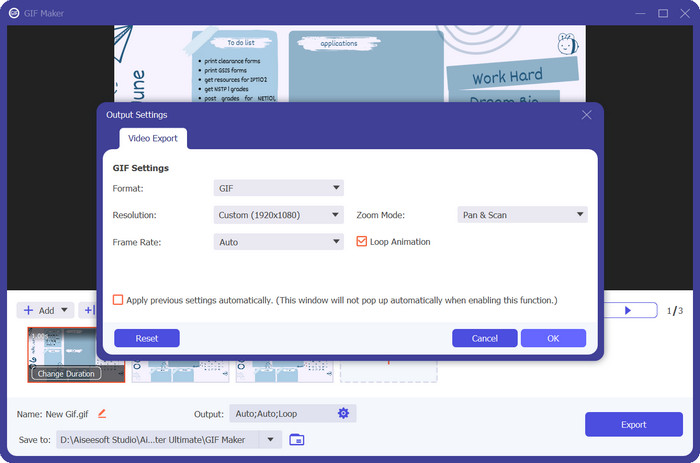
長所
- これにより、AVIF から GIF への変換中に視覚的な忠実度の損失が最小限に抑えられます。
- さまざまな編集オプションを使用します。
- 多彩な出力設定。
短所
- 制限付きの無料版。
- システムリソースへの依存。
パート 2. オンラインで AVIF を GIF に変換する方法
Free Image Converter Online appears as a dependable and quick solution for converting multimedia files. It allows users to convert AVIF files and other formats with ease thanks to its user-friendly interface, wide format support, rapid conversion speed, and varied output options. The online convenience, cross-platform interoperability, and security commitment add value to the tool. Free Video Converter Online is a beneficial solution that fulfills a wide range of conversion requirements.
オンラインコンバーターとして、Free Image Converter Online はソフトウェアをインストールする必要がありません。ユーザーは Web ブラウザを通じてコンバータに直接アクセスできるため、外出先での変換に便利なソリューションとなります。この機能により、ユーザーのデバイス上の貴重な時間とストレージ容量が節約されます。
Step 1. To start off, make sure that you have your AVIF file ready. Then, visit the program’s official website using any of your preferred browsers.
Step 2. After that, you will see the three options for image conversion. From here, select the GIF radio button and set it as the output format.
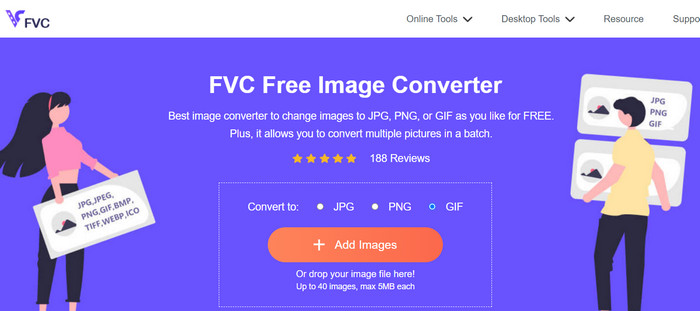
Step 3. Next, hit the Add Image button and browse the AVIF file from your computer. Once located, tick the Open button from the File Explorer.
Step 4. Then, the conversion process will start immediately as soon as the file is uploaded. Now, hit the Download button to get a copy of the output file or Download All to get all the converted files.
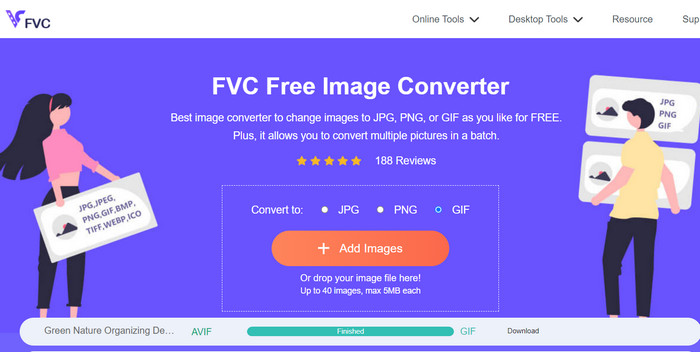
長所
- ソフトウェアのインストールは必要ありません。
- ユーザーのセキュリティとプライバシーを優先します。
- 直感的で簡単なインターフェイス。
短所
- ファイルサイズの制限。
- 画質に関する考慮事項。
さらに詳しく読む:
GIFのウォーターマークを削除する4つのベスト方法【オンライン&オフライン】
How to Convert HEIC to GIF Format [Best Ways]
パート 3. AVIF と GIF の変換に関する FAQ
AVIF から GIF への変換は画質にどのような影響を与えますか?
AVIF を GIF に変換すると、GIF のカラー パレットが限られており、AVIF に比べて圧縮能力が低いため、画質が多少低下する可能性があります。ただし、適切な設定と調整を行えば、画質への影響を十分に最小限に抑えることができます。
AVIF から GIF へ、または GIF から AVIF へ変換する際に著作権に関する考慮事項はありますか?
画像を変換するときは、画像を使用および変換するために必要な権利または許可があることを確認することが重要です。著作権法を尊重し、変更または使用する法的権利を有する画像のみを目的の形式に変換してください。
AVIF から GIF、または GIF から AVIF に変換する場合、制限はありますか?
AVIF から GIF、または GIF から AVIF への変換にはいくつかの制限がある場合があることに注意することが重要です。これには、ファイル サイズの制限、画質の低下の可能性、バッチ変換機能の制限などが含まれる場合があります。使用しているコンバーターの特定の機能と制限事項を確認することをお勧めします。
結論
AVIF to GIF conversion provides a solution for compatibility and optimization in various scenarios. By converting AVIF (AV1 Image File Format) to GIF (Graphics Interchange Format), users can ensure more comprehensive support across platforms and devices that may not fully support AVIF files. GIF format, being widely supported, allows for easy sharing and viewing on the web.
さらに、AVIF から GIF への変換は、ファイル サイズの最適化と Web パフォーマンスの向上に役立ちます。 GIF ファイルは、ファイル サイズが比較的小さく、アニメーションをサポートしていることで知られており、帯域幅と読み込み時間が重要な Web アプリケーションやオンライン コンテンツに適しています。
-
 ビデオをGIFに変換して人目を引くGIFを作成する方法
 厳選されたビデオから GIF へのコンバーターと、わかりやすいビデオから GIF へのプロセスを使用して、ビデオを魅力的な GIF に簡単に変換する方法を発見してください。
-
 見逃してはならないオフラインおよびオンラインのGIF引伸機トップ4
 この投稿は、最高の GIF 拡大機能を探している場合に役立ちます。お使いのコンピューターで最高のパフォーマンスを発揮するオンラインおよびオフラインの GIF 引き伸ばし機をリストしました。
-
 GIFをカットしてコンテンツにスパイスを加える方法に関するベストガイド
 この必読ガイドをお見逃しなく。オンラインとオフラインの優れた GIF カッターを使用して、視聴者の注目を集めるために GIF をトリミングおよびカットする方法を学びます。
