


 ビデオコンバーター究極
 スクリーンレコーダー
 ビデオ修復
ビデオ修復
 安全なダウンロード
CAF ファイルを正確に WAV に変換し、信頼性を維持します
これを想像してください。CAF 形式の素晴らしいオーディオ ファイルがいくつかありますが、それを次のレベルに引き上げたいと考えています。 WAV形式が答えです! CAF ファイルを WAV に変換すると、まったく新しいレベルの優れたオーディオを解放できます。
音質に関しては、なぜ最高以外のもので妥協する必要があるのでしょうか? WAV 形式は優れた明瞭さ、忠実度、豊かさを提供し、リスニング体験を本当に素晴らしいものにします。音楽、ポッドキャスト、その他のオーディオ コンテンツのいずれであっても、WAV 形式によりあらゆる細部が正確にキャプチャされます。
しかし、ここからが本題です。変換プロセスはとても簡単です!ほんの数ステップで、CAF ファイルを WAV に変換でき、あらゆるデバイスで再生する準備が整います。さあ、オーディオ環境をワンランクアップさせて、完璧なサウンドを目指すエキサイティングな旅に出ましょう。それでは、あなたのオーディオコレクションの真の可能性を解き放つために、詳しく見ていきましょう。

パート 1. CAF を WAV に変換する 5 つの優れた方法
1.ビデオコンバーターアルティメット
Video Converter Ultimate は、手間なく効率的に CAF を WAV に変換できる、頼れるソフトウェアです。シンプルさを重視して設計されたこの多機能ツールを使えば、CAF オーディオファイルを高い互換性を持つ WAV 形式へと、簡単に変換できます。さらに、このツールでは複数の CAF ファイルを一括で WAV に変換することも可能です。
ステップ1. デバイスでプログラムの起動を開始するには、無料ダウンロードボタンをクリックします。続く手順では、画面の指示に従ってプログラムを有効化してください。インストール後は、インターフェースもすぐに理解できます。このツールは、Mac と Windows の両方のオペレーティングシステムで動作する CAF から WAV へのコンバーターとして機能します。
無料ダウンロードWindows 7 以降対応安全なダウンロード
無料ダウンロードMacOS 10.7 以降対応安全なダウンロード
ステップ2. 編集したいオーディオファイルを取り込むには、メインインターフェースの追加ボタンを選択します。その後、インポートしたファイルのサムネイルが表示されます。フォルダを指定することで、複数ファイルを同時に変換することもできます。必要なオーディオファイルが保存されているディレクトリを選択してください。
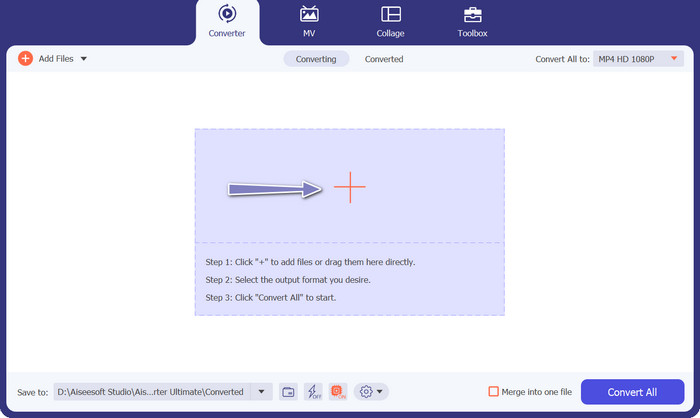
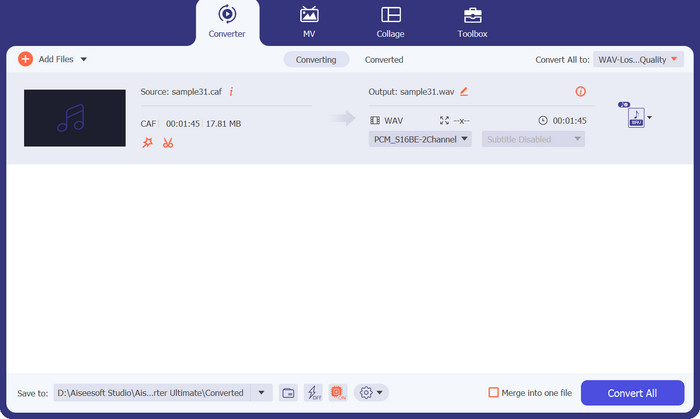
ステップ3. 出力形式を変更するには、プログラムウィンドウ上部にあるすべて変換のドロップダウンリストを選択します。オーディオタブからWAVを選択します。目的の音質を得るために、出力ファイルのサンプルレートやビットレートを調整することも可能です。
ステップ4. 変換プロセスを完了するには、すべて変換ボタンをクリックします。プログラムは自動的に出力フォルダを開き、変換後のファイル形式を確認できます。
編集者の見解:
CAF ファイルを WAV 形式に変換することに関しては、FVC Video Converter Ultimate がトップパフォーマンスとして際立っています。このソフトウェアは、その卓越したパフォーマンスと豊富な機能により、オーディオ変換の基準を高く設定します。
2.FFmpeg
FFmpeg は、包括的なマルチメディア処理機能を提供するコマンド ライン ツールです。 CAF や WAV など、幅広いオーディオおよびビデオ形式をサポートしています。使用するにはある程度の技術的知識が必要ですが、FFmpeg は CAF を WAV に変換するための強力で信頼性の高いソリューションです。
ステップ1. お使いのオペレーティングシステムに対応した FFmpeg を、公式サイトからダウンロードしてインストールします。
ステップ2. コマンドプロンプトまたはターミナルウィンドウを開きます。
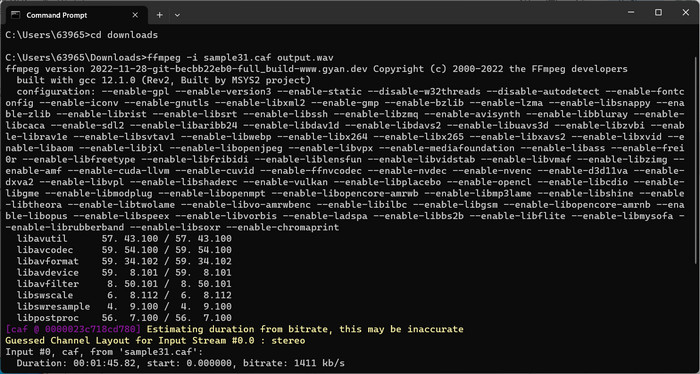
ステップ3. 「cd」コマンドを使って、CAF ファイルが保存されているフォルダに移動します。
ステップ4. 次のコマンドを入力します: ffmpeg -i input.caf output.wav。
ステップ5. Enterキーを押し、この CAF to WAV コンバーターに CAF ファイルを WAV に変換させます。
編集者の見解:
FFmpeg は、コマンド ライン インターフェイスに精通している必要があるにもかかわらず、その卓越したパフォーマンスと柔軟性により、変換プロセスを正確に制御したいユーザーにとって推奨されるオプションです。
3. MediaHuman オーディオ コンバーター
MediaHuman Audio Converter は、シンプルかつ効果的なオーディオ変換ソフトウェアです。 CAF および WAV 形式をはじめ、その他多くの形式をサポートしています。直感的なインターフェイスを介して、数回クリックするだけで CAF ファイルを WAV に簡単に変換できます。
ステップ1. お使いのオペレーティングシステムに対応した MediaHuman Audio Converter を、公式サイトからダウンロードしてインストールします。
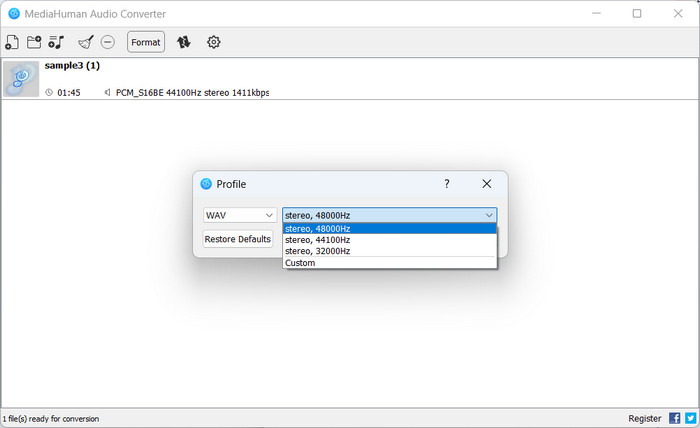
ステップ2. MediaHuman Audio Converter を起動します。その後、追加ボタンをクリックし、CAF ファイルを選択します。
ステップ3. 次に、ドロップダウンメニューから出力形式として WAV を選択します。そのうえで、変換後のファイルを保存したい保存先フォルダを指定します。
ステップ4. 変換ボタンにチェックを入れて変換プロセスを開始します。MediaHuman Audio Converter が CAF ファイルを WAV 形式へ変換します。
編集者の見解:
MediaHuman Audio Converter は、そのシンプルさとユーザーフレンドリーなインターフェイスが印象的です。このツールはシームレスなエクスペリエンスを提供し、ユーザーは数回クリックするだけで CAF を WAV ファイルに簡単に変換できます。
4.無料オンラインビデオコンバーター
Free Video Converter Online は、CAF ファイルを WAV 形式に変換するための、便利なWebベースのツールです。わずか数クリックで、CAF ファイルを簡単に WAV に変換できます。さらに、このプラットフォームは幅広いオーディオおよびビデオ形式に対応しており、高い柔軟性と互換性を実現しています。入力形式に CAF、出力形式に WAV を選択するだけで、すぐに変換プロセスを開始できます。
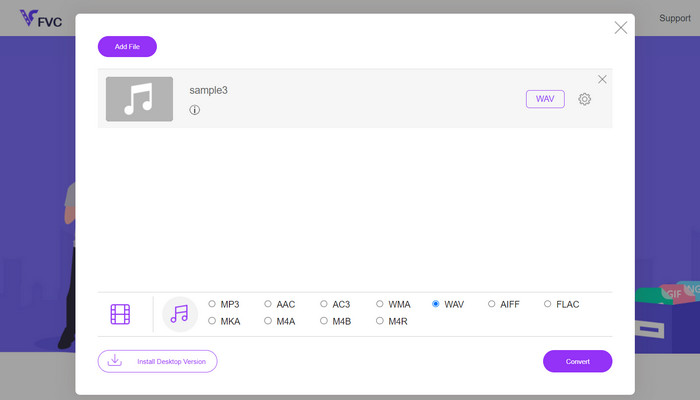
ステップ1. 上記のリンクをクリックして Free Video Converter Online のサイトにアクセスします。オーディオファイルをアップロードするには、メイン画面の変換するファイルを追加オプションを選択します。
ステップ2. 選択したファイルが画面上に一時的に表示されます。希望する出力形式を選択するには、先ほどの画面の下部にあるパネルへ移動してください。
ステップ3. CAF ファイルを WAV 形式に変換するには、変換ボタンを選択します。別のファイルを変換する場合は、最初の手順を繰り返す必要があります。
編集者の見解:
Free Video Converter Online は、オーディオ変換のための Web ベースのソリューションとしての地位を確立しています。ソフトウェアにアクセスできるため、インストールの必要がなく、時間を節約できるため便利です。 Free Video Converter Online は、主にビデオ変換に重点を置いているにもかかわらず、CAF を WAV に変換する優れた能力を示しています。
5.オンラインオーディオコンバーター
別の Web ベースのソリューションを希望する場合は、Online Audio Converter が便利なオプションです。これは、ソフトウェアをインストールせずにオーディオ ファイルを変換できる無料のオンライン ツールです。 CAF ファイルをアップロードし、出力形式として WAV を選択するだけで、残りの作業はツールに任せます。
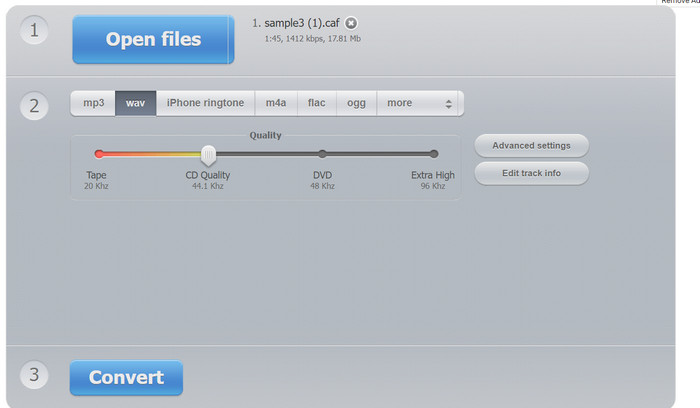
ステップ1. Webブラウザを起動し、Online Audio Converter のサイトにアクセスします。その後、「Open Files」ボタンをクリックします。
ステップ2. パソコンから CAF ファイルを選択します。次に、出力形式として WAV を選択します。
ステップ3. 変換ボタンにチェックを入れて変換プロセスを開始します。サイトが CAF ファイルを WAV に変換するまで待ちます。
編集者の見解:
Web ベースのツールである Online Audio Converter は、シンプルさと利便性に優れています。直感的なインターフェイスを提供し、CAF や WAV などのさまざまなオーディオ形式をサポートします。
さらに詳しく読む:
CAF を MP3 に変換して、互換性と利便性をさらに高めましょう
WAV プレーヤー – Android/iPhone/PC/Mac 向けおすすめ WAV プレーヤーアプリ 5 選
パート 2. CAF から WAV への変換に関する FAQ
Mac で CAF を WAV に変換できますか?
はい、Mac 上でさまざまなソフトウェア オプションを使用して CAF を WAV に変換できます。 FFmpeg、MediaHuman Audio Converter、FVC Video Converter Ultimate などのアプリケーションには Mac バージョンが用意されています。これらのツールを使用すると、Mac コンピュータで CAF ファイルを WAV 形式に変換する簡単な方法が提供されます。
WAV を CAF に変換する際に品質に関する考慮事項はありますか?
オーディオ形式間で変換する場合は、品質が低下する可能性があることに留意することが重要です。変換プロセス自体は本質的にオーディオ品質を低下させるわけではありませんが、適切な変換設定とコーデックを選択すると、元のオーディオの忠実度を維持できます。潜在的な劣化を最小限に抑えるために、変換中にロスレスまたは高品質のオーディオ コーデックを使用することをお勧めします。
CAF から WAV への変換中に品質の低下はありますか?
オーディオ形式間で変換する場合、圧縮アルゴリズムとエンコードアルゴリズムの違いにより、品質がわずかに低下する可能性があります。
CAF から WAV への変換中にオーディオ設定を調整できますか?
はい、サンプリング レート、ビット深度、オーディオ チャンネルなどのパラメーターを制御できます。これらの設定を使用すると、特定の要件に従って出力 WAV ファイルを調整したり、元の CAF ファイルの特性に一致させたりすることができます。
CAF を WAV に変換するとオーディオ品質は向上しますか?
CAF を WAV に変換しても、本質的にオーディオ品質は向上しません。ただし、元の CAF ファイルが非可逆圧縮でエンコードされている場合は、WAV などの可逆形式に変換すると、音質のさらなる低下を防ぐことができます。
結論
CAF ファイルを WAV 形式に変換することで、オーディオの互換性や再生オプション、リソースの活用効率が向上します。音質を維持しつつスムーズかつ効果的に変換を行うには、ニーズに合ったソフトウェア型またはオンライン型の適切な変換ツールを選ぶことが重要です。
-
 M4AをWAVに変換する方法に関するガイドライン[PCおよびMac]
 詳細な手順と選択可能なさまざまなツールを使用して、M4AをWAVに変換する方法について詳しく知ることができます。
-
 Windows / Mac/Onlineで最高のWAVメタデータエディタの3つ
 WindowsにWAVメタデータエディタが必要ですか?マック?オンライン?もしそうなら、私たちはWAVに最適なメタエディタをレビューしたので、この記事を読み続けてください。
-
 FLAC と WAV: どちらのオーディオ形式が最適ですか
 FLAC と WAV の品質の詳細な比較について詳しくご覧ください。それぞれの長所と短所、およびファイル間で変換する効率的な方法も提供します。
