


 ビデオコンバーター究極
 スクリーンレコーダー
 ビデオ修復
ビデオ修復
 安全なダウンロード
Google ドライブにビデオをアップロードすると品質が低下しますか?ここをチェックしてください
Google ドライブは、ユーザーがインターネット接続を使用してさまざまなデバイスからファイルを共有、保存、保存し、アクセスできるようにするクラウドベースの保管システムです。このプラットフォームを使用すると、ユーザーはリアルタイムのドキュメント、スプレッドシート、プレゼンテーションを作成するときに同僚や友人と簡単に共同作業できます。このサービスでは 15 GB の無料ストレージ スペースが提供され、有料で追加のストレージ プランにアップグレードする機会もあります。
全体として、このクラウドベースのストレージは、多用途で使いやすいクラウドストレージソリューションであり、個人・法人を問わず役立ちます。重要なドキュメントを保存したい場合でも、他者とプロジェクトで共同作業をしたい場合でも、Google ドライブは便利で信頼性の高いプラットフォームを提供します。このプラットフォームで最もよく保存されているファイルは動画です。しかし、比較的少ない容量でどうやって複数のファイルを保存できるのでしょうか。Google ドライブは動画を圧縮するのでしょうか?これらの疑問にはすべて、この記事でお答えします。

パート 1. Google ドライブにビデオをアップロードすると品質が低下しますか?
Google ドライブにビデオをアップロードすると、ビデオの品質が低下する可能性があります。これは、Google ドライブがサーバー容量を節約するためにビデオ ファイルを圧縮するためです。また、ビデオを他の人と共有しやすくなります。ビデオを圧縮すると、細部の一部が失われ、場合によってはファイル全体の品質が低下することがあります。品質の低下の量は、元のビデオの解像度、ファイル形式、Google ドライブで使用される圧縮設定などのさまざまな要因によって異なります。たとえば、圧縮すると、高解像度のビデオは低解像度のビデオよりも品質が低下する可能性があります。 Google ドライブにビデオをアップロードする際の品質の低下を最小限に抑えるために、推奨されたビデオ形式と圧縮設定を使用することをお勧めします。 AVC (H.264) や HEVC (H.265) を含む MP4 などのビデオ形式を使用でき、ビデオ ファイル サイズを圧縮しながらビデオの品質を維持できます。
パート 2. Google ドライブを使用してビデオを圧縮できますか?
はい、上で説明したように、Google ドライブはビデオを圧縮しており、ユーザーはサーバーに複数のビデオを保存できます。このプロセスの唯一の欠点は、ユーザーが 4K などの高品質のビデオをアップロードするときに、ファイルの外観の品質が大幅に低下する可能性があることです。 Google ドライブを使用してビデオを圧縮する方法は次のとおりです。
ステップ 1. 容量を減らしたいファイルを Google ドライブのアカウントにアップロードします。動画ファイルをドラッグ&ドロップして、Google ドライブ上に読み込むことができます。
ステップ 2. 動画ファイルが Google ドライブにアップロードされると、推奨設定に基づいて自動的に圧縮されます。内蔵メディアプレーヤーを使って動画ファイルを再生できます。
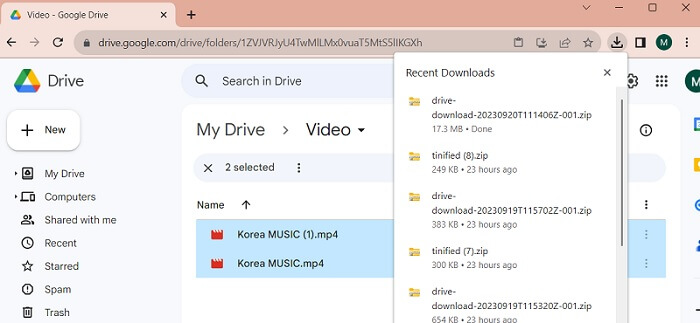
ステップ 3. 最後に、動画ファイルをダウンロードするか、ZIP ファイルにまとめてサイズを小さくすることができます。複数の動画ファイルを同時に選択し、マウスを右クリックします。メニュー一覧が表示されるので、ダウンロードボタンを選択します。すると、Google ドライブが動画を ZIP 形式でダウンロードし、PC に保存します。
パート 3. Google ドライブ用にビデオを圧縮する方法
お使いのデバイスで動画ファイルを効率よく圧縮できるツールをお探しですか?その場合は、Video Converter Ultimate を使って、PC 上で動画ファイルのサイズを縮小・調整できます。このアプリケーションは Mac と Windows の両方に対応しており、ノートパソコンやデスクトップ PC など、さまざまなデバイスで利用可能です。MP4、MOV、MKV、WebM、AVI など、幅広い動画コンテナ形式をサポートしています。スライダー機能が搭載されており、動画の再生時間をカットすることなく、ファイルサイズを任意の割合で圧縮できます。また、このアプリは 4K 動画も問題なく処理可能です。高度なテクノロジーを用いて動画を処理・圧縮しており、制限なくファイルサイズを削減できる点が、このツールをユニークなコンプレッサーたらしめています。以下の詳細なガイドを参考に、使い方を確認してみてください。
ステップ 1. アプリをインストール
最初に行うべきことは、パソコンやノートパソコンに Video Converter Ultimate をダウンロードすることです。簡単にインストールしたい場合は、下に表示されている無料ダウンロードアイコンをクリックしてください。
無料ダウンロードWindows 7 以降対応安全なダウンロード
無料ダウンロードMacOS 10.7 以降対応安全なダウンロード
ステップ 2. 動画ファイルを読み込む
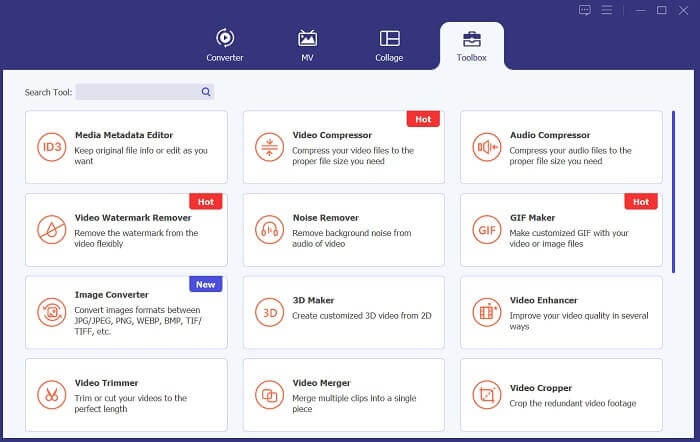
次の手順は、アプリのインターフェースに動画を取り込むことです。ツールのインターフェースを開き、ツールボックスオプションをクリックします。リストから動画圧縮機能を選択し、+アイコンを押します。
ステップ 3. 動画を圧縮
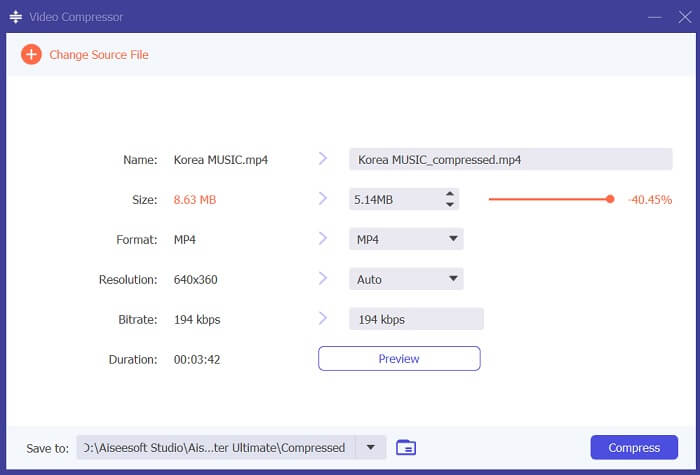
すると、PC 上のフォルダが表示されます。変換したい動画を選択し、開くをクリックしてインポートします。新しい画面が表示され、そこでファイルサイズを縮小できます。スライダーを動かすか、解像度、形式、ビットレートなどの動画パラメーターを変更します。圧縮オプションをクリックして処理を開始します。
ステップ 4. 出力ファイルを再生
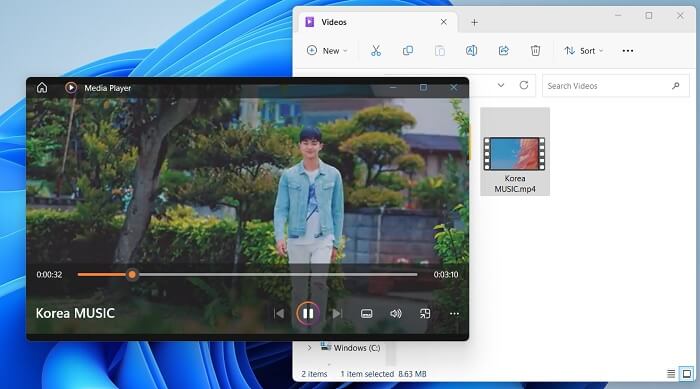
最後のステップは、圧縮プロセスが完了するのを待つことです。出力フォルダーに移動し、ファイルをプレビューします。ビデオをダブルタップすると、PC のメディア プレーヤーで起動できます。
さらに詳しく読む:
【解決済み】Google ドライブで MP4 ファイルを再生する方法
iPhone/Android/オンラインでメール用に動画を圧縮する方法
パート 4. Google ドライブのビデオ圧縮に関するよくある質問
4K ビデオを Google ドライブにアップロードできますか?
はい、4K ビデオを Google ドライブにアップロードできます。高品質のビデオを保存し、他の人と共有するのに最適な方法です。 4K ビデオは多くのスペースを占める可能性があるため、十分なストレージ容量があることを確認してください。ビデオをアップロードしたら、ビデオ ファイルの元のコピーを共有する必要はありません。ビデオ ファイルにアクセスするには、ドライブへのリンクを送信するだけです。この Web ベースのプラットフォームを使用すると、ビデオ ファイルを簡単に共有できます。
品質を落とさずにビデオを Google ドライブに保存するにはどうすればよいですか?
動画を画質を落とさずに Google ドライブへアップロードするには、次の手順に従ってください。まず、動画が 4K 解像度であることを確認します。次に、Google ドライブのアカウントにアクセスし、左上の新規ボタンをクリックします。そこからファイルのアップロードを選択し、アップロードしたい動画を指定します。アップロードが完了したら、ファイルのリンクを相手に送ることで、簡単に動画を共有できます。このようにシンプルな手順で、画質を損なうことなく動画を Google ドライブにアップロードできます。
Google ドライブの最大ビデオ解像度はどれくらいですか?
Google ドライブの最大ビデオ解像度は 4K です。したがって、品質を落とさずにビデオをアップロードしたい場合は、ビデオが 4K 解像度であることを確認してください。前の手順に従って、メディア ファイルを Google ドライブ アカウントに簡単にアップロードし、他のユーザーと共有できます。
結論
動画は、私たちが所有するあらゆるデバイスに保存して大切にしている、貴重なデジタルデータです。スマートフォン、デジタルカメラ、パソコン、タブレットなど、どのデバイスであっても、動画ファイルを保存・保管するための手段やバックアップ方法を常に考えています。幸いなことに、Google ドライブは最も便利なメディア共有・保存プラットフォームのひとつです。また、このサービスがユーザーにとって都合の良い形で動画ファイルを圧縮・縮小できることも分かりました。ですから、もしまだ「Google ドライブは動画を圧縮するのか」と疑問に思っているのであれば、上で紹介した解決策や情報をもう一度見直してみてください。
-
 品質を損なうことなく効率的にWeb用のビデオを圧縮する方法
 あなたのウェブサイトのビデオが常にたくさんバッファリングするというクライアントから多くの苦情を受けたとき、あなたは2つの効率的な方法でウェブ用のビデオを圧縮することを試みることができます。
-
 [詳細ガイド]コンピュータで再生されないGoogleドライブビデオを修正する方法
 Googleドライブの動画は、「この動画の再生に問題がありました」というエラーで再生されません。これは、Googleドライブ自体またはクロムの問題が原因である可能性があります。この記事では、6つのソリューションを詳しく紹介します。
-
 Google ドライブで HEIC を JPG に変換する最良の方法
 Google ドライブで HEIC を JPG に変換する方法を知りたい場合は、このガイドの投稿を読んで、PC の Google ドライブで HEIC を JPG に変換する最も簡単な方法を学んでください。
