


 ビデオコンバーター究極
 スクリーンレコーダー
 ビデオ修復
ビデオ修復Windows および Mac 向けの最高パフォーマンスの 3D ビデオ編集アプリを知る
近年、多くの動画編集者やコンテンツクリエイターが、コンテンツや動画をより楽しめるものにするために3D動画を活用しています。現在はアプリケーションやデバイスも進化しており、とりわけ最適なアプリを使えば、3D動画の作成はとても簡単になります。そこで、私たちは3D動画を作成するための優れたソフトウェアを調査し、お使いのデバイス向けに最適な3D動画編集ソフトを厳選してご紹介します。

パート 1. Windows/Mac 用 3D ビデオエディター
以下は、Windows または Mac デバイスで 3D ビデオを作成するために最も使用されている優れたビデオ エディタのリストです。このソフトウェアをダウンロードして、ニーズに合った 3D ビデオ メーカーの最適なアプリケーションを試すことができます。賢明に選択できるように、説明をよく読んでください。
1.FVCビデオコンバーターアルティメット
究極の無料3D動画編集ソフトをお探しなら、このソフトを第一候補にすべきです。FVC Video Converter Ultimateは、無料で使いやすいことで人気の3D動画編集アプリケーションです。本ツールの3Dメーカー機能を使えば、プロ品質の3D動画をすぐに作成できます。また、FVC Video Converter Ultimateには、動画結合、カラー補正、動画スピードコントローラー、動画強化など、動画をさらに向上させるための多彩な編集機能が搭載されています。さらに、ほぼすべての動画形式に対応しているため、任意の動画を自由にインポート・エクスポートできます。
無料ダウンロードWindows 7 以降対応安全なダウンロード
無料ダウンロードMacOS 10.7 以降に対応安全なダウンロード
FVC Video Converter Ultimate を使用して 3D ビデオを作成する方法:
ステップ1. デスクトップにFVC Video Converter Ultimateをダウンロードします。ダウンロードが完了したら、デバイス上でアプリケーションを起動します。
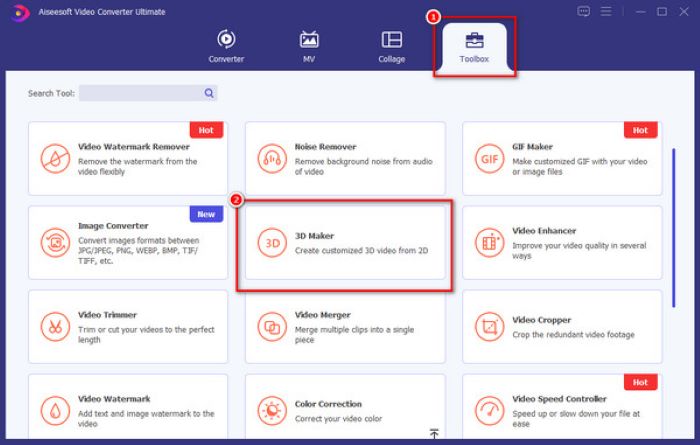
ステップ2. 次に、ツールボックスタブに移動します。ツールボックスには、数多くの動画・音声編集機能が並んでいます。3D動画を作成するには、3Dメーカー機能をクリックします。
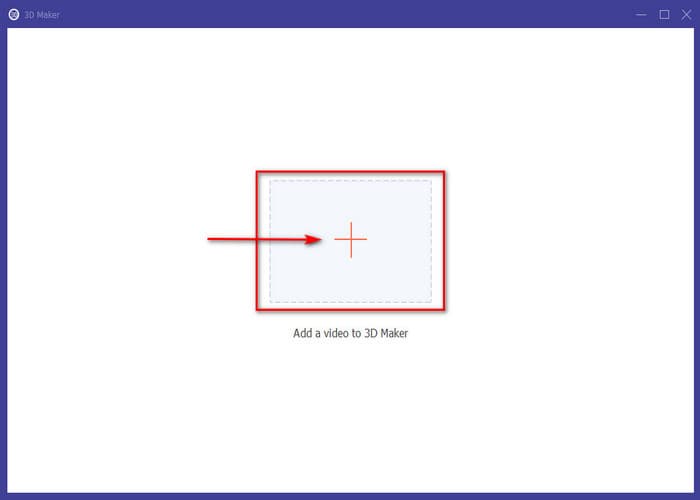
ステップ3. その後、プラスアイコンボタンをクリックして、ファイルから動画を選択し、3D動画として作成します。
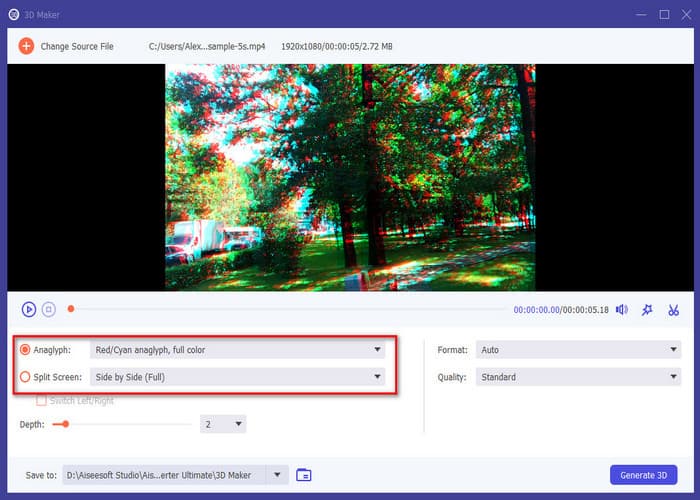
ステップ4. 動画ファイルがアップロードされると、そのファイルは3D動画に変換されているのが分かります。3D動画のアナグリフ形式を変更したり、動画を分割画面表示にすることも可能です。
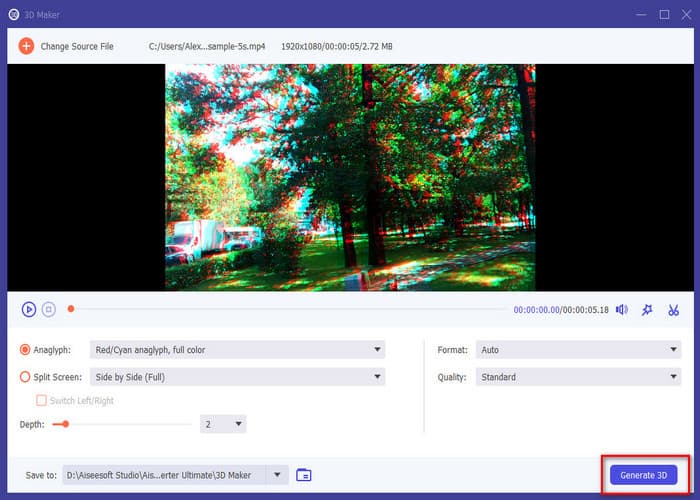
ステップ5. 最後に、3Dを生成ボタンをクリックして、新しく作成した3D動画を確定します。処理を終了するにはOKボタンを押してください。以上で完了です。これで3D動画を存分にお楽しみいただけます。
2.ファイナルカットプロ
Final Cut Pro は、Mac デバイス上のもう 1 つの 3D アニメーション ビデオ エディタです。このビデオ編集ソフトウェアは、macOS デバイス用の最もよく知られた編集ソフトウェアの 1 つです。それに加えて、Final Cut Pro の 3D ビデオ編集機能を使用すると、[タイトルとジェネレーター] サイドバーから 3D タイトルを追加したり、2D タイトルを 3D に変換したりすることができます。しかし、多くの初心者は、Final Cut Pro のグラフィカル ユーザー インターフェイスのせいで、Final Cut Pro を使用して 3D ビデオを作成するのが困難です。それにもかかわらず、3D ビデオを作成するための最も優れたビデオ編集アプリの 1 つです。
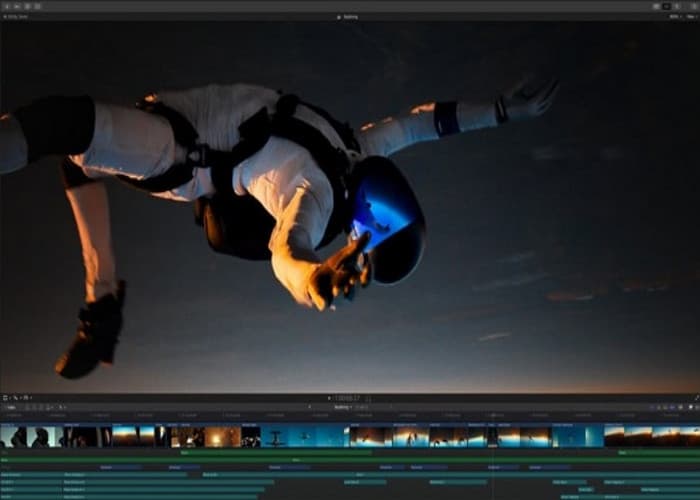
長所
- 評価、ライブラリ、タグ付け、自動分析などの整理ツールが備わっています。
- 360 度の映像と広い色空間をサポートします。
- 高速に動作するアプリ。
短所
- 長年のビデオプロデューサーの仕事を辞めてしまうかもしれない。
- 使いにくい。
- macOS デバイスのみをサポートできます。
3. ブレンダー
PC に最適な 3D ビデオ エディターのリストには、Blender もあります。 Blender は、Windows または Mac デバイスで 3D ビデオを生成および編集するのに役立つ無料のオープンソース グラフィック ソフトウェアです。さらに、Blender を使用すると、そのすべての機能にアクセスするためにライセンス、サブスクリプション、アドオンの料金を支払う必要はありません。ただし、Blender は、学習曲線が急で、ユーザー インターフェイスが使いにくいため、多くの初心者にとっては難しいかもしれません。それでも、Blender は 3D ビデオやアニメーションを作成するための優れたツールです。
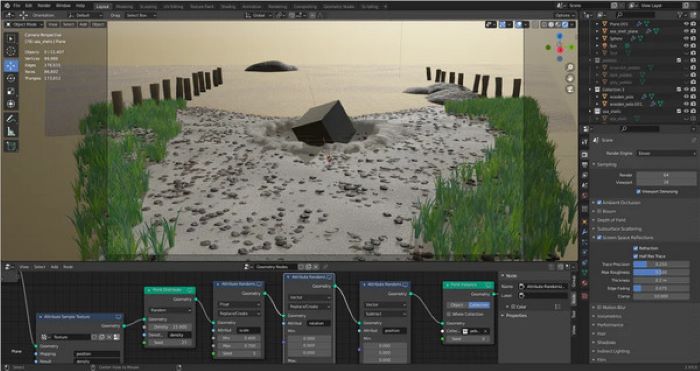
長所
- 完全に無料でご利用いただけます。
- 定期的に更新されます。
- Mac と Windows の両方のデバイスで利用できます。
- オープンソース ソフトウェアです。
短所
- 初心者向けのアプリケーションではありません。
- Mac のハードウェアおよびソフトウェア用に最適化されていません。
4. Adobe Premiere Pro
Adobe Premiere Pro は、Windows または Mac デバイスを使用している場合に使用するのに最適な 3D ビデオ編集アプリの 1 つです。これは、ビデオを専門的に編集できる最も有名なビデオエディタの 1 つです。さらに、このアプリケーションにアクセスして 3D ビデオを作成することもできます。 Adobe Premiere Pro は、応答性の高いツールであり、高速レンダリング アプリケーションでもあります。この 3D メーカー ソフトウェアを使用すると、ビデオにユニークでダイナミックな 3D の動きを大量に作成できます。さらに、プロのビデオエディターであるため、ビデオのスタイルを調整し、より素晴らしいものにするためにアクセスできる多くの編集機能があります。しかし、多くの非プロのビデオ編集者は、このソフトウェアのインターフェイスに怖気づいています。
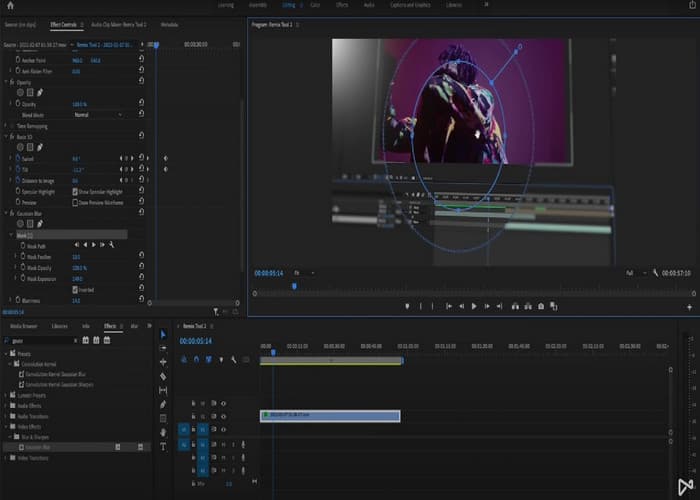
長所
- 無制限のマルチカム角度があります。
- すっきりとしたユーザーインターフェイスを備えています。
- Windows や macOS を含むほぼすべてのプラットフォームで利用できます。
短所
- 初心者には使いにくい。
- 一部の機能/テクニックには、Adobe After Effects や Media Encoder などの追加のアプリケーションが必要です。
パート 2. トップ 3 動画編集アプリ
1.パワーディレクター
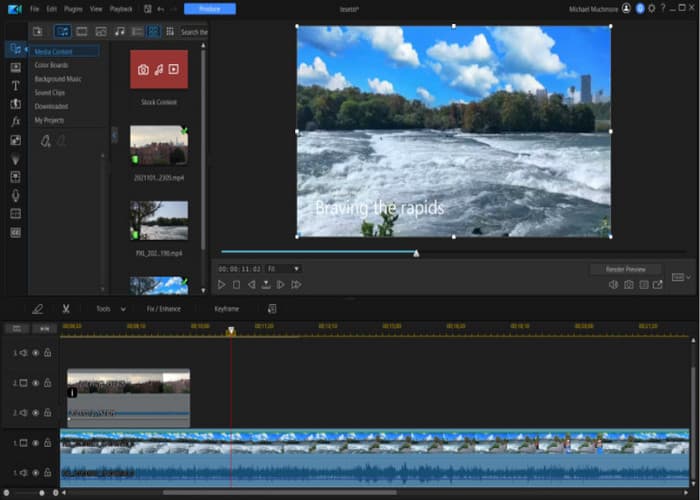
価格:月額 $4.58
PowerDirector は、iOS と Android ユーザーの両方が利用できる人気のモバイル編集アプリです。ノートパソコンやPCでもダウンロード可能です。 PowerDirector は単なる通常のビデオ編集アプリではありません。これを使えば簡単に3D動画を作成することができます。さらに、PowerDirector には、興味をそそられる他の編集機能もあります。
2.キネマスター
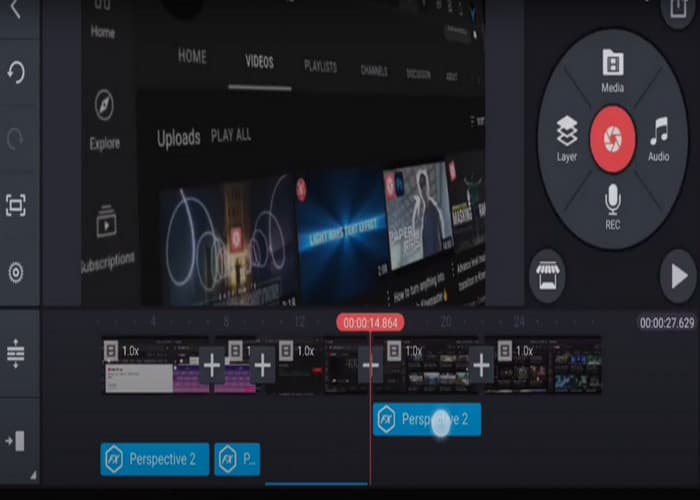
価格:月額 $3.99 または 年額 $39.99
携帯電話や PC で使用できるもう 1 つの 3D ビデオ編集アプリは、KineMaster です。 KineMaster を使用すると、初心者向けのインターフェイスで 3D ビデオを簡単に作成できます。さらに、デバイスに自由にダウンロードできます。ただし、出力をエクスポートする前に、ウォーターマークを削除するアプリケーションを購入する必要があります。
3.ビバビデオ
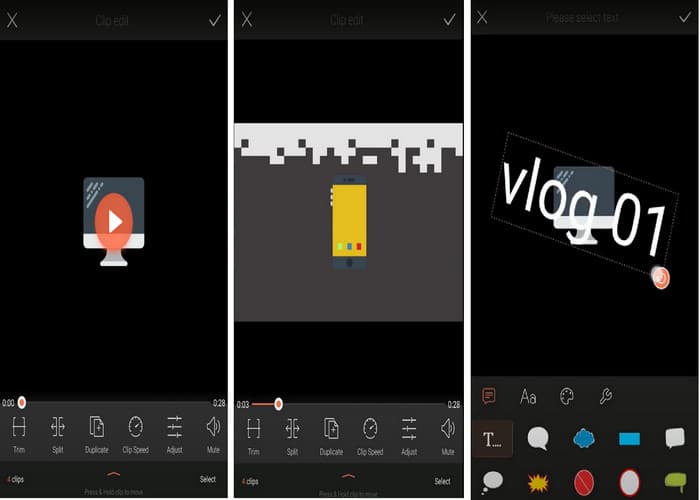
価格:月額 $10
そして最後になりましたが、VivaVideo です。このアプリケーションは、提供する機能により、トップ 3D ビデオ編集アプリの 1 つにもなっています。 VivaVideo は、3D ビデオを作成するための単なるアプリではありません。これを使用してビデオを結合したり、字幕を作成したり、ビデオ ファイルをトリミングしたりすることもできます。しかし、多くのユーザーは、特にビデオのサイズが大きすぎる場合に、生成される品質について不満を抱いています。それにもかかわらず、VivaVideo は使いやすさから初心者に最適なアプリの 1 つです。
さらに詳しく読む:
パート 3. 3D Video Editor に関するよくある質問
優れた 3D ビデオ編集者にはどのような機能が必要ですか?
3D 動画編集ソフトは、使いやすく、3D 作成以外の編集機能が豊富で、複数のファイル形式に対応しているものが良いと言えます。
編集経験がなくても 3D ビデオ エディタを使用できますか?
絶対そうです。 FVC Video Converter Ultimate など、初心者向けにダウンロードできる 3D ビデオ編集アプリケーションがいくつかあります。
無料のオンライン 3D ビデオ エディタはありますか?
はい。 FlexClip、CapCut、Make Web Video などのオンライン 3D ビデオ エディタがブラウザ上で見つかります。
3Dビデオ編集とは何ですか?
3D ビデオは、三次元の外観を提供します。通常、それらは結合され、赤または青に着色された 2 つの異なるビデオ画像で構成されます。 3D ビデオを作成するには、編集者がビデオ上に赤とシアンの色を生成する必要があります。
結論
上記でご紹介したすべての3D動画編集アプリは、3D動画の作成に役立ちます。ただし、実際に使うのはそのうち一つだけです。どれを選ぶか迷っている場合は、操作性のわかりやすさと価格を基準に検討してみてください。もし無料で使いやすい3D動画編集ソフトをお探しなら、FVC Video Converter Ultimateが最適なツールです。
-
 3Dとは何ですか? 3Dとその作成方法について知っておくべきことすべて
 3Dまたは3次元は、高さ、幅、奥行きのあるオブジェクトを表すために使用されます。 3Dとは何か、および3Dビデオの作成方法を知りたい場合は、こちらをお読みください。
-
 レビュー: これまで見たことのない 3D アニメーション ソフトウェア
 3D アニメーションの作成がこれまでより簡単になりました。この記事には、使用できる 3D アニメーション デザイン ソフトウェアのリストが含まれています。
-
 2D 対 3D?映像と映像のアニメーションの戦い
 ぜひこの記事をクリックして、2D アニメーションと 3D アニメーションの間の戦いを解き明かしてください。この 2 つの極端な比較をお見逃しなく。
