


 ビデオコンバーター究極
 スクリーンレコーダー
 ビデオ修復
ビデオ修復
 安全なダウンロード
ビデオエラーコード224002を修正するための簡単な解決策を見つける
動画を再生しようとしてエラーコードが表示されていませんか? このような不運な状況に遭遇することはそれほど多くはありませんが、発生したということは、早急に対処すべき根本的な問題が潜んでいるサインです。面倒なエラーコード 224002など、動画エラーをすぐに解決したいとお考えなら、まさに適切な場所に来ています。動画の再生エラーは、仕事や娯楽を中断させるため、とてもストレスになるものです。そのため、まずは原因を正しく理解することが、効果的な解決策を見つける第一歩になります。では、前置きはこのくらいにして、次のセクションでは、この種の動画トラブルに素早く対処・修復するために知っておくべきことを詳しくご紹介します。

パート1. エラーコード224002とは何か
エラー コード 224002 は、ユーザーがオンライン コンテンツを視聴しようとする際に発生する可能性のあるビデオ再生の問題に割り当てられた特定の指定です。このエラー コードは、ストリーミング サービスやビデオ プラットフォームに関連付けられることが多く、ストリーミング プロセス中に通常のデータ フローが中断されたことを示します。
ビデオ エラー コード 224002 が発生する可能性のある原因は次のとおりです。
ネットワーク接続の問題
弱い、または不安定なインターネット接続が原因となることがよくあります。ネットワークに中断や変動があると、ストリーミング サービスがビデオ コンテンツをスムーズに配信できなくなり、エラー コード 224002 が発生する可能性があります。
互換性の問題
使用しているビデオ プレーヤーまたはストリーミング サービスには、ブラウザーまたはデバイスとの互換性の問題が発生する可能性があります。これらの互換性のギャップにより、224002 などのエラー コードが発生する可能性があります。更新を確認し、プレーヤーとシステム間の互換性を確保することは非常に重要です。
サーバー側の不具合
場合によっては、ストリーミング プラットフォームのサーバー側での一時的な不具合やメンテナンスの問題が原因でエラーが発生することがあります。これはユーザーの制御の範囲外であり、技術チームがこれらのサーバー関連の問題を解決するまで忍耐が重要です。
ソフトウェアの古さ
オペレーティング システム、ブラウザ、またはビデオ プレーヤーが古い場合、最新のストリーミング プロトコルとの互換性が失われます。ソフトウェアを定期的に更新すると、よりスムーズなビデオ再生エクスペリエンスを実現できます。
キャッシュとクッキー
ブラウザに蓄積されたキャッシュと Cookie は、ストリーミング プロセスを妨げる可能性があります。これらの保存されたファイルを消去することは、ビデオ再生エラーに対処するためのシンプルかつ効果的な解決策となります。
モバイルネットワークの切り替え
モバイル ユーザーの場合、ビデオの再生中に Wi-Fi とモバイル データを切り替えると中断が発生する可能性があります。これが、モバイル デバイスでエラー コード 224002 が発生する原因となる可能性があります。
パート2. クイックフィックス - xc00d36e5 エラーの修復
xc00d36e5 エラーコードを素早く確実に解決したい場合は、動画修復ツールを利用することを強くおすすめします。FVC Video Repairは、この特定の動画問題に対処するうえで非常に優れた選択肢です。このツールの特長は、損傷した動画ファイルを高度に解析し、シームレスに修復できる先進的な機能を備えている点にあります。中でも注目すべきなのは、AI 駆動であらゆる動画の不具合を自動修復でき、多数の一般的な動画形式に対応していることです。以下の手順に従ってご利用ください。
ステップ1. まずはソフトウェアをダウンロードして入手します。無料ダウンロードボタンをクリックしてください。ダウンロードが完了したら、パソコンにインストールします。
無料ダウンロードWindows 7以降に対応安全なダウンロード
無料ダウンロードMacOS 10.7以降に対応安全なダウンロード
ステップ2. 次に、ツールを起動します。ここで表示される 2 つのボタンに惑わされないでください。画面左側に赤いプラスボタン、右側に青いプラスボタンが表示されます。xc00d36e5 エラーコードが出ている動画は赤いプラスボタンから追加し、サンプル動画は青いプラスボタンから追加してください。
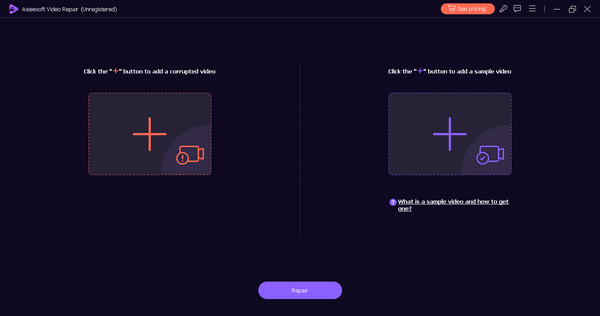
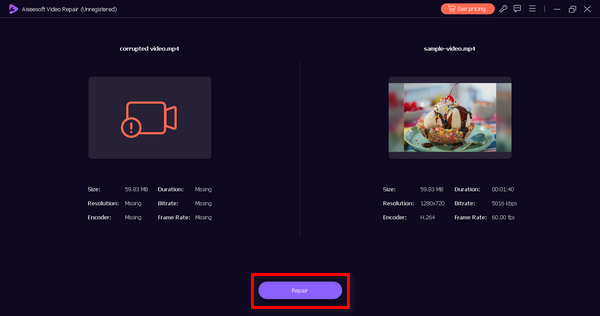
ステップ3. その後、修復ボタンをクリックします。ソフトウェアが動画ファイルの修復処理を行います。
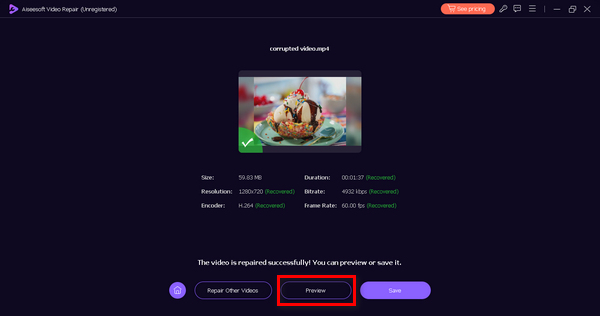
ステップ4. 最後に、プレビューボタンをクリックして、xc00d36e5 エラーコードが正常に解消されているか確認します。結果に問題がなければ、そのままファイルを保存できます。
ビデオ修復ツールを使用する以外にエラー コード xc00d36e5 を迅速に修正する方法はありません。FVC Video Repair の使用を強くお勧めします。トップクラスの機能と性能を備えたこのソフトウェアを使用すれば、間違いなくあらゆる種類のビデオの問題を効果的に修正できます。
パート3. 0xc00d36e5 エラーを修正するための手動ソリューション
ビデオ修復ツールを使用して xc00d36e5 エラーを修正する以外に、このタイプのビデオの問題を解決する手動の方法があります。
方法1: Google Chromeを更新する
Google Chrome ブラウザを更新することは、ビデオ再生中の 0xc00d36e5 エラーに対処するための予防的なアプローチです。このエラーは、互換性の問題や古いブラウザ バージョンに存在するバグが原因である可能性があります。Chrome を最新の状態に保つことで、最新の Web 標準との互換性が確保され、安定性を高めるバグ修正の恩恵を受け、潜在的な脅威から保護するためのセキュリティ パッチを受け取ることができます。これを行うには、次の手順に従います。
ステップ1. Chrome を開きます。
ステップ2. 画面右上の 3 つの点、または設定と管理ボタンをクリックします。
ステップ3. ヘルプを選択します。
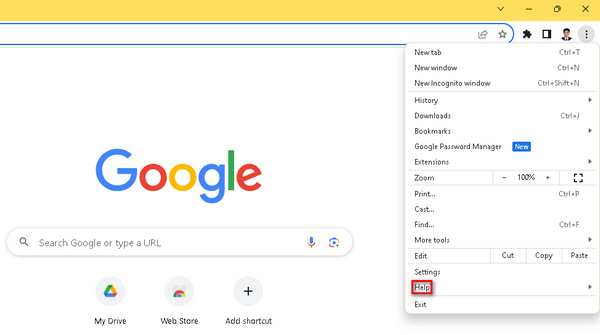
ステップ4. 続いて、Google Chrome についてをクリックします。新しいバージョンがある場合は、Google Chrome を更新という項目が表示されますので、それをクリックし、画面の指示に従います。更新がない場合は、再起動ボタンが表示されます。
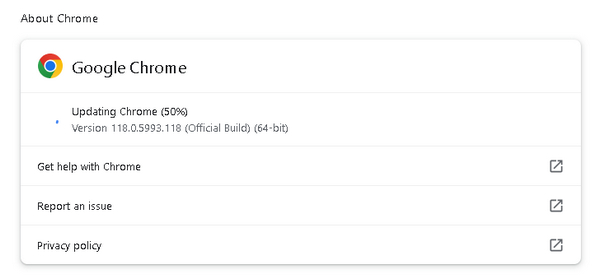
Google Chrome を最新の状態に保つことで、0xc00d36e5 エラーの発生リスクを軽減できるだけでなく、ブラウジング全体をより安全でスムーズに行えるようになります。また、Chrome で動画が再生されない場合にも、この方法は有効です。
方法2: クッキーとキャッシュを消去する
クッキーとキャッシュをクリアすることも、0xc00d36e5 エラーを解決するための効果的な方法です。この手動プロセスは、ビデオの再生を妨げる可能性のあるデータ干渉の潜在的な原因を排除するのに役立ちます。破損または古くなったクッキーとキャッシュ ファイルは再生エラーの原因となる可能性があります。これらのファイルをクリアすると、ブラウザーはサーバーから最新のデータを取得し、0xc00d36e5 エラーが発生する可能性が低くなります。これを行うには、次の手順に従います。
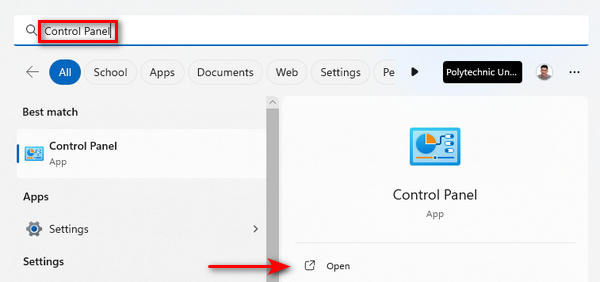
ステップ1. まずホーム画面の検索バーでコントロール パネルと入力し、表示されたコントロールパネルを開きます。
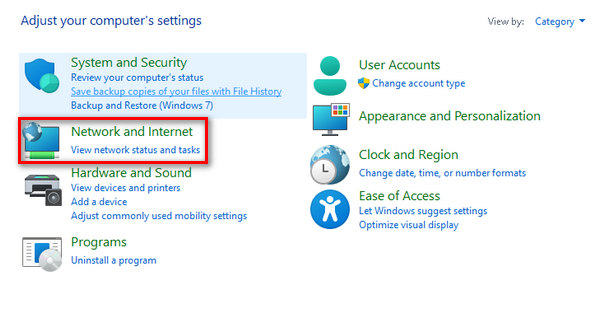
ステップ2. 次に、ネットワークとインターネットをクリックします。
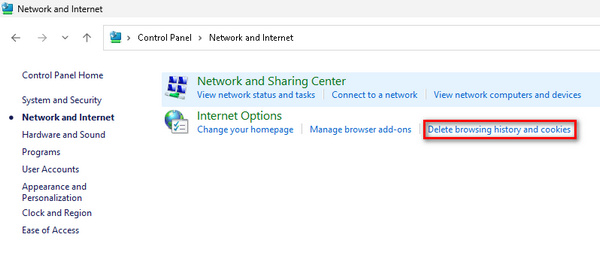
ステップ3. 続いて、閲覧の履歴とクッキーの削除をクリックします。
ステップ4. 新しいタブで、削除したい項目にチェックを入れます。選択が終わったら、削除ボタンをクリックして処理を完了します。
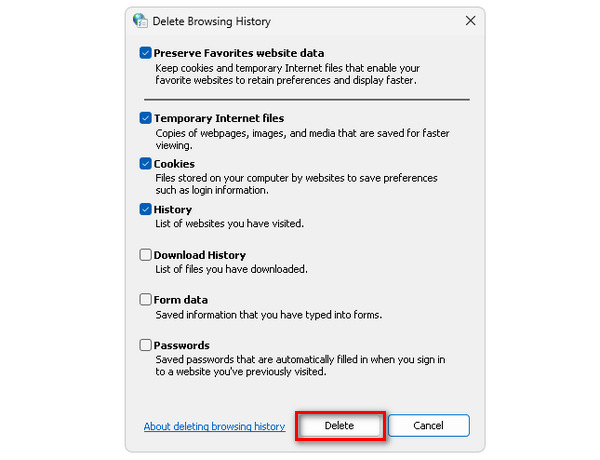
ブラウザのクッキーとキャッシュを定期的に削除すると、不要なデータを一掃できるため、ブラウザの動作が軽くなり、動画ストリーミング時に最新かつクリーンなデータを効率よく取得できるようになります。これは、さまざまな理由で動画が再生されない場合の対処法としても有効です。
パート 4. エラー コード 224002 に関する FAQ
Kickassanime のエラーコード 224002 とは何ですか?
Kickassanime のエラー コード 224002 は、通常、ビデオの再生に問題があることを示しています。このエラーは、インターネット接続の不良、ブラウザーの設定、互換性の問題などの問題が原因である可能性があります。この問題を解決するには、インターネット接続を確認し、ブラウザーのキャッシュと Cookie をクリアし、ブラウザーとシステム ソフトウェアが最新であることを確認してください。
Mac でエラー コード 224002 を修正するにはどうすればよいですか?
Mac でエラー コード 224002 を解決するには、まずインターネット接続の安定性を確認します。ブラウザのキャッシュと Cookie をクリアし、更新します。また、Mac のオペレーティング システムが最新であることを確認してください。古いソフトウェアはビデオ再生の問題の原因となる可能性があります。さらに、ストリーミングを妨げる可能性のあるブラウザ拡張機能をオフにして、ビデオ品質設定を調整してみてください。
Wiiのエラーコード244002とは何ですか?
Wii のエラー コード 244002 は、他のプラットフォームのエラー コード 224002 に関連する問題と同様に、ビデオ再生に問題があることを示しています。インターネット接続を調べ、Wii のブラウザーまたは関連ソフトウェアを更新し、互換性の問題がないか確認して、トラブルシューティングを行ってください。Wii のブラウザーの Cookie とキャッシュをクリアすると、エラーが軽減されることもあります。問題が解決しない場合は、Wii プラットフォームが提供するサポート リソースを参照するか、カスタマー サポートに問い合わせてください。
結論
まとめると、動画再生中にエラーコード 224002が表示されるのは、とても厄介な問題です。しかし、本ガイドでは、こうした問題に素早く対処・解決するための多様な効果的手段を紹介しました。エラーコード 224002 の原因を理解することから始め、Google Chrome の更新やクッキー・キャッシュの削除といった手動での対処方法まで、動画ストリーミング体験を向上させるための具体的なステップを身につけていただけたはずです。
-
 エラーコード 102630 を手動で素早く修正する方法
 エラーコード102630で視聴体験が台無しにならないようにしましょう。役立つガイドで修正方法を学びましょう。これらの包括的なガイドに従って、すぐに修正してください。
-
 ビデオ 0xc00d36e5 エラーを迅速かつ効果的に修正する
 ビデオを再生中に 0xc00d36e5 エラーが発生していませんか? このエラーを修正してスムーズなビデオ再生を実現するためのシンプルかつ効果的な方法を学びましょう。
-
 0xC10100BE エラーを 3 つの方法で修正する方法 (100% が動作中)
 包括的なトラブルシューティングガイドを使用して、0xC10100BEエラーを解決し、コンピューターをスムーズに操作できるようにする方法を学びます。
