


 ビデオコンバーター究極
 スクリーンレコーダー
 ビデオ修復
ビデオ修復
 安全なダウンロード
クイックおよび手動修正で AVI ファイルを修復する
Audio Video Interleave、通称 AVI ファイルは、現代のメディア消費において広く利用されている形式です。ビデオ愛好家のあいだでは、楽曲や映画を共有するための一般的な手段として活用されています。注目すべき点として、AVI は音声と映像コンテンツを保存するために特化して設計されたデジタルコンテナ形式として機能します。さらに、これらのファイルはさまざまなプラットフォームやアプリケーションでの再生に対応しており、多くのデジタルメディアプレーヤーとの互換性を実現しています。しかし、こうした優れた特性を持ちながらも、AVI ファイルが破損・損傷してしまう場合があります。それでも心配する必要はありません。AVI ファイルを修復し、再び再生できる状態にするための方法は数多く存在します。ここでは、代表的な対処法をいくつかご紹介します。

パート1. AVIビデオファイルを修正する必要がある理由
AVI ビデオ ファイルの修復は、いくつかの重要な理由から必要になります。これらの理由を理解することで、効果的なファイル修復方法の重要性が理解できるようになります。
• ファイルの破損が原因。
不完全なダウンロード、システム クラッシュ、ファイル転送中のエラーなどの要因により、あらゆる種類のビデオ ファイルが破損する可能性があります。他のファイルと同様に、AVI ファイルも破損しやすいです。
• メディア プレーヤーの問題が原因。
古いバージョンのプレーヤーや特定のメディア プレーヤーとの非互換性により、AVI ファイルが誤動作する可能性があります。
• マルウェアまたはウイルスが原因。
もう 1 つの理由は、AVI ファイルはウイルスやマルウェアの攻撃に対して脆弱であり、破損や損傷につながる可能性があることです。
• ダウンロードおよびファイル転送の問題のため。
これは、ファイル破損の一般的な原因でもあります。AVI ファイルをあるデバイスから別のデバイスに転送するプロセス中にエラーが発生します。ファイルの破損につながるエラーが発生する可能性があります。
パート2. AVIビデオファイルを修復するクイックフィックス
お約束どおり、AVI を修復するための簡単な方法をご紹介します。厳選された Video Repair は、トラブルを抱えた AVI 動画を修復するために特別に設計された便利なツールです。さらに、ファイルの破損やインデックスチャンクのエラーといった、より複雑な問題への対処にも優れています。これらのエラーを修正し、不具合が生じた可能性のある動画部分を再構築します。そのうえで、ファイルが部分的に破損していたり不完全であっても、再生可能な動画ストリームとして組み立て直してくれます。
このビデオ修復ツールの特徴は、ビデオとオーディオの品質を損なうことなく、破損した AVI ファイルを修復する高度な修復アルゴリズムを採用していることです。これが、このツールが AVI ファイルを修復するための迅速なソリューションである理由です。修復プロセスの後、ビデオ ファイルはさまざまなメディア ソフトウェアで再び再生できるようになります。
ステップ1.まず最初に、カーソルを動かして下のダウンロードボタンをクリックします。その後、すばやくソフトウェアをパソコンにインストールしてください。
無料ダウンロードWindows 7以降に対応安全なダウンロード
無料ダウンロードMacOS 10.7以降に対応安全なダウンロード
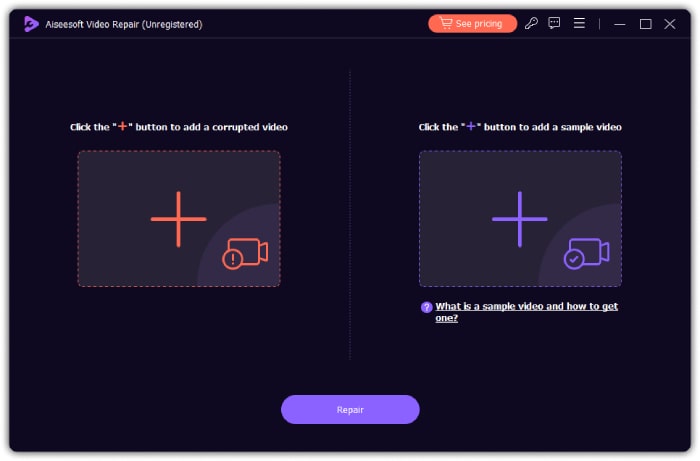
ステップ2.パソコンへのインストールが完了したら、ソフトを起動し、破損した AVI ファイルの取り込みを開始します。そのためには、左側にある赤いプラスボタンをクリックします。次に、もう一方の追加ボタンをクリックしてサンプル動画ファイルをアップロードします。サンプルは AVI でも、その他の動画形式でもかまいません。
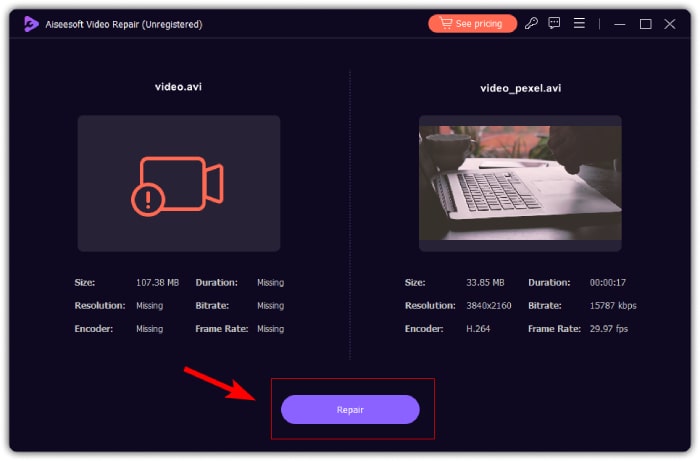
ステップ3.動画の準備ができたら、修復ボタンをクリックします。あとは数秒ほど待つだけで、修復された AVI ファイルを書き出す工程へと進むことができます。
パート 3. AVI ファイルを修復するための手動修正 (一般的な解決策)
AVI 形式のビデオ ファイルを修正するには、一般的な解決策または手動修正を試してください。
1. 他のメディア プレーヤーを見つけて使用します。
多くの方は、PC で動画を視聴する際に標準搭載のプレーヤーを使用していると思います。そのため、もし 動画が Windows Media Player で再生できない場合は、現在使用しているもの以外のメディアプレーヤーを試してみてください。というのも、AVI 動画の問題は必ずしもファイル自体にあるとは限らず、使用中のメディアプレーヤー側に原因があることも多いからです。したがって、複数のメディアプレーヤーでファイルを再生してみることで、特定のプレーヤーに問題があるかどうかを見極めることができ、最適な再生環境を見つける手がかりになります。
2. ディスクの問題を確認します。
次に、ディスク ユーティリティを検査し、特に AVI ファイルがコンピューターに保存されている場合は、潜在的なディスク エラーを修正します。ハード ドライブの不良セクタに対処することは重要です。特に AVI ビデオの場合、不良セクタはファイルの破損を引き起こす可能性があるためです。また、ディスク ユーティリティを定期的に使用してこれらの問題を特定し、解決すると、保存されている AVI ファイルの全体的な健全性と整合性が向上します。
3. AVIのコーデックを確認します。
コーデックとは、AVI ファイルの圧縮および伸張の処理方式を規定する仕組みのことです。ここには音声と映像の両方の圧縮が含まれ、コンプレッサを通して処理することで、伸張時にデコードされたファイルを生成します。もし AVI ファイルが破損していたり、使用しているプレーヤーで動画コーデックがサポートされていない場合は、どのコーデックが使われているかを確認することが重要です。コーデックを特定する専用ツールを利用すれば、AVI ファイルに関連する潜在的な問題を診断・修正することができます。
4. AVIファイルを再ダウンロードする
AVI ファイルを初めてダウンロードしたとき、ダウンロードが中断されました。ビデオとオーディオのデータが同期されていないか破損している可能性があります。したがって、このような AVI ファイルを修復する一般的で効果的な方法の 1 つは、ファイルを取得することです。したがって、ファイルの元のソースに戻って新しいダウンロードを開始し、システム上のオーディオ コンポーネントとビデオ コンポーネントのシームレスな統合を確保してください。
パート4. AVIビデオの修正に関するよくある質問
最高の AVI 修復ツールは何ですか?
AVI ファイルの修復に最適なツールはさまざまですが、堅牢性から最も推奨されるビデオ ツールを知りたい場合は、FVC が推奨するビデオ修復ツールが最適です。
AVI インデックスを永続的に修正するにはどうすればよいですか?
AVI インデックスを修復します。AVI ファイルのインデックスを修復または再構築するように設計された専用ツールを使用して、インデックス関連の問題を解決できます。
AVI ファイルのエラーを確認するにはどうすればよいですか?
診断ツールを使用して、AVI ファイルのエラーを確認します。AVI ファイル内のエラーや不整合を識別して報告できるツールは、ファイルの整合性を評価するのに役立ちます。
結論
この記事では、AVI ファイルを修復するための手早く一般的な方法をまとめて紹介しました。また、この種の動画ファイルを修復する理由についても触れ、なぜこの作業が重要なのかを理解しやすいようにしています。一方で、すでに破損していて再ダウンロードできない動画ファイルがある場合には、この厳選された Video Repair が心強い助けとなるでしょう。これは、破損した動画ファイルを元の状態に近いかたちへと強力に復元してくれる、理想的な動画修復ツールです。
-
 エラー コード 232011: その内容と解決方法
 これらの簡単で効果的なヒントを使用して、コンピューターのエラー コード 232011 をトラブルシューティングして解決する方法を学びます。このエラーによってコンピューターの使用がこれ以上妨げられないようにしましょう。
-
 エラーコード 102630 を手動で素早く修正する方法
 エラーコード102630で視聴体験が台無しにならないようにしましょう。役立つガイドで修正方法を学びましょう。これらの包括的なガイドに従って、すぐに修正してください。
-
 MP4 ファイルを修復する方法: 数分でビデオを復元します
 MP4修復の秘密を解き明かしましょう!わかりやすいチュートリアルに従ってトラブルシューティングと修正を行ってください。破損したビデオによってメディア体験が台無しにならないようにしてください。
