


 ビデオコンバーター究極
 スクリーンレコーダー
 ビデオ修復
ビデオ修復
 安全なダウンロード
YouTube を着信音にする: 変換は簡単
Are you tired of getting notified by bland and repetitive ringtones on your mobile device? How about starting to use that trendy, catchy, and upbeat tone on YouTube? You don’t know how? Well, we've got your back, as converting them is the answer to your concern and your luck hasn’t started yet as we listed software and online tools designed for converting YouTube to ringtones. Start converting YouTube videos today and turn your daily ringtone from boring to pleasing.

パート1. YouTubeリンクをMP3着信音に変換する
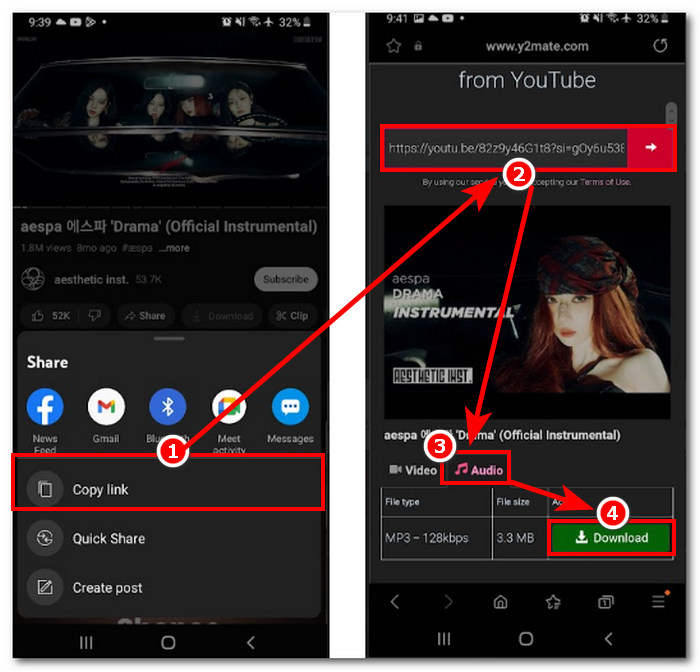
YouTube 動画を着信音にする方法を知りたいですか? この部分では、リンクをコピーして貼り付け、Y2Mate などの Web ベースの変換ツールを利用して、YouTube 動画を MP3 着信音に変換する方法を説明します。このプロセスは約 3 つのステップで完了し、簡単な変換で時間を節約し、新しく変換した着信音を設定できます。
Step 1. Copy the link of your chosen YoTube video you want to convert into a ringtone. It can done through a browser on your desktop or a YouTube app on mobile.
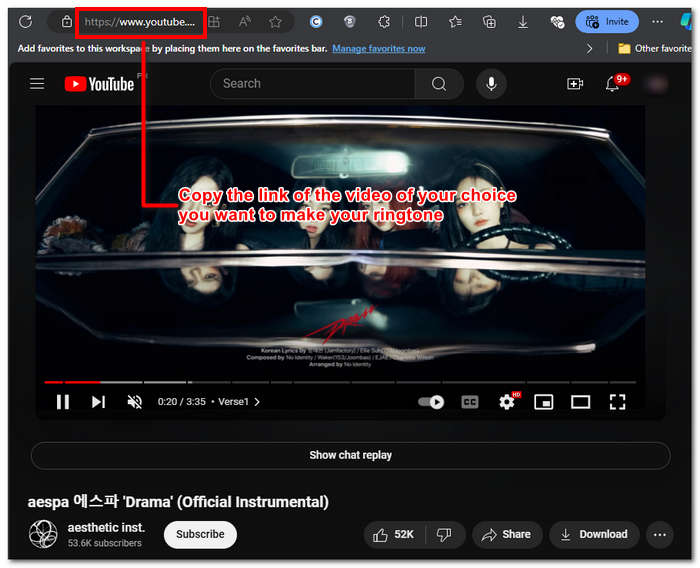
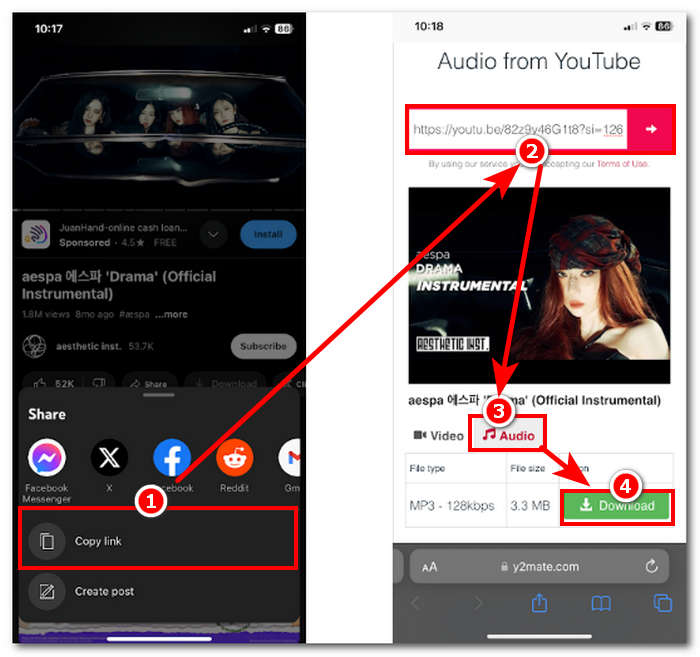
Step 2. Go to Y2Mate.com and casually paste the link of your YouTube video in its designated field.
Step 3. Next, click on the Audio button and then click the Download button to convert the file and save it to your device.
この手順は携帯電話でも実行でき、携帯電話のブラウザを使用できます。
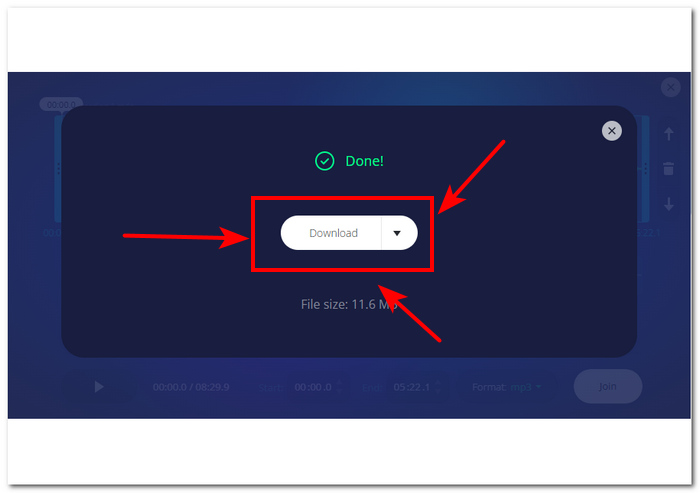
パート2. YouTubeビデオをAndroid/iPhone用のMP3着信音にカスタマイズする
If you want to download a YouTube video, turn it into your ringtone, and customize it for a more personal touch, then a software-based tool is your go-to solution. FVC-picked Video Converter Ultimate is an all-in-one tool that can convert, enhance, compress, and even edit videos and audio with up to 1000 supported file formats. In contrast, integrated with high-speed processing technology to ensure fast conversion speed without losing quality.
おそらく、このタスクは YouTube ビデオ ファイルをカスタマイズしてから、M4R または MP3 着信音に変換することです。したがって、このソフトウェアを使用すると、継続時間を短縮したり、フェード効果を追加したり、不要と思われる部分を削除したりして、着信音の好みに完全に合った完全なカスタマイズを行うことができます。
着信音をカスタマイズする前に、YouTube 動画をダウンロードしておく必要があります。動画をデバイスにダウンロードしていない場合は、Y2Mate を使用してダウンロードできます。
Step 1. Using your desktop, download and install the FVC-picked Video Converter Ultimate on your device. Open the program on your device and load the downloaded YouTube video by clicking on the Add Files link in the upper-left part of the interface.
![[ファイルの追加]をクリックします](/images/2024/09/click-add-files.jpg)
無料ダウンロードWindows 7 以降に対応安全なダウンロード
無料ダウンロードMacOS 10.7 以降に対応安全なダウンロード
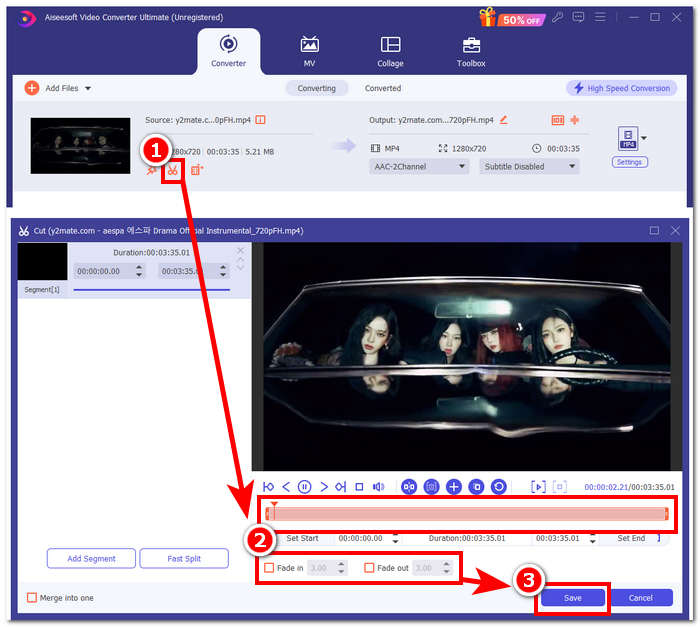
Step 2. Once the video is in the program, click on the scissor icon near the video to begin customizing your ringtone. When a new window appears on your screen, you can add fade effects to your ringtone and shorten it by dragging the cursor bar from left to right. When you are done customizing it, just click the Save button.
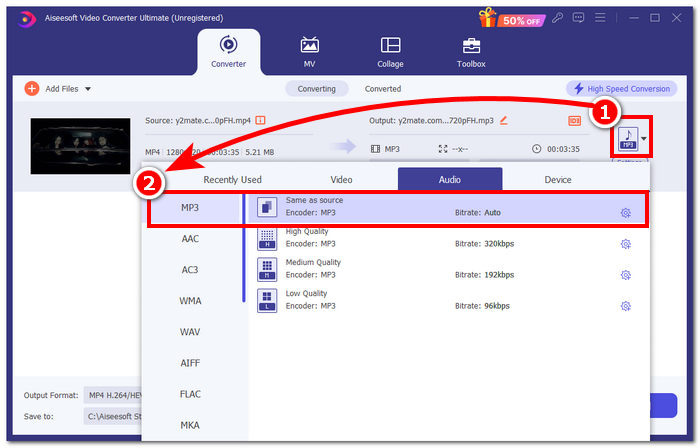
Step 3. Once you've customized your ringtone, change its file format from MP4, a video file format, to an actual MP3 format to make it appear as an audio file on your device.
Step 4. Click the Convert All button to begin the conversion process and automatically save the ringtone to your device. Once you're done converting, your ringtone will be in your download folder.
![[すべて変換]ボタンをクリックします](/images/2024/09/click-convert-all-button.jpg)
パート3. YouTubeビデオをMP3着信音に設定する
アイフォン
After making ringtones for iPhone, setting a ringtone on an iPhone is quite a weighty process compared to Android. iPhones don’t have built-in support to simplify the process of setting up a new ringtone that came from another source. Thus, it doesn’t stop us from finding ways to make a converted YouTube to MP3 ringtone on the iPhone guide.
Step 1. Copy the link to the video in your iPhone's YouTube app.
Step 2. Paste the URL to your preferred converting tool into Safari. Remember to choose the Audio option first so that your movie will be converted to MP3 before tapping the Download button.
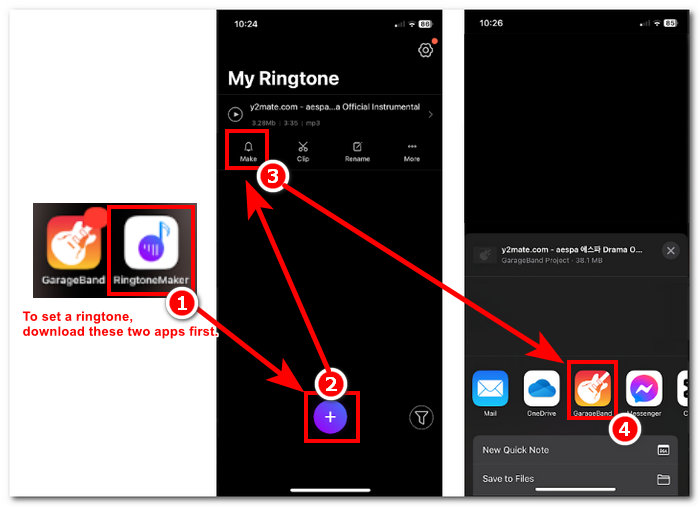
Note: Make sure you install GarageBand and RingtoneMaker apps before proceeding to the next step.
Step 3. Open the RingtoneMaker app and load the downloaded YouTube ringtone on the app. Once loaded, tap the Make Ringtone button and select the GarageBand app to proceed.
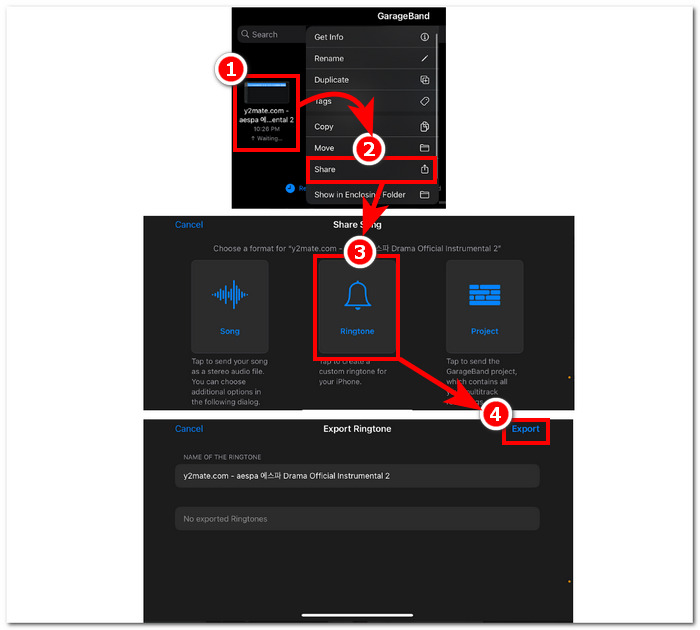
Step 4. Once you are redirected to the GarageBand app, tap the ringtone you imported on the app, then proceed to follow these navigation Share > Ringtone > Export.
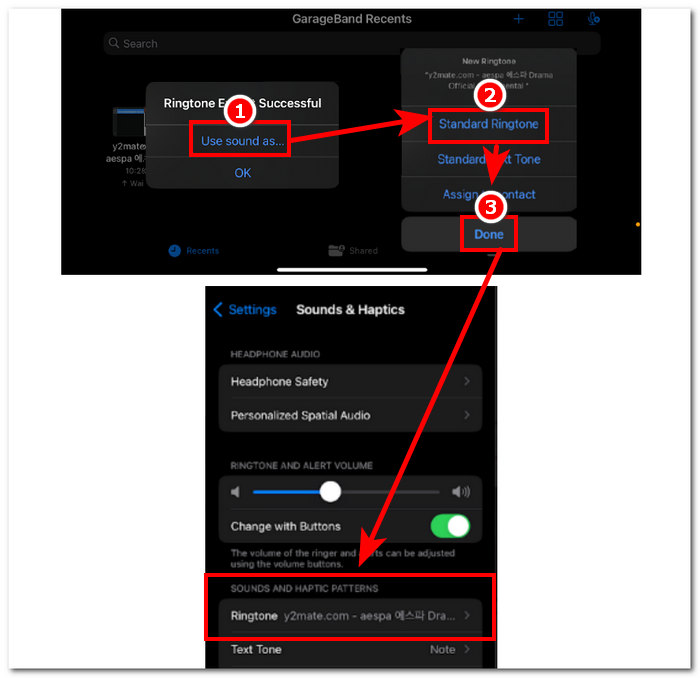
Step 5. Once you've finished exporting, use sound as a standard ringtone and hit the Done button. To check if you successfully set your new ringtone, go to Settings > Sound & Haptics. The name of your file should be under the Ringtone section.
アンドロイド
Android で YouTube を MP3 着信音に変換するのは、設定するのと同じくらい簡単です。Android の組み込み機能により、ユーザーは着信音を設定できるため、プロセスがはるかに簡単で便利になります。したがって、ユーザーは、Y2mate オンライン ツールを使用して YouTube 動画をダウンロードして変換する必要があります。
Step 1. Using the YouTube app, copy the link of the video you want to make a ringtone.
Step 2. Using your browser, paste the link to the converter tool of your choice. Before clicking on the Download button, remember to select the Audio section first so that it will convert your video into MP3.
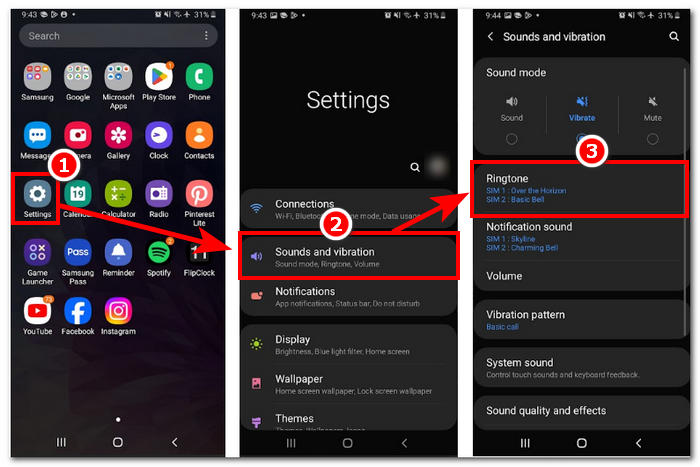
Step 3. Access your phone’s Ringtone setting to set your newly converted audio as a ringtone. Just follow these navigation steps: Settings > Sound and Vibration > Ringtone.
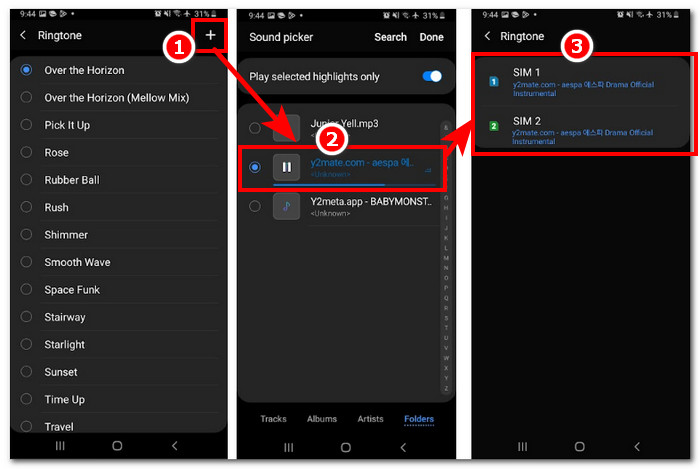
Step 4. Once you are in the Ringtone setting, proceed to add your new ringtone by clicking on the + button located at the top-most right part of your screen. And just like that, you have successfully set your new ringtone that came from a YouTube video.
パート4. YouTubeからMP3着信音への変換に関するよくある質問
YouTube を MP3 に変換する AI ツールは何ですか?
多くの一流 AI ツールは、YouTube 動画を MP3 に効果的に変換できます。人気のある選択肢としては、YTMP3.cc や ClipGrab などがあります。
YouTubeからMP3へのコンバーターアプリとは何ですか?
YouTube から MP3 へのアプリケーションは、ユーザーのモバイル デバイスにダウンロードできるツールです。このようなコンバーター アプリには、TubeMAte、VideMate、Snaptube などがあります。
YouTube ショートからオーディオを保存するにはどうすればよいですか?
YouTube は音声、つまりプラットフォーム上のコンテンツの違法ダウンロードを禁止しています。YouTube ショートから音声を違法に保存するには、ユーザーはオンライン コンバーター ツールや携帯電話の画面録画に頼ります。
結論
Converting YouTube to an MP3 file for ringtone use can be quite a process, especially for a novice or non-tech-savvy person. Thus, thoroughly following the steps above can help users create their ringtone with ease. Giving options on how to convert a YouTube video and make a ringtone using the online software Y2Mate for Android and iPhone devices and a software-based tool, FVC-picked Video Converter Ultimate, for customization features.
-
 MOV VS MP4 –どちらを選択しますか?
 MOV VS MP4、どちらが良いですか?この投稿では、MP4とMOVの違いを説明しているので、ビデオファイルに使用するためのより良い選択を得ることができます。
-
 FLAC vs. MP3: どのオーディオファイルフォーマットが最高に君臨するか
 この投稿では、FLAC と MP3 の主な違いを比較します。これには、音質、ファイル サイズ、互換性などが含まれます。
-
 MP3をM4Aに変換して音質を向上させる方法
 専門的なヒントとコツを使って MP3 を M4A に変換することで、音楽ファイルの品質を向上させます。私たちのガイドでは、段階的な手順と推奨ソフトウェアを提供しています。
