


 ビデオコンバーター究極
 スクリーンレコーダー
 ビデオ修復
ビデオ修復
 安全なダウンロード
品質を損なうことなくWeb用のビデオを圧縮する2つの効率的な方法
独自のWebサイトを管理している場合、またはWebサイトを設計している場合、ビデオのバッファ時間を短縮し、ユーザーエクスペリエンスを向上させるには、Web用にビデオを圧縮することが非常に必要です。通常、スムーズに再生されるWebサイトのビデオは、WebM / MP4形式で10MB未満です。したがって、ビデオが大きすぎてロードできない場合は、Web用にビデオを圧縮してWebサイトを最適化することが、まさに今必要なことです。

パート1:Web FreeOnlineのビデオを圧縮する方法
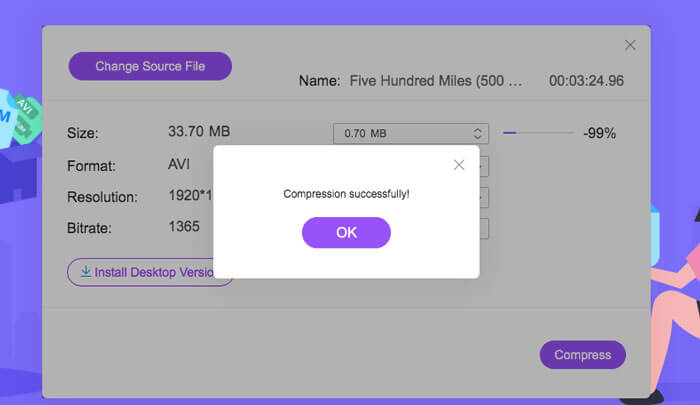
FVC Free Online Video Compressor を使えば、Web 用の動画を無料かつ効率的に小さいサイズへ圧縮できます。ソフトウェアをダウンロードする必要はなく、たった 3 ステップで希望どおりに圧縮された動画ファイルを取得できます。
- 1.オンラインで無料でアップロードしてサイズ設定を調整するだけで、Web用のビデオを圧縮できます。
- 2.大きなビデオを50MB未満に圧縮して、Webサイトにすばやくアクセスできるようにします。
- 3. Web用のビデオを、互換性のあるWebMおよびMP4形式を含む任意の形式に変換します。
- 4.所有権を保護する透かしなしでビデオを保存します。
ステップ 1: FVC Free Video Compressor のサイトを開き、Add Files to Compress ボタンをクリックします。ガイドに従ってプラグインを起動し、その後もう一度 Add Files をクリックして、Web 用に圧縮したい動画を選択します。

ステップ 2: サイズ、形式、解像度を詳細に調整して、Web 用に動画を圧縮します。Web サイト用動画の推奨サイズ設定は、640×480 の解像度で 10 MB 未満です。Chrome と互換性のある形式は WEBM または MP4 です。

ステップ 3: Compress ボタンをクリックし、保存したいフォルダーを選択します。
パート2:Web用のビデオを圧縮する最も効率的な方法
エンコーダー、解像度、ビットレート、フレームレートなどの詳細設定を調整したい場合は、プロ向けツールである FVC Video Converter Ultimate が、Web 用に動画を圧縮するのに最適な選択です。画質を落とさずに、動画を最適なサイズと形式に変換することができます。
- 1.品質をあまり落とさずに、ビデオを640×480以下などの低解像度に圧縮します。
- 2.ビデオに適切な解像度を選択するために、10を超える解像度を提供します。
- 3.Webサイトと互換性のあるWebMまたはMP4形式を含む200を超える形式にビデオを変換できます。
- 4.パラメータを変更するための参照を提供するプレビュー機能をサポートします。
無料ダウンロードWindows 7 以降に対応安全なダウンロード
無料ダウンロードMacOS 10.7 以降に対応安全なダウンロード
ステップ 1: Windows/Mac 用の FVC Video Converter Ultimate をダウンロードして起動します。Toolbox ボタンをクリックし、Video Compressor ツールを選択します。
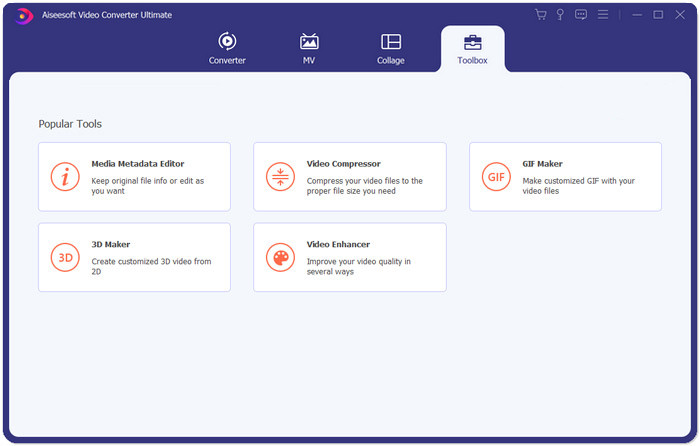
ステップ 2: Plus icon をクリックして、圧縮したい動画ファイルを選択します。設定画面に入ったら、動画サイズ、形式、解像度、ビットレートなどの詳細パラメーターを変更できます。
- •サイズ:前述のように、サイズは10MB未満である必要があります。したがって、下向きの矢印をクリックしてビデオサイズを小さくすることができます。
- •形式:MP4形式はサイズが小さく、品質が比較的高いため、MP4形式を選択することをお勧めします。
- •解像度:Webのビデオサイズを10 MB未満に縮小するには、標準の640×480以下の解像度を使用することをお勧めします。
- •ビットレート:解像度に応じて自動的に変化します。 640 * 480の解像度を選択した場合、ビットレートは約1000kbpsになります。
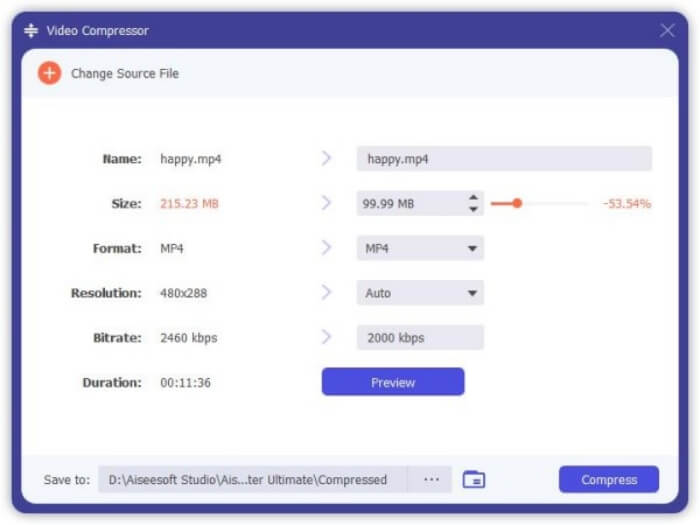
ステップ 3: Web 用に動画を圧縮する前に、Preview ボタンをクリックして仕上がりを確認できます。その後、Compress ボタンをクリックし、保存したいローカルフォルダーを選択します。
このソフトはほぼすべての動画形式に対応しており、YouTube 用に動画を圧縮したり、Facebook をはじめとする各種 Web 用途向けに簡単に動画を圧縮できます。
パート3:Web用のビデオ圧縮に関するFAQ
1.ウェブの背景に最適な圧縮ビデオのサイズはどれですか?
Web背景用のビデオの圧縮に最適なサイズは1分以内に10MB未満であり、ロードには1〜2秒しかかかりません。
2.どのビデオフォーマットがウェブサイトと最も互換性がありますか?
WebMまたはMP4形式は、Google Chrome、Safari、Firefoxなどを含むすべての主要なブラウザでサポートされているため最適です。さらに、WebMおよびMP4形式は、主にWebビデオの視聴に使用されるHTML 5Playerとも互換性があります。
3.なぜWeb用にビデオを圧縮する必要があるのですか?
動画が大きいほど、読み込みに時間がかかります。あなたがあなた自身のウェブサイトを開発しているならば、速い読み込み速度はあなたのウェブサイトを閲覧することをいとわないより多くのクライアントを可能にします。
結論
あなたがあなた自身のウェブサイトを管理していて、それが常にたくさんバッファリングするとき、あなたはウェブ用のビデオをより小さなサイズの無料オンラインに圧縮するか、ビデオをあまり品質を失うことなくより低い解像度に変換することによってビデオの読み込み速度を改善するように努めるべきです。 FVC Free Online Compressorを使用してWebのビデオを簡単に縮小するか、プロのFVC Video ConverterUltimateをダウンロードしてWebのビデオを高品質で圧縮します。
-
 Facebook用のビデオをGBからMBに解放する方法
 Facebookに大きな動画をアップロードすることが禁止されている場合でも、心配する必要はありません。無料のビデオコンプレッサーを使用して、大きなビデオサイズをGBからMBに圧縮するだけです。
-
 WhatsApp用に大きなビデオファイルを圧縮および変換する3つの方法
 この記事から、WhatsAppのビデオをオンラインで圧縮する3つの簡単な方法を得ることができます。 WhatsAppでビデオを送信できないのはなぜですか? WhatsAppビデオサイズ制限を修正するために何ができますか?読んで確認するだけです。
-
 iPhone / Android /オンラインで電子メール用のビデオを圧縮するためのチュートリアル
 大きすぎるビデオをメールで送信できませんか?この問題が発生した場合は、ここで電子メール用のビデオを圧縮するための実行可能な方法を入手できます。この記事では、大きなビデオファイルを無料で縮小する方法について詳しく説明します。
