


 ビデオコンバーター究極
 スクリーンレコーダー
 ビデオ修復
ビデオ修復
 安全なダウンロード
品質を損なうことなくTSファイルをFLV形式に変換する方法
本ガイドでは、TS を FLV に変換する方法に焦点を当てて解説します。一般的に、動画形式には「よく使われる形式」と「それ以外」の2種類があります。FLV はインターネット向けに開発された代表的な動画形式の一つであり、TS は後者に属します。TS は Transport Stream(トランスポートストリーム)の略で、MPEG-2 の動画データを保存するために使われ、DVD などでよく見かけます。それでは、さっそく始めていきましょう。

パート1:デスクトップでTSをFLVに変換する3つの簡単な方法
方法1:無料のFLVコンバーターでTSをFLVに変換する
名前の通り、FVC Free FLV Converter は TS を FLV に変換するのに最適な FLV コンバーターです。これを使えば、動画ファイルを視聴したり、SNS で共有したりできます。完全無料で、ウォーターマーク(透かし)や機能制限も一切ありません。有料ソフトにしかないような機能がいくつか搭載されている点も特徴です。
最高のFLVコンバーターの主な機能
- 1.FLVと他のビデオフォーマットを簡単に変換します。
- 2.変換中にビデオとオーディオの品質を保護します。
- 3.複数のTSビデオファイルを同時にバッチ処理します。
無料ダウンロードWindows 7 以降に対応安全なダウンロード
無料ダウンロードMacOS 10.7 以降に対応安全なダウンロード
TSファイルを無料でFLVに変換する方法
ステップ1: TS ファイルをインポートする
コンピューターにインストールした後、最高のFLVコンバーターを起動します。次に、[ファイルの追加]ボタンをクリックして、DVDまたはコンピューターからすべてのTSファイルをインポートします。その後、ビデオがライブラリエリアに表示されます。

ステップ2: 出力形式を設定する
動画を編集する必要がある場合は、編集(Edit)ボタンをクリックして動画編集ウィンドウを開きます。編集しない場合は、画面下部の出力形式(Output format)オプションをクリックして展開します。続いて、一般動画(General Video)タブでFLVを検索して選択します。

ステップ3: TS を FLV に変換する
次に、参照(Browse)ボタンをクリックして、FLV 出力ファイルを保存するフォルダーを指定します。最後に、右下の変換(Convert)ボタンをクリックして、TS から FLV への変換を開始します。

方法2:VLCでTSをFLVに変換する方法
VLCは、オープンソースプロジェクトであるため、TSをFLVに無料で変換するもう1つの方法です。 PC、Mac、Linuxで利用できます。コストは明らかにです。出力品質はあまり良くなく、手順は複雑です。よろしければ、以下の手順を実行してください。
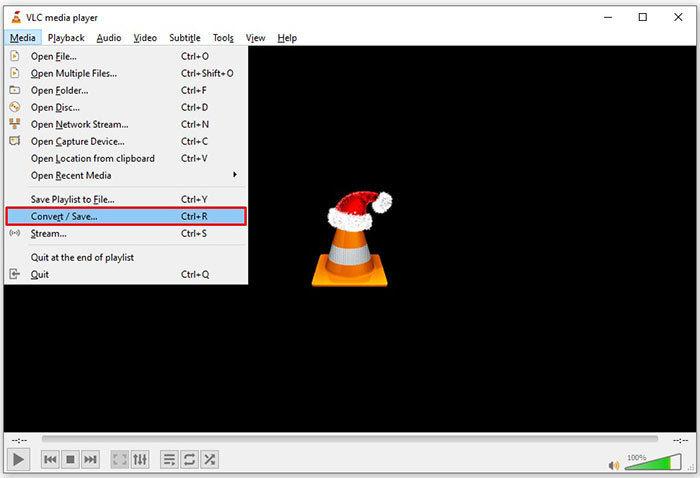
ステップ1: VLC を起動し、メディア(Media)メニューをクリックして変換/保存(Convert/Save)を選択します。メディアを開くダイアログが表示されます。
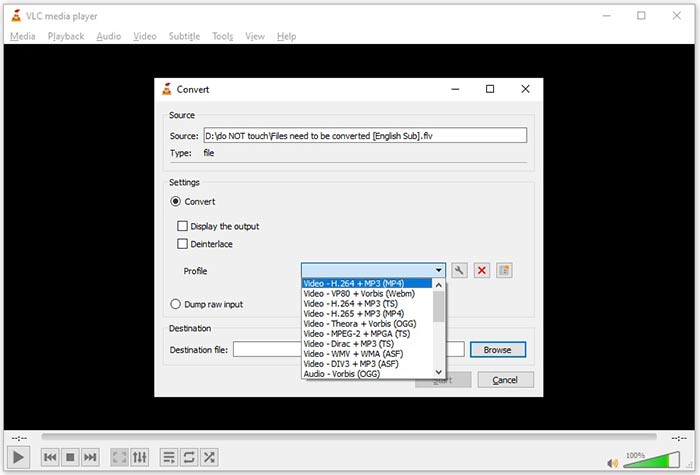
ステップ2: 追加(Add)ボタンをクリックし、TS ファイルを VLC に追加します。変換/保存(Convert/Save)ボタンを押して次に進みます。
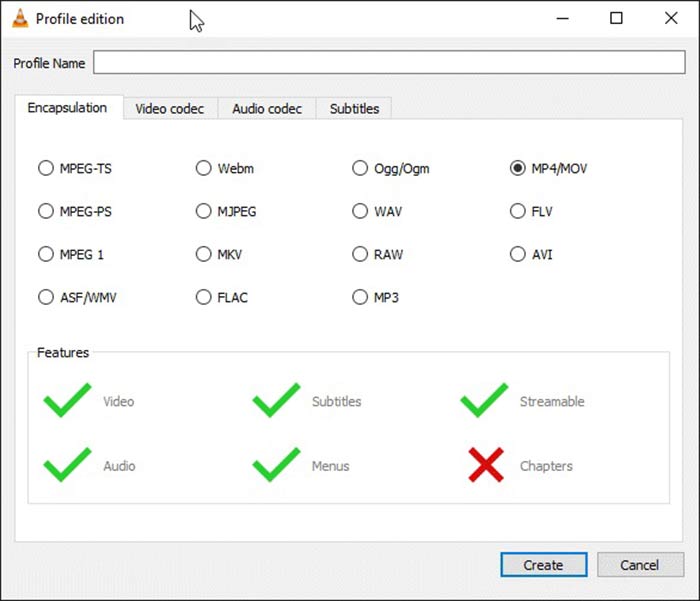
ステップ3: プロファイル(Profile)オプションを開き、出力形式を選択します。プロファイル内にFLVが見つからない場合は、プロファイル編集(Profile Edit)ボタンをクリックし、プロファイル名(Profile Name)欄にFLVと入力して、コンテナとしてFLVを選択し、作成(Create)をクリックします。その後、プロファイル(Profile)からFLVを選択します。
ステップ4: 参照(Browse)ボタンをクリックして保存先フォルダーを指定し、開始(Start)ボタンをクリックします。
方法3:FormatFactoryを介してTSをFLVに変換する方法
FormatFactoryは、PC用の無料のファイル変換プログラムです。それはあなたがペニーを支払うことなくTSファイルをFLVに変換することを可能にします。ただし、損失のある変換のみをサポートします。これは、ビデオ品質がダウンスケールされることを意味します。さらに、MacまたはLinuxでは使用できません。
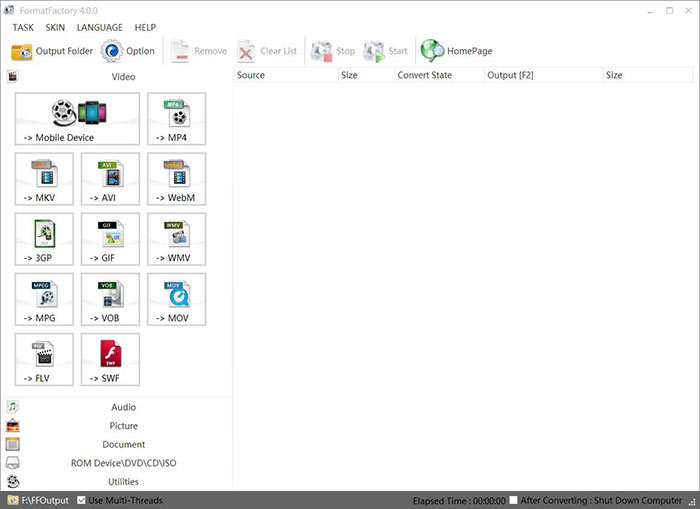
ステップ1: 無料の TS から FLV へのコンバーターを起動し、動画(Video)セクションに進んでFLVを選択します。
ステップ2: ファイル追加(Add File)ボタンをクリックして、パソコンから TS 動画ファイルをインポートします。OK を押して確定します。
ステップ3: 次に、開始(Start)ボタンをクリックして、PC 上で TS から FLV への変換を開始します。このフリーソフトは速度が遅いため、完了まで少し時間がかかります。変換が終わったら、出力(Output)セクションで指定したフォルダーを開き、FLV ファイルを確認します。
パート2:TSをFLVオンラインに変換する方法
VLC やその他の動画変換ソフトは、いずれもハードディスクへのインストールが必要で、内蔵ストレージの容量を消費します。ソフトをインストールせずに TS を FLV に変換できないかと考える人もいるでしょう。その答えが、FVC Free Online Video Converterです。これはオンラインで動作し、無料で利用できます。追加機能はあまりありませんが、基本的な動画変換のニーズを満たすには十分です。
ステップ1: Web ブラウザーでhttps://www.free-videoconverter.net/free-online-video-converter/を開き、Add Files to Convertボタンをクリックしてランチャーをダウンロードします。

ステップ2: ダウンロードが完了すると、ランチャーが自動的に起動します。Add Fileボタンをクリックして TS ファイルをアップロードします。この Web アプリは一括変換にも対応しています。画面下部でFLVを選択します。

ステップ3: 準備ができたら、Convertボタンをクリックして TS から FLV への変換を開始します。アプリ自体は高速に動作しますが、実際の所要時間はインターネット回線の状態によって変わります。変換が完了するまで待ち、FLV 出力ファイルをダウンロードします。
お見逃しなく:
パート3:TSからFLVへの変換に関するFAQ
TSを他の形式に変換できないのはなぜですか?
TSはDVDのビデオファイル形式です。ほとんどの商用DVDは暗号化されており、著作権によって保護されています。また、適切なビデオ変換ソフトウェアがない場合、TSファイルの変換もブロックされます。
Windows Media PlayerでTSを開くことはできますか?
Windows Media PlayerはDVDまたはTSファイルを開くことができないため、WMPでTSを再生することはできません。または、VLCなどのサードパーティのビデオプレーヤーを使用することもできます。または、WMP用に追加のコーデックパッケージをインストールする必要があります。
TSファイルを見る方法は?
VLCなどのTSファイルをサポートしているメディアプレーヤーはごくわずかです。 PCとMacの組み込みメディアプレーヤー、Windows MediaPlayerとQuickTimePlayerは、TSと互換性がありません。 TSファイルを視聴するもう1つの方法は、DVDに書き込むことです。
結論
ここで、オンラインで共有したり、デジタルデバイスで再生したりするために、TSファイルをFLVビデオに変換する少なくとも4つの方法を学ぶ必要があります。 DVDムービーのビデオ形式として、TSはコンピュータやモバイルデバイスで広く使用されていません。ほとんどのメディアプレーヤーがそれを開くことができないことは理にかなっています。 FVCフリーFLVコンバーター;ただし、TSをFLVに簡単に変更するのに役立ちます。さらに質問を?この投稿の下にそれらを書き留めてください。返信します。
-
 Mac / Windowsでビデオ_TSファイル/フォルダをDVDに書き込むための3つの簡単なステップ
 TSファイルをDVDディスクに変換して書き込むにはどうすればよいですか?このステップバイステップガイドでは、Windows / MacでTSファイルとフォルダをDVDにコピーして、DVDプレーヤーまたはTVでTSファイルを視聴できるようにする方法を説明します。
-
 Windows / MacでTSをAVI / MKV / MOV / WMVに変換する6つの簡単な方法
 TSファイルをAVI / MKV / MOV / WMVにすばやく変換したいですか?この記事では、オンラインおよびオフラインのビデオコンバーターと完全なガイドを紹介します。たぶんあなたはここで最高の無料のTSコンバーターを手に入れることができます。
-
 TSビデオファイルの圧縮–TSファイルをより小さなサイズに圧縮する方法
 高解像度TSビデオファイルをデバイスに保存する場合は、この記事からTSビデオファイルをより小さなサイズに圧縮する方法について詳しく学ぶ必要があります。
