


 ビデオコンバーター究極
 スクリーンレコーダー
 ビデオ修復
ビデオ修復
 安全なダウンロード
MTSをMP3に無料で変換する2つの簡単な方法
さまざまなニーズに応じて、ビデオからオーディオトラックを抽出する必要があります。たとえば、ファイルサイズを小さくするためにビデオをMP3に変換したい場合があります。場合によっては、必要なのは映画のBGMだけであり、そこからオーディオを抽出することを選択できます。

MTS は、720p および 1080i HD をサポートする高精細ビデオ形式です。AVCHD(Advanced Video Coding High Definition)のファイル拡張子でもあります。MTS ファイルを入手しても、メディアプレーヤーや動画編集ソフト、iOS/Android の携帯端末ではそのまま再生できないことがあります。そのため、よりスムーズに再生・編集するには、MTS を MP3 または MP4 に変換することが非常に重要です。この記事では、MTS を無料で MP3 に変換する方法をご紹介します。
パート1。品質を損なうことなくMTSをMP3に自由に変換する方法
MTSまたはM2TSビデオからMP3オーディオを抽出するのに役立つMTSからMP3への変換ツールがインターネット上にたくさん提供されています。しかし、それらの多く、特に一部の無料のものは、低品質のMP3ファイルを出力する可能性が高いことに気付くかもしれません。
この点を踏まえて、まず最初のパートでは、最も優れた無料の MTS から MP3 への変換ソフトである Free Video Converter をおすすめします。このソフトは、AVHCD ファイルを元の音質をそのまま維持したまま MP3 に変換できます。今すぐ無料でダウンロードし、以下のガイドに従って MTS/M2TS 動画から MP3 オーディオトラックを抽出してみてください。
無料ダウンロードWindows 7 以降に対応安全ダウンロード
無料ダウンロードMacOS 10.7 以降に対応安全ダウンロード
ステップ 1. まず、上のダウンロードボタンをダブルクリックして、この無料の MTS から MP3 へのコンバーターをパソコンにインストールします。メイン画面が表示されたら、Add File(s) をクリックして、変換したい MTS ファイルを読み込みます。
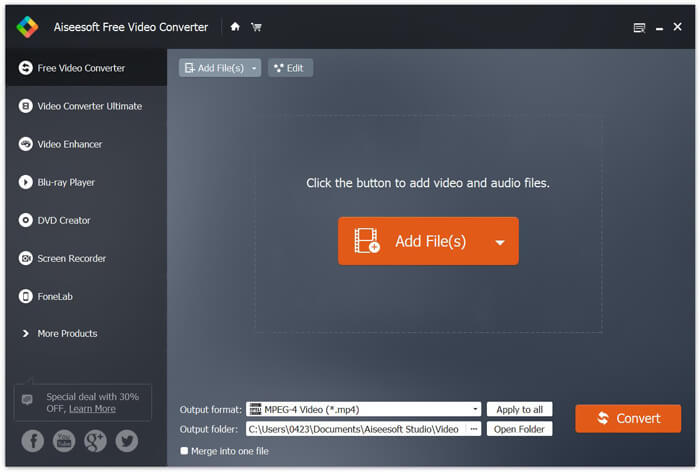
ステップ 2. Output フォーマットをクリックし、出力形式として MP3 を選択します。このとき、変換後の MP3 オーディオを保存する適切な保存先フォルダも指定できます。準備ができたら、Convert ボタンをクリックして、AVHCD ファイルから MP3 への変換を開始します。
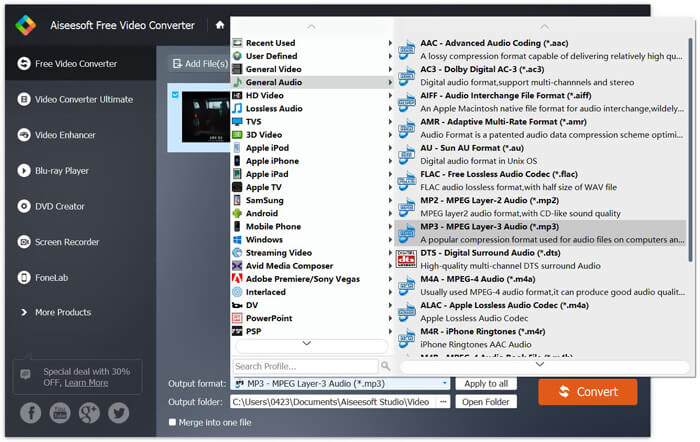
高度な加速技術の採用により、MTSからMP3への変換速度が非常に速くなります。さらに重要なことに、この無料のMTSからMP3への変換により、変換中にオーディオ品質が低下することはありません。また、ビデオオーディオファイルの編集や出力効果の調整に役立つ編集機能も備えています。
パート2。オンラインコンバーターでMTSをMP3に無料で変換する方法
小容量の AVHCD ファイルから MP3 オーディオトラックだけを抽出したい場合は、無料のオンラインコンバーターを利用することもできます。前述のとおり、MTS を MP3 に変換できるオンライン変換ツールは多数存在します。どれを使えばよいか分からない場合のために、ここでは人気のオンライン MTS から MP3 へのコンバーターである FVC Free Online Video Converter をご紹介します。
FVC Free Online Video Converterは、MTSをMP3に簡単に無料で変換するのに役立つ最も人気のあるビデオおよびオーディオ変換ツールの1つです。 AVCHDファイルの変換に加えて、他のメディアファイルの変換も可能です。次のステップでは、このオンラインビデオコンバーターを使用してMTSをMP3にオンラインで変換する方法を示します。
ステップ 1. ブラウザを開き、FVC Free Online Video Converter の公式サイトにアクセスします。本サービスには、MTS を MP3 に変換するための専用ページ https://www.free-videoconverter.net/free-online-video-converter/ が用意されています。変換を行う際は、このページに移動してください。
ステップ 2. Add Files to Convert ボタンを見つけてクリックし、ランチャーをダウンロードしてインストールします。ランチャーを起動したら、変換したい MTS ファイルをアップロードします。

ステップ 3. 出力形式が MP3 になっていることを確認し、Convert ボタンをクリックして AVCHD ファイルから MP3 オーディオの抽出を開始します。その後、プログラムが自動的に MTS から MP3 への変換を実行します。

この記事を読み終えると、MTS を MP3 に変換する 2 つのシンプルで無料な方法が分かります。大容量の AVCHD ファイルを音質を落とさずに MP3 に変換したい場合は、Free Video Converter に任せることができます。一方、100MB 未満の小さな MTS/M2TS 動画であれば、FVC Free Online Video Converter を利用するのが便利です。なお、まだ不明点がある場合は、コメントでお知らせください。
-
 デスクトップとオンラインでWMVをMP3に変換する方法
 FVCスタジオから無料のビデオコンバータソフトウェアを見つけることができます。 MP4、MOV、TS、AVI、WMV、FLAC、MP3など、あらゆるビデオ/オーディオ形式がサポートされています。
-
 音質を損なうことなくM4AをMP3に変換する4つの最良の方法
 M4Aを再生できず、MP3に変換する必要がありますか?オンラインでM4AをMP3に変換する無料の方法はありますか?この投稿では、iTunes、オンラインおよびプロフェッショナルオーディオコンバーターを使用してM4AをMP3に変換するのに役立つ4つの無料の方法を共有しています。
-
 M2TSファイルを無料でMP3に変換する方法
 M2TSファイルをMP3に変換できますか?この投稿では、M2TSをMP3、AAC、AIFF、およびその他のオーディオ形式に変換するのに役立つ無料のオンライン方法のトップ6をリストしました。
