


 ビデオコンバーター究極
 スクリーンレコーダー
 ビデオ修復
ビデオ修復
 安全なダウンロード
2022年にデスクトップおよびオンラインソリューションを使用してVOBをFLVに無料で変換する方法
VOB 形式のファイルは、通常 DVD のルートにある VIDEO_TS フォルダに保存されています。VOB 動画には、ディスクに保存されているデータの大部分、つまり映像・音声・字幕・DVD メニュー・その他のナビゲーション用コンテンツが含まれています。しかし、YouTube などのソーシャルネットワークに VOB ファイルをアップロードしたい場合は、VOB ファイルの形式を FLV のようなストリーミング対応形式に変換する必要があります。FLV はインターネット上でのストリーミングメディアの標準形式です。そこで本記事では、オンラインまたは無料のVOB から FLV へのファイルコンバーターを使って、VOB を FLV に変換する方法を解説します。

パート1。無料のデスクトップソフトウェアでVOBをFLVに変換する方法
VOB ファイルの形式を手早く FLV に変換したい場合は、FVC Free FLV Converter をお試しください。このフリーソフトを使えば、VOB から FLV、MP4、AVI、WMV、MOV など多くの形式に動画ファイルを変換できます。さらに、必要に応じて基本的な動画編集機能も利用可能です。VOB から FLV へのファイルコンバーターをダウンロードし、以下の簡単な手順に従ってください。
無料ダウンロードWindows 7 以降に対応安全なダウンロード
無料ダウンロードMacOS 10.7 以降に対応安全なダウンロード
ステップ 1. FVC Free FLV Converter を起動する
まず、WindowsまたはMac用のVOBからFLVへのコンバーターをダウンロードします。インストールファイルがダウンロードされたら、それをダブルクリックして、画面の指示に従います。その後、コンピュータで起動すると、次のようにインターフェイスが表示されます。

ステップ 2. VOB ファイルをプログラムに追加する
Add File(s) ボタンをクリックし、VOB ファイルを選択してから、Next をクリックして続行します。

ステップ 3. 出力形式として FLV を選択する
次に、Output format フィールドから FLV ファイル形式を選択します。
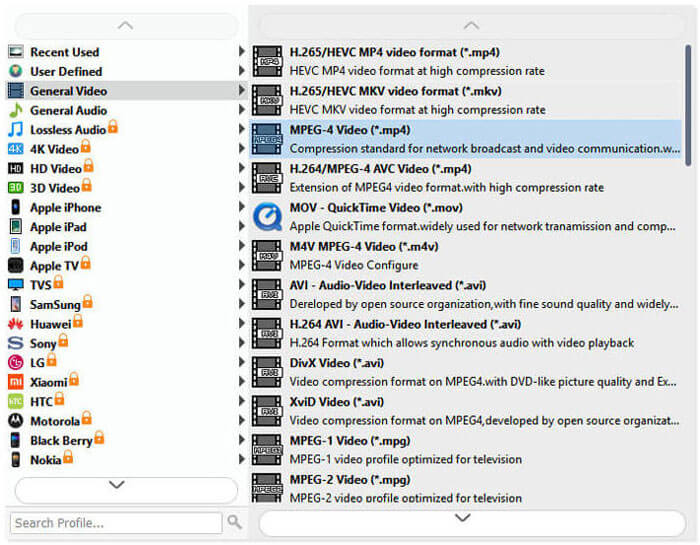
ステップ 4. VOB を FLV に変換する
Open Folder ボタンをクリックし、変換後のファイルを保存したいフォルダを選択します。VOB ファイルの FLV への変換を開始するには、Convert ボタンをクリックします。変換が完了すると、変換済みファイルを格納したフォルダが自動的に開きます。
パート2。VOBをFLVオンラインに変換する方法
オンラインサービスを使用してVOBをFLVに変換することも良い選択です。 2つのオンラインVOBからFLVへのコンバーターから選択できます。これらのオンラインツールはすべて無料で、多くのユーザーが頻繁に使用しています。オンラインツールを使用して、コンピューターでVOBをFLVに変換する方法を学習するために読んでください。
FVC無料オンラインビデオコンバーター
FVC Free Online Video Converter は、多くの一般的な動画・音声形式をサポートする多機能なオンラインツールです。このオンラインサービスでの変換は安全で、変換済みファイルはダウンロード後すぐにサーバーから削除されます。ソフトウェアのインストールは不要で、変換の手順もとても簡単です。
以下の手順に従って、VOBファイルをFLVに変更できます。
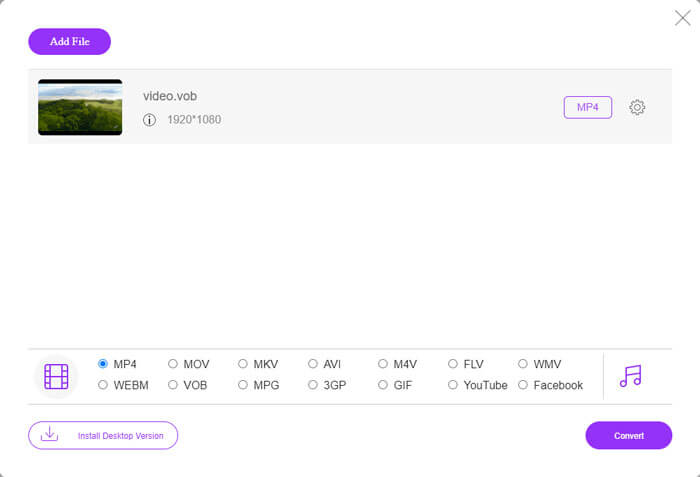
ステップ 1. FVC Free Online Video Converter のウェブサイトで、Add Files to Convert ボタンをクリックして VOB ファイルを追加します。初めてこのツールを利用する場合は、最初にランチャーをダウンロードしてインストールする必要があります。
ステップ 2. ウィンドウ下部の Video カテゴリで、出力形式として FLV が選択されていることを確認します。
ステップ 3. Convert ボタンをクリックし、保存先フォルダを指定します。変換処理が完了すると、変換されたファイルは自動的にダウンロードされ、変換済みファイルを保存しているフォルダが開きます。
ConvertFiles
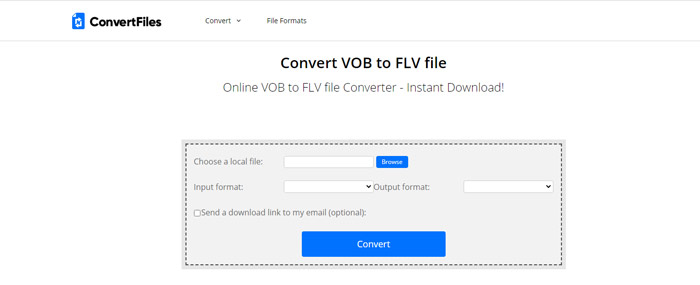
ConvertFilesは、別のオンライン無料のVOBからFLVファイルへのコンバーターです。このサービスは、さまざまなファイルタイプを数分以内に無料で変換できます。このサービスは、必要に応じて、変換されたファイルへのダウンロードリンクを電子メールアドレスに送信できます。変換にはソフトウェアのインストールは不要で、変換プロセス全体が簡単です。ただし、このオンラインツールは最大250MBのファイルを変換できることに注意してください。
これが、このオンラインVOBからFLVへのコンバーターの使用方法です。
ステップ 1. ConvertFiles のページにアクセスし、Browse をクリックして VOB ファイルをプログラムに追加します。
ステップ 2. 次に、Output format のドロップダウンリストから Flash Video File (.flv) を選択します。
ステップ 3. Convert ボタンをクリックして VOB ファイルの FLV への変換を開始します。ファイルの変換が完了するとリンクが表示されるので、それをクリックしてダウンロードページに移動し、変換済みファイルをダウンロードします。
パート3。VOB形式とFLV形式の比較
| 比較パラメータ | VOB | FLV |
| ファイル拡張子 | .vob | .flv |
| によって開発された | DVDフォーラム | アドビシステム |
| ビデオ00codecs | MPEG-1、MPEG-2 | On2 VP6、Sorenson Spark、スクリーンビデオ、スクリーンビデオ2、H.264 |
| オーディオコーデック | MP1、MP2、PCM、AC-3、DTS | MP3、ADPCM、Nellymoser、Speex、AAC |
| VOB / FLVファイルを開くプログラム | WindowsメディアプレーヤーVLCメディアプレーヤー | VLC Media PlayerAdobe Flash Player |
パート4。VOBからFLVへの変換に関するFAQ
VOBとは何ですか?
VOB(Video Object の略)は、DVD-Video メディアで使用されるコンテナ形式です。VOB には、DVD ディスク上の映像・音声・字幕・チャプターを含むナビゲーション付きの DVD メニューを格納できます。VOB 形式は通常 MPEG-2 でフォーマットされており、ほとんどのメディアプレーヤーで再生可能です。より多くの VOB プレーヤーについては、Windows 10/8/7 PC と Mac 向け VOB プレーヤー Top 5 をお読みください。
FLVとは何ですか?
FLV は、Adobe Flash Player 6 以降を使用して、インターネット上でデジタル動画コンテンツをストリーミング配信するためのコンテナ型オーディオビジュアル形式です。FLV は、Windows Media Player、VLC、Adobe Media Player、Winamp、RealPlayer など、またはその他のFLV プレーヤーで再生できます。
VOBファイルには音声が含まれていますか?
はい。 VOBファイルには、ビデオ、オーディオ、字幕、およびDVDメニューが含まれています。
結論
ご覧のとおり、無料のVOBファイルコンバーターを使用すると、元のビデオの高品質を維持しながら、MP4をFLVに簡単に変換できます。さらに、VOBからFLVへの変換をオンラインで行うこともできます。上記のデスクトップおよびオンラインのVOBからFLVへのコンバーターはすべて無料です。お客様のニーズに最適な満足のいくソリューションが見つかることを願っています。
-
 VOBファイルとは何ですか?VOBファイルを無料でGIFに変換する方法
 VOBファイルと、リッピング後に共有する方法について詳しく知りたいですか?またはなぜVOBをGIFに変換する必要があるのですか?次に、この記事を注意深く読んでください。
-
 VOBからMP4へ–VOBファイルを無料でMP4に一括変換する3つの方法
 この記事では、3つの無料のVOBからMP4へのコンバーターと関連するチュートリアルを紹介します。 Windows / Mac /オンラインでVOBをMP4ファイルに無料で簡単に無料で変換できます。
-
 VOBファイルをオンラインおよび無料で圧縮する方法
 VOBファイルを圧縮する方法をお探しですか?この記事では、VOBファイルのサイズを小さくするための最良の方法を学びます。
