


 ビデオコンバーター究極
 スクリーンレコーダー
 ビデオ修復
ビデオ修復最も信頼性の高い4つのMPEGからMP3へのコンバーターはオンラインとオフラインで使用できます
MPEGまたはMotionPicture Experts Groupは、ビデオおよびオーディオのコンテナファイルです。 ISOおよびIECの一部として、このファイル形式はMPEG-1またはMPEG-2ビデオエンコーディングアルゴリズムを使用して圧縮されます。技術的に言えば、このフォーマットで作成されたビデオは満足のいくものです。これは、多くの人がこの形式でさまざまなソーシャルメディアネットワークまたはビデオストリーミングサイトにビデオをアップロードすることを好む理由の1つでもあります。同様に、このファイルの音質は非常に明確で、オーディオプロバイダーからの録音とほとんど同じです。したがって、MPEGをMP3に変換してビデオからオーディオを抽出することを考える場合、これは満足のいくオーディオ品質を得るために見つけたいファイルです。

パート1。MPEGをMP3に変換する方法のトップ2の実行可能な方法
今日、MPEG4をMP3に変換することは難しいことではありません。オンラインで利用できるツールはたくさんあります。オンラインの無料ツールと、コンピューターにダウンロードできるオフラインツールを見つけることができます。残念ながら、デバイスに害を及ぼさない信頼できるものはごくわずかです。すべてのサイトが信頼できるわけではなく、すべてのソフトウェアが安全であるとは限りません。そこで、簡単にするために、信頼できる最高のオンラインアプリとオフラインアプリをいくつか挙げました。
オンラインツール:FVC無料オーディオコンバータ
セキュリティと信頼性について言えば、FVC Free AudioConverterのようなツールを見つけることは本当にまれです。 PCのセキュリティを保証できるオンラインコンバーターはごくわずかですが、FVC Free Audio Converterを使用すると、MP3出力を変換してダウンロードする際に、機器がマルウェアから確実に安全になります。任意のファイルを任意のビデオ形式からMP3、WMA、AAC、WAV、AC3、AIFF、およびFLACファイルに変換できます。たった3つの簡単なステップで、変換を実行できます。さらに、100%が無料で、ブラウザからアクセスでき、使用に制限はありません。ツールがあなたの個人データを保護することを約束するため、あなたのプライバシーは保護されます。これらすべての優れた機能をリストした後、このツールがどのように機能するかを知る価値があります。
ステップ1. FVC Free Audio Converter の公式ウェブページにアクセスし、「Add Files to Convert」をクリックします。
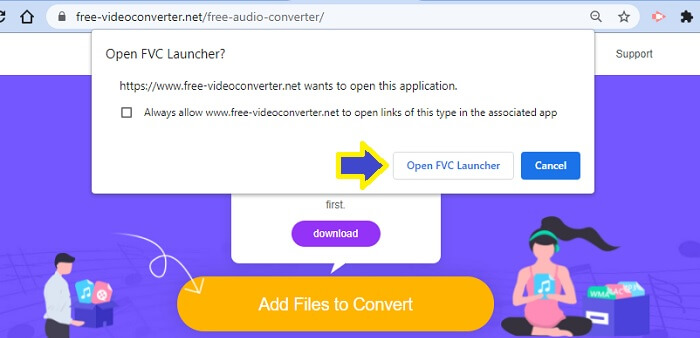
ステップ2. 指示に従ってランチャーを開きます。「Open FVC Launcher」と表示されているボタンをクリックします。
注意: 2つ目のステップは初めて利用する場合にのみ必要です。2回目以降に変換する際は、インストールは不要です。すぐに次のステップに進んでください。
ステップ3. その後、「Add Files to Convert」をクリックし、フォルダーから変換したいファイルを選択します。
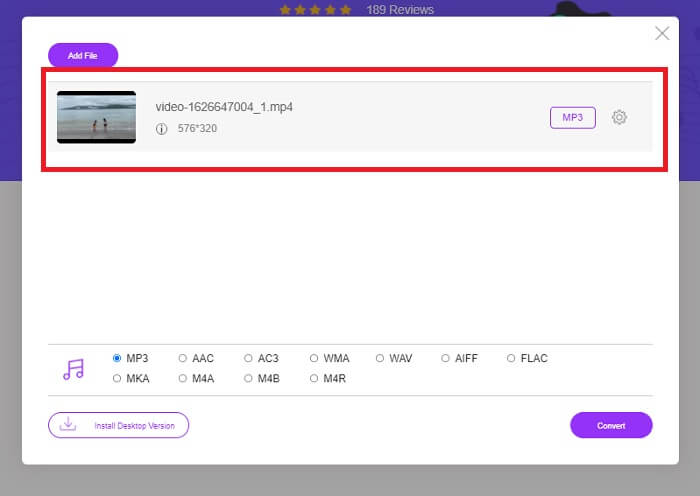
ステップ4. ファイルがツールにアップロードされると、そのファイルはデフォルトでMP3に設定されているのが分かります。つまり設定を変更する必要はありません。「Convert」をクリックするだけでOKです。
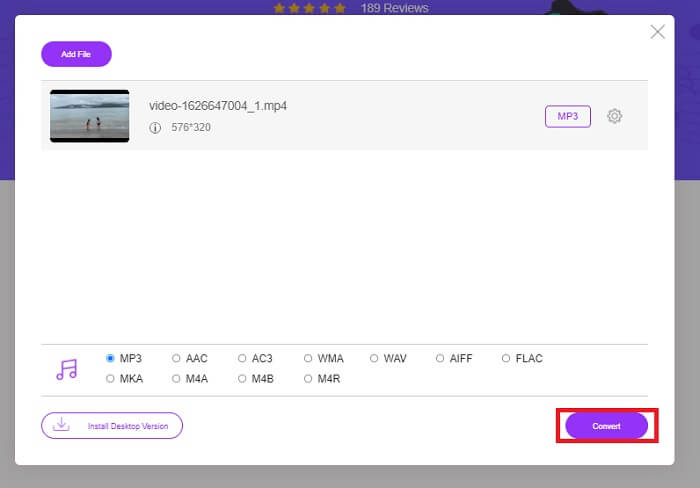
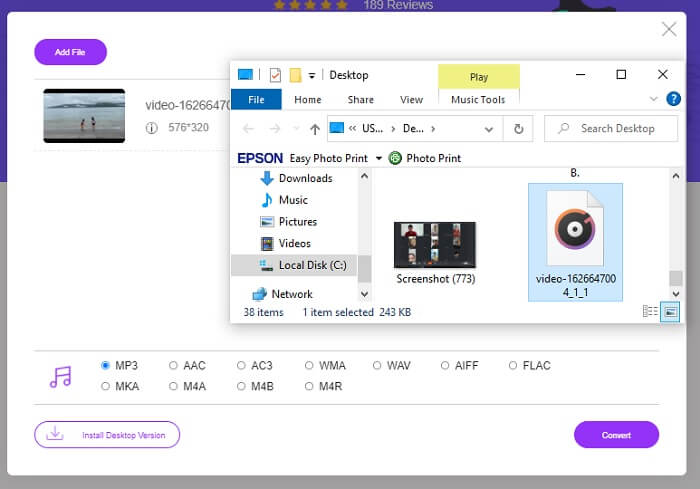
ステップ5. ファイルを保存するフォルダーの場所を選択します。その後「Select folder」をクリックすると、ファイルが自動的に保存されます。
長所
- 無料。
- 登録は必要ありません。
- ダウンロードする必要はありません。
- 高速変換プロセス。
- マルウェアから安全です。
短所
- 純粋に編集機能を変換していません。
オフラインツール:Video Converter Ultimate
一方、上記のオンラインツールから得られる出力にまだ満足できない場合は、役立つソフトウェアのダウンロードを検討することもできます。 FVC Video Converter Ultimateは、オンラインで簡単に見つけることができる最高のツールの1つです。 Video Converter Ultimateは、オーディオの最高のコンバーター、エディター、コンプレッサー、およびエクストラクターであり、現在、世界中の多くのユーザーによって使用されています。
このツールを使えば、動画を変換し、必要に応じてフレームレートやビットレートを調整できます。また、動画をGIFファイルに変換して、さまざまなSNSを通じて友達と共有できるミームを作成することもできます。さらに重要なのは、複雑な操作をせずにMPEG動画をMP3に変換できる点です。このツールにはまだ多くの機能がありますので、実際に使ってみながら詳しく確認してみてください。以下の手順も参考にしてください。
ステップ1. PCにVideo Converter Ultimateをダウンロードしてインストールします。下のダウンロードボタンを利用し、セットアップウィザードが完了するまで待ちます。
無料ダウンロードWindows 7 以降に対応安全なダウンロード
無料ダウンロードMacOS 10.7 以降に対応安全なダウンロード
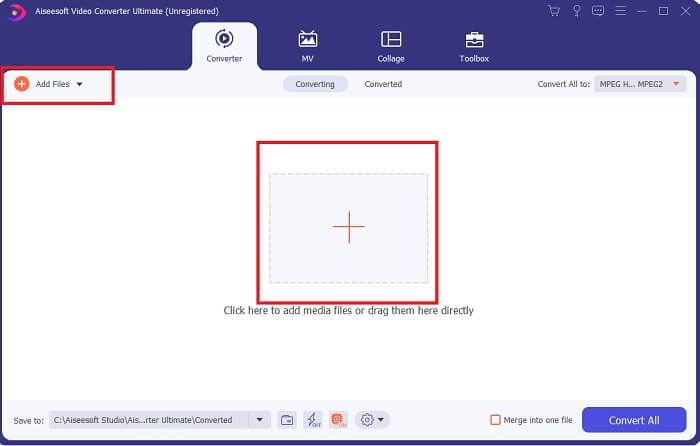
ステップ2. ファイルのアップロード方法は2通りあります。ファイルをドラッグ&ドロップするか、「Add Files」をクリックする、もしくはインターフェース中央のプラスアイコンをクリックします。
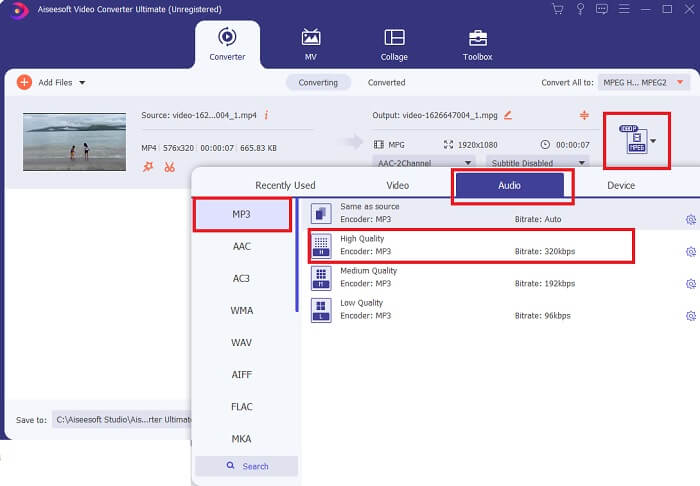
ステップ3. ファイルがアップロードされたら、抽出したい音声ファイルのフォーマットと品質を変更できます。
ステップ4. カスタマイズが完了したら、「Convert All」をクリックします。
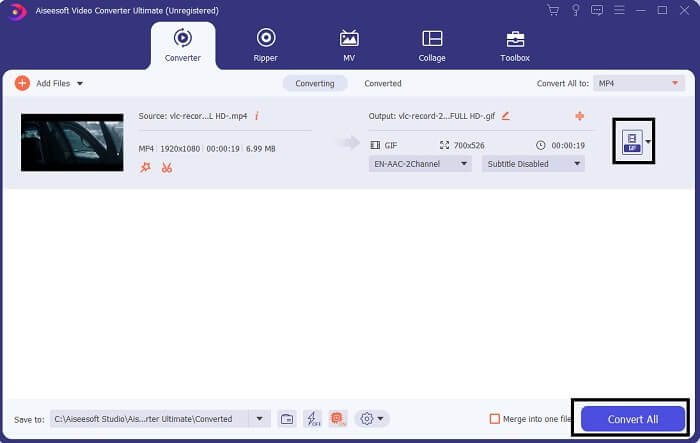
ステップ5. メインインターフェース下部に表示されているフォルダーから、変換されたファイルを確認します。

長所
- 信頼性のある。
- ビデオコンバーター。
- 動画編集者。
- 変換プロセスが高速です。
- フィルターとエフェクト付き。
短所
- 有料アプリです。
パート2。MPEGからMP3に関するFAQ
MPEGの品質は良いですか?
MPEGは、高解像度品質をサポートする標準のビデオ形式ですが、それを実現するために大量のファイルを保持します。また、ビデオストリーミングサイトやインターネットDVDサイトで使用される形式でもあります。ほとんどのオープンソースサイトもこれを使用しています。以上のことから、フォーマットの品質は良好です。
MPEGとMP4のどちらが良いですか?
保存容量という観点では、MP4のほうが有利です。MPEGもMP4も圧縮形式ですが、MPEGのほうが多くのデータを保持できます。一方で、動画の画質という点ではMPEGのほうが優れており、MP4よりも高画質です。使い勝手については、MPEGはモバイル端末での再生が遅くなりがちですが、MP4はモバイルフレンドリーです。では、どちらがベストなのでしょうか?それはお使いのデバイスや好みによって変わります。MPEGをMP4に変換したい場合は、MPEGをMP4に変換する方法を読んで、さらに詳しい情報を確認してください。
どちらが普遍的ですか? MP4またはMPEG?
明らかにMP4は普遍的です。ほとんどすべてのメディアプレーヤーは、MP4ファイルやストリーミングサイトを再生できます。 MPEGには、実際には再生されないプレーヤーがいくつかあります。
結論
簡単にするために、MPEGオーディオファイルを抽出する方法は簡単です。 FVCの信頼できるツールを使用すると、サービスの料金を支払わなくても作業を行うことができます。使用できる最も安全なツールがどこにあるかがわかっているので、MP3変換は今では難しい作業ではありません。また、MPEGについて質問がある場合は、この記事のFAQを参照してください。
-
 Mac / Windows / OnlineでWMAをMP3に変換する方法
 Windows Media PlayerでWMAをMP3に変換することは可能ですか? WMAをMP3フリーに変換する方法は?この投稿では、Mac、Windows PC、およびオンラインでWMAからMP3へのオーディオ変換を行うのに役立つ4つの簡単な方法を共有しています。
-
 MP4をMP3オーディオに変換する8つの方法(バッチ変換とラージサイズ)
 MP4ビデオからMP3オーディオを抽出する場合は、この記事を確認して8つのソリューションを入手できます。携帯電話やコンピューターでMP4をMP3に簡単に変換するオンラインとオフラインの方法があります。
-
 WMVからMP3–無料でビデオをオーディオに変換する方法[デスクトップ/オンライン]
 WMVビデオを見ていると、オーディオ部分が魅力的であることがわかります。したがって、MP3プレーヤーで再生する必要があります。ただし、明らかに、プレーヤーはWMV形式をサポートしていません。それはあなたにWMVをMP3に変換する方法があるかどうか疑問に思います。
