


 ビデオコンバーター究極
 スクリーンレコーダー
 ビデオ修復
ビデオ修復Web、デスクトップ、および携帯電話で最高のビデオからMP3へのコンバーターを見つける
音楽は、世界が私たちに与えてくれる最高の娯楽のひとつです。特に、毎日のように聴いているお気に入りのアーティストを支えるためにも、私たちは音楽を愛しています。しかしときどき、どうしてもお気に入りの曲を聴きたいのにインターネット環境がない、という場面があります。そんなときは、ミュージックビデオをダウンロードしておけば安心です。ただし、ダウンロードしたミュージックビデオのファイルサイズは、音声ファイルだけの場合に比べてかなり大きくなってしまいます。この問題を解決するために、動画をMP3形式に変換して容量を節約できるさまざまなツールを検証していきます。また、本記事ではこの問題を解決するための確かな根拠も提示しているので、最後まで読み進めて一緒に始めていきましょう。

パート1。比較チャート付きのWindowsとMac用の最高のビデオからMP3へのコンバーター
FVC無料MP3コンバーター
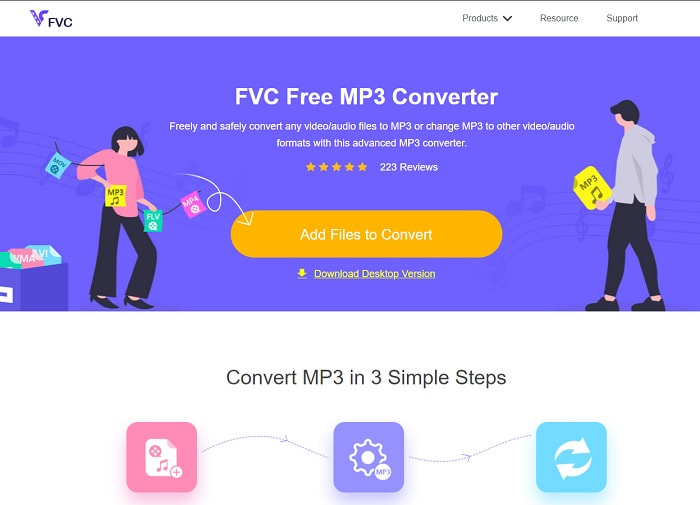
無料の動画からMP3へのコンバーターを探しているなら、FVC Free MP3 Converter がぴったりです。モバイル用コンバーターやその他のオンラインコンバーターと同様、多くの機能を備えているだけでなく、ウェブ上でも高速かつ正確な変換機能によってコンバーターの王者として君臨しています。ただし対応している形式の範囲がやや狭いため、自由自在に変換したいというニーズには制約となるかもしれません。それでも、十分に優秀なコンバーターであることに変わりはありません。このツールについてさらに詳しく知りたい方は、以下の手順を読み進めて、使い方を確認してみてください。
ステップ1. 上記のハイパーリンクをクリックして、メインのウェブツールのページを開きます。
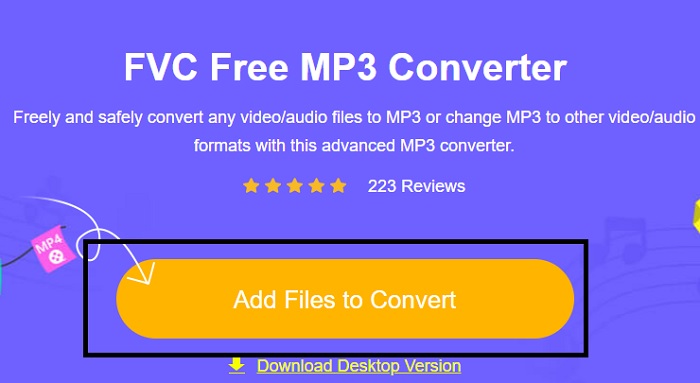
ステップ2. その後、Add Files to Convert をクリックして、ツールを起動します。
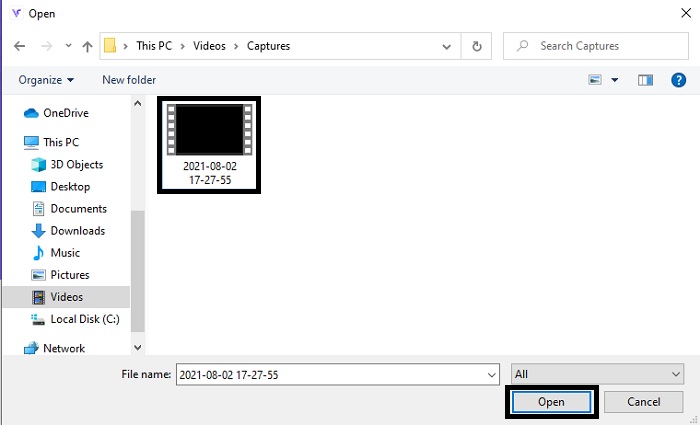
ステップ3. 変換したい動画ファイルを探し、open をクリックしてファイルを追加します。
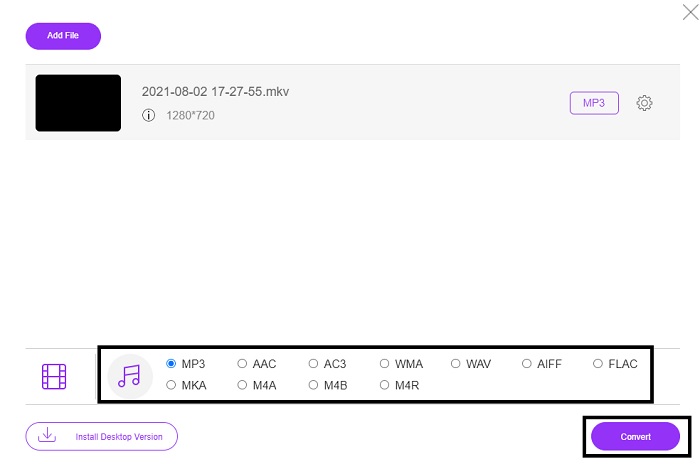
ステップ4. ここで、出力したい音声フォーマットを選択します。変換の準備ができたら、Convert をクリックして変換を開始します。
ステップ5. 変換したファイルを聴きたい場合は、folder をクリックしてファイルが保存されている画面を表示します。
FVCビデオコンバーターアルティメット
最初のツールで満足のいく変換結果が得られなかった場合は、万能コンバーターである FVC Video Converter Ultimate を試してみてください。これまでに使ったことのある、あるいは使ったことのないどのコンバーターとも異なり、このコンバーターはあらゆる面で非常にユニークです。変換処理、編集、作成、強化など、どの点においてもこのツールに勝るものはないと言われています。とはいえ、「使いにくいのでは」と思うかもしれませんが、その予想は外れです。操作は非常に簡単で、変換のプロでなくても見事な出力を作成できます。それでは、この最高のコンバーターを使って動画をMP3に変換する方法を、一緒に確認していきましょう。
ステップ1. まず最初に、このデスクトップ版ツールをパソコンにダウンロードします。必要に応じてセットアップ内容を変更し、完了時に「finish」をクリックして設定を保存します。
無料ダウンロードWindows 7 以降に対応安全なダウンロード
無料ダウンロードMacOS 10.7 以降に対応安全なダウンロード
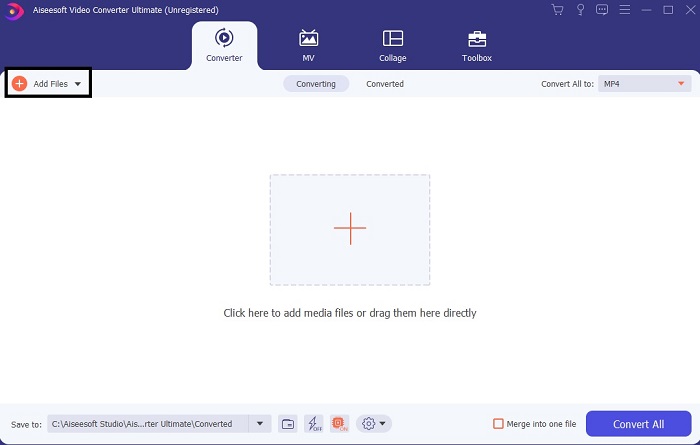
ステップ2. このようなインターフェースが画面に表示されます。Add Files もしくはプラスアイコンをクリックして、変換したいファイルをインターフェースに追加します。
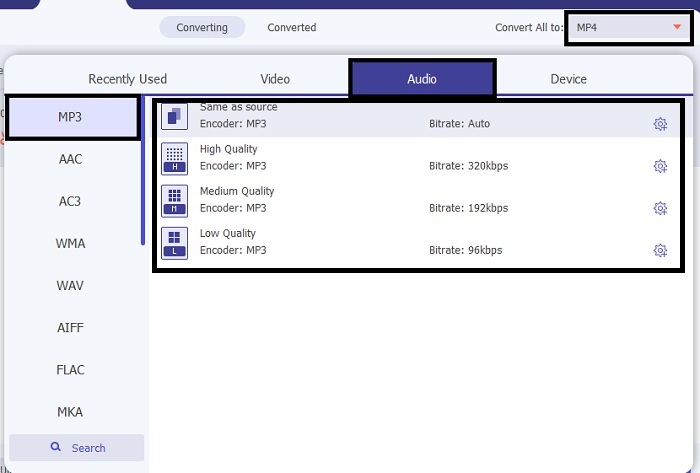
ステップ3. 変換したいファイルを選んだら、Convert All の横にあるドロップダウンメニューをクリックし、500種類以上ある形式の中から出力形式を選択します。
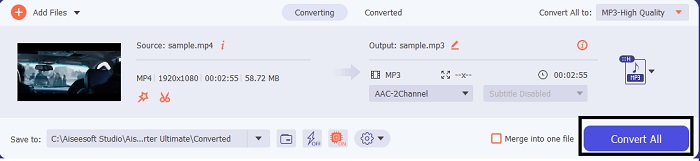
ステップ4. その後、Convert All をクリックして、動画をMP3 に変換する処理を開始します。
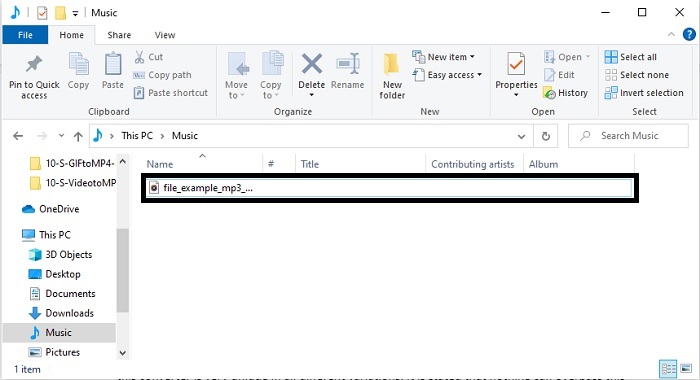
ステップ5. すべての処理が完了すると、ファイルマネージャーが画面に表示されます。変換されたファイルをクリックして、再生・視聴をお楽しみください。
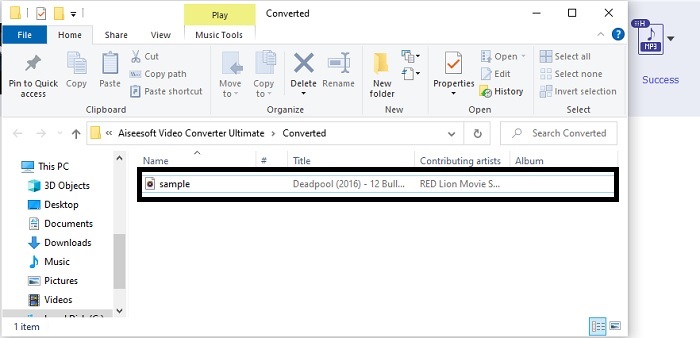
FVC Video ConverterUltimateを使用して変換する前にオーディオをブーストするための追加の手順
FVC Video Converter Ultimate に搭載されている機能のひとつで、音声を編集することもできます。動画ファイルを変換する前に音声を強化しておくと、あとでより快適に聴くことができます。そこで、Volume Booster を使って音量をブーストする手順を、ステップごとに見ていきましょう。
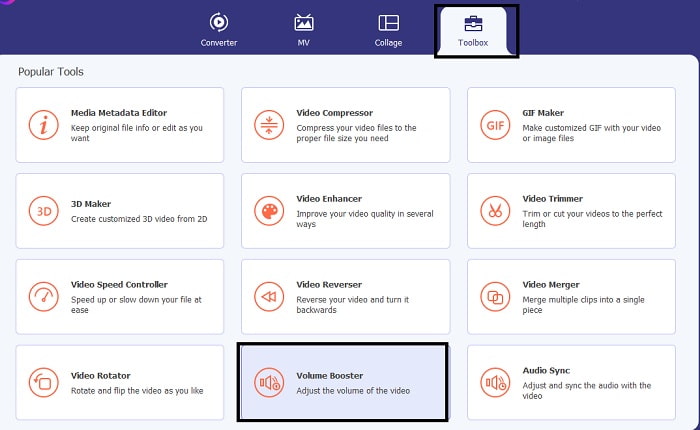
ステップ1. すでにツールをインストールしている場合は、Toolbar に進み、そこで Volume Booster をクリックします。
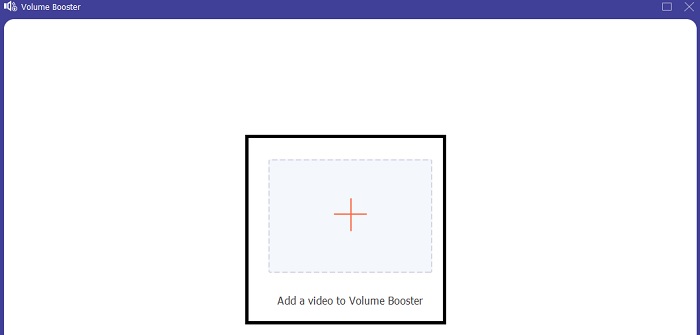
ステップ2. 強化したい動画ファイルを選択し、Open をクリックして読み込みます。
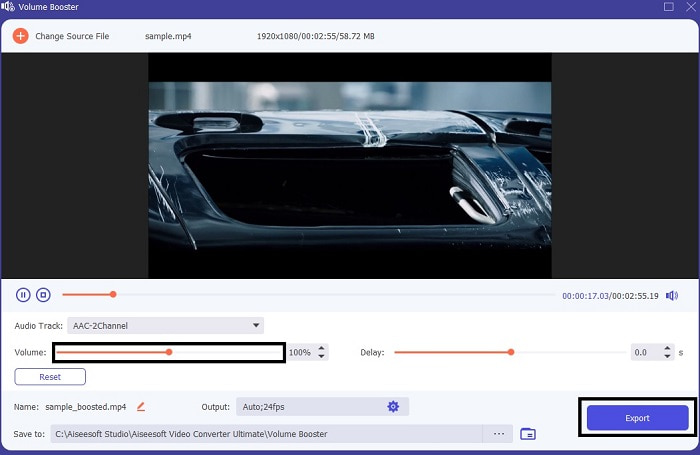
ステップ3. volume slides を自分の好みに合わせて調整します。続いて 歯車(cog) アイコンをクリックし、出力設定を変更します。完了したら OK をクリックして変更を保存します。最後に Export をクリックして最終的な出力を保存し、楽しんでください。
FVC Free VideoConverterとVideoConverterUltimateの比較
どちらのツールも、それぞれの専門分野で最高であるため、必要なものを提供します。何を使用するかを決めるのは難しいかもしれません。しかし、このケースを解決するために、2つのツールの比較表を次に示します。個々のツールとしての弱点と強みを調べてみましょう。
| 特徴 | FVC無料MP3コンバーター | ビデオコンバーター究極 |
| オーディオ変換 |  | |
| 編集機能 |  | |
| ダウンロードまたはアクセスが簡単 | | |
| 使いやすい | | |
| サポートされているプログラム | Webベースのツール | デスクトップベースのツール |
| 利用可能なソフトウェア | すべてのソフトウェアで | すべてのソフトウェアで |
| 価格帯 | その無料のオンラインツール | 1か月間:$25.00 1年間:$31.20 生涯ライセンスの場合:$55.20 |
パート2。iPhoneおよびAndroidデバイス用のビデオからMP3アプリ
1.ビデオからMP3へのコンバーター
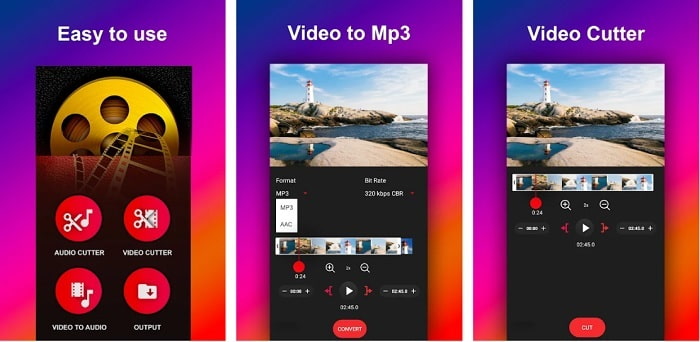
もしAndroid で使える動画からMP3へのコンバーターを探しているなら、Video to MP3 Converter を試してみるとよいでしょう。このツールは、あらゆるメディアファイルをMP3またはAAC形式に変換するために特別に作られています。また、ビットレートの変更やカット編集も行うことができます。高品質な出力が得られる一方で、変換したファイルが音楽フォルダに直接保存されない点は少し不便です。変換後すぐに聴くのではなく、自分で保存先を探さなければならないからです。
2. MP4からMP3-ビデオをオーディオに変換し、着信音をカットします
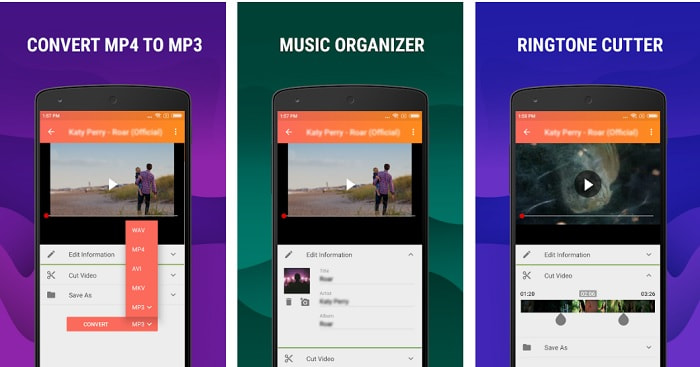
リストの最初のツールも希望どおりのMP3変換を提供してくれますが、MP4 to MP3 - Convert Video to Audio, Cut Ringtones はそれを上回る部分もあります。また、このアプリはAndroid専用のため、iOSユーザーは利用できません。Playストアでの評価は4.0とまずまずですが、利用者数は多くありません。多くのユーザーが、変換後にファイルの保存場所が分からなくなるという、先ほどのツールと同じ問題を指摘しています。それでも、複数ファイルの一括変換ができるため、個人用のMP3コンバーターとして使い続けているユーザーもいます。
関連記事:
3.オーディオコンバータ
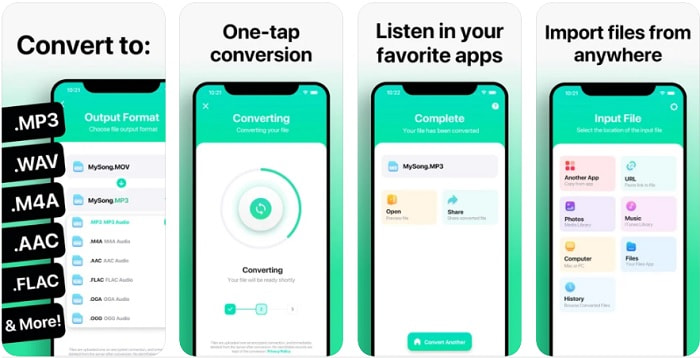
iOSユーザーの中には、「スマホで高品質な音声変換はできないのでは」と思っている方もいるかもしれません。しかし、その考えは間違いで、The Audio Converter は優れた変換処理などを提供してくれます。このツールを使えば、iPhoneで動画をMP3に変換するのも簡単です。ただし無料版で変換する場合、ファイルサイズに上限があります。大きなファイルを変換したい場合は、有料版に課金して購読する必要があります。さらに、場合によってはサブスクリプションを解約しようとしても、解約ボタンが見当たらないこともあるようです。この支払い方法を利用する際には、カードに思わぬ請求が発生する可能性もあるため、注意が必要です。
パート3。比較チャート
| 特徴 | FVC無料MP3コンバーター | FVCビデオコンバーターアルティメット | ビデオからMP3へのコンバーター | MP4からMP3–ビデオをオーディオに変換し、着メロをカット | オーディオコンバータ |
| オーディオコンバータ | | | | | |
| フォーマットのサポート | MP3、AAC、AC3、WMA、WAV、AIFF、FLAC、MKA、M4A、M4B、M4R | 500以上のメディアフォーマットが利用可能 | MP3&AAC | MP3 | MP3&AAC |
| ツールのアクセシビリティ | Webベースのツール | デスクトップベースのツール | Androidフォンベースのアプリ | Androidフォンベースのアプリ | iOS電話ベースのアプリ |
| 価格帯 | その無料のオンラインツール | 1か月間:$25.00 1年間:$31.20 生涯ライセンスの場合:$55.20 | 無料でダウンロード可能なAndroidアプリ | $6.49 –アイテムあたり$19.99 | プレミアムパス$3.99 ライフタイムパス$6.99 |
パート4。MP3へのビデオに関するFAQ
コンピューターでビデオを再生できないのはなぜですか?
動画形式がデフォルトのメディアプレーヤーでサポートされていない場合もあります。そんなときは、FVC Free Video Player を使って動画を再生してみてください。200種類以上の有名なフォーマットに対応しているため、再生できないのではないかと心配することなく、どんな動画ファイルでも視聴できます。
MP3は最高のオーディオフォーマットですか?
MP3は、音声ファイルの再生・録音・保存に広く使われていることから、事実上の標準音声フォーマットとして知られています。しかし、MP3よりも優れた音声フォーマットとしてAACがあります。このAACはより高品質ではあるものの、MP3よりファイルサイズが大きくなります。ただし、AVIのように極端に大きいわけではないので、そこまで心配する必要はありません。MP3ファイルを変換したい場合は、圧縮率が低く安全性にも欠けるツールではなく、MP3 to AAC web converter を利用することをおすすめします。
オーディオの欠点は何ですか?
音声ファイルは動画ファイルよりサイズは小さいものの、視覚的な要素を伴わないためインタラクティブ性には欠けます。もしポッドキャストなどを制作するなら、最高の音声レコーダーを選ぶべきであり、それが FVC Screen Recorder です。このツールは録音した音声の編集機能が非常に優れているうえ、他のダウンロード型・オンラインツールより多くの音声形式に対応しています。録音に悩んでいるなら、解決策はひとつ、FVC Screen Recorder を使うことです。よりプロ仕様のMP3レコーダーを知りたい方は、こちらをクリックしてください。
結論
そして、この記事もいよいよ終わりに近づき、当初の問題はすでに解決されています。ここからはそれぞれが別の道を進み、この「事件」の結末をあなたに託すことになります。FVC Video Converter Ultimate のように、信頼して頼れる最適なツールを選べば、探し続ける必要はもうありません。このツールを使うたびに、高速で信頼性が高く、安全な変換プロセスを期待できます。また、音声に問題があり強化したい場合でも、このツールで改善が可能です。今後も、最高レベルの変換を提供する FVC Video Converter Ultimate を引き続き検証し続けていただければ幸いです。本記事で示した正確な「証拠」が、すべてあなたのために用意されたものであることを忘れないでください。もしすでに満足できたなら、この「事件」はこれにて解決、クローズとしましょう。
-
 [2021] M2TSをMP3に変換するためのトップ6の無料およびオンラインの方法
 M2TSファイルをMP3に変換できますか?この投稿では、M2TSをMP3、AAC、AIFF、およびその他のオーディオ形式に変換するのに役立つ無料のオンライン方法のトップ6をリストしました。
-
 4 100%FLVビデオファイルをMP3形式に変換するための作業方法
 FLVをMP3ファイルに変換する方法は?あなたがする必要があるのは、この記事を注意深く読み、あなたの好きな方法を見つけて、あなたが望むものを得るために私たちのステップバイステップガイドに従うことです。
-
 品質を損なうことなくOGGをMP3に変換するためのトップ4の方法
 コンピューターやモバイルデバイスで聴くためにOGGファイルをMP3形式に変換するにはどうすればよいですか?ここでは、デスクトップまたはオンラインでそれを行う5つの最も簡単な方法を共有します。
