


 ビデオコンバーター究極
 スクリーンレコーダー
 ビデオ修復
ビデオ修復
 安全なダウンロード
Android 用着信音メーカー | あなたにぴったりのツールを見つけましょう
時々、Android デバイスのデフォルトの着信音は時代遅れで、自分のスタイルに合わないように聞こえることがありますが、もちろんそれは望ましくありません。着信音をカスタマイズすることは、デバイスのサウンドを本当に自分らしくし、独自のスタイルと好みを反映させる優れた方法です。
そこで、よく使われている優秀なAndroid着信音作成ツールを5つ取り上げ、それぞれを評価しながら、あなたの好みやニーズに最適なツールを見つけるお手伝いをします。Androidの着信音をパーソナライズする準備はいいですか?それでは続きをご覧ください!

パート1. Android向けの最高の着信音メーカー
FVC が選んだ Video Converter Ultimate
価格:
・永続ライセンス:$49.96
・1か月ライセンス:$14.50
・ビジネスライセンス:$119.00
Android向け最高の着信音メーカーの1つ目は、FVC が選んだ Video Converter Ultimate です。このツールを使えば、音声ファイルを変換・トリミング・カスタマイズして、高音質なAndroid用着信音に仕上げることができます。オーディオトリミング機能により、任意の音声ファイルから着信音にしたい部分だけを簡単に抜き出せます。さらに、このツールは編集・加工後も元の音質を保つため、クリアでプロ仕様のサウンドの着信音を作成できます。
FVC が選んだ Video Converter Ultimate の使い方:
ステップ1. まず、ツールをダウンロードしてインストールします。
無料ダウンロードWindows 7 以降に対応安全なダウンロード
無料ダウンロードMacOS 10.7 以降に対応安全なダウンロード
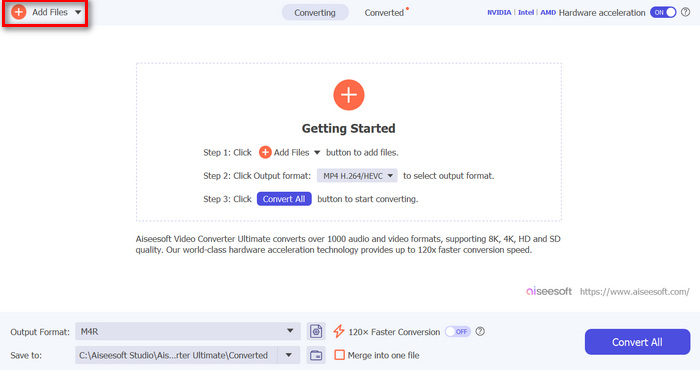
ステップ2. その後、Add Files ボタンをクリックします。これにより、Androidの着信音としてカスタマイズしたいMP3ファイルをインポートできます。
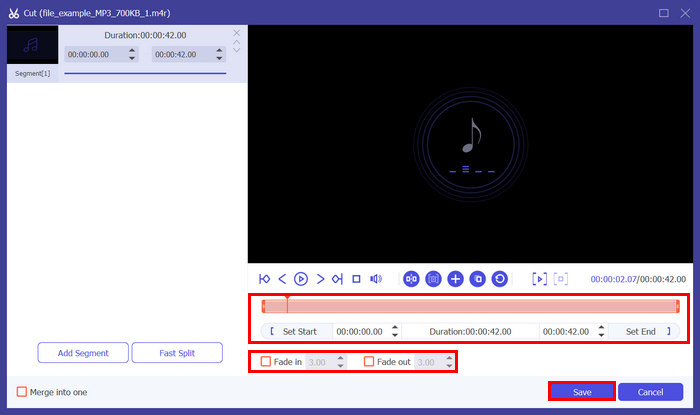
ステップ3. Android着信音を編集して個性を加えるには、Cut ボタンをクリックします。そこから、Bar ラインを動かして分割したい位置まで移動し、Split ボタンをクリックすることで、簡単に音声を分割できます。さらに、Fade in と Fade out をクリックして、着信音にフェード効果を追加します。完了したら、Save ボタンをクリックします。
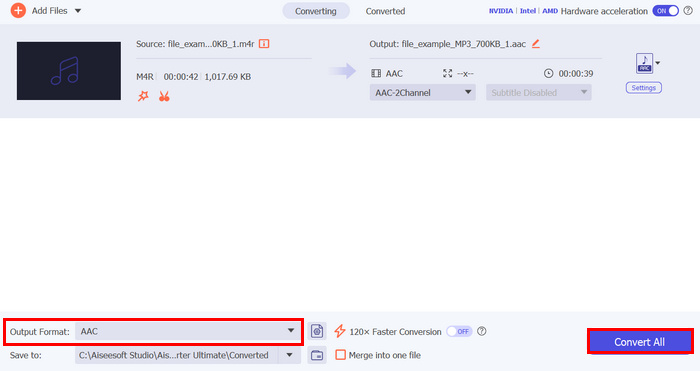
ステップ4. 次に、Convert All ボタンをクリックしてファイルの変換を開始します。変換されたファイルはパソコン上のフォルダーに直接保存されます。
FVC が選んだこの Video Converter Ultimate の最も優れた点は、Android デバイス用の着信音を作成するための非常に効率的でユーザーフレンドリーな方法を提供していることです。正確なオーディオ トリミング、幅広いオーディオ形式のサポート、高品質の出力など、包括的な機能により、このツールは優れた Android 着信音作成ツールとして際立っています。
パート2. 着信音メーカー: 着信音を作成する
価格: 無料
着信音メーカー: 着信音作成は、ユーザーが Android デバイスの着信音をカスタマイズできる無料アプリです。これを使用すると、ユーザーはオーディオ ソングの一部を切り取って着信音として使用できます。このアプリは、音楽エディター、アラーム音メーカー、着信音カッター、通知音作成者としても機能します。最後に、アプリ内で音声を録音して、編集して着信音として使用することもできます。
Ringtone Maker: create ringtone の使い方:
ステップ1. まず、Play ストアからアプリをインストールします。
ステップ2. アプリを開いたら、デバイス内の写真やメディアへのアクセスを許可します。
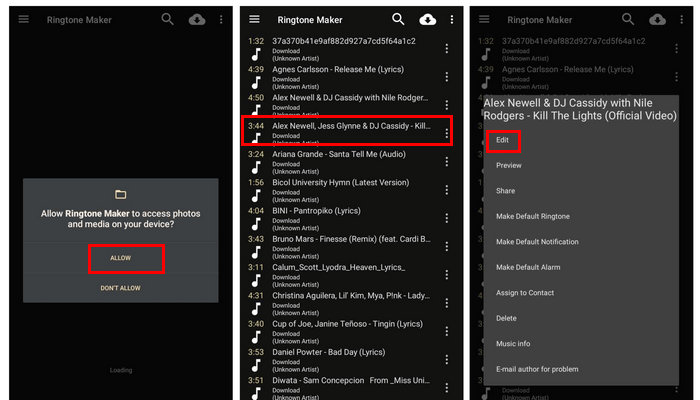
ステップ3. すると、端末内のすべての音声ファイルが表示されます。その中から、着信音として作成したい音声を選択します。
ステップ4. 選択後、右上の 3 点マークをタップして Edit を選びます。着信音にしたい部分だけをトリミングするには、カーソルを左右に動かして範囲を調整します。
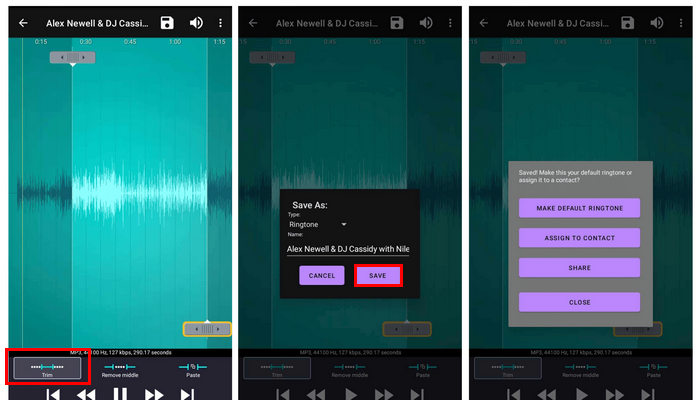
ステップ5. 最後に、新しく作成したAndroid用着信音を書き出すには、Saveボタンをタップします。
この Android 用着信音メーカーは、使いやすさから最高の着信音メーカーの 1 つとなっています。ただし、いくつかの制限があります。着信音の作成と編集に不可欠な機能は備えていますが、より詳細なカスタマイズに必要な高度な編集オプションがいくつか欠けています。
パート3. ゼッジ
価格: 無料/アプリ内課金:$0.49~$399.99(アイテムごと)
Android デバイスで独自の着信音を作成するのは面倒だという方には、このツールが最適です。Zedge は、ユーザーが豊富な曲の中から既製の着信音を自由に選択して楽しむことができるツールです。このツールでは、着信音を一から作成できますが、連絡先、メッセージ アラート、アラーム、デフォルトの着信音などの着信音をカスタマイズすることもできます。
Zedge の使い方:
ステップ1. まず、AndroidスマートフォンにZedge着信音アプリをダウンロードして開きます。
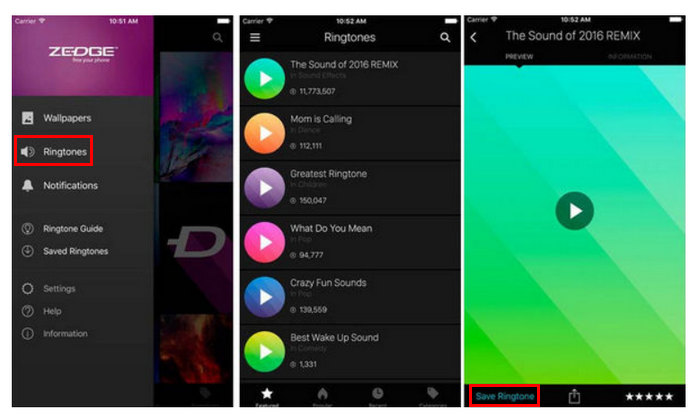
ステップ2. その後、この着信音アプリ内で Ringtones カテゴリを選択すると、数多くのトーン一覧が表示されます。
ステップ3. 最後に、モバイルの着信音として設定したいサウンドを試聴します。そのうえで、Save Ringtone オプションを選択します。すると、このAndroid用着信音メーカーが自動的に着信音を変更してくれます。
Zedge は、Android デバイスで既製の着信音を使いたい方に最適です。ただし、このアプリの問題点は、ある程度煩わしいポップアップ広告が頻繁に表示されることと、アプリ内購入が高額になることです。これらの問題にもかかわらず、無料版でも十分な機能が提供されており、多くのユーザーにとって便利な選択肢となっています。
パート4. 無料の着信音メーカー
価格: 無料
Android 用の着信音をオンラインで作成したい場合は、Free Ringtone Maker がお勧めです。この Android 用着信音メーカーは非常に使いやすいです。着信音として作成したいオーディオ ファイルをアップロードするだけで、トリミングや音量調整などのすべての編集機能が同じページに表示されます。ただし、このツールは出力に 2 つの主要なオーディオ形式のみをサポートしていることに注意してください。残念ながら、このツールは最も一般的な着信音形式である M4R を入力としてサポートしていません。
Free Ringtone Maker の使い方:
ステップ1. 着信音に使いたい音声ファイルを読み込むには、Upload Files ボタンをクリックするか、ツールのメイン画面にファイルをドラッグ&ドロップします。
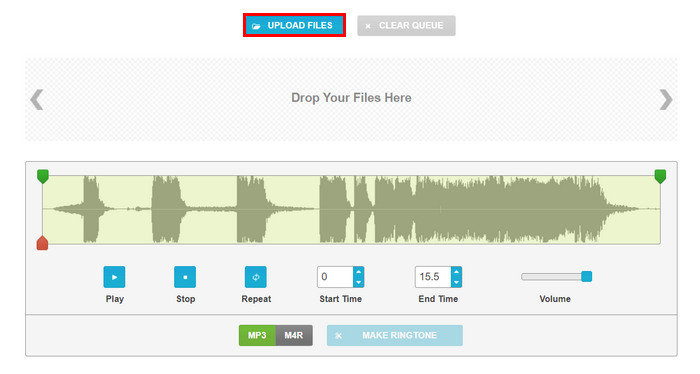
ステップ2. 次に、音声をカットするには、緑色のカーソルを動かして、オリジナルのAndroid着信音の開始時間と終了時間を調整します。または、Start Time と End Time のボックスに開始・終了させたい時刻を直接入力しても構いません。同時に、volume を上げたい場合は、ボリュームレベルのスライダーをドラッグします。
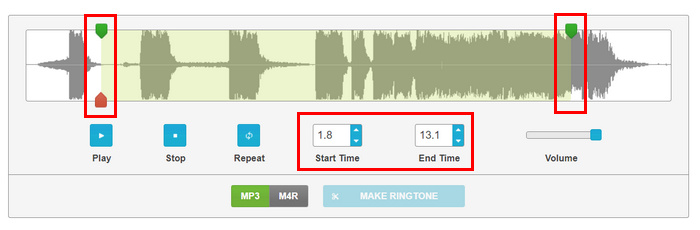
ステップ3. 形式については、MP3 と M4R のいずれかを選択します。これは、お使いのAndroid端末が対応している着信音形式によって決まります。
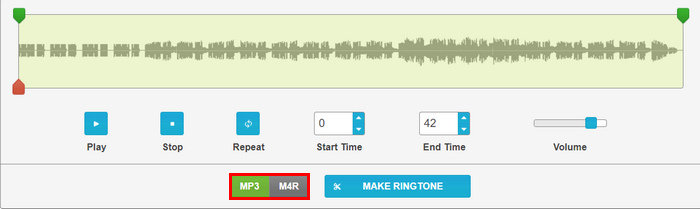
ステップ4. 設定が完了したら、Make Ringtone ボタンをクリックします。
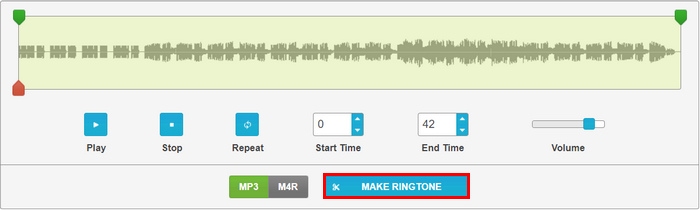
この Android 用着信音メーカーの素晴らしい点は、すべてのカスタマイズ設定を 1 ページで簡単に操作できることです。独自の Android 着信音を作成するために、複雑なタブやその他のメニューを操作する必要はありません。
パート5. 着信音メーカー:ミュージックカッター
価格:
・月額 Php. 48.00
・年額 Php. 289.00
・買い切り Php. 635
この Android 用の無料着信音メーカーを使用すると、ユーザーは新しい着信音を編集したり作成したりできます。このツールは、MP3、FLAC、OGG、AAC、WAV、AMR、MP4 などのさまざまな形式をサポートしています。さらに、デバイス上の曲や音楽を検索して、内蔵レコーダーを使用してオーディオを編集または録音することもできます。
Ringtone Maker: Music Cutter の使い方
ステップ1. Play ストアでアプリをダウンロードし、インストールします。
ステップ2. 次に、Trim Audio ボタンをタップして、Android の着信音にしたい音声ファイルを選択します。リストから使用する音声を選びます。
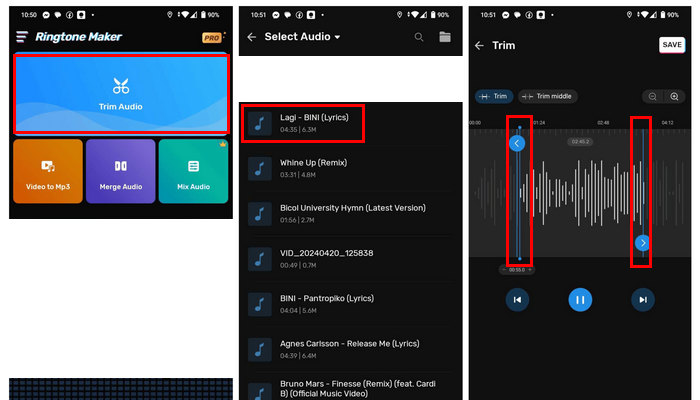
ステップ3. 続いて、音声の一部をトリミングするには、Blue line を動かして、好みのタイミングに合わせます。
ステップ4. 音量を変更したい場合は、Volume ボタンをタップし、バーを左右に動かして調整します。
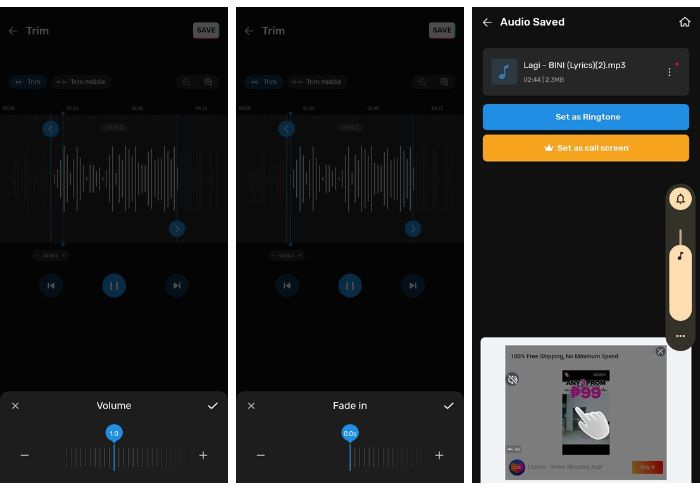
このツールの無料バージョンを使用している場合、音量を最大 2.0 までしか上げられません。
ステップ5. 着信音にフェードイン・フェードアウトを追加するには、Fade in と Fade out の両方のボタンをタップします。
ステップ6. すべてのカスタマイズが完了したら、Save ボタンをタップして保存します。
このアプリは、Android 用の着信音メーカーとして優れています。特に、無料で使いやすいからです。ただし、システムに少しバグがあったため、問題があります。また、出力を携帯電話に保存するためのファイルの場所を選択できないため、少し制限があります。アプリにはバグがあり、広告が多すぎます。
パート6. Android用着信音メーカーに関するよくある質問
Android に最適な着信音メーカーは何ですか?
Android向けのベストな着信音メーカーは、あなたのニーズと好みによって異なります。高度な機能を備えた総合ツールを求めるなら、FVC が選んだ Video Converter Ultimate が最適です。精密なオーディオトリミング(たとえば、MP3のカット)、幅広い音声フォーマットへの対応、高品質な出力を提供します。一方、あらかじめ用意された着信音を使いたい人や、シンプルで使いやすいインターフェースを重視する人には、広告が多くアプリ内課金が高めである点はあるものの、Zedge が理想的な選択肢と言えるでしょう。
Zedgeの着信音は本当に無料ですか?
はい。Zedge は無料です。ただし、アプリにはアイテムごとに $0.49 から $399.99 の範囲のアプリ内購入が含まれます。
Android 用の最高の無料着信音サイトは何ですか?
Android 用の最高の無料着信音サイトは、実際には個人のニーズによって異なります。Zedge は、無料着信音の膨大なライブラリとカスタマイズ オプションにより、人気のある選択肢です。Free Ringtone Maker は、シンプルなインターフェイスでパーソナライズされた着信音をオンラインで作成するためのもう 1 つの優れたオプションですが、形式のサポートは限られています。
結論
結論として、Android 用の適切な着信音メーカーを見つけることは、カスタマイズされた着信音を作成するプロセスを効率化するのに役立つため、非常に重要です。したがって、使用する予定のツールに関係なく、各ツールには、可能な限り最善の方法で役立つ独自の機能が備わっています。Android 着信音をパーソナライズする準備はできましたか? 今すぐこれらのツールのいずれかをお試しください。
-
 Spotify の曲を着信音にする方法 – どうやって実現するのでしょうか?
 お気に入りの Spotify の曲を携帯電話の着信音にしたいと思っても、その方法が分からないのですか? この記事では、設定方法を説明します。
-
 iPhoneでMP3を着信音に変換する: 初心者向けガイド
 iPhone で MP3 を着信音に変換したいのですが、どこからどのように始めればよいかわかりませんか? この記事では、この変換を簡単に実現するための 3 つの方法を紹介します。
-
 YouTube から着信音への変換ツール: 最も簡潔な 5 つのツール
 YouTube 動画を着信音に変換する方法をお探しですか? 今すぐこれら 5 つのコンバーター ツールをチェックして、インターネットなしでもどこでも着信音を再生しましょう。
