


 ビデオコンバーター究極
 スクリーンレコーダー
 ビデオ修復
ビデオ修復
 安全なダウンロード
WavePad サウンド エディター: 完全なレビューとユーザー エクスペリエンス
数多くのオーディオ編集ソフトを試しては、仕上がりにがっかりしていませんか? そんな心配はもう不要です。今回は、NHC が開発した高性能ソフトウェアを詳しくご紹介します。WavePad は、その豊富な機能でよく知られたオーディオ制作・編集プログラムです。プロ仕様のこのソフトは、まさにあなたが探していた一本かもしれません。さあ、迷っている時間はありません。この記事を読み進めて、ソフトの概要、用途、搭載されている高度な機能、さらに長所と短所までしっかり理解していきましょう。

パート1. WavePadの評価
WavePad を実際にテストしたところ、オーディオ編集の能力の高さで知られており、特にオーディオ編集および作成ツールの多様性に重点が置かれています。提供される圧倒的で終わりのない機能のリストは、オーディオ セクションのカット、トリミング、削除など、すべての基本的なオーディオ編集機能を備えたエディター機能に基づいています。エフェクトとフィルターは、オーディオのフェードインとフェードアウト エフェクト、オーディオ ノイズ除去、ビート検出から、プロジェクトに適用するさまざまなムードと雰囲気を作成するサウンド エフェクト ライブラリまで多岐にわたります。WavePad で私たちが経験したもう 1 つの注目すべき体験を、長所と短所として以下にリストします。
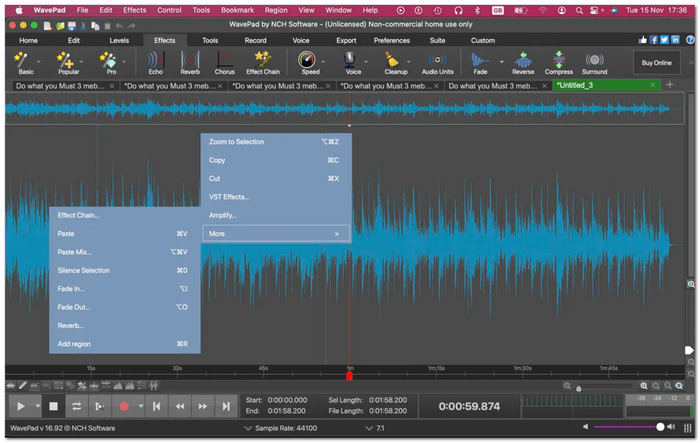
長所
- 無料版では、幅広い機能と編集機能にアクセスできます。
- オーディオ レコーダー、エディター、エンハンサーとして使用できるプログラム。
- このソフトウェアには包括的な編集機能とツールが搭載されています。
- WAV、MP3、MP4、WMA、FLAC など、幅広いファイル形式をサポートしています。
- デスクトップおよびモバイル デバイスでのマルチプラットフォームの利用。
- 競争力のあるプロフェッショナルレベルのソフトウェア。
短所
- 一部の高度な機能は有料版でのみ利用可能です。
- 顧客サポートサービスが不足しています。
- 複数のエフェクトを適用するとレンダリング速度が遅くなります。
全体的に、強力でいわゆる高度なオーディオ編集ソフトウェアである WavePad は、ロスレス品質のエクスポートを保証するソフトウェアであるため、プロジェクトの質という点で私たちの期待を超えています。ボイスチェンジャーなどの高度な編集機能を利用すると、フル機能のツールとしてのソフトウェアの能力が最大限に発揮されます。したがって、価格は比較的安くはありませんが、機能の数と高度なツールの可用性を考慮すると、ユーザーにとっては有利です。ソフトウェアの複雑なインターフェイスについて議論したり懸念したりする人もいるかもしれませんが、ソフトウェアを操作するための適切なガイドと資料があれば、すべてを学ぶことができます。使用する前に、まず WavePad に慣れることをお勧めします。
パート2. WavePadの概要
WavePad オーディオ編集ソフトウェアは NCH Software が作成したツールで、プロと個人の両方でシームレスにタスクを実行できるように設計された多機能オーディオ エディターおよびレコーダーです。これは一般的なオーディオ ソフトウェア ツールではなく、長いオーディオ ファイルのトリミング、オーディオ トラックからのボーカルの削減、オーディオ イコライザー、オーディオ ノイズ除去、ボイスオーバー レコーダー、着信音の作成など、プロ向けの機能が満載です。Windows および Mac 用のこのフル機能のオーディオおよび音楽エディターは、一般的なオーディオ形式 MP3 および WAV に加えて、その他の 50 種類以上のオーディオ形式をサポートしているため、誰でも使用できます。
対応プラットフォーム
• Windows 10、7、8、8.1、11。
• macOS 10.5 以降。
• iOS 12.0以上。
• Android 5.0 (Lollipop) 以上。
価格
• スタンダードエディション($34.99)。
• マスターエディション ($59.95)
パート3. WavePadの主な機能
使いやすさ
WavePad の使いやすさは、次のようないくつかの主要な機能とデザインの選択によって実現されています。
• 直感的なインターフェース —— 分かりやすいアイコン表示、整理されたツール群、見やすいメニュー画面を備えています。
• ドラッグ&ドロップ機能 —— WAV ファイルをソフトへ簡単にインポートできます。
• ガイドとツールチップの用意 —— ソフトの基本的な操作方法や各ボタンの役割を簡潔に説明し、初めてのユーザーをサポートします。
• バッチ処理 —— 複数の WAV ファイルに対して、同時に編集や一括変更を適用できます。
• カスタマイズ可能なワークスペース —— パネルやツールバーを自由にレイアウトし、使いやすい作業環境に調整できます。
音声編集
WavePad のオーディオ編集機能は、いくつかの基本的なオーディオ編集機能を備えた一般的なオーディオ編集ソフトウェア ツールを超えています。
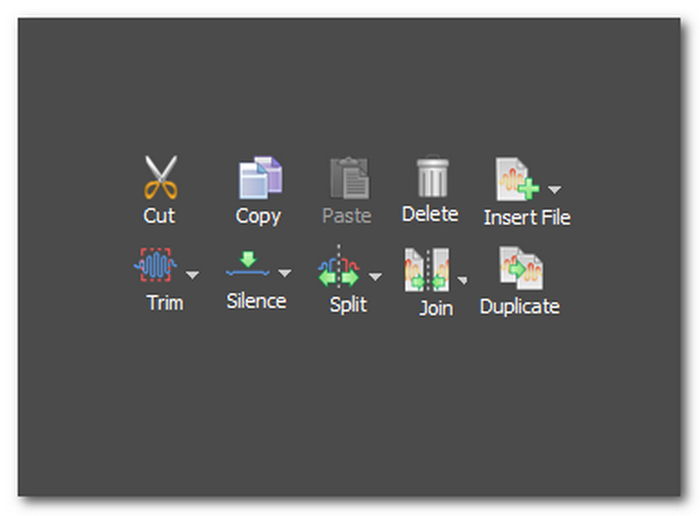
• カット・コピー・ペースト ツール —— オーディオファイル内のセクションをスムーズにカット、複製、整理できます。
• 削除・挿入ツール —— 不要なセクションを削除したり、無音部分をトラック内に挿入したりできます。
• トリムツール —— オーディオファイルを短く切り詰めることができます。
• 無音トリムツール —— トラックの冒頭と末尾にある無音部分を自動的にカットします。
• 分割ツール —— 1 つのオーディオファイルを複数のセクションに分割できます。
• 結合ツール —— 2 つ以上の別々のオーディオファイルを 1 つのファイルに結合できます。
• 複製 —— 選択したオーディオファイルと同一のファイルを作成します。
エフェクトとフィルター
これは、プロジェクトに適用できるすぐに使用できるエフェクトとフィルターを指します。これらを使用すると、ユーザーは多くの労力や高度な技術的知識を費やすことなく、オーディオを編集および強化できます。ソフトウェア ツールで使用できる人気のオーディオ エフェクトをいくつか紹介します。
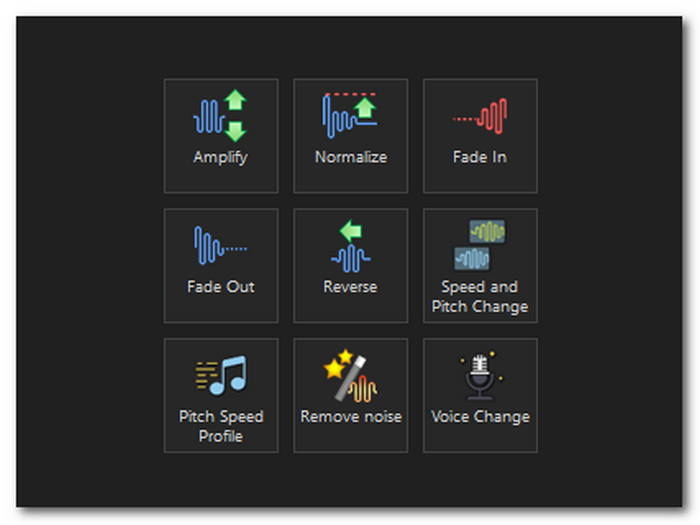
• フェードイン・フェードアウト・クロスフェード効果 —— トラックの冒頭や末尾で音量を徐々に上げ下げし、自然なつながりを演出します。
• ノイズ除去 —— ファイル全体を解析し、ノイズ、ホワイトノイズ、ハム音など不要な音を取り除きます。
• 再生速度・ピッチ変更 —— オーディオの再生速度を速くしたり遅くしたり、ピッチを調整できます。
• 逆再生効果 —— オーディオを逆方向に再生できるようにします。
• オーディオアンプ —— ファイル全体の音量をコントロールし、増幅することができます。
• ボイスチェンジャー —— 声の音質やトーンを変化させ、ビブラートやささやき声などの効果を付加できます。
高度なツール
オーディオ編集と録音にこのソフトウェアを強力かつ多用途にする、注目に値する WavePad のその他の高度なツールは次のとおりです。
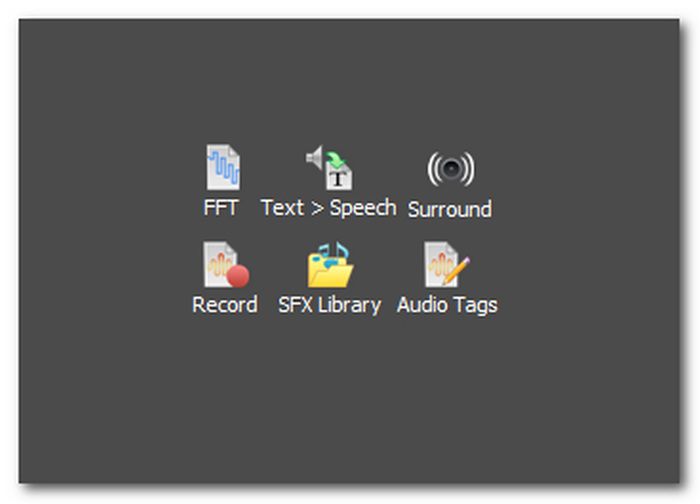
• スペクトル解析(FFT) —— 周波数特性をグラフ表示し、各帯域がどの程度強いか、正常かを分析できます。
• 音声合成(テキスト読み上げ) —— ユーザーが入力したテキストからコンピューター音声を生成します。
• オーディオレコーダー —— 録音ソフトとして使用でき、録音と同時にその編集作業を行うための作業スペースとしても機能します。
• SFX ライブラリ —— 事前に用意された効果音やロイヤリティフリー音源を提供し、オーディオの厚みとクオリティを高めます。
• サラウンドサウンド —— オーディオファイルから即座にサラウンドミックスを生成します。
• オーディオタグ —— オーディオファイルのメタデータを編集できます。
ソフトウェアをインストールしたくない場合は、オーディオファイルをオンラインで直接カットおよび結合できます。
パート4. WavePadの使用例
WavePad の使用例はオーディオ編集に限定されません。このソフトウェアは Windows と Mac で利用でき、iOS と Android 用のアプリ バージョンも利用できます。ソフトウェアの使いやすさは幅広く、次のような用途があります。
• ボイスオーバー —— 個人プロジェクト、ポッドキャスト、ビジネス用途などのナレーションを高音質で素早く録音し、ソフト内のボイス強調機能でさらに品質を向上できます。
• オーディオ修復 —— 古い録音をクリーニングし、フィルターやエフェクトを適用して音声の明瞭さを改善します。
• サウンドデザイン —— 映画や映像制作向けの音楽・効果音として使用するオーディオを作成・編集します。
• 音楽制作 —— レコーディング、編集、ミキシング、マスタリングなど、音楽制作に必要な作業をまとめて行えます。
パート5. WavePadの評価とユーザーレビュー
G2 レビュー概要
G2 のユーザーレビューでは、WavePad はオーディオ編集の能力が明らかに優れており、素晴らしいミキシングツールであるとされています。ユーザーのレビューでよく言及されているのは、WavePad のオーディオエディターとしての機能、ソフトウェアの使いやすさ、編集機能などです。また、あるユーザーは、WavePad はプロ仕様の録音および編集アプリであるものの、ソフトウェアの操作が少し複雑で時間がかかると感じるユーザーもいるかもしれないと指摘しています。
WavePad の全体的な満足度は 5 点満点中 4.3 点という評価を獲得しました。
GetApp レビュー概要
GetApp でレビューされたユーザーは、WavePad のサウンド効果ライブラリ機能の下にある面白いフィルターが便利で、不快ではないと感じています。WavePad はコストパフォーマンスに優れ、使いやすく、ソフトウェアに備わった豊富な機能に優れていますが、ユーザーからよく指摘されているように、カスタマー サポートの満足度は低いです。一方、あるユーザーは、このソフトウェアが他のプラグインやソフトウェアに対して柔軟であるにもかかわらず、初心者向けのアプリ内チュートリアルやガイドをもっと追加することで WavePad を改善できると指摘しています。
WavePad の全体的な満足度は 5 点満点中 4.5 点と評価されました。
TechRadar レビュー概要
TechRadar の WavePad に関するレビューは非常に具体的で詳細でした。価格プランに関しては、WavePad はさまざまな無料および有料のエフェクトや機能を提供しているため、頼りになるツールであり、優れた投資であるとユーザーは述べています。その編集機能は、オーディオ編集ツールとして優れたパフォーマンスを発揮し、ロスレス品質でエクスポートできるため、ユーザーから肯定的な評価を得ており、ユーザーの満足度を高めています。
WavePad の全体的な満足度は 5 点満点中 4 点と評価されました。
パート6. オーディオとビデオを編集するための最高のWavePadの代替品
FVC は理想的な WavePad の代替エディターを探してインターネットを調査した結果、FVC 推薦の Video Converter Ultimate を見つけました。このソフトは Windows と Mac で無料ダウンロードでき、シンプルな UI と充実した機能を備えています。音量ブースト、分割、結合、カットツール、フェード効果に加え、動画編集とオーディオ編集のセクションが分かれている設計です。さらに、ツールボックスセクションにはオーディオコンプレッサー、ノイズリムーバー、ビデオ強化、オーディオ同期などの高度な機能も搭載されています。
無料ダウンロードWindows 7 以降に対応安全なダウンロード
無料ダウンロードMacOS 10.7 以降に対応安全なダウンロード
500 万回以上ダウンロードされているこの優れたプログラムは、MP3、MP4、AAC、WMA、WAV など 1000 種類以上のファイル形式をサポートする多機能なオーディオおよびビデオ エディター プログラムとして機能します。WavePad とは異なり、このソフトウェアは最もわかりやすいインターフェイスと高速処理テクノロジを備えているため、個人用とプロ用の両方で初心者でもシームレスな操作体験が得られます。
パート7. WavePadオーディオエディタに関するよくある質問
WavePad でボーカルを削除できますか?
はい、WavePad には、エフェクト メニューの下にあるオーディオ ファイルからボーカルを削除するための「ボーカル削減と分離」ツールという機能があります。操作するには、エフェクト > 音声 > ボーカルの削減の順にクリックします。
WavePadは使いやすいですか?
はい、個人プロジェクトでもプロフェッショナル プロジェクトでも簡単に使用できるように設計されています。ソフトウェアには、簡単に操作できるようにガイドとチュートリアルが用意されています。
WavePad の欠点は何ですか?
WavePad の欠点の 1 つは、さまざまなアイコンやボタンが多すぎて混乱し、ユーザーを圧倒する、時代遅れのインターフェースです。もう 1 つは、無料版の制限です。無料版ではできないタスクをエクスポートしたり実行したりするときに、ユーザーのオーディオ編集プロセスが妨げられる可能性があります。
WavePad のノイズ低減機能はどれくらい効果的ですか?
ノイズ低減機能は、静的ノイズ、ハム音、バックグラウンド ノイズを低減し、全体的な品質を向上させるのに十分効果的です。ただし、最高品質の結果を得るには、ユーザーは設定を微調整して実験する必要があります。
WavePad は他のオーディオ編集ソフトウェアと比べてどうですか?
WavePad は競争力があり、Adobe Audition などの高価なオーディオ編集ソフトウェアと比較できます。WavePad は機能面で非常に優れているため、このソフトウェアはオーディオ編集用のプロ仕様で高価なソフトウェアの代替品となります。
結論
このWavePad オーディオ編集ソフトレビューを読み進めれば、WavePad がオーディオエディターとしてどのように動作し、どんな性能を持つのか知識のないユーザーでも理解できるようになります。個人利用であれプロ用途であれ、WavePad には最高のオーディオ制作・編集結果を得るために試してみる価値のある多彩な機能が用意されています。そのため、使用中にいくつか制限を感じる場面があったとしても、WavePad は依然として試してみる価値のあるソフトだと言えるでしょう。
-
 デスクトップおよびオンライン ユーザー向けのベスト 10 GIF コンプレッサー
 この記事では、大きな GIF ファイルの問題を解決するのに役立つ最高の GIF コンプレッサーについて学びます。それらをチェックして、最良の洞察を得ることができます。
-
 Android および iOS で最もおすすめの 5 つのオーディオ レコーダー アプリ [2023 年更新]
 どのオーディオレコーダーアプリを使うべきかわからないのですか?もしそうなら、この記事はあなたがあなたのオーディオ録音タスクであなたを助けるであろうアプリを選ぶのを助けるでしょう。
-
 使用を検討すべき優れた MP4 から MP3 への変換ツール
 最高評価の MP4 から MP3 へのコンバーターを使用して、オーディオの多用途性の力を解き放ちます。シームレスな変換、卓越した音質、超高速処理を体験してください。
