


 ビデオコンバーター究極
 スクリーンレコーダー
 ビデオ修復
ビデオ修復
 安全なダウンロード
Windows / Mac / OnlineでM2TSをWMVに変換する方法(完全に無料で使用)
一部のCanonおよびSonyカメラは、デフォルトの出力形式としてM2TSを使用します。 M2TSビデオはファイルサイズが大きいです。 M2TSフォーマットの互換性も良くありません。さらに編集するためにM2TSファイルをWindowsムービーメーカーにインポートする場合は、最初にM2TSをWMVビデオに変換する必要があります。
この記事では、オンラインとオフラインの両方で、ステップごとにM2TS から WMV 形式へ動画を変換する方法を紹介します。これにより、スマホやパソコン上で M2TS 動画を簡単に WMV に変換できます。

パート1:WindowsとMacでM2TSをWMVに変換する方法
ビデオフォーマットを変更したいだけなら、無料のM2TSからWMVへのビデオコンバーターで十分です。必要のない追加機能にお金を払う必要はありません。ここにあなたが選ぶことができる2つのM2TSからWMVへのコンバーターフリーウェアがあります。
無料でWindows上でM2TSをWMVに変換する
Windows パソコンで M2TS ファイルを WMV に変換するには、FVC Free M2TS Converter を利用できます。これは M2TS の一括変換ができるコンバーターで、M2TS ファイルを WMV、MOV、MP4 などの各種動画・音声形式にまとめて変換可能です。内蔵されている動画編集ツールも無料で利用できます。変換前に M2TS 動画を編集・カスタマイズ することも可能です。以下は、この無料 M2TS から WMV 変換ソフトの主な機能です。

無料 M2TS コンバーター
112,356以上のダウンロード- Windows 10/8/7 / Vista / XPでM2TSをWMVに無料で変換します。
- M2TSからWMVへのバッチ変換をサポートします。
- 変換速度が50倍速くなります。
- 他のビデオエフェクトを圧縮、マージ、およびM2TSファイルに適用します。
- 家族、誕生日、休日など、特別なテーマをM2TSファイルに追加します。
無料ダウンロードWindows 7 以降対応安全にダウンロード
無料ダウンロードMacOS 10.7 以降対応安全にダウンロード
ステップ 1:FVC Free M2TS Converter を無料ダウンロードしてインストールし、起動します。Add File(s) をクリックして、複数の M2TS 動画ファイルを読み込みます。

ステップ 2:output format リストから WMV を探して選択し、出力動画形式に設定します。

ステップ 3:M2TS 動画を編集したい場合は、上部の Edit をクリックします。すると、FVC Free M2TS Converter 内で、オープニングとエンディング部分のタイトル、作者、時間を編集できます。

ステップ 4:Convert をクリックして、Windows 上で無料で M2TS から WMV へ変換します。
MacでM2TSをWMVに無料で変換
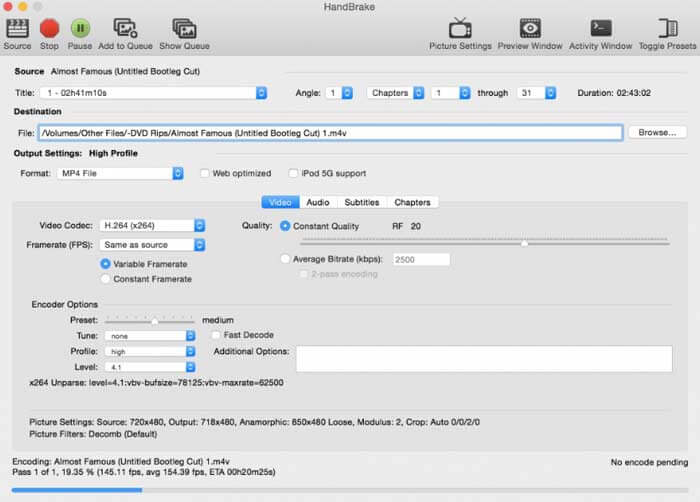
Macユーザーの場合、HandBrakeをM2TSからWMVへの無料コンバーターとして使用できます。 HandBrakeを使用してMacでM2TSをWMVに無料で変換する詳細な手順は次のとおりです。
ステップ 1:HandBrake を起動します。[Source]ポップアップウィンドウで M2TS ファイルを選択し、Open をクリックします。
ステップ 2:Format リストを開きます。動画形式として WMV を選択します。
ステップ 3:Browse をクリックして、保存先フォルダーを変更します。
ステップ 4:Start をクリックして、Mac で M2TS から WMV への動画変換を完了させます。
パート2:M2TSをWMVオンラインに変換する方法
パソコンに何もインストールしたくない場合は、オンライン動画コンバーターを利用することもできます。ここでは例として、FVC Free Online Video Converter を使用します。
ステップ 1:ブラウザで FVC Free Online Video Converter にアクセスします。

ステップ 2:まだ FVC launcher をダウンロードしていない場合は、まず Add Files to Convert をクリックしてダウンロードします。その後、ランチャーをインストールして最新状態に更新します。

ステップ 3:M2TS ファイルを開いて追加します。続いて、変換を開始する前に形式として WMV を選択し、Convert をクリックします。

ステップ 4:保存先フォルダーを確認したら、そのまま WMV ファイルが生成されるまで待ちます。
パート3:M2TSをWMVに変換するためのFAQ
AndroidはM2TSファイルを再生できますか?
いいえ。VLCMediaPlayerをM2TSプレーヤーアプリとして使用できます。または、M2TSをWMV形式に変換して、AndroidやiPhoneで簡単に再生することもできます。
MTSとM2TSに違いはありますか?
実のところ、答えは「いいえ」です。MTS と M2TS の間に機能的な違いはありません。どちらも AVCHD に関連するハイビジョン動画ファイルです。
M2TSはWMVよりも優れていますか?
M2TSは、カムコーダー用に特別に設計されています。そのため、M2TSファイルは高解像度でファイルサイズが大きくなります。 M2TSをWMVに変換することで、ビデオを小さくすることができます。 M2TSと比較すると、WMVは一般的で広くサポートされているビデオ形式です。 M2TSを圧縮して一般的なビデオ形式に変更する場合は、M2TSをWMV形式に変換することをお勧めします。
以上が、M2TS から WMV 形式へ動画を変換する方法です。Windows・Mac・オンラインのいずれでも、動画形式の変換と基本的な動画効果の適用を無料で行うことができます。完全に無料かつ安全で、潜在的なリスクやアプリ内課金もありません。安心して M2TS ファイルを WMV 形式に変換してください。
-
 Windows / MacでM2TSをMOVに変換する方法
 多くのプレーヤーやプラットフォームでビデオファイルを再生するには、M2TSをMOVに変換する必要がありますか?この記事は、Windows / MacでM2TSをMOVに変換するための最良のオンライン/オフライン方法を見つけるのに役立ちます。
-
 M2TSファイルを無料でMP3に変換する方法
 M2TSファイルをMP3に変換できますか?この投稿では、M2TSをMP3、AAC、AIFF、およびその他のオーディオ形式に変換するのに役立つ無料のオンライン方法のトップ6をリストしました。
-
 Windows / MacでTSをAVI / MKV / MOV / WMVに変換する5つの簡単な方法
 TSファイルをAVI / MKV / MOV / WMVにすばやく変換したいですか?この記事では、オンラインおよびオフラインのビデオコンバーターと完全なガイドを紹介します。たぶんあなたはここで最高の無料のTSコンバーターを手に入れることができます。
