


 ビデオコンバーター究極
 スクリーンレコーダー
 ビデオ修復
ビデオ修復
 安全なダウンロード
Windows / Mac(オンライン/オフライン)でM2TSをMOVに変換する方法
高解像度ビデオカメラは、軽量で大容量のメモリを備えているため、人々の間でますます人気が高まっています。休日や誕生日などの瞬間をとらえるのに使えます。ただし、ビデオカメラのこれらのファイルはとして保存されます。 AVCHD形式のmtsまたは.m2ts拡張子。 QuickTime、iPhone、iPadなどでは再生できません。
ビデオカメラの M2TS ファイルを再生したい場合、Mac や PC で広く使われている QuickTime ムービーファイル形式である MOV に M2TS を変換する必要があるかもしれません。ここでは、Windows と Mac で M2TS を MOV に変換する6つの無料方法を紹介します。具体的な手順を見ていきましょう。

パート1:WindowsでM2TSをMOV Freeに変換する(オフライン)
M2TS を無料で MOV に変換するには、FVC Free M2TS Converter が第一候補となるでしょう。Free M2TS Converter はワンストップの M2TS 変換ソフトです。あらゆる M2TS ファイルを MOV、MP4、MKV、AVI、MP3 などに変換できます。バッチ変換機能により、複数の M2TS ファイルを同時に MOV に変換することも可能です。
さらに、ユーザーがM2TSビデオを編集およびカスタマイズするのにも役立ちます。組み込みのビデオエディタを使用すると、ユーザーは各ビデオファイルに対して、誕生日、家族、料理、風景、スポーツ、またはハロウィーンなどの休日に関するテーマを選択できます。タイトル、作成者、時間でM2TSファイルをカスタマイズすることもできます。

無料 M2TS コンバーター
123,443以上のダウンロード- 品質を損なうことなく、M2TSをオフラインで簡単にMOVに変換できます。
- MP4、AVI、MOV、MKV、WMV、MP3などのさまざまなターゲット形式をサポートします。
- 圧縮、テーマの追加、開始と終了の調整などのM2TSビデオファイルを編集します。
- 100%は安全で、ソースファイルをクラッシュさせず、ウイルスも発生しません。
無料ダウンロードWindows 7 以降対応安全にダウンロード
無料ダウンロードMacOS 10.7 以降対応安全にダウンロード
ステップ1: Windows パソコンに FVC Free M2TS Converter をダウンロードしてインストールし、起動します。
ステップ2:「ファイルを追加」ボタンをクリックして、M2TS ファイルをプログラムに読み込みます。M2TS ファイルをメイン画面にドラッグ&ドロップすることもできます。

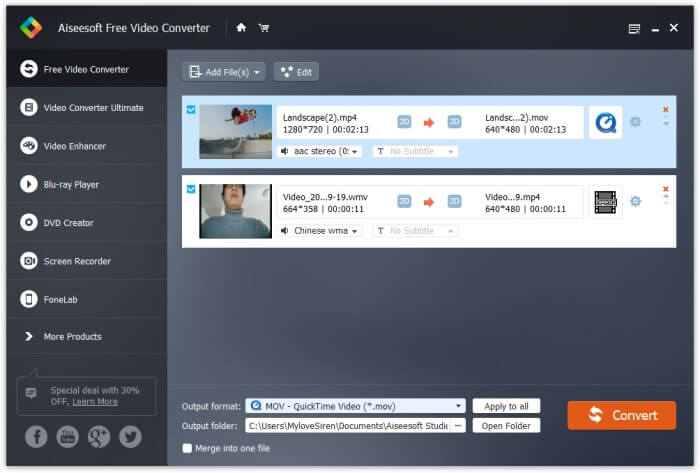
ステップ3:「出力形式」の横にあるドロップダウンボタンをクリックして出力形式を選択します。ここでは、ターゲット形式として MOV を選びます。
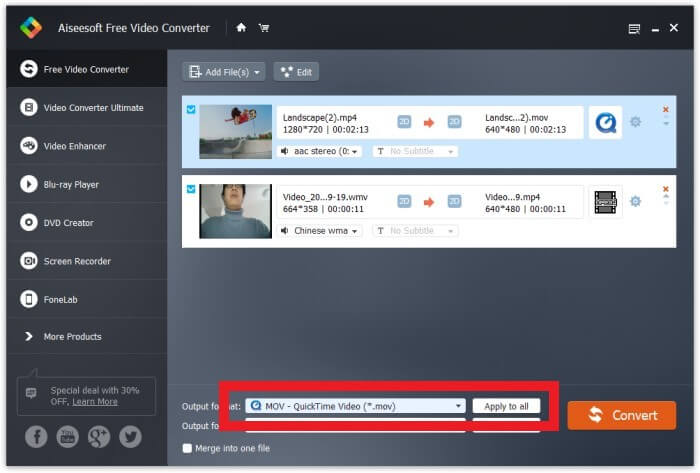
ステップ4:ギアアイコンをクリックすると、動画/音声コーデック、フレームレート、解像度、ビットレートなどを設定できます。最後に、「変換」ボタンをクリックして変換を開始します。
パート2:MacでM2TSをMOV Freeに変換する(オフライン)
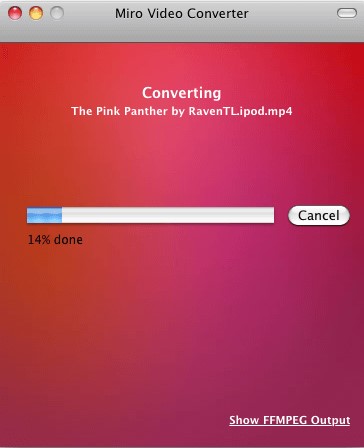
Macユーザーの場合、Miro VideoConverterを使用してM2TSをMOVに変換できます。 Miro Video Converterは、12のデバイスプリセットを備え、一度に1つのファイルのみをサポートするマルチメディアコンバーターです。また、ほとんどすべてのビデオをMP4、WebM、Ogg Theora、またはAndroid、iPhone、iPadに変換できます。 100%は無料でオープンソースです。そのシンプルなインターフェースは「初心者に強い」ものであり、変換品質は同じカテゴリの他のプログラムと同等です。それがどのように機能するか見てみましょう。
ステップ1: Mac に Miro Video Converter をダウンロードしてインストールし、起動します。
ステップ2: M2TS ファイルをメイン画面にドラッグします。続いて、下部のドロップダウンメニューを開き、その中からターゲット形式として MOV を選択します。
ステップ3:最後に、「Convert」をクリックして変換を開始します。
パート3:M2TSをMOVフリーに変換するためのトップ4オンラインメソッド
1.FVC無料オンラインビデオコンバーター
無料のオンラインマルチメディアコンバーターである FVC Free Online Video Converter を使えば、HD 動画を元の画質を保ったまま、数秒で MP4 や MOV などの一般的な形式に変換できます。
ステップ1.リンク先の FVC Free Online Video Converter を開きます。「Add Files to Convert」をクリックして、FVC ランチャーをダウンロードします。ダウンロード後、ランチャーをインストールして更新します。

ステップ2.M2TS ファイルを開いて追加します。その後、形式として MOV を選び、「Convert」をクリックします。

ステップ3.保存先フォルダを選択すると、自動的に変換が開始されます。
2. Convertio
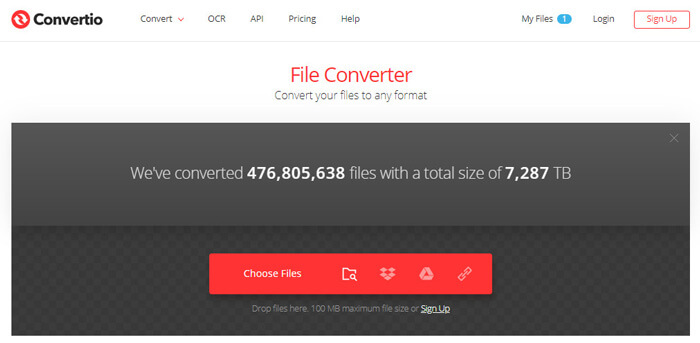
Convertioは、M2TSファイルをオンラインで簡単にMOVに変換できる最も人気のある変換ソフトウェアの1つです。また、GoogleドライブやDropboxなどのさまざまなプラットフォームにファイルをアップロードすることもできます。
ステップ1: ブラウザーで Convertio を開き、「Choose Files」をクリックして M2TS ファイルを追加します。Dropbox や Google ドライブ、URL リンクから M2TS ファイルをアップロードすることもできます。
ステップ2: 右側のドロップダウンボタンから出力形式として MOV を選択します。
ステップ3:「Convert」をクリックして、M2TS ファイルから MOV への変換を開始します。
3. AnyConv
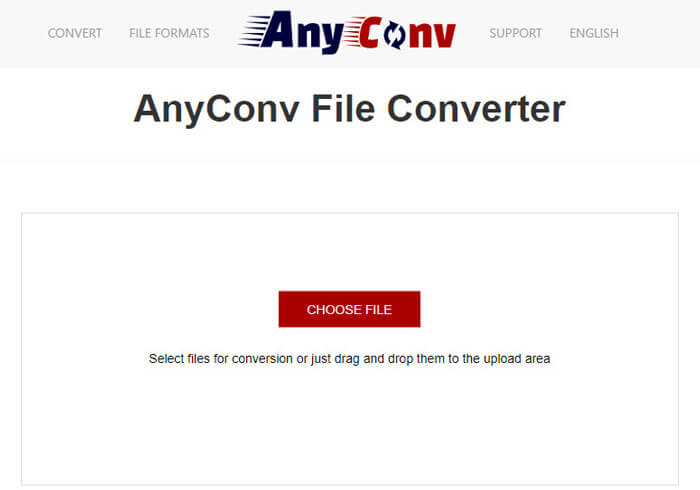
AnyConvは、M2TSをMOVに変換するのに役立つ素晴らしいオンラインコンバーターです。 300以上のファイル形式をサポートしています。また、ドキュメント、画像、オーディオおよびビデオファイル、電子書籍、アーカイブを簡単に変換できます。
ステップ1: ブラウザーで AnyConv を開き、「Choose Files」をクリックして M2TS ファイルを追加します。
ステップ2: ドロップダウンメニューから出力形式として MOV を選択します。
ステップ3:「Convert」をクリックして、M2TS から MOV への変換を開始します。
4. ConvertFiles
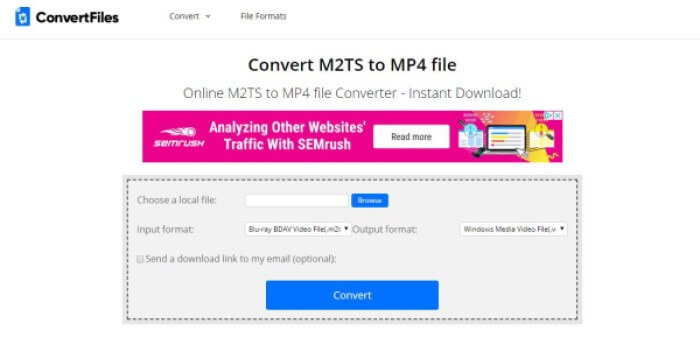
ConvertFilesは、非常に人気のあるオンラインコンバーターです。これを使用すると、M2TSファイルをさまざまな形式に変換できます。取り扱いが簡単です。 M2TSファイルにはURLでアクセスできることにも注意してください。
ステップ1: ブラウザーで ConvertFiles を開き、「Browse」をクリックして M2TS ファイルをアップロードします。
ステップ2:「出力形式」欄のドロップダウンメニューを開き、その中からターゲット形式として QuickTime Movie File(.mov) を選択します。
ステップ3:「Convert」をクリックして変換を開始します。変換には数秒かかる場合があります。その後、ダウンロードリンクをクリックしてダウンロードページへ移動し、変換された MOV ファイルをダウンロードします。
これらの無料のオンラインコンバータを使用して、M2TSをMOVに変換するのは簡単なようです。ただし、エラーが原因で変換が失敗する場合があります。高い成功率でM2TSをMOVに変換したい場合は、代わりにFVC Free M2TSConverterを試してみてください。
パート4:M2TSからMOVへの変換に関するFAQ
M2TSとは何ですか?
M2TSは、Blu-rayディスクオーディオビデオMPEG-2トランスポートストリーム(M2TS)コンテナファイル形式に使用されるファイル拡張子です。オーディオ、ビデオ、その他のストリームを多重化するために使用されます。これは、MPEG-2トランスポートストリームコンテナに基づいています。このフォーマットは、Blu-rayディスクおよびAVCHDの高解像度ビデオに一般的に使用されます。
なぜ人々はM2TSをMOVに変換する必要があるのですか?
主な理由は2つあります。 1つ目は、MOV形式が多くのプレーヤーとプラットフォームでサポートされており、M2TS形式と比較して、軽量でスペースが少ないことです。 2つ目は開発者に関連しているため、問題を確実に理解するためにある程度の技術用語を使用し、関連する用語を最適な方法で適用します。 MOVファイルは、他のプログラムや構築されたWebサイトに埋め込むことができます。
M2TSをMP4に変換する方法は?
これは、FVC Free M2TSConverterにとって簡単です。この無料のM2TSコンバーターをコンピューターで起動します。メニューバーの[ファイルの追加]ボタンをクリックして、M2TSファイルをロードします。 [プロファイル]をクリックし、ターゲット出力形式としてMP4を選択します。最後に、[変換]ボタンをクリックして変換を開始します。
結論
この記事を読めば、オンライン/オフラインでさまざまなデバイスから M2TS を MOV に変換する方法が分かるはずです。ちなみに、FVC Free M2TS Converter はとてもおすすめです。M2TS ファイルを変換できるだけでなく、動画編集も行えます。ぜひ試してみてください。きっと気に入るでしょう。
-
 MTSファイルをMP4に変換する方法
 MTSファイルをMP4に変換する方法がわかりませんか?このガイドでは、品質を損なうことなく、WindowsまたはMacでMTS形式をMP4に変更する6つの無料で簡単な方法を紹介します。
-
 TSをMP4に変換する方法に関する包括的なガイド
 TSファイルとは何ですか?TSをMP4に変換したいですか?この投稿では、TSをMP4に変換するための無料のオンライン方法を紹介します。
-
 Mac / Windowsでビデオ_TSファイル/フォルダをDVDに書き込むための3つの簡単なステップ
 TSファイルをDVDディスクに変換して書き込むにはどうすればよいですか?このステップバイステップガイドでは、Windows / MacでTSファイルとフォルダをDVDにコピーして、DVDプレーヤーまたはTVでTSファイルを視聴できるようにする方法を説明します。
