


 ビデオコンバーター究極
 スクリーンレコーダー
 ビデオ修復
ビデオ修復
 安全なダウンロード
MTS を M4V に即座に変換する特別な方法
お使いのデバイスに最適な変換ソフトをお探しですか?それなら、この記事で紹介する詳しい情報を読めばヒントが得られます。ここでは、Mac と Windows を使ってMTS を M4V に変換するさまざまな方法をご紹介します。さらに、より多くのファイルを変換したいときに試せるオンラインツールについても解説します。

パート 1: MTS と M4V の違い
これら 2 つのファイル形式の違いを確認するには、下の表の詳細を参照してください。
| MTS | M4V | |
| ファイル拡張子 | Advanced Video Coding High Definition (AVCHD) ビデオ ファイルのファイル名拡張子は MTS です。ファイル名拡張子は .mts で、JVC、Sony、Canon、Sanyo などの特定のビデオカメラのメーカーとモデルで記録された HD MPEG ビデオが含まれています。多くのソフトウェアで開くことができ、最大 1080i x 720p の HD ビデオをサポートします。 | Apple Inc. は、M4V デジタル ビデオ コンテナ フォーマットを作成しました。構造的には、よく知られている MP4 に匹敵しますが、M4V ファイルには DRM が付属している場合があります。最近の iTunes Store のビデオの主なビデオ形式は M4V で、複数のオーディオおよびビデオ データを多重化することができます。 |
| によって開発された | ソニー/パナソニック | アップル社。 |
| 関連プログラム | VLCメディアプレーヤー Apple Final Cut Pro X Roxio Creator NXT Pro 7 | メディア プレーヤー クラシック KMPlayer VLCメディアプレーヤー ズームプレーヤー |
| MIME タイプ | ビデオ/mp2t | ビデオ/x-m4v |
パート 2: Mac を使用して複数の MTS を M4V に変換する優れた方法
Mac を使用して MTS を M4V に変換する場合は、FVC Video Converter Ultimate を試すことができます。このオフライン ツールは、変換速度が 30 倍高速であるため、ファイルを即座に変換できます。さらに、このツールはバッチ変換を提供するため、複数のファイル形式を一度に変換できます。また、このアプリケーションでは、MKV、MOV、MP4、FLV、AVI、SWF などの多数のファイル形式をサポートしているため、ほぼすべてのビデオ形式をアップロードできます。 MTS ビデオ ファイルを編集することもできます。複数の MTS ファイルがあり、それらを結合したい場合は、このツールに頼ることができます。これは、ビデオ マージ ツールを提供するためです。このようにして、複数の MTS ビデオを 1 つの部分に結合できます。また、MTS ビデオの音量を調整したい場合は、音量ブースター ツールを使用できます。このオフライン アプリケーションの助けを借りて、ビデオの音量を簡単に変更できます。 Video Converter Ultimate を使用して楽しめる機能は他にもあります。
機能
◆ 100 以上のビデオ ファイル形式を変換できます。
◆ 多数の無料テーマを備えたミュージック ビデオ メーカーを提供します。
◆ 無料のテンプレートとフィルターを使用してコラージュを作成できます。
◆ 再生速度コントローラー、圧縮、トリミングといった編集ツールも搭載しています。
◆ ビデオから透かしを削除できます。
以下の基本的な手順に従って、Mac で FVC Video Converter Ultimate を使用して MTS ビデオ ファイルを M4V 形式に変換します。
ステップ1: Mac を使って、下のダウンロードボタンをクリックし、FVC Video Converter Ultimate をダウンロードします。その後、アプリケーションを起動します。
無料ダウンロードWindows 7 以降に対応安全なダウンロード
無料ダウンロードMacOS 10.7 以降に対応安全なダウンロード
ステップ2: インターフェース中央にあるプラスアイコンをクリックして、MTS 動画ファイルを追加します。ファイルをボックス内にドラッグ&ドロップして読み込むこともできます。
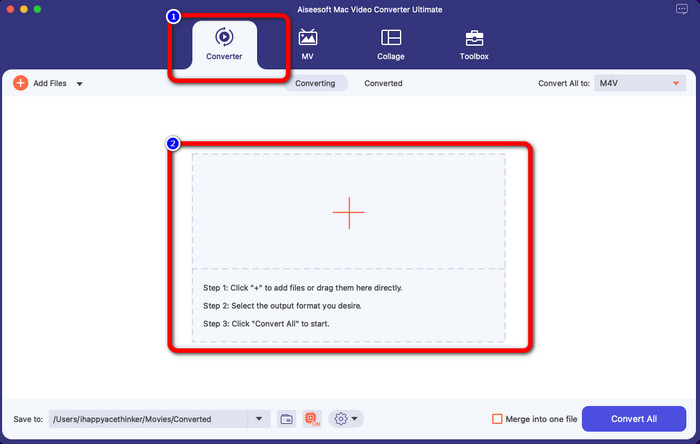
ステップ3: 次の手順として、インターフェース右上にある一括変換ボタンが表示されます。クリックして形式オプションを表示し、M4V 形式を選択します。複数の MTS ファイルを追加したい場合は、インターフェース左上の[ファイルを追加]ボタンを押します。
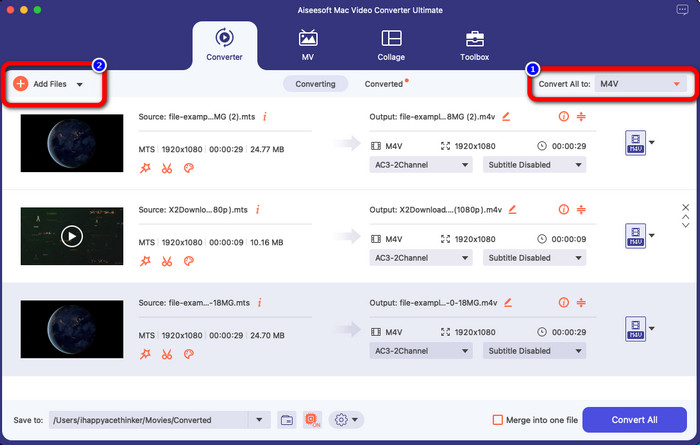
ステップ4: すべての MTS ファイルを M4V 形式に設定したら、一括変換ボタンをクリックし、最終的な出力ファイルを保存したい場所を指定します。
パート 3: Windows で複数の MTS ファイルを無料で M4V に変換する方法
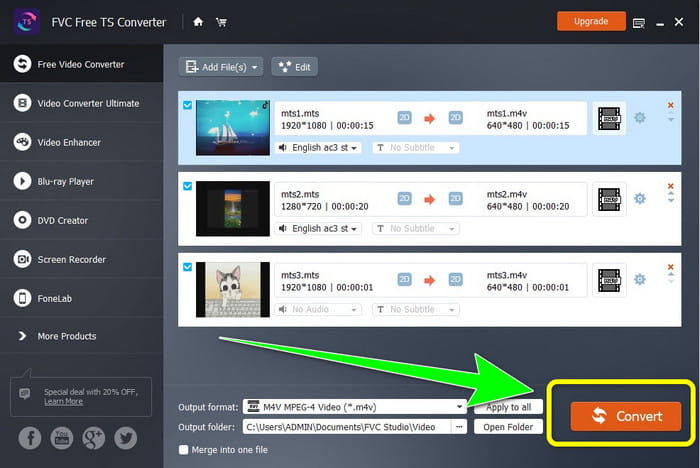
このパートでは、Windows を使って複数の MTS ファイルを 1 つの M4V に変換する方法を紹介します。MTS ファイルを変換するには、FVC Free TS Converter を使用できます。このソフトは、一般的な変換速度より最大 10 倍速く動画を変換可能です。一括変換機能を備えており、複数のファイルをまとめて変換できます。そのため、1 ファイルずつ変換して退屈することもありません。さらに、直感的なインターフェースと基本的な操作方法で、初心者にも扱いやすくなっています。Windows で FVC Free TS Converter を使って複数の MTS ファイルを M4V 形式へ変換したい場合は、以下の簡単な手順に従ってください。
機能
◆ AVI、MOV、MPEG、MP4、DIVX、XVID などのビデオ ファイル形式を変換します。
◆ ビデオ エンハンサーを提供します。
◆ 画面録画が可能。
◆ ブルーレイ ディスクを再生できます。
◆ バッチ変換を提供します。
ステップ1: 下のダウンロードボタンをクリックして、Windows にFVC Free TS Converter をダウンロードします。インストール完了後、アプリケーションを起動します。
無料ダウンロードWindows 7 以降対応安全なダウンロード
無料ダウンロードMacOS 10.7 以降対応安全なダウンロード
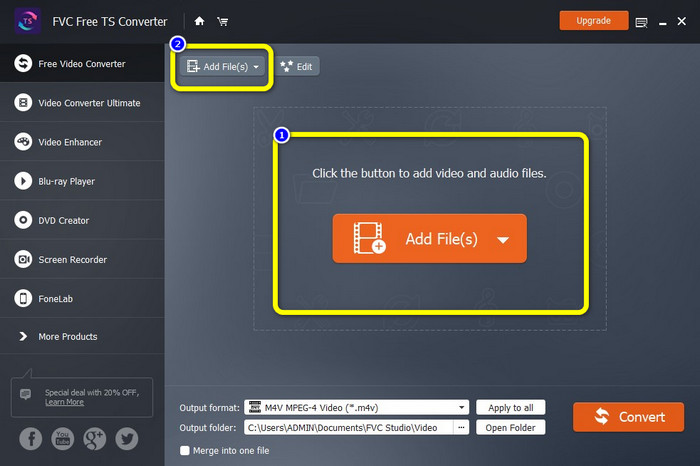
ステップ2: アプリケーションを起動したら、中央のファイルを追加ボタンを押して MTS ファイルを読み込みます。インターフェース上部にある別のファイルを追加ボタンをクリックして、変換したい MTS ファイルをさらに追加することもできます。
ステップ3: インターフェース右側の形式オプションをクリックします。そこで、出力形式としてM4V を選択します。残りの MTS ファイルについても同じ手順を行います。
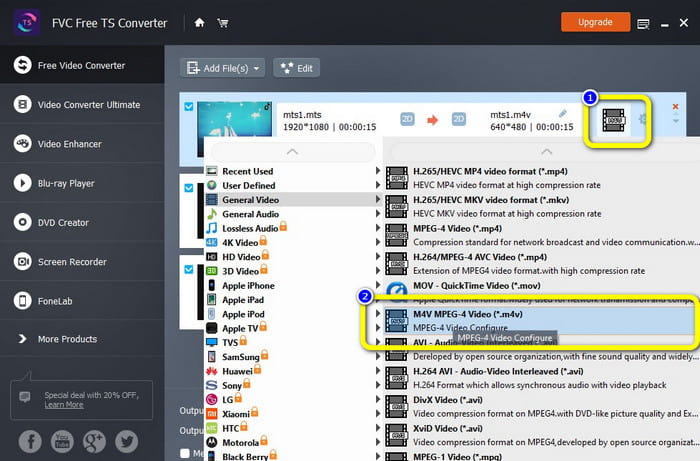
ステップ4: 変換ボタンをクリックして、複数の MTS ファイルを M4V 形式に変換します。
パート 4: オンライン アプリケーションを使用して MTS を M4V に変換する最良の方法
オンラインツールを使って MTS を M4V に変換する場合、最もおすすめなのが FVC Free Video Converter Online です。このツールを使えば、MTS ファイルを簡単に M4V に変換できます。変換は 3 ステップだけで完了します。また、このオンラインツールは完全に無料で利用できます。それでは早速、MTS を M4V 形式に変換してみましょう。以下の手順に従ってください。
機能
◆ MP4、FLV、WMA、MOV、MTS、M4V などの複数のファイルを変換します。
◆ バッチ変換が可能です。
◆ Mac と Windows の両方でアクセス可能。
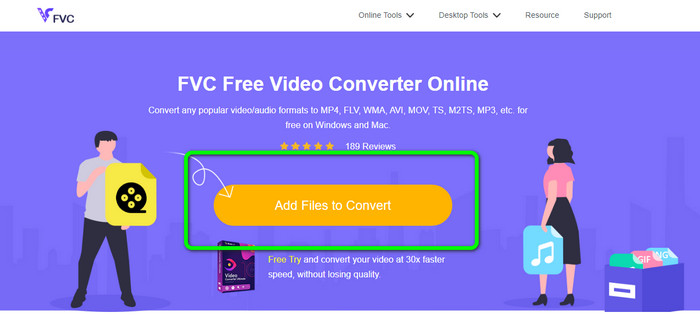
ステップ1: FVC Free Video Converter Online の公式サイトにアクセスします。次に、ファイルを追加して変換ボタンをクリックし、MTS 動画をアップロードします。
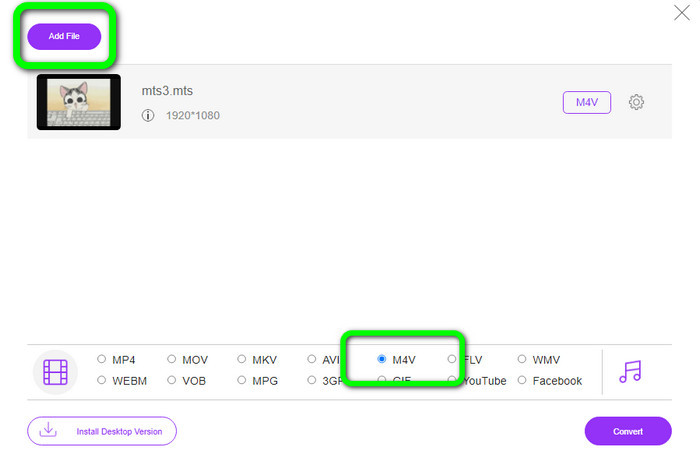
ステップ2: 次に、インターフェース下部の形式オプションからM4V 形式を選択します。ファイルを追加ボタンをクリックして、複数ファイルを変換用に追加することもできます。
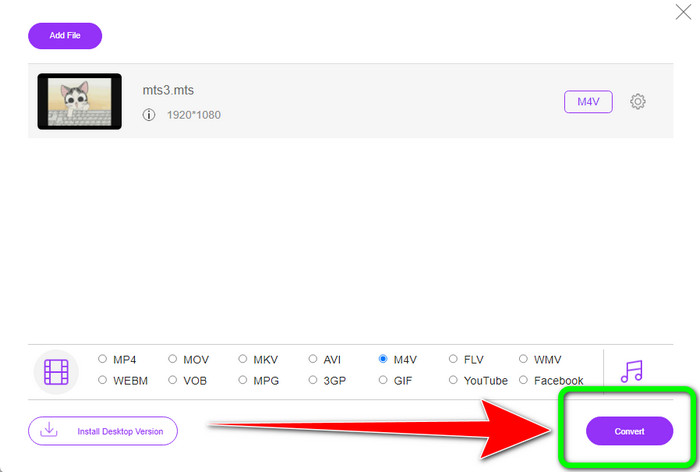
ステップ3: 希望の形式を選択したら、変換ボタンをクリックして、動画を M4V 形式として保存します。
パート 5: MTS から M4V への変換に関する FAQ
1. MTS は適切なフォーマットですか?
はい。 720p および 1080i HD ビデオ コーデックは、MTS、高解像度 MPEG、および H.264 トランスポート ストリーム ビデオ形式でサポートされています。 MTS ファイルは、ソニーとパナソニックが共同で作成し、2006 年に高品質フォーマットでリリースされた AVCHD と呼ばれることがよくあります。
2. MTS を MP4 に変換するにはどうすればよいですか?
上記で紹介したアプリケーションはすべて活用できます。これらのコンバーターは、MTS を MP4 に変換したり、その他の形式に変換したりするときにも有効で便利です。
3. M4V を使用する理由は何ですか?
M4V ファイルには、著作権侵害を防止し、消費者がデバイス間でファイルを配布することを困難にするために、ソフト サブタイトルと DRM 保護を含めることができます。
結論
上記 3 つのアプリケーションはいずれも、お使いのデバイスで利用できる優秀なコンバーターです。Windows ユーザーであれば FVC Video Converter Ultimate を、Mac を使用している場合は FVC Free TS Converter を試してみてください。オンラインツールを好むなら、FVC Free Video Converter Online を利用できます。これらのコンバーターを使えば、MTS を M4V にスムーズに変換できます。
-
 MTS VS M2TS –MTSとM2TSの違い
 MTSまたはM2TSファイルとは何ですか? M2TS と MTS の違いは何ですか?ビデオカメラで記録された MTS または M2TS ファイルを見るにはどうすればよいですか?この投稿ですべての答えを見つけてください
-
 あなたが知っておくべきWindows / Mac / Android / iOS用のトップ5M4Vプレーヤー
 QuickTime Player で M4V ビデオを再生できない場合は、この記事の Windows、Mac、Android、および iOS 用の 5 つの優れた M4V プレーヤーから詳細を学ぶ必要があります。
-
 [解決済み] 元の品質で MTS を MKV に変換する方法
 MTS を MKV に無料で変換する方法を知りたいですか?この記事では、最高の無料の MTS から MKV へのコンバーターをリストしました。
