


 ビデオコンバーター究極
 スクリーンレコーダー
 ビデオ修復
ビデオ修復チュートリアルでF4VをFLVに変更するために使用される2つの推奨コンバーター
Adobe Flash Player は、インターネットからコンテンツをストリーミング再生する際のメディアコンテナとして F4V と FLV をサポートしています。どちらも Adobe ベースの形式ではありますが、実際には多くの点で異なります。たとえば、FLV にエンコードされるデータは F4V と同じではなく、FLV は SWF に近い構造を持っています。さらに、もし F4V を FLV に変換し、SWF に似たエンコーダーを使いたいのであれば、本記事を読んで詳しく理解しましょう。

パート1.2F4VをFLVに変換するための最もピックなコンバーターの2
ファーストピック。 FVCビデオコンバーターアルティメット
「FVC Video Converter Ultimate」は、Windows と Mac のどちらにもダウンロードできる、最もおすすめの F4V から FLV へのコンバーターです。このツールは、これまでに経験したことのないほど高速かつ信頼性の高い変換処理を備えており、すでに何百万人ものユーザーを満足させています。さらに言えば、このツールの強みは形式変換だけではありません。なんと、ここでは動画のカット、結合、音量ブースト、クロップなどの編集も行えます。ニーズをすべて満たすユニークなコンバーターが欲しいなら、このコンバーターがまさにうってつけです。以下の詳細は、数分で F4V ファイルを FLV 形式に変換する手順です。
FVC Video Converter Ultimate を使って F4V を FLV に変換する方法:
ステップ 1. パソコンにソフトウェアをダウンロードするには、ダウンロードボタンをクリックします。
無料ダウンロードWindows 7 以降に対応安全なダウンロード
無料ダウンロードMacOS 10.7 以降に対応安全なダウンロード
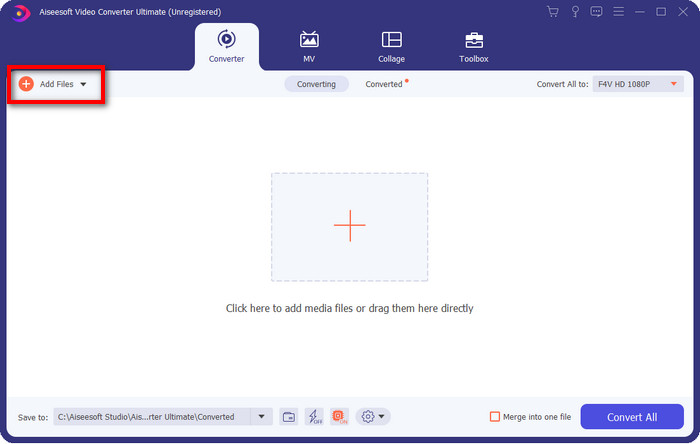
ステップ 2. ソフトウェアをクリックして起動し、インターフェース右上の Add Files をクリックしてファイルを読み込みます。変換したい F4V ファイルを選択したら、Open をクリックします。
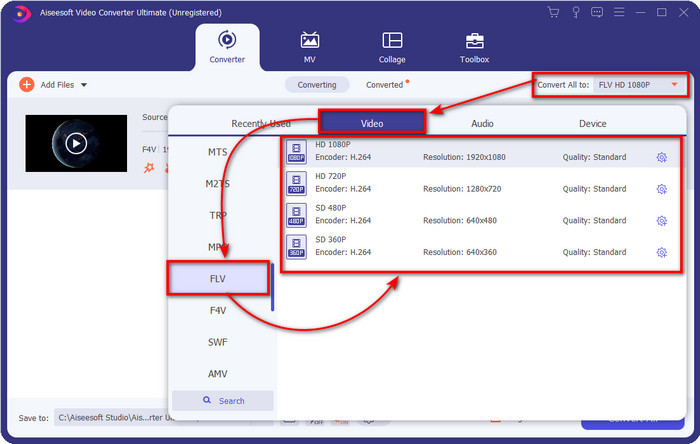
ステップ 3. Convert All to ボタンをクリックし、形式を FLV に変更します。
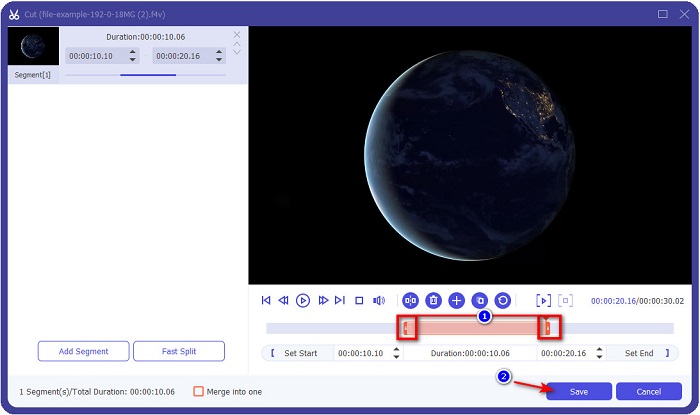
動画を短くしたいですか?その場合は、scissors アイコンをクリックします。希望の長さになるように handlebar を調整し、Save をクリックして変更を保存します。
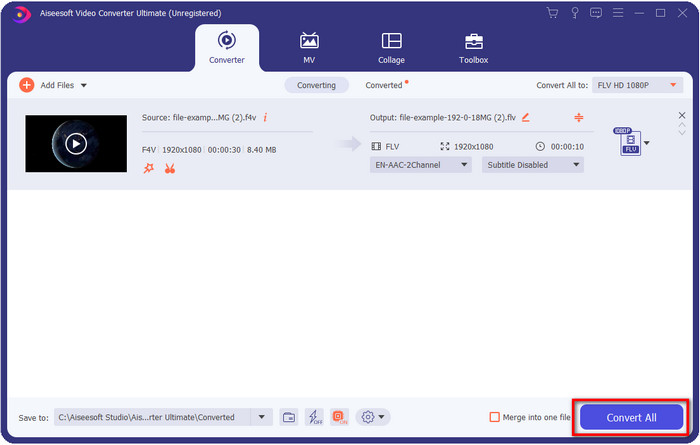
ステップ 4. F4V を FLV に変換するには、Convert All をクリックすると、すぐに処理が開始されます。処理が完了すると、ファイルが保存されている場所を示すパソコン上のフォルダが表示されます。
長所
- 複数のF4VをFLV、AVI、MOV、MKV、および200以上のフォーマットに簡単に変換します。
- ここでは、ハードウェアアクセラレーションと高速変換を利用して、変換を高速化できます。
- すべてのWindowsとmacOSで利用できます。
- ビデオを驚異的に見せるための優れたビデオ編集機能は、ツールボックスの下にあります。
短所
- 使用する前に購入する必要があります。
- デスクトップにコンバーターをダウンロードする必要があります。
2番目のピック。 FVC無料ビデオコンバーターオンライン
FVC Free Video Converter Online を使えば、オンライン上で変換処理を完了できます。このツールはあらゆるブラウザで利用でき、制限なく F4V を FLV にオンライン変換できます。ただし、バッチ変換には対応していないため、一括変換はできません。それでも、このオンラインコンバーターを使えば、変換したい形式はきちんと取得できます。やり方を知りたいですか?それでは、以下の手順に従ってください。
FVC Free Video Converter Online を使って F4V を FLV に変換する方法:
ステップ 1. Web ツールを開くには、この リンク をクリックします。
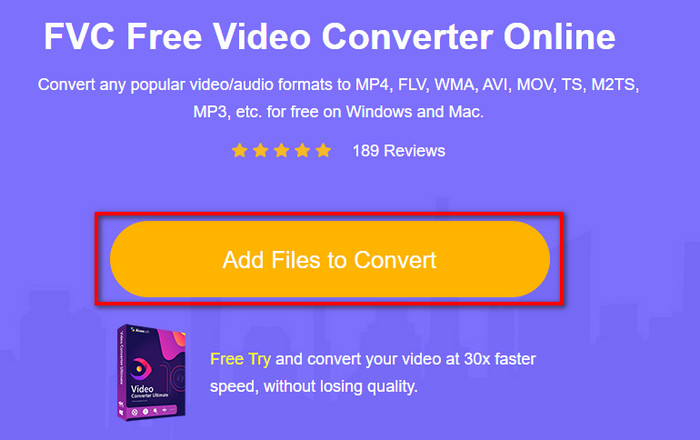
ステップ 2. Web コンバーターのメイン画面で、Add Files to Convert ボタンをクリックします。表示されるフォルダから F4V ファイルを探して選択し、Open を押します。
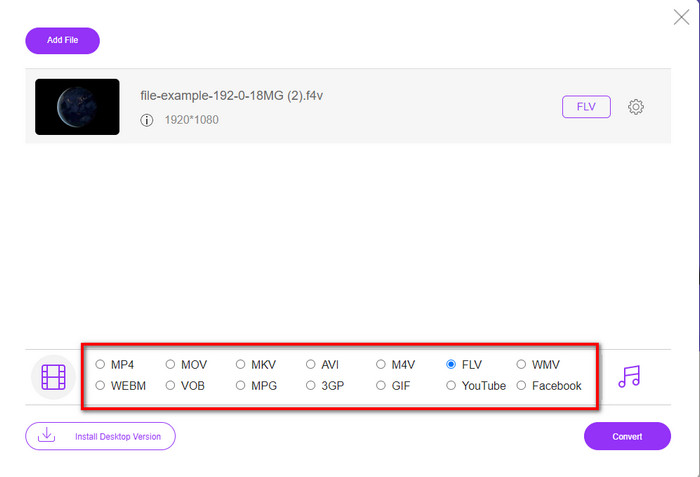
ステップ 3. 画面下部には複数の形式が表示されているので、その中から FLV をクリックします。
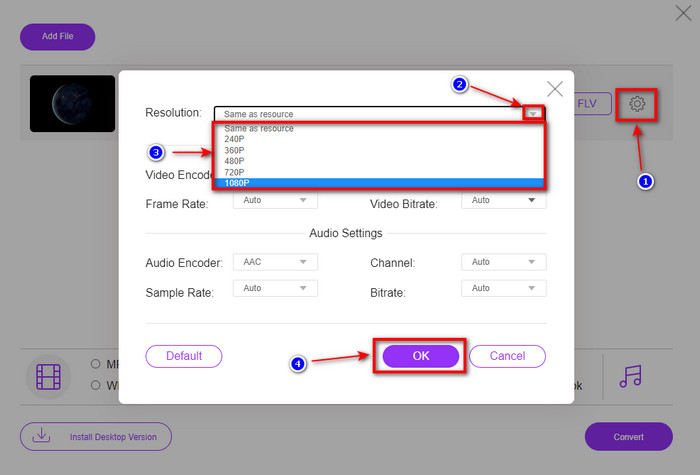
動画の解像度を変更したいですか?その場合は、cog アイコンをクリックし、drop-down を開いて、希望する画質を選択します。
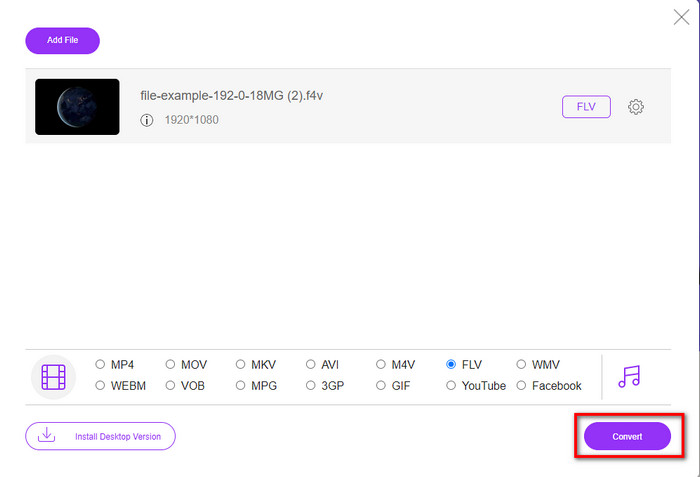
ステップ 4. Convert をクリックして、F4V から FLV への変換プロセスを開始します。
長所
- お持ちのすべてのWebブラウザで利用できます。
- 無料で使いやすいオンラインコンバーター。
- マルウェアフリーで、メインのWebサイトに広告はありません。
短所
- インターネット接続は必須です。
- FVC Video ConverterUltimateのようなビデオ編集機能はサポートしていません。
パート2。F4VとFLV:どちらのフォーマットが最適か
冒頭で述べたように、これら2つの形式は、Web上で配布するために使用できるAdobeコンテナーです。しかし、ここで、以下の詳細を読んで、2つの形式の違いを比較してみましょう。
F4V形式は、MP4形式のようなQuicktimeコンテナです。これは、インターネット経由でビデオをストリーミングするためのISOベースのメディアファイル形式です。また、このフォーマットはFLVのアップグレードバージョンです。それでも、FLV上にあるビデオとオーディオのエンコードには多くの問題があります。さらに、FLVのようにHTMLWebページを生成することはできません。
FLVは、SWFとほぼ同じ構造のファイルです。この形式は、Adobe FlashPlayerおよびほとんどのHTML5でよりサポートされています。これは、SorensonSparkまたはVP6コーデックのようなビデオおよびオーディオ圧縮をサポートします。さらに、Webでビデオをダウンロードすることを検討している場合は、この形式が最適です。 F4Vとは異なり、WebページでHTMLを生成する場合は、これが最適な形式です。
F4Vでは利用できないFLVで得られるメリットがあるため、F4VをFLVに変換するのが最適です。 F4VはFLVの新バージョンと言われていますが、それでもFLVの独自性は、F4Vが多くの面でコピーできない種類の1つです。
パート3。F4VからFLVへの変換に関するFAQ
F4Vビデオを再生するにはどうすればよいですか?
高性能なメディアプレーヤーを使えば、手間をかけずにこれらを行うことができ、その代表例が Aiseesoft Blu-ray Player です。F4V ファイルを再生する方法を知るには、次の簡単な手順に従ってください。まず、ソフトウェアをデスクトップにダウンロードして起動します。次に、Open File をクリックしてファイルを読み込みます。読み込みが完了すると、自動的に再生が始まります。
どちらが良いですか? F4VまたはMOV?
それは、どのような目的で使いたいかによって異なります。たとえば、F4V は画質を落とさずに Web 上でメディアファイルを配信するのに適しています。しかし、Mac で動画編集を行いたい場合は、MOV を選ぶ方がよいでしょう。つまり、F4V 動画を Mac で編集したいなら、F4V を MOV に変換する方法 を学ぶ必要があります。
F4Vには高品質の出力が含まれていますか?
F4Vファイルには1080または720のビデオ品質を含めることができますが、ファイルサイズは最小限に抑えられます。
結論
すでにコンバーターを使って F4V を FLV に変換する方法を学んだので、次はレビューを参考にして信頼できるコンバーターを選ぶ番です。無料でオンライン変換を体験したいなら、FVC Free Video Converter Online を使うべきです。しかし、この Web ツールは、最初に紹介した究極のコンバーターにはかないません。説明は不要かもしれませんが、変換作業をより簡単かつ高速にこなしたいなら、FVC Video Converter Ultimate をおすすめします。この驚異的なコンバーターは、そのユニークな機能で多くのユーザーを魅了してきました。これらのツールの助けを借りれば、成功へ一歩近づいたと言えるでしょう。
-
 F4VをAVI形式に変換する4つの最新のオンラインおよびオフラインコンバーター
 F4VをAVIまたはその他のビデオ形式に変換するためにどのコンバーターを使用すべきかわかりませんか?次に、利用可能なツールを使用して変換する方法を学びながら、この記事を読んでください。
-
 品質を落とさずにF4VをMOVに変換する方法[解決済み]
 F4Vのようないくつかのビデオフォーマットを認めるのに苦労しているなら。この記事を読んで、F4VおよびMOVビデオ形式の詳細と、さまざまな方法を使用してF4VをMOVに変換する方法を学びます。
-
 最も簡単なオフラインおよびオンラインの方法でTRPをFLVに変換する
 TRPビデオファイルを手間をかけずにすばやくFLVに変換しますか?この記事を読んで、状況に最適な最高のソフトウェアとオンラインサービスを提供してください。
