


 ビデオコンバーター究極
 スクリーンレコーダー
 ビデオ修復
ビデオ修復
 安全なダウンロード
デスクトップとオンラインでFLVビデオファイルを3G2形式に変換する方法
よく「テクノロジーは生活を変え、私たちの日常生活や仕事をより楽にしてくれる」と言われます。しかし、すべての物事には表と裏があり、テクノロジーも例外ではありません。たとえばデジタル動画は、いつでもどこでもエンターテインメントや情報にアクセスできる機会を与えてくれますが、問題になるのが動画フォーマットです。最近の調査によると、動画フォーマットは100種類以上も存在します。本ガイドでは、パソコン上およびオンラインで無料でFLV を 3G2 に変換(または 3GP に変換)する方法に焦点を当てて解説します。

パート1:PC / MacでFLVを3G2に変換する方法
方法1:無料のFLVコンバーターでFLVを3G2に変換する
3G2 形式に対応している動画変換ソフトは限られていますが、FVC Free FLV Converter はそのひとつです。さらに、このソフトは一切お金をかけずにニーズを満たすことができます。大量の FLV ファイルがある場合でも、複数ファイルを同時かつ高速に処理できます。
最高の FLV から 3G2 への変換ソフトの主な機能
- 1.品質を損なうことなくFLVを3G2に変換します。
- 2.マルチスレッドテクノロジーを使用して、複数のFLVファイルをバッチ処理します。
- 3.ビデオ編集など、さまざまなボーナスツールを提供します。
無料ダウンロードWindows 7 以降に対応安全なダウンロード
無料ダウンロードMacOS 10.7 以降に対応安全なダウンロード
FLV を 3G2 に一括変換する無料方法
ステップ1:FLVファイルを追加する
FLV を 3G2 に変換する必要があるときは、まず最高の無料動画変換ソフトをパソコンにインストールして起動します。次に、ファイルを追加ボタンをクリックし、変換したいすべての FLV ファイルを選択して開きます。

ステップ2:出力フォーマットを選択する
動画の読み込みが完了したら、画面下部に移動します。出力形式オプションをクリックして展開し、検索バーで 3G2 を探して右側から選択します。続いてフォルダーを開くボタンをクリックし、出力ファイルを保存するフォルダーを指定します。

ステップ3:FLVを3G2に変換する
最後に、変換ボタンをクリックして、FLV から 3G2 への変換をすぐに開始します。数分後、指定したフォルダー内に 3G2 ファイルが作成されているはずです。

方法2:VLCでFLVを3G2に変換する方法
VLCは、オープンソースのメディアプレーヤーであるだけでなく、無料のFLVから3G2へのコンバーターでもあります。それはあなたがWindowsとMacの両方で無料でビデオコンバーターをすることを可能にします。手順は次のとおりです。
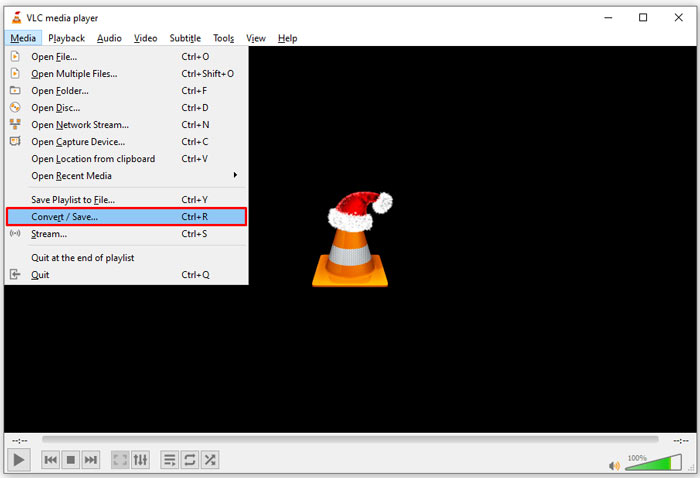
ステップ 1: VLC を起動し、上部メニューのメディアを開いて、変換/保存を選択します。
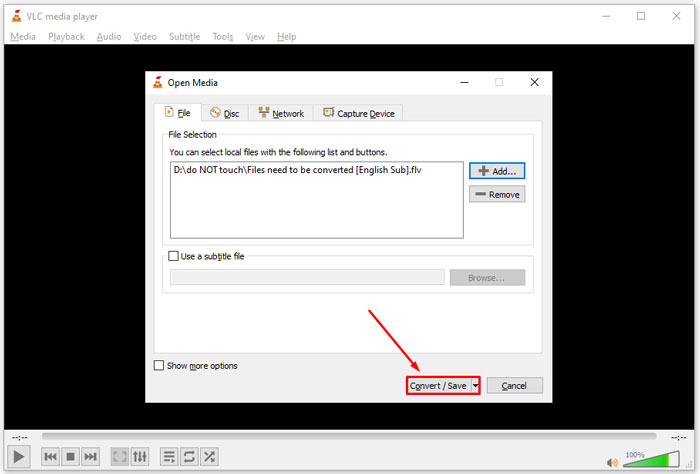
ステップ 2: 追加ボタンをクリックし、別の形式に変換したい FLV ファイルを開きます。変換/保存ボタンを押して次へ進みます。
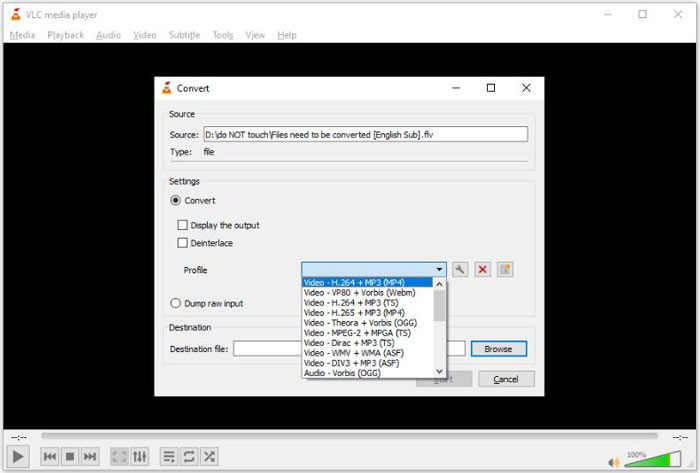
ステップ 3: プロファイルオプションを開き、3G2もしくは関連する形式を選択します。次に、参照ボタンをクリックして出力フォルダーを指定します。
ステップ 4: 開始ボタンをクリックすると、VLC が FLV を 3G2 に変換し始めます。少し時間がかかるので、完了するまで待ちましょう。
パート2:FLVを3G2オンラインに変換する方法
たまにしか FLV を 3G2 に変換しないのであれば、Web アプリを利用するのが便利です。たとえば、FVC Free Online Video Converter などがあります。無料で利用でき、会員登録やファイルサイズの制限もありません。
ステップ 1: 任意のブラウザで https://www.free-videoconverter.net/free-online-video-converter/ にアクセスします。変換するファイルを追加ボタンをクリックしてランチャーを取得します。

ステップ 2: ダウンロードが完了するとランチャーが自動的に起動します。ファイルを追加ボタンをクリックし、FLV ファイルをアップロードします。このオンライン動画変換アプリは一括変換にも対応しています。
解像度やフレームレートなどのパラメータを調整したい場合は、歯車アイコンをクリックして設定ダイアログを開きます。

ステップ 3: 画面下部の形式エリアで適切な出力形式を選択します。準備ができたら変換ボタンをクリックします。その後、変換結果をハードドライブにダウンロードします。
こちらもおすすめ:
パート3:FLVから3G2に関するFAQ
3G2ファイルとは何ですか?
3G2は、3rd Generation Partnership Project Group 2の略で、MPEG-4に基づくマルチメディアファイルの拡張機能です。これは、CDMAネットワーク上の携帯電話用の7つの標準開発組織のグループによって作成されました。これは3GPと非常によく似ています。
Windows Media Playerは3G2を開くことができますか?
いいえ、対応するコーデックがないため、WMPは3G2ビデオファイルを開いたり再生したりできません。 3G2ファイルを開くには、標準のビデオ形式に変換する、3G2ビデオプレーヤーをダウンロードする、またはWMP用の追加のコーデックパッケージをインストールするという3つの選択肢があります。
FLVは3G2よりも優れていますか?
答えはあなたの目的に依存します。 CDMAネットワークを備えた携帯電話でビデオを見る場合は、3G2の方が適しています。ビデオ共有の場合、FLVは3G2よりも優れています。
結論
これで、3G2の意味と、品質を損なうことなくFLVを3G2に変換する方法を理解する必要があります。 VLCは、ビデオ形式を変更する機能を備えた無料のビデオコンバーターです。ただし、FVC Free FLVConverterの方がパフォーマンスが優れています。 VLCよりも使いやすく、完全に無料です。さらに問題がある場合は、この投稿の下にメッセージを残してください。すぐに返信します。
-
 FLVからWAVへ–FLVをWAVにオンラインで無料およびMac / PCで変換
 FLVファイルを変換するにはどうすればよいですか? VLCはFLVをWAVに変換できますか?この投稿では、品質を損なうことなくFLVをWAVに変換する3つの無料の方法について説明しています。
-
 FLVからMPG– Mac、PC、オンラインでFLVをMPGに変換する方法無料
 FLVをMPEGに変換する方法は? FLVをMPGに無料で変換できますか?この投稿では、品質を損なうことなくFLVをMPGに変換するのに役立つ3つの無料のビデオコンバーターを共有しています。
-
 FLVからXboxへ–XboxでFLVを変換して再生する方法
 XboxOneまたはXbox360でFLVファイルを再生できませんか? FLVをMP4、AVI、MOV、WMVなどのXbox対応形式に変換する必要がありますか?この投稿では、XboxでFLVを再生するための3つの無料のFLVからXboxへのコンバーターをリストしています。
