


 ビデオコンバーター究極
 スクリーンレコーダー
 ビデオ修復
ビデオ修復
 安全なダウンロード
FLVビデオファイルを無料で3GP形式に変換する方法
この記事では、FLV を 3GP に変換する最適な方法を紹介します。調査によると、市場には非常に多くの動画ファイル形式が存在し、それぞれ異なる目的のために開発されています。例えば FLV は Flash Video の略で、インターネット上で Adobe Flash Player で再生するための動画コンテンツを保存する形式です。
一方、3GPは、モバイルデバイスの帯域幅とデータ使用量を節約するために第3世代パートナーシッププロジェクトによって作成されたマルチメディア形式です。言い換えれば、FLVを3GPに変換し、携帯電話でビデオを見る方がよいでしょう。

パート1:デスクトップでFLVを3GPに変換する最良の方法
FVC Free FLV Converter は高機能な動画変換ソフトです。その名の通り、FLV を無料で 3GP に変換できます。さらに、動画・音声編集など多くの便利な機能も備えています。特に、ユーザーに優しいインターフェースにより、目的の機能をすぐに見つけられます。
最高の無料FLVコンバーターの主な機能
- 1.FLVビデオを3GPなどのマルチメディア形式に変換します。
- 2.複数のビデオファイルを同時にバッチ処理します。
- 3.モバイルデバイスで再生するためにFLVファイルをトランスコードします。
無料ダウンロードWindows 7 以降に対応安全なダウンロード
無料ダウンロードMacOS 10.7 以降に対応安全なダウンロード
FLVを3GPに無料で変換する方法
パソコンにインストールしたあと、最高の無料 FLV 変換ソフトを起動します。Windows 10/8/7 および Mac OS X に対応しています。「Add File(s)」ボタンをクリックしてファイル選択ダイアログを開きます。変換したい FLV ファイルを選択して「Open」をクリックすると、動画がライブラリ領域に表示されます。

ステップ2: 出力形式を設定する
下部の「Profile format」ドロップダウンメニューをクリックして展開すると、プロファイルボックスが表示されます。「Search Profile」ボックスに3GPと入力し、キーボードのEnterキーを押します。そのあと、出力形式を選択します。動画をモバイル端末で再生したい場合は、メーカーを選び、該当する機種を直接選択してください。

ステップ 3: FLV を 3GP に変換
下部の「Open Folder」ボタンをクリックして、出力ファイルを保存するフォルダーを指定します。最後に「Convert」ボタンをクリックして FLV から 3GP への変換を開始します。数分後、ハードディスク上に 3GP ファイルが作成されているはずです。

パート2:FLVを3GPオンラインに変換する方法
Web 版の動画変換アプリも、FLV を無料で 3GP に変換する人気の方法です。しかし、ほとんどのサービスには、ファイルサイズ制限、ウォーターマーク、セキュリティリスクなど、さまざまな欠点があります。幸い、FVC Free Online Video Converter を使えば、こうした問題を解決できます。このサービスは完全無料で、制限は一切なく、出力品質も優れています。
ステップ 1: Web ブラウザーで https://www.free-videoconverter.net/free-online-video-converter/ にアクセスし、「Add Files to Convert」ボタンをクリックしてランチャーを取得します。ランチャーはコンピューターのローカル容量をほとんど消費しません。
ファイルを一括変換するには、デスクトップ版をダウンロードしてください。
ステップ 2: 「Add File」メニューをクリックして、変換したい FLV ファイルをアップロードします。この Web アプリでは、複数の動画を一括で変換できます。
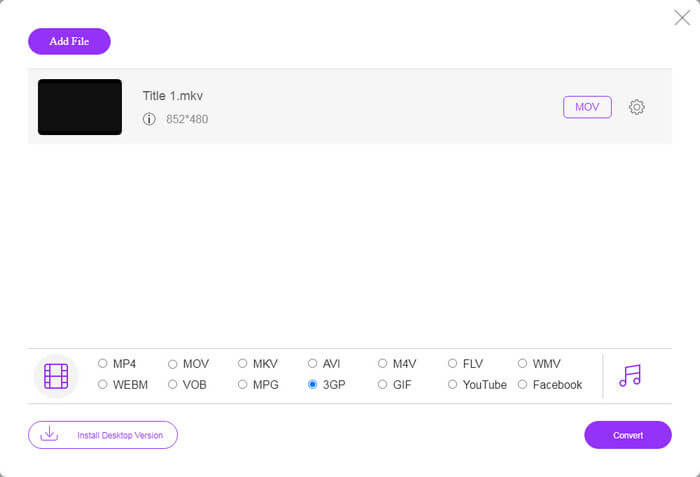
ステップ 3: 画面下部のプロファイル欄で 3GP を選択します。次に「Convert」ボタンをクリックして、オンラインで FLV から 3GP への変換を開始します。回線速度が速ければ、数秒で完了します。その後、3GP ファイルをハードディスクにダウンロードしてください。
お見逃しなく:
パート3:VLCでFLVを3GPに変換する方法
時々、フリーウェアはプロのソフトウェアと同じくらい強力です。たとえば、VLCは人気のあるオープンソースメディアプレーヤーです。 Windows、Mac、LinuxでFLVを3GPに無料で変換できます。もちろん、使いにくいなどの費用は明らかです。したがって、以下の手順を共有します。
ステップ 1: パソコンで無料の FLV から 3GP への変換ソフトを起動します。事前にインストールしておく必要があります。公式サイトでは安全なインストーラーを提供しています。
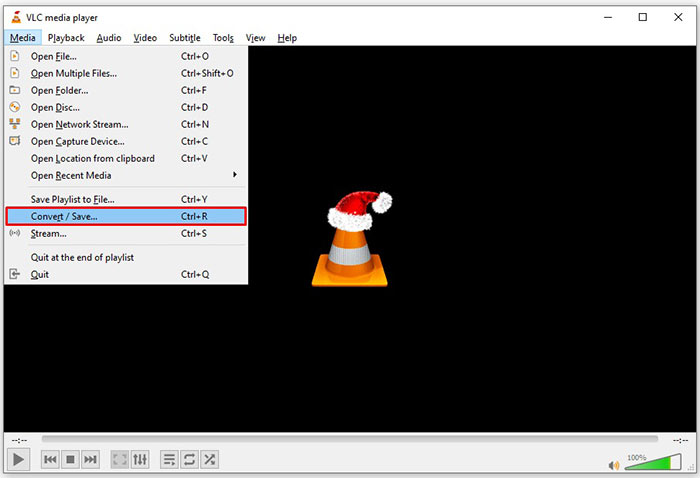
ステップ 2: 画面上部の「Media」メニューを開き、「Convert/Save」を選択します。するとメディアを開くダイアログが表示されます。
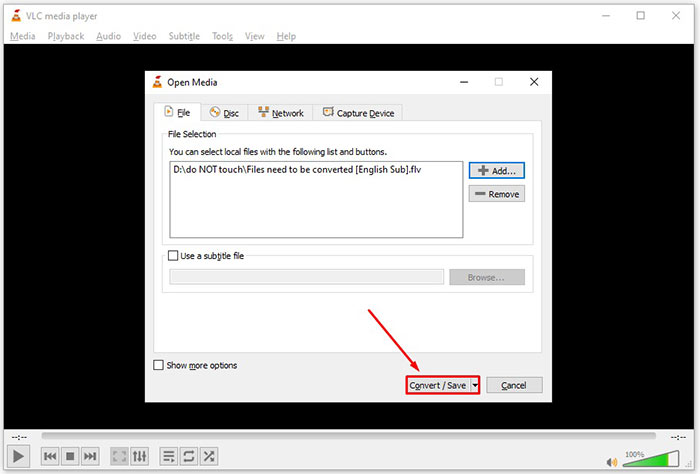
ステップ 3: 「Add」ボタンをクリックし、変換したい FLV ファイルを探して選択し、「Open」をクリックします。続けて「Convert/Save」ボタンを押して次の画面に進みます。
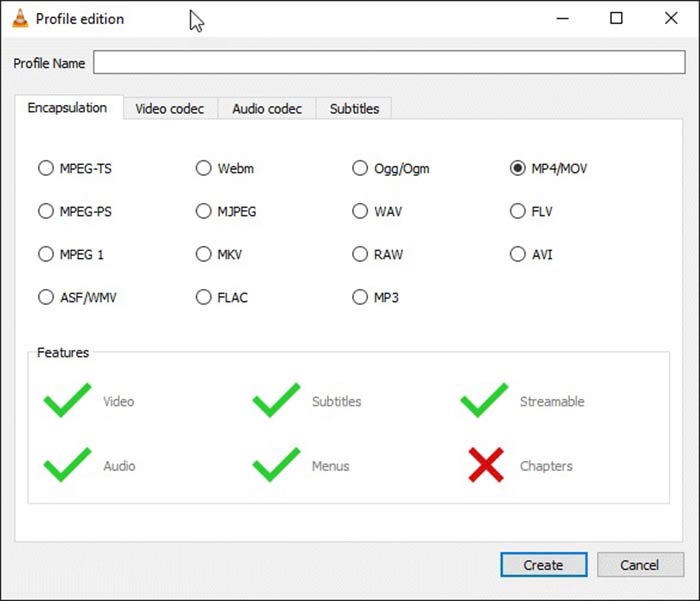
ステップ 4: 「Profile」の横にあるドロップダウンリストを開き、3GP または関連する動画形式を選択します。動画コーデックやその他のパラメーターを変更したい場合は、ドロップダウンリスト横の「Profile Edit」ボタンをクリックして 3GP を追加します。
ステップ 5: 「Browse」ボタンをクリックし、「Destination」セクションで出力する 3GP ファイルを保存するフォルダーを指定します。
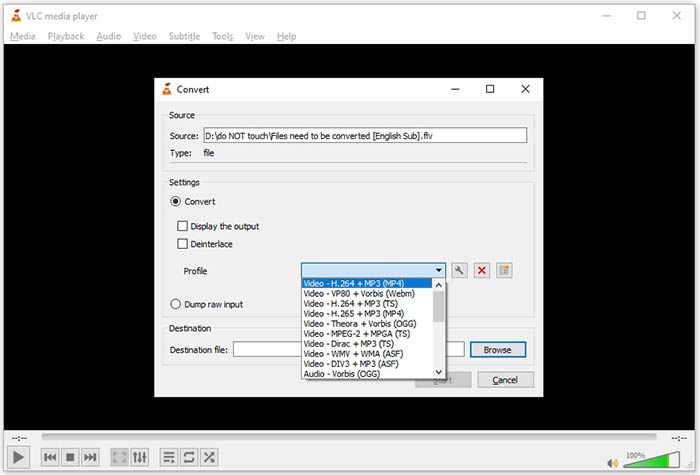
ステップ 6: 「Start」ボタンをクリックすると、VLC が FLV から 3GP への変換を開始します。
VLCは元のビデオを録画して作業を行うため、変換が完了するまでに少し時間がかかります。これは、プロセスがFLVビデオの長さと同じくらい長くかかることを意味します。
FLV vs. 3GP
Adobe Flash Playerは、FLVを使用して、映画やテレビ番組などのビデオコンテンツを配信しました。現在、アドビはプレーヤーを開発しておらず、セキュリティ上の理由からユーザーにアンインストールすることを推奨しています。ただし、Adobe/Macromedia以外の多くのプログラムでは引き続きFLV形式を使用できます。
3rd Generation Partnership Project(3GPP)は、マルチメディアコンテナフォーマットとして3GP/3GPPフォーマットを作成しました。実際には、ISOメディアファイル形式に基づいています。 3G携帯電話とオンラインの間で送信されるビデオ/オーディオストリームを保存するためによく使用されます。
パート4:FLVから3GPへの変換に関するFAQ
FLVを3GPに変換すると、ビデオ品質が低下しますか?
一般的に言って、ビデオ変換は品質を失います。ただし、強力なビデオコンバータプログラムは、この問題を修正し、高度なテクノロジを使用してビデオ品質を最適化することができます。
FLVビデオの変換にはどのくらい時間がかかりますか?
これは、ビデオの長さ、使用するビデオ変換ソフトウェア、ハードウェアのパフォーマンスなど、いくつかの要因によって決まります。 Webビデオコンバーターを使用している場合、インターネット接続は不可欠な要素です。
FLVがiPhoneで再生されないのはなぜですか?
iPhoneは、MP4、ASF、およびAVIの一部であるMOVをサポートしています。したがって、iPhoneでFLVを直接開くことはできません。ただし、モバイルデバイスでFLVを視聴する方法はいくつかあります。 FLVファイルがGoogleドライブなどのインターネットサービスでホストされている場合は、組み込みのメディアプレーヤーを利用できます。さらに、VLCなどの別のメディアプレーヤーを使用できます。
結論
このガイドでは、コンピューターまたはオンラインでFLVビデオファイルを3GP形式に変換する3つの無料の方法について説明しました。モバイルデバイスでFLVビデオを視聴する準備をしている場合は、FVC Free FLVConverterを使用して3GPまたはその他のモバイル対応のビデオ形式に変換することをお勧めします。使いやすいだけでなく、ビデオ品質を保護することもできます。さらに質問を?以下にメッセージを残してください。
-
 ペニーを支払わずにFLVビデオファイルをMP4に変換する方法
 このガイドでは、Windows 10/8/7 / XPおよびMacOS XでFLVビデオファイルをMP4形式に変換する4つの無料の方法を共有しているため、どのデバイスでもビデオを楽しむことができます。
-
 デスクトップとオンラインでFLVビデオをMP3オーディオファイルに変換する方法
 FLVをMP3ファイルに変換する方法は?あなたがする必要があるのは、この記事を注意深く読み、あなたの好きな方法を見つけて、あなたが望むものを得るために私たちのステップバイステップガイドに従うことです。
-
 FLVをMOVに変換するトップ3の方法
 FLVをMOVに変換する方法は? MacでFLVをMOVに変換するにはどうすればよいですか?オンラインでFLVをMOVに変換する無料の方法はありますか?この投稿では、FLVファイルをMOVに変更するための3つのFLVからMOVへのコンバーターを共有しています。

