


 ビデオコンバーター究極
 スクリーンレコーダー
 ビデオ修復
ビデオ修復FLVファイルをMKVに変換するのに最適な3つのFLVからMKVへのコンバーターを見つける
インターネットで「無料でFLVをMKVに変換する一番良い方法」を探し回って疲れていませんか? 偶然かもしれませんが、今回私たちは利用できる最高のFLVコンバーターを見つけました。もちろん、厳選したものだけを紹介します。FLVやMKVの基礎知識から、実際に使えるコンバーターまで効率よく理解するために、ぜひこの記事を読み進めてください。きっと役立つ情報が得られるはずです。

パート1。無料でFLVをMKVに変換する2つの方法
第一の方法。オンラインコンバーターを使用してFLVをMKVに変換する
このオンラインコンバーターは、FLVをMKVにオンラインで変換するうえで、間違いなく有力なトランスコーダーのひとつです。FVC Free Video Converter Online は、シンプルで分かりやすく、オンライン上で使えるコンバーターです。ただしこのツールはインターネット接続が必須なので、オフライン環境では利用できません。オンラインツールではありますが、画面上に煩わしい広告はなく、マルウェアの心配もありません。では、実際にこのツールを使ってみたい場合は、以下の手順に従って操作してください。
ステップ1. このリンクをクリックして、新しいタブで FVC Free Video Converter Online を開きます。
ステップ2. Add Files to Convert ボタンをクリックして、使用しているパソコンのフォルダーを開きます。変換したいFLVファイルを選択し、Open を押してファイルをアップロードします。
ファイルを一括変換するには、デスクトップ版をダウンロードしてください。
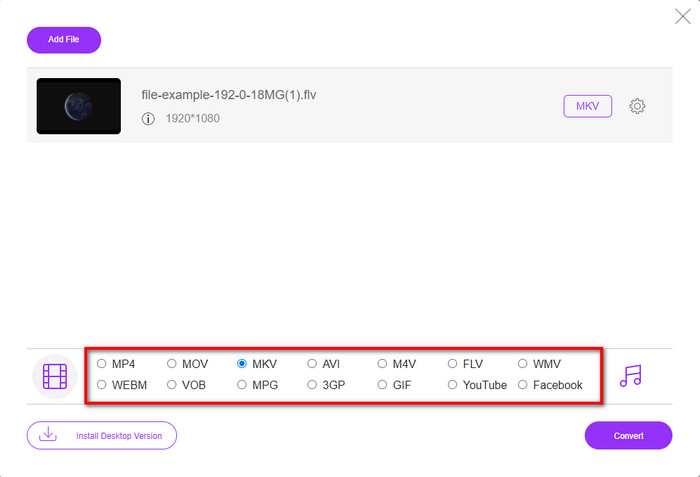
ステップ3. 表示されているフォーマット一覧から、MKV 形式を選択します。
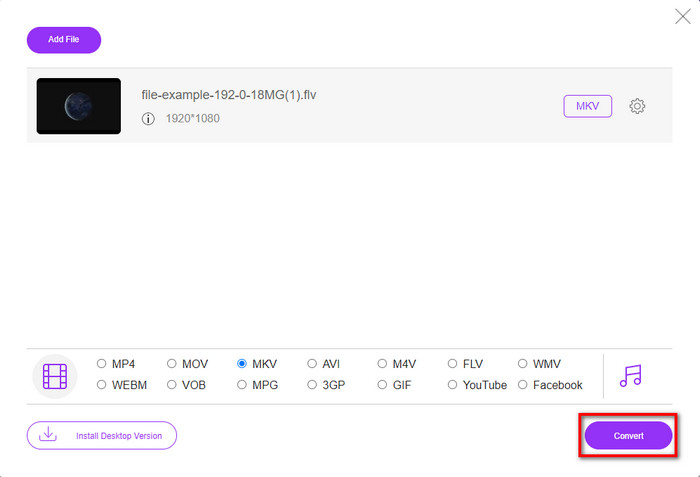
ステップ4. Convert ボタンをクリックして変換を開始します。変換後のファイルは、自動的にパソコン内のドライブに保存されます。
2番目の方法。 WindowsおよびMacにダウンロードできる無料のコンバーターを使用する
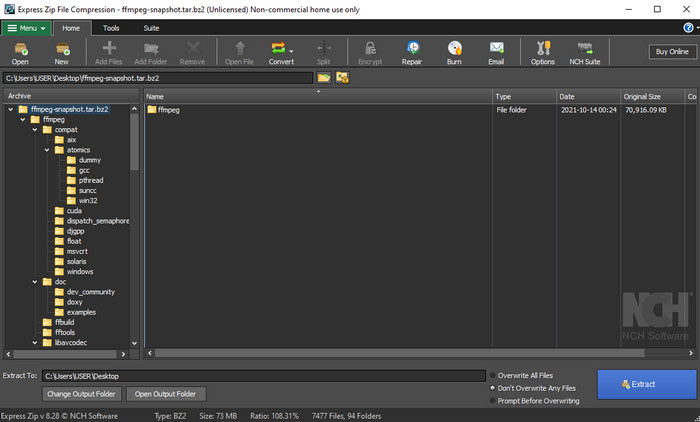
FFmpeg は、一般的なGUI型コンバーターとは一味違うツールです。通常のコンバーターとは異なりますが、FLVファイルの変換にも対応しています。このツールの大きな特徴は、CLI(コマンドラインインターフェース)ベースであることです。つまり、変換を実行する前にエンコードのコマンド、言い換えれば文字入力による指示が必要になります。このコンバーターに興味がある場合は、以下の手順に従って FFmpeg を使ってFLVをMKVに変換してみましょう。
ステップ1. FFmpeg.exe をダウンロードして起動します。
ステップ2. パソコンでコマンドプロンプトを開きます。
ステップ3. CMD を使って変換したいFLVファイルがある場所へ移動します。その後、次のコードをコピーしてコマンドプロンプトに貼り付け、ffmpeg -i input.flv -vn -ar 44100 -ac 2 -b:a 192k output.mkv と入力したら、Enterキーを押して処理を開始します。
パート2。最高のFLVからMKVへのコンバーターをロスレスで使用してFLVをMKVに変換する
第三の道。 ProfessionalConverterを使用してFLVをWMVに変換する
上で紹介した2つのコンバーターではまだ物足りませんか? それなら、ぜひ FVC Video Converter Ultimate を試してみてください。なぜかと言うと、このソフトは手間をかけなくてもプロ並みの出力を得られるからです。さらに、FLVをMKVだけでなく、AVI、MOV、AVI、MP4など、200種類以上の形式に変換することができます。それでもまだピンと来ないなら、動画にちょっとした「魔法」をかけてみたくありませんか? このコンバーターには、高度な動画編集機能も搭載されているので、さまざまな加工が可能です。「高機能だと操作が難しそう」と不安に思うかもしれませんが、以下の手順に沿って操作すれば、FLVからMKVへの変換もすぐにマスターできます。
ステップ1. まずは下のダウンロードボタンをクリックして、このコンバーターをダウンロードします。ダウンロード後、表示されるインストール手順に従ってセットアップし、ソフトを起動します。
無料ダウンロードWindows 7 以降に対応安全なダウンロード
無料ダウンロードMacOS 10.7 以降に対応安全なダウンロード
ステップ2. 変換したいFLVファイルを追加するには、+ ボタンをクリックします。表示されたフォルダー画面で目的のFLVファイルを選び、Open を押して次のステップへ進みます。
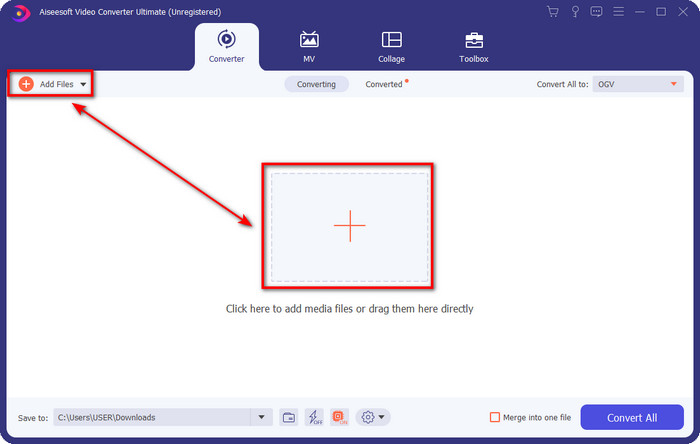
ステップ3. 次に、ユーザーインターフェース右上の ドロップダウン ボタンをクリックして、出力形式をMKVに変更します。
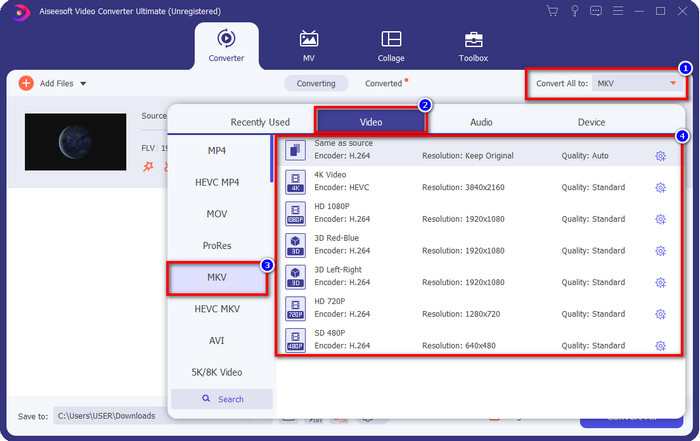
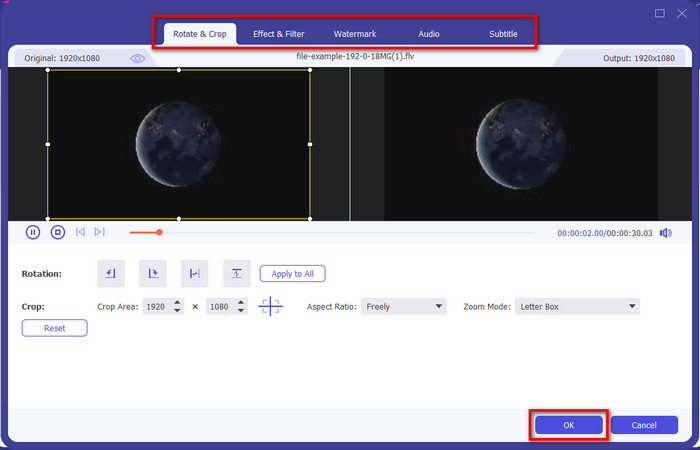
オプション. 動画を編集したい場合は、wand ボタンをクリックしてください。新しい編集画面が表示され、ここで 回転、クロップ、エフェクト、フィルター、ウォーターマーク、オーディオ、字幕 などの編集が行えます。想像力を制限せず、思い通りに編集してみてください。すべての「魔法」を適用するには、OK をクリックします。
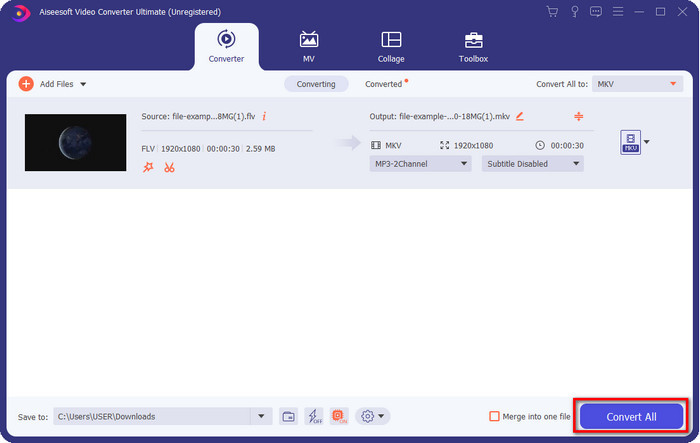
ステップ4. 準備ができたら、Convert All をクリックしてFLVをMKV形式に一括変換します。処理時間は1分もかからないので、長く待つ必要はありません。変換が完了すると、変換済みFLVファイルが入ったフォルダーが画面に表示されます。
関連記事:
パート3。FLVとMKVの違いは何ですか
FLVとMKVは、誰もが知っている最高のコンテナの1つとして知られています。しかし、何よりもまず、2つの形式に関するより詳細な情報を比較して見てみましょう。
FLVは、主にAdobeが作成したため、Webページで人気があるため、すべてのWebサイトで知られています。さらに、.flvは、他の形式よりもはるかに簡単にロードできるため、ビデオストリームをオンラインで再生します。また、この形式のビデオを表示または視聴するには、プラグインプレイが必要です。または、FlashPlayerを簡単にダウンロードすることもできます。フォーマットは優れていますが、使用するプラグインプレイはすでに普及しているため、フォーマットは最良の選択ではありません。ただし、多くのメディアプレーヤーは引き続きこの形式をサポートしており、ユーザーは引き続きこの形式を使用しています。
MKVは、利用可能な最も未来的なフォーマットとして知られています。このフォーマットを比較しようとすると、多くの意味で他のフォーマットとは異なります。たとえば、この形式で作成された構造は、MP4またはAVIと同じではありませんが、異なります。デザインとそのユニークなメディアファイルの保存は、それをより印象的にします。今日では、どのフォーマットが古くなっているかを選択するのは難しく、1つはMKVです。
詳細を掘り下げると、FLVをMKVに変換する必要がある理由がたくさん見つかります。 2つの形式にはメディアコンテンツが含まれていますが、MKVはFLVよりも強力です。したがって、MKV独自の機能が必要な場合は、ファイルをこの形式に変換する必要があります。
FLVとMKV
Adobe Flash Playerは、FLVを使用して、映画やテレビ番組などのビデオコンテンツを配信しました。現在、アドビはプレーヤーを開発しておらず、セキュリティ上の理由からユーザーにアンインストールすることを推奨しています。ただし、Adobe/Macromedia以外の多くのプログラムでは引き続きFLV形式を使用できます。
2002年にリリースされたMatroskaマルチメディアコンテナ形式は、多数のビデオ、オーディオ、画像、および字幕トラックを含めることができるオープンソース形式です。そのため、短いビデオクリップ、テレビ番組、および映画を簡単に保存するために使用できます。アニメファンサブで大人気。
パート4。FLVからMKVへの変換に関するFAQ
オンラインでFLVをMKVに変換しても安全ですか?
Webツールを使用する場合は、フォーマットの変換は安全です。ただし、すべてのオンラインコンバーターがファイル形式を安全に変換できるわけではありません。いくつかの傾向があるため、間違ったコンバーターを使用すると、予期しないエラーが多数発生します。たとえば、品質の低下は広範囲にわたる問題であり、変換後にファイルをダウンロードする際のウイルス、複数のポップアップ広告、感染性マルウェアなどがあります。したがって、オンラインで安全な変換プロセスを実行したい場合は、代わりにFVC Free VideoConverterOnlineを使用する必要があります。
FLVの変換には時間がかかりますか?
変換プロセスは多くの要因に依存しますが、そのうちの1つは、使用しているツールとファイルサイズです。大きなFLVファイルがある場合、特に急いでいる場合は、FVC VideoConverterUltimateを使用する必要があります。このツールは超高速のプロセスを提供するため、使用するためにインターネット接続は必要ありません。そして今、あなたがあなたのフォーマットをより速く処理することができるコンバーターを探しているなら、究極のツールが選択です。
FLVファイルを開けないのはなぜですか?
FLVファイルを開くことができない理由はいくつかあります。メモを取る;この次の詳細は、FLVファイルを開くことができない100番目の理由の1つです。まず第一に、ファイルがクラックされているか、ウイルスが含まれている場合、FLVを開くことはできません。第二に、ビデオファイルが使用しているアプリでサポートされていない最も一般的な問題。第三に、インターネットでFLVファイルをダウンロードすると、ファイルを再生するための重要な情報が失われる場合があります。これは問題ですが、FLVを別の形式に変換することでこれを支援できます。ただし、FLVが破損しているか不完全な場合は、フォーマットを変更してFLVを復元することはできません。
結論
ここまでで、FLVをMKVに変換するさまざまな方法を学んできました。上記のツールはいずれも、FLVを別の形式に変換する際に便利に使えるものです。あとは、自分の用途や環境に最も合った方法を選ぶだけです。3つのツールのどれを選んでも、変換自体は問題なく行えますが、もし「よりプロフェッショナルな仕上がり」や「動画の魅力を最大限に引き出すこと」を重視するのであれば、FVC Video Converter Ultimate を選ぶべきでしょう。多くを語る必要はありません。このツールなら、あなたのニーズの「足りない部分」をしっかり埋めてくれるはずです。
-
 FLVをPSPにロスレスで変換する方法に関する3つのソリューション
 FLVをPSPに変換する方法は?ここでは、WindowsおよびMacでFlashビデオをPSPでサポートされている形式(WMV、MP4、AVI、FLVなど)に変換するためのステップツーステップガイドを入手できます。
-
 FLVをWMAオーディオに変換する2つの方法[無料&オンライン]
 FLVビデオからWMAオーディオを抽出したいですか? Mac OSXおよびWindows10 / 8/7で高速変換速度でFLV(Flash Video)をWMA(Windows Media Audio)に変換するための2つの無料のWMAオーディオエクストラクターがあります。
-
 [解決済み] FLVビデオを無料でアニメーションGIFファイルに変換する方法
 送信を改善するためにFLVビデオセグメントからGIFを作成する場合は、この記事からFLVビデオをGIFファイルに簡単に変換する方法の詳細を学ぶことができます。

