


 ビデオコンバーター究極
 スクリーンレコーダー
 ビデオ修復
ビデオ修復
 安全なダウンロード
FLVからWMAへのコンバーター-無料でFLVビデオからWMAオーディオを抽出する方法
YouTube WebサイトからFlashビデオファイルをダウンロードすると、FLVをWMAロスレスオーディオに変換できます。 WMA(Windows Media Audio)は、Microsoftによって開発された一連のオーディオコーデックおよび対応するオーディオコーディング形式です。 WMAオーディオは、マルチチャネルおよび高解像度オーディオをサポートします。この記事から、WindowsとMacでFLVビデオをWMAオーディオに変換する2つの方法を学びます。

パート1。無料でFLVからWMAオーディオを抽出するための最良の方法
FVC Free FLV Converter は、Windows と Mac で複数の FLV ファイルを一括して WMA に変換できる、無料で使いやすく高速な FLV→WMA コンバーターです。同時に、FLV 動画を HD MP4、AVI、WMV、MKV、3GP、MP3、AAC、AC3 など、その他の動画・音声形式にも変換できます。内蔵の編集機能を使えば、WMA のメタデータ情報を無料で編集することができます。

FVCフリーFLVコンバーター
145000以上のダウンロード- Windows 10/8/7 / Vista / XPおよびMacOSXでFLVをWMAに変換します。
- WMAファイルの圧縮、マージ、テーマの追加、およびメタデータの編集。
- 休日、家族、誕生日などの特別なテーマをFLVファイルに追加します。
- FLVをWMA、MP3、AAC、FLAC、M4R、OGG、WAVにバッチ変換します。
無料ダウンロードWindows 7 以降に対応安全なダウンロード
無料ダウンロードMacOS 10.7 以降に対応安全なダウンロード
ステップ1.FLVファイルを追加します
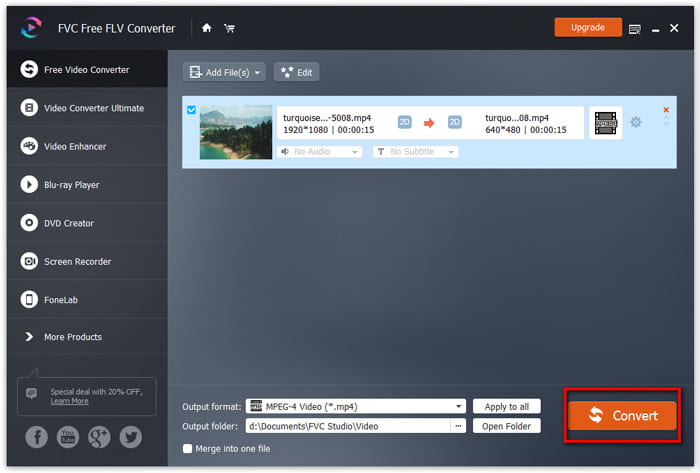
FVC Free FLV Converter を無料ダウンロードしたら、パソコンにインストールして起動します。Add File(s) ボタンをクリックして Flash 動画ファイルを読み込みます。複数の FLV ファイルを、ドラッグ&ドロップで一度に追加することもできます。

ステップ2.FLVファイルを編集する
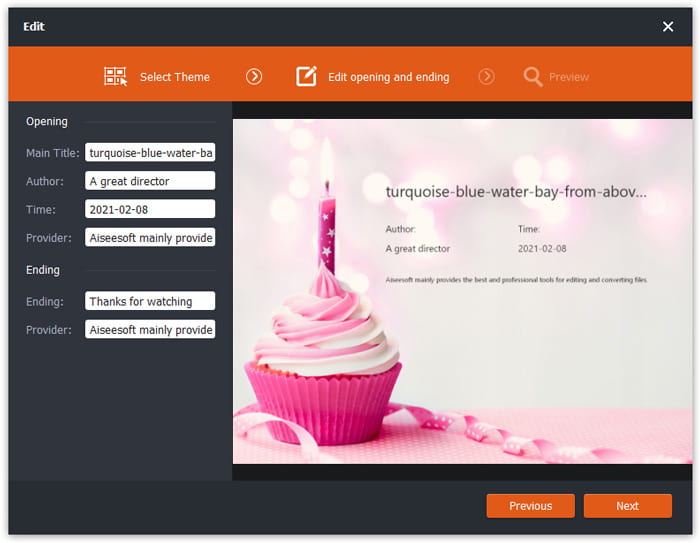
Edit ボタンをクリックして、FLV ファイルの編集を開始します。任意のテーマを選択したり、タイトル、作者、開始時刻・終了時刻などのデータ情報を編集できます。
手順3.WMAを出力として設定する
次に Output format エリアに移動し、検索ボックスに WMA と入力します。ここで出力形式として WMA - Windows Media Audio (*.wma) を選択できます。

ステップ4.FLVをWMAに変換する
Output folder エリアに進み、WMA ファイルの保存先フォルダーを指定します。Convert ボタンをクリックすれば、FLV を WMA 音声ファイルに無料で変換し始めます。
パート2。無料でFLVをWMAオンラインに変換する方法
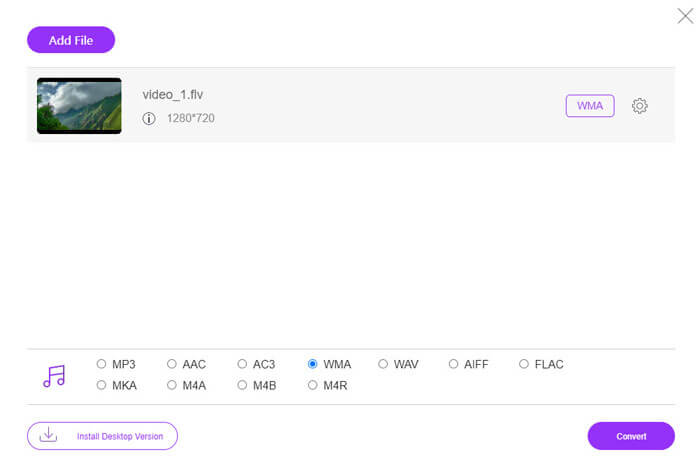
ソフトウェアパッケージをダウンロードするのが面倒な場合は、FVC Free Audio Converter を試してみてください。これは強力なウェブベースの FLV→WMA コンバーターで、あらゆる一般的な動画/音声ファイルを WMA、MP3、AAC、FLAC、WAV などに変換するのに役立ちます。FVC Free Audio Converter を使って FLV を WMA に変換する詳しい方法も確認できます。
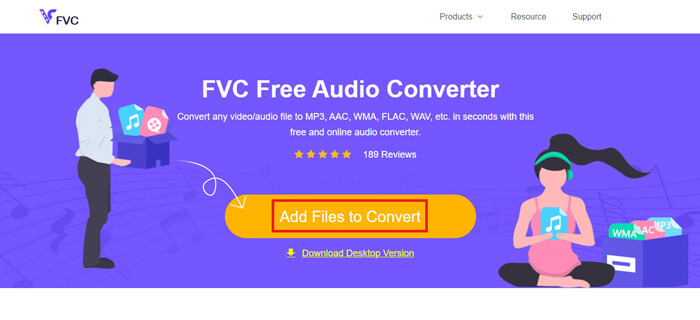
Step 1. FVC Free Audio Converter の公式サイト(https://www.free-videoconverter.net/free-audio-converter/)にアクセスします。Add Files to Convert ボタンをクリックしてランチャーをダウンロード・インストールします。その後、ローカルコンピューターから FLV ファイルをアップロードできます。
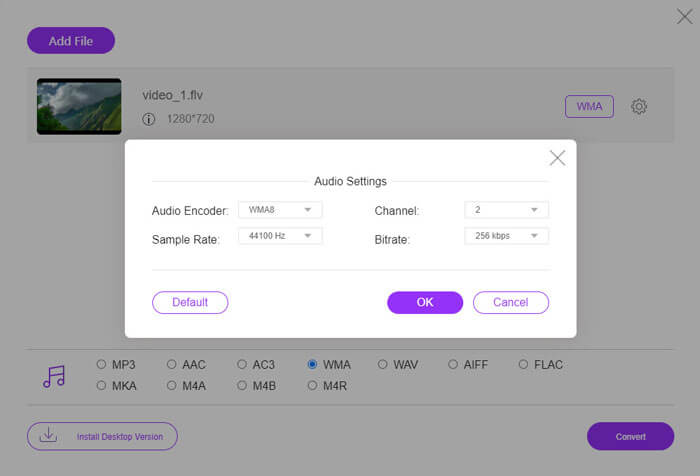
Step 2. 画面下部で WMA にチェックを入れ、出力形式として設定します。さらに詳細な設定を行いたい場合は、歯車アイコンをクリックして、オーディオエンコーダー、チャンネル、サンプルレート、ビットレートを調整します。OK ボタンをクリックして変更を保存します。
Step 3. 最後に、Convert ボタンをクリックすると、オンラインで無料の FLV から WMA への変換が開始されます。
パート3。FLVをWMAに変換する際のFAQ
FLVファイルとは何ですか?どうすれば再生できますか?
FLVは、Adobeによって開発されたフラッシュビデオファイル形式です。ビデオ、オーディオ、テキスト、添え字などを保存できます。 Windows Media PlayerとQuickTimeはどちらもFLVをサポートしていないため、VLCなどのサードパーティのメディアプレーヤーを使用してFLVを開く必要があります。
WMA形式は何に使用されますか?
WMAは、MP3と競合するためにMicrosoftによって作成された不可逆オーディオ形式です。 WMAは、主にオンライン音楽のストリーミングに使用されます。拡張子が.wmaのWMAファイルはWindowsMediaAudioです。 Windows MediaPlayerで完全にサポートできます。
WMAミュージックプレーヤーはありますか?
はい。FVC Free Video Player、KMPlayer、Elmedia Video Player、Macgo Free Mac Media Player、VOX Music Player、VLC Media Player、GOM Media Player、foobar2000、AIMP、Samsung Music など、選択できるWMA 音楽プレーヤーがあります。
結論
この記事では、主にWindows 10PCとMacでFLVビデオをWMAに変換する2つの無料の方法について説明しました。これらすべてのソリューションが問題の解決に役立つことを願っています。次回WebサイトからFlashビデオをダウンロードするときは、FVC Free FLV Converterを試して、FLVビデオをWMA、MP3、AAC、MP4、AVI、VOBなどに変換できます。
-
 FLVからWAVへ–FLVをWAVにオンラインで無料およびMac / PCで変換
 FLVファイルを変換するにはどうすればよいですか? VLCはYouTubeFLVをWAVに変換できますか?この投稿では、品質を損なうことなくFLVをWAVに変換する3つの無料の方法について説明しています。
-
 Windows / MacでMOVファイルをFLVに変換する2つの簡単な方法
 MOVをFLVに無料で変換する方法は?これは、デスクトップとオンラインで、1セントも払わずにMOVファイルを数秒でFLVに変換するのに最適なビデオコンバーターです。
-
 Mac / Windows / OnlineでWMAをMP3に変換する方法
 Windows Media PlayerでWMAをMP3に変換することは可能ですか? WMAをMP3フリーに変換する方法は?この投稿では、Mac、Windows PC、およびオンラインでWMAからMP3へのオーディオ変換を行うのに役立つ4つの簡単な方法を共有しています。
