


 ビデオコンバーター究極
 スクリーンレコーダー
 ビデオ修復
ビデオ修復
 安全なダウンロード
無料のFLVからXvidへのコンバーターでFLVをXvidに変換する3つのステップ
FLVは、Media Player Classic、MPlayer、RealPlayer、VLCメディアプレーヤーなどのほとんどのメディアプレーヤーで広くサポートされているコンテナファイル形式です。ただし、DVDまたはCDプレーヤーでFLVファイルを再生したい場合は、行き詰まります。 CDまたはDVDプレーヤーは、FLV再生をネイティブでサポートしていません。
この問題の解決策は、CD や DVD プレーヤーで再生できるコーデックである Xvid に FLV を変換することです。
このチュートリアルでは、シンプルな無料 FLV から Xvid 変換ソフトを使って、3 ステップで FLV を Xvid に変換する方法を紹介します。

パート1。FLVをXvidに無料で変換する3つのステップ
FLVをXvidに変換するのは簡単で、FLVをXvidに変換する手順により、無料のFLVからXvidへのコンバーターが起動します。
FVC Free FLV Converter は、FLV ファイルを Xvid、Divx、MP4、MOV、MKV、WMV、AVI などの他の形式やコーデックに変換できるウィザード形式のツールです。

FVCフリーFLVコンバーター
155411+ダウンロード- FLV、Xvidなどを含む300以上のビデオフォーマットを変換します。
- NTSC、PAL、およびSECAMでビデオをDVDVOBに変換します。
- FLVからオーディオを抽出して、BGMを保存します。
無料ダウンロードWindows 7 以降に対応安全なダウンロード
無料ダウンロードMacOS 10.7 以降に対応安全なダウンロード
それでは、このコンバーターでFLVをXvidに変換するための詳細な手順を確認しましょう。
ステップ 1. FLV ファイルを追加
このFLVからXvidへのコンバーターをコンピューターに無料でダウンロードしてください。 WindowsとMacの両方のコンピューターで動作します。ダウンロードしてコンピュータにインストールします。
ファイルを追加ボタンをクリックして、複数の FLV ファイル、または FLV フォルダ全体をこのプログラムに追加します。
FLVファイルをこのソフトウェアに直接ドラッグアンドドロップできます。

ステップ 2. Xvid 出力を選択
出力形式のドロップダウンリストを開き、Xvidを検索して、Xvid SD/HD/4K のいずれかの形式を選択します。
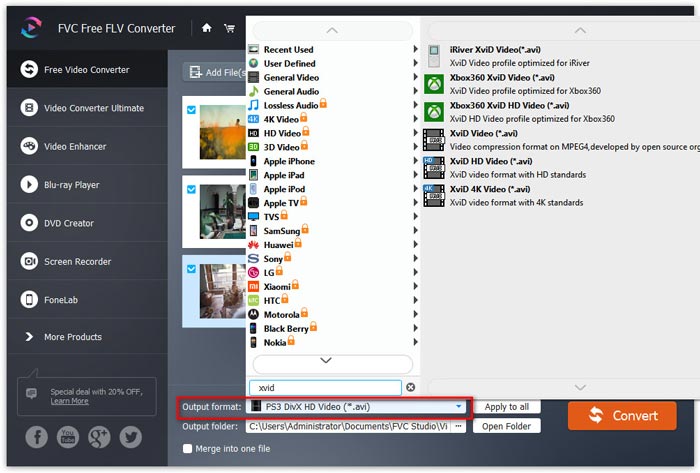
ステップ 3. FLV を Xvid に変換
Xvid 形式を確認したら、出力フォルダの横にある三点リーダーをクリックして、変換後の Xvid ファイルを保存する保存先フォルダを指定します。
最後に、右上の変換ボタンをクリックして、FLV から Xvid への変換を開始します。
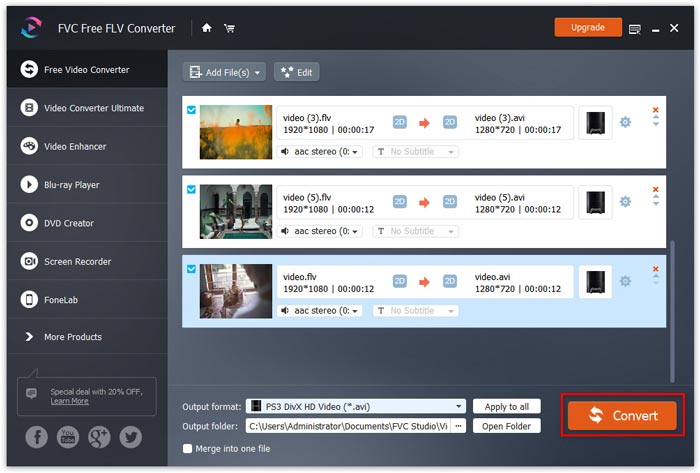
このソフトウェアでは、[1つのファイルにマージ]チェックボックスをオンにすることで、複数のファイルを1つのファイルにマージすることもできます。トップメニューの編集アイコンを使用すると、ビデオ作成の開始テーマと終了テーマを追加できます。
パート2。FLVとXvidとは何ですか
Xvidとは何ですか?
Xvid(以前のXviD)は、MPEG-4ビデオコーディング標準に準拠したビデオコーデックライブラリです。プロプライエタリソフトウェアであるDivXPro Codecの主要な競合相手として、XvidはGNU General PublicLicenseに基づく自由ソフトウェアです。
Xvid は、MPEG-4 Advanced Simple Profile 圧縮を使用するプログラム(コーデック)です。Xvid でエンコードされたファイルは CD や DVD に書き込むことができ、一部の DivX 対応 DVD プレーヤーやその他のXvid メディアプレーヤーで再生できます。
さらに、Windows、Mac OS、Linux、BSDもXvidライブラリに直接アクセスできます。
FLVとは何ですか?
FLV、Flash Videoは、コンテナファイル形式として、テレビ番組や映画などのデジタルコンテンツをインターネット経由で配信するために使用されます。
以前は、この形式は Web 上やローカル環境で、Adobe Flash Player プラグインまたはアプリケーションによりサポートされていました。しかし、Adobe は 2021 年以降、Flash Player の開発中止を発表しました。それでも、Media Player Classic、MPlayer、RealPlayer、VLC Media Player など、さまざまなFLV プレーヤーソフトで FLV ファイルを開くことができます。
FLCはほとんどのプレーヤーで広くサポートされていますが、CDまたはDVDプレーヤーで開くことはできません。
パート3。FLVをXvidに変換する際のFAQ
XvidとAVIの違いは何ですか?
AVIは、ビデオとオーディオの両方を含むマルチメディアコンテナ形式です。 DV、H.263、VP8、VP9、DivXなどのコーデックをサポートします。DivXおよびXvidでエンコードされたAVIファイルは同じ拡張子.aviを共有し、AVIファイルの品質をDVDと同等またはそれ以上にすることができます。
XvidはDivXと同じですか?
いいえ。2021年1月、DivXNetworksはOpenDivXをオープンソースのMEPG-4ビデオコーデックとして最初に設立しましたが、制限付きライセンスの下に置かれ、DivX Advanced Research Center(DARC)のメンバーのみがプロジェクトのCVSへの書き込みアクセス権を持っていました。その後、2001年7月、DARCはencore2に基づくクローズドソースの商用DivX 4コードのベータ版をリリースし、すべてのOpenDivXコードは、削除される前に、ダウンロードされた最新バージョンのencore2を使用してXvidに置き換えられました。 XvidでエンコードされたファイルはCDまたはDVDに書き込むことができ、一部のDivX互換DVDプレーヤーおよびメディアプレーヤーで再生できます。ただし、Xvidはオプションで、ほとんどのDivX認定セットトッププレーヤーがサポートしていない高度なMPEG-4機能を使用してビデオをエンコードできます。
FLVはまだ使用されていますか?
FLV は、インターネット上でデジタル動画コンテンツを転送するために使われるコンテナファイル形式です。動画、バナー広告、アニメーション、ストリーミングなどに利用されてきました。現在は、より効率的なコンテナファイル形式も存在しますが、FLV は依然として Windows、HandBrake、FFmpeg、VLC などで利用・サポートされています。もしお使いのデバイスで FLV がサポートされていなくても、FLV を MP4、MOV、WMV など、より互換性の高い形式に変換することができます。
結論
FLV は Web、デスクトップ、モバイルデバイスで広く利用されているものの、CD や DVD プレーヤーではサポートされていません。CD や DVD プレーヤーで FLV ファイルを視聴する必要がある場合は、FLV を Xvid に変換することが解決策です。ここでは、無料の FLV から Xvid 変換ソフトを使って、3 ステップで FLV を Xvid に変換する詳しい手順を紹介します。このソフトは、ほとんどの動画・音声ファイルを完全無料で変換できます。もし本記事の内容がお役に立ったら、ぜひフォロワーと共有してください。
-
 デスクトップとオンラインで FLV を AVI に変換する 3 つの簡単な方法
 1.FLVビデオを他のマルチメディア形式に簡単に変換します。 2. AVI、MP4、MKVなどのほぼすべてのビデオ形式をサポートします。3。変換ごとに数百のFLVファイルをバッチ処理します。
-
 WindowsとMacでFLVをWMVに変換するトップ3の方法
 PCまたはMacで品質を損なうことなくFLVをWMVに変換する最良の方法をお探しですか?ここでは仕事を簡単に行うための3つの方法を共有しているので、あなたは幸運です。
-
 FLVビデオをYouTubeにアップロードするための具体的なガイド
 FLVをYouTubeにアップロードしましたが、失敗しましたか?ステップバイステップガイドに従って、この問題を自分で解決し、FLVをYouTubeでサポートされているコーデックに変換できます。
