


 ビデオコンバーター究極
 スクリーンレコーダー
 ビデオ修復
ビデオ修復
 安全なダウンロード
WindowsとMacでRMVBビデオファイルをFLVに変換する方法
私たちの調査によると、市場には100種類以上の動画フォーマットが存在し、それぞれ異なる目的で開発されています。たとえば RMVB は、ファイルサイズが小さい一方で画質に優れているため、インターネット上で映画を配布するのに最適な形式です。アニメやアジア系映画のスタジオは、この形式を使って動画を配信することを好みます。しかし、RMVB は一般的な動画プレーヤーやモバイル端末では広くサポートされていません。そこで本記事では、最適なRMVB から FLV への変換ソフトをご紹介します。

パート1:PC用の最高のRMVBからFLVへのコンバーター
FVC Free FLV Converter は、PC 向けの優れた RMVB から FLV への変換ソフトのひとつです。RMVB ムービーを画質を落とさずに FLV 形式へ変換できます。さらに重要な点として、このコンバーターは完全無料で、機能制限も一切ありません。
最高の RMVB から FLV へのコンバーターの主な機能
- 1.RMVBをFLVにすばやくバッチ変換します。
- 2.変換後に高品質のビデオを作成します。
- 3.支払い、登録、透かし、その他の制限はありません。
無料ダウンロードWindows 7 以降に対応安全なダウンロード
無料ダウンロードMacOS 10.7 以降に対応安全なダウンロード
PCでRMVBをFLVに変換する方法
ステップ1:RMVBファイルを開く
PC にインストールした後、この最高の RMVB から FLV へのコンバーターを起動します。ホーム画面の Add File(s) ボタンをクリックして、RMVB ファイルを追加します。その後、内蔵メディアプレーヤーでムービーを再生して確認できます。

ステップ2:出力フォーマットとしてFLVを設定する
画面下部の Output format オプションをクリックして展開し、General Video リストから FLV を選択します。解像度などの設定を変更したい場合は、Gear アイコンをクリックします。

ステップ3:RMVBをFLVに変換する
次に、Open Folder ボタンを押して、出力ファイルを保存するフォルダーを指定します。最後に、Convert ボタンをクリックすれば、RMVB から FLV への変換がすぐに開始されます。

パート2:オンラインのトップ3RMVBからFLVへのコンバーター
トップ1:FVC無料オンラインビデオコンバーター
FVC Free Online Video Converter は、オンラインで使える優れた RMVB から FLV への変換ツールのひとつです。ファイルサイズの制限なく無料で利用できます。さらに、一度に多数の RMVB ムービーを変換できるバッチ変換機能も便利です。
最高のオンライン RMVB から FLV へのコンバーターの主な機能
- 1.RMVBをオンラインで無料でFLVに変換します。
- 2.使いやすい。
- 3.バッチ変換をサポートします。
オンラインで RMVB を FLV に変換する方法
ステップ 1: ブラウザで https://www.free-videoconverter.net/free-online-video-converter/ を開きます。Add Files to Convert をクリックしてランチャーをダウンロードします。
ファイルを一括変換するには、デスクトップ版をダウンロードしてください。
ステップ 2: Add File ボタンを押して、変換したい RMVB ファイルをアップロードします。続いて、画面下部で FLV を選択します。

ステップ 3: Convert ボタンをクリックし、処理が完了するまで待ちます。その後、生成された FLV ファイルをダウンロードします。
トップ2:CloudConvert
CloudConvertは、クラウドベースのファイルコンバーターアプリです。変換ごとに最大1GBのRMVBファイルを無料で処理できます。さらに、Googleドライブなどのさまざまなソースから動画をアップロードできます。
CloudConvert RMVB から FLV へのコンバーターの主な機能
- 1.コンピューターまたはオンラインからRMVBを変換します。
- 2.基本的なカスタムオプションを提供します。
- 3.変換中にビデオをトリミングします。
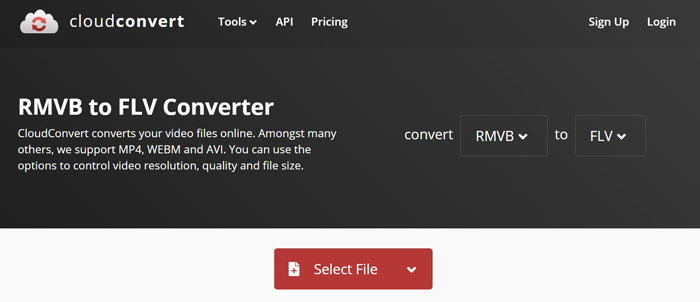
オンラインで RMVB を FLV に変換する方法
ステップ 1: ブラウザで https://cloudconvert.com/rmvb-to-flv を開きます。Select File ボタンをクリックして RMVB ファイルをアップロードします。
ステップ 2: 動画のアップロードが完了したら、Convert ボタンをクリックします。
ステップ 3: 変換が終了したら、FLV ファイルをダウンロードします。
トップ3:FreeConvert
FreeConvertはCloudConvertに似ています。また、WebRMVBからFLVへのコンバーターでもあります。デフォルトの最大ファイルサイズは1GBですが、個人の電子メールでサインアップするか、容量を増やすために料金を支払うことができます。
FreeConvert RMVB から FLV へのコンバーターの主な機能
- 1.オンラインでRMVBをFLVに変換します。
- 2.詳細設定を提供します。
- 3.変換後にビデオを削除します。
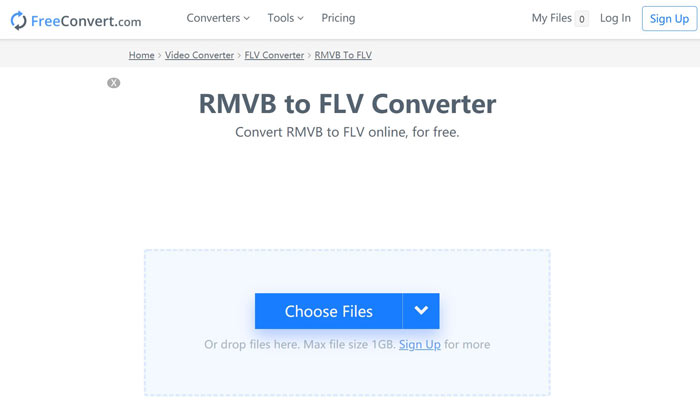
FreeConvert で RMVB を FLV に変換する方法
ステップ 1: ブラウザを開き、https://www.freeconvert.com/rmvb-to-flv にアクセスします。
ステップ 2: Choose Files ボタンをクリックし、パソコンから RMVB ファイルをアップロードします。
ステップ 3: 表示に従い、Convert To FLV ボタンをクリックします。変換後、FLV ファイルをダウンロードします。
RMVBとFLV
標準のRealMedia(.RM)形式の新しいバリエーションであるRMVBは、可変ビットレートを使用して圧縮されたRealMediaビデオファイル形式です。これは、アジアの映画やアニメで人気のある形式です。 RMVBファイルはサイズが小さく、ビットレートは低くなりますが、品質は向上します。
Adobe Flash Playerは、FLVを使用して、映画やテレビ番組などのビデオコンテンツを配信しました。現在、アドビはプレーヤーを開発しておらず、セキュリティ上の理由からユーザーにアンインストールすることを推奨しています。ただし、Adobe/Macromedia以外の多くのプログラムでは引き続きFLV形式を使用できます。
パート3:RMVBからFLVへのコンバーターに関するFAQ
RMVBファイル形式とは何ですか?
RMVBは、可変ビットレートで圧縮されたReal MediaVideoです。ビデオのコンテンツ用に最適化されています。 RMVBは、標準のRealMediaファイル形式の新しいバリエーションです。
Windows Media PlayerはRMVBファイルを開くことができますか?
最新バージョンの WMP には多くのコーデックが含まれていますが、Windows Media Player では RMVB を開くことができません。RMVB を MP4 などの一般的な動画形式に変換する必要があります。あるいは、専用の RMVB プレーヤー を利用して RMVB ファイルを再生することもできます。
VLCはRMVBファイルを変換できますか?
はい、VLCはRMVBファイルを開いて変換できますが、ジョブを完了するには長い時間がかかります。また、出力品質が悪い。
結論
ここで、WindowsおよびMac用の少なくとも上位4つのRMVBからFLVへのコンバーターを学習する必要があります。 Webビデオコンバーターアプリは、インストールせずにRMVBファイルをFLV形式に変換する便利な方法です。ただし、FVC Free FLV Converterはより安定しており、より良い出力品質を生成します。さらに質問を?以下にメッセージを残してください。
-
 MP4からFLV |トップ3無料コンバーター(オンライン/ Mac / Windows)
 この投稿は、MP4からFLVへの変換の詳細なガイドです。上位3つの無料コンバーターを使用して、WindowsまたはMacコンピューターでMP4をFLVにオンラインで簡単に変更できます。
-
 VOBファイルとは何ですか?VOBファイルを無料でGIFに変換する方法
 VOBファイルと、リッピング後に共有する方法について詳しく知りたいですか?またはなぜVOBをGIFに変換する必要があるのですか?次に、この記事を注意深く読んでください。
-
 高速アップロードのためにFLVビデオを圧縮する2つの簡単な方法
 FLVビデオのアップロードに失敗した場合、またはファイルの共有に時間がかかる場合は、記事からFLVビデオを圧縮する2つの簡単な方法の詳細を学ぶことができます。

