


 ビデオコンバーター究極
 スクリーンレコーダー
 ビデオ修復
ビデオ修復Windows / Mac/Online用のWebMファイルをFLVに変換する方法に関するヒントとコツ
WebM 形式の動画が再生できなくてお困りですか? もしかすると、WebM ファイルをお使いのデバイスで再生可能な形式に変換する最適な方法を探しているところかもしれません。その場合は幸運です。本記事では、オンライン・オフラインのどちらでも使える優秀な WebM 変換ソフトを 2 つご紹介します。では、デスクトップで使えて実際に WebM を変換しながら学べる、無料のWebM から FLV へのコンバーターを見ていきましょう。

パート1。WindowsとMacで一流のWebMからFLVへのコンバーター
最初にご紹介するのは、お使いのデスクトップにダウンロードして問題解決に役立てられる、非常に優秀な WebM から FLV へのコンバーターです。FVC Video Converter Ultimate は、変換をほぼ 100%の成功率で行える、最良のコンバーターと言えるでしょう。これは、動画や音声ファイルを、お好みの 200 以上の形式の中から互換性のあるものへ変換するために特化して作られています。さらに、高速変換でありながら画質を損なうことなく、シンプルな操作で変換が行えるという点も洗練されています。このコンバーターは変換作業を次のレベルへと引き上げてくれます。体験してみたくなりましたか? それでは、以下の詳しい手順に従って、このツールの使い方を学びましょう。
FVC Video Converter Ultimate を使って WebM ファイルを FLV 形式に変換する手順:
ステップ 1. 下のダウンロードボタンをクリックし、画面の案内に従ってインストールします。
無料ダウンロードWindows 7 以降に対応安全なダウンロード
無料ダウンロードMacOS 10.7 以降に対応安全なダウンロード
ステップ 2. WebM ファイルを追加するには、インターフェース左上の Add Files をクリックします。次にフォルダー内から .webm ファイルを選択し、Open をクリックします。
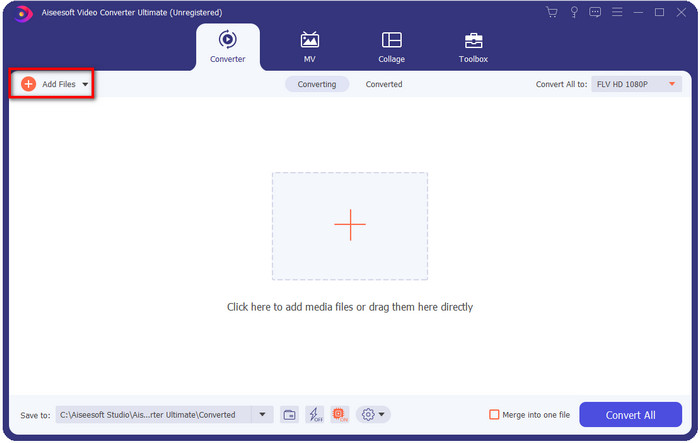
バッチ変換を行うために複数のWebMファイルまたはその他のファイルを追加する場合は、ファイルをインターフェイスにドラッグアンドドロップできます。
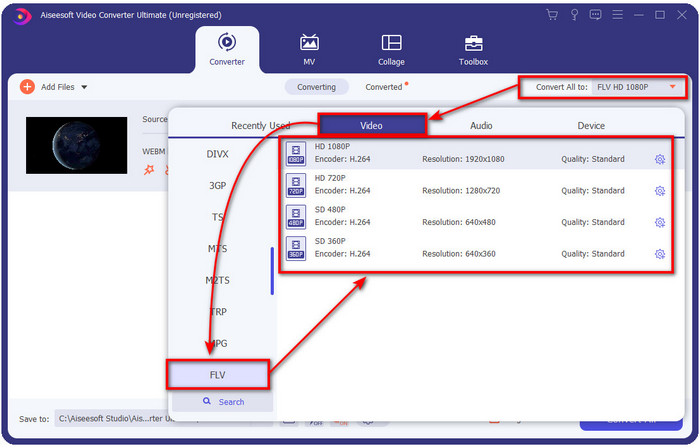
ステップ 3. インターフェース右上の Convert All の横にあるオプションをクリックし、出力形式として FLV を選択します。
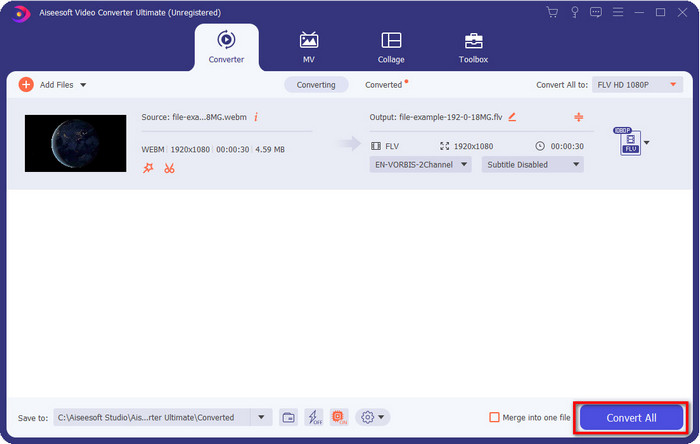
ステップ 4. Convert All をクリックして WebM から FLV への変換を開始します。処理が完了すると、新しく変換された FLV ファイルが入ったフォルダーが画面に表示されます。
長所
- それはあなたが選ぶことができる無数のフォーマットプロファイルをサポートします。
- より高速な変換手順のためのハードウェアアクセラレーションと高速変換をサポートします。
- カット、マージ、クロップ、エフェクトの追加など、複数の高度な編集機能を提供します。
- WebMファイルをバッチで変換します。
- WindowsやMacなどのすべてのオペレーティングシステムで利用できます。
短所
- デスクトップにダウンロードしてください。
- 有料コンバーター。
パート2。無料のオンラインでWebMをFLVに変換する
FVC Free Video Converter Online は、強力なオンライン WebM から FLV へのコンバーターを提供します。このコンバーターは、お好みのあらゆる検索エンジンから利用可能です。デスクトップにコンバーターをダウンロードする代わりに、このウェブツールを代替として使ってみてはいかがでしょうか。無料であるだけでなく、広告やマルウェアも一切ありません。ただし、対応形式の範囲など、多くの機能は FVC Video Converter Ultimate ほど豊富ではありません。このウェブコンバーターの使い方を知りたいですか? それでは、以下の手順に従ってください。
FVC Free Video Converter Online を使って WebM ファイルをオンラインで FLV 形式に変換する手順:
ステップ 1. この FVC Free Video Converter Online をクリックして、コンバーターの公式サイトを開きます。
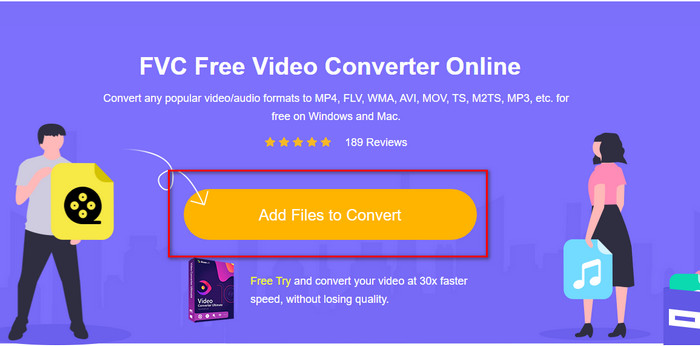
ステップ 2. コンバーターのサイトで、Add Files to Convert をクリックしてウェブツール用のランチャーをインストールします。もう一度クリックするとフォルダーが開くので、.webm ファイルを探して選択し、Open をクリックします。
ステップ 3. 形式の一覧から FLV を選んで、出力形式に設定します。
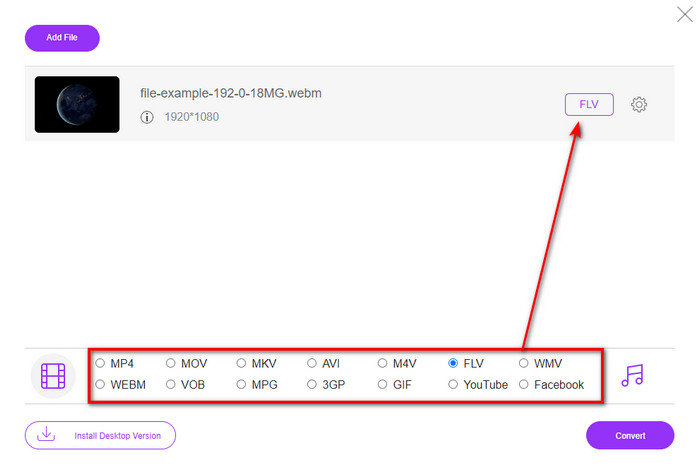
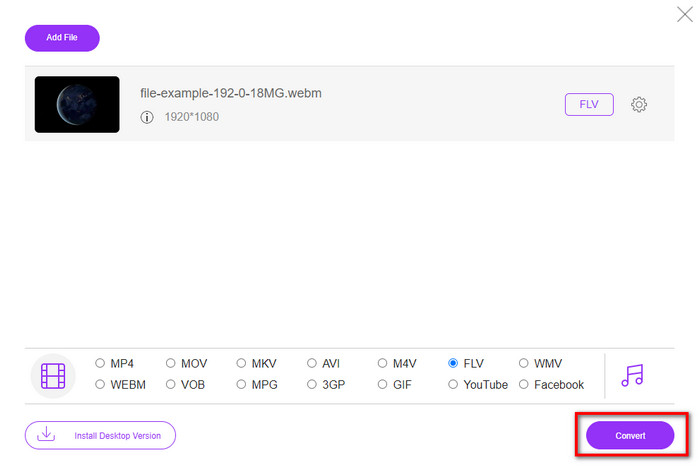
ステップ 4. ファイルを変換するには、Convert をクリックします。
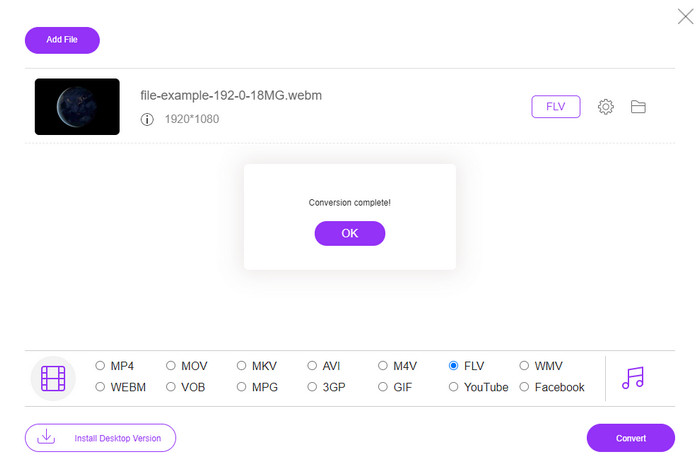
ステップ 5. 変換が完了すると、フォルダーが表示されます。
長所
- すべてのWebブラウザで利用可能で無料でアクセスできます。
- 厄介な広告はなく、マルウェアもありません。
- 中距離フォーマットをサポートします。
短所
- インターネット接続が必要です。
- このコンバーターでは特別な機能は利用できません。
パート3。WebMとFLV
WebMは、HTML5で動作するほとんどのブラウザーで再生できます。このフォーマットの目的は、ロイヤリティフリーであり、すべてのWebブラウザでビデオとオーディオを再生できるようにすることです。さらに、ユーザーが抱えるあらゆる帯域幅の状況に適応できます。ユーザーがひどいインターネット接続を持っていても、品質に影響を与えることなく、主にビデオとオーディオを再生します。このフォーマットのもう1つの素晴らしい機能は、ビデオストリームとオーディオストリームで個別のコーデックを使用することです。このフォーマットには高品質のビデオを含めることができますが、一部のスマートフォンやメディアプレーヤーはこのタイプのフォーマットのビデオを再生できません。ファイルを再生できない理由はたくさんありますが、その1つは、OSのバージョンが古くなっていることです。
WebMとは異なり、FLVの目的は、AdobeFlashPlayerまたはAdobeAirを使用してインターネット経由でビデオコンテンツを配信することです。また、この形式には、ビデオコンテンツだけでなく、メタデータ、短いヘッダー、オーディオ、ビデオストリームなどの要素も含めることができます。このフォーマットにはプラグインがありますが、メディアプレーヤーでファイルを再生したり、携帯電話に保存したりするためにプラグインは必要ありません。 WebMの場合と同様に、この形式でもビデオとオーディオの圧縮コーデックが別々に使用されます。
WebMファイルに互換性を持たせるには、WebMをFLVに変更する必要があります。 WebMファイルはデバイスに保存できますが、使用できない場合はストレージの無駄になります。さらに、WebMファイルを再生可能な形式に変換すると、複数のデバイスでファイルを表示する機会が得られます。
パート4。WebMからFLVへの変換に関するFAQ
VLCはWebM形式をサポートしていますか?
VLC は、Windows や Mac はもちろん、スマートフォンにもダウンロードできる多機能メディアプレーヤーの 1 つです。さまざまな動画・音声の再生に対応しており、.webm ファイルもサポートしています。しかし、WebM ファイルをより優れたメディアプレーヤーで視聴したい場合は、WebM ファイルを再生できるおすすめソフト 5 選を紹介している本記事を続けてお読みください。
WebMをGIFに変換する方法は?
WebM ファイルをアニメーション GIF に変換する作業は、1 分もかからず完了します。WebM を GIF に変換する方法を知りたいですか? そうであれば、このリンクをクリックして詳しい手順をご覧ください。
WebMファイルを圧縮できますか?
もちろん可能です。WebM ファイルのサイズを小さくして、メールで送信したり、ドライブの空き容量を節約したりできます。もし現在お使いのソフトがない場合でも心配はいりません。無料で使える WebM 圧縮ソフトを 2 つ厳選してご紹介しています。
結論
ここまでで、WebM ファイルを FLV 形式へ変換する方法が分かりました。次は、どのコンバーターを使うかを選ぶ番です。ここで紹介した 2 つの WebM コンバーターはいずれも成功を約束してくれますが、それぞれ性能に違いがあります。たとえば、制限や広告なしで WebM をオンライン変換したい場合は、FVC Free Video Converter Online を選ぶべきでしょう。一方、単なるファイル変換以上のことを行いたい場合は、FVC Video Converter Ultimate を選ぶのが最適です。究極のコンバーターの実力にまだ半信半疑ですか? それなら、今すぐデスクトップにダウンロードして、そのフル機能を体験してみてください。
-
 音質を損なうことなくWebMをMP3に変換する3つの方法
 保存したオーディオの再生にWebMファイルを使用できないため、問題が発生しましたか?次に、WebMをMP3に変換することで効果的な支援を提供するため、この記事を読んでください。
-
 3WebMファイルをAVI形式に変換するために使用される見事なソフトウェア
 WebMをAVIに変換する方法がわかりませんか?それでは、この記事を読み始めましょう。 WebMと、変換に使用できる3つのコンバーターに関するすべての詳細を指定します。
-
 WEBMをMOVに変換する方法に関するわかりやすい方法
 WebMビデオをサファリで再生できないこと、およびこの形式をサポートするブラウザーに切り替えたくないことは難しいと思いますか?この記事を読んで、WebMをMOVに簡単に変更する方法を学びましょう。
