


 ビデオコンバーター究極
 スクリーンレコーダー
 ビデオ修復
ビデオ修復
 安全なダウンロード
メール用に写真を簡単に圧縮する 3 つの方法 [ガイド]
電子メールは、写真やその他の必要なファイルを添付したメッセージを送信するのに最適なプラットフォームです。ただし、アップロード時間が長くなったり、配信に失敗したり、電子メール プロバイダーによって課せられた添付ファイルのサイズ制限を超えたりするため、大きなファイルの写真を送信するのが難しいと感じるユーザーもいます。これらの問題を回避するには、送信前に写真のサイズを変更することが不可欠です。
そこで本記事では、メール用に写真を圧縮する方法を3つご紹介し、画質を損なうことなく、写真の添付ファイルをスムーズに送受信できるようにしていきます。

パート 1. 電子メール用に写真を圧縮する利点
一般的に、写真を圧縮すると、電子メールでの使用を含め、多くの利点があります。電子メール用に写真のサイズを変更すると、次のような利点があります。
・画像圧縮とは写真をより小さなサイズにリサイズすることなので、圧縮していない写真に比べて、1通のメールに複数の写真を簡単に添付できます。
・多くの場合、メールサービスは添付ファイルのサイズ上限を設けています。メール用に写真を圧縮しておけば、この制限内に収めることができ、問題なくメールを配信できます。これは、複数の宛先にメールを送る場合や、写真以外の添付ファイルも同時に送りたい場合に便利です。
・写真を圧縮すると、単に容量が小さくなるため、メールボックスのストレージ枠を有効に活用できます。
・大きな添付ファイルは、メールサーバーによってブロックされたり、配送エラーになったり、迷惑メール扱いされることがあります。メール用に写真を圧縮しておくことで、こうしたトラブルを回避し、添付ファイルを問題なく相手に届けやすくなります。
・受信者がスマートフォンでメールを確認するケースでは、圧縮された写真の方が、非圧縮の写真よりもダウンロードや閲覧がはるかに簡単です。
パート2. 画像形式を変換して電子メール用に写真を圧縮する
電子メール用に写真を圧縮したい場合、まず試すことができる方法は、画像変換ツールを使用することです。これを使用すると、画像を希望する形式に変換し、変換プロセスで写真を望ましい、より扱いやすいサイズに最適化します。
FVC Free Image Converter は、写真を JPG、PNG、GIF などさまざまな画像ファイル形式に変換できる無料のコンバーターです。もし、より多くのデータを保持する形式の画像ファイルをメールで送信していて、そのせいでファイルサイズが大きくなっている場合は、このツールを活用できます。さらに、一度に最大40枚まで一括変換できるので、大きなファイルをまとめて送りたいときにも最適です。以下は、このツールを使ってメール用に写真を圧縮する手順です。
手順1. まずブラウザで FVC Free Image Converter を検索し、オンラインツールにアクセスします。
手順2. 次に、Convert to で希望する出力ファイル形式を選択します。その後、Add Images ボタンをクリックして、変換したい画像をインポートします。
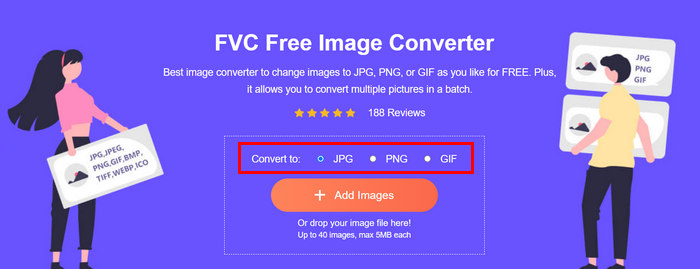
手順3. 設定が終わったら、Download All ボタンをクリックします。
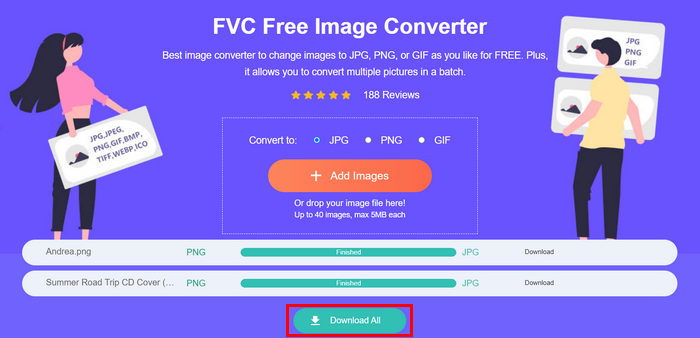 FVC 無料画像コンバータ ツールを使用すると、変換された写真が圧縮され、サイズが縮小されることが保証されるため、電子メールでの使用に最適です。
 パート3. オンライン圧縮ツールでメール用に写真を縮小する
FVC Free Image Compressor は、メール用に写真を圧縮する作業を簡単にしてくれる無料オンライン圧縮ツールです。ユーザーは画像ファイルをアップロードまたはインポートするだけで、あとはツールが自動的に圧縮してくれます。画質の低下が心配な場合でも、このツールは最適化と高度な圧縮アルゴリズムを採用しているため、メール用に圧縮しても画像の品質が維持されます。
また、画像を一括圧縮する必要がある場合、このツールを使用すると、一度に 40 枚の画像を同時に圧縮できます。最後に、JPEG、PNG、SVG、アニメーション GIF など、さまざまな一般的な画像形式をサポートしています。
手順1.ブラウザで公式サイトにアクセスします。
手順2. その後、Upload Images をクリックして、Web 用に圧縮したい画像をインポートします。このツールは、画像を選択して「開く」をクリックした時点で、自動的に写真の圧縮を開始することに注意してください。
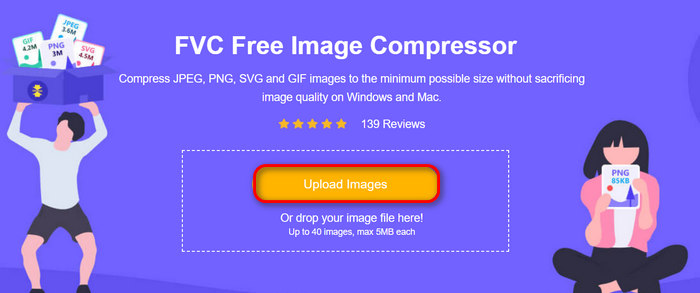
手順3. 画像の圧縮が完了したら、新しいファイルサイズを確認してプレビューできます。最後に、Download All をクリックして画像を保存します。
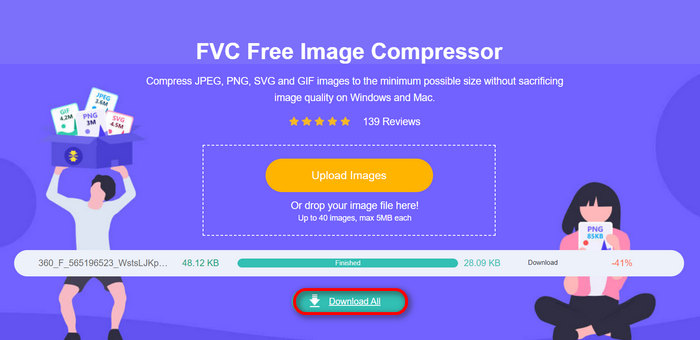
この方法は、複雑な手順やサブスクリプション料金を支払わずに、電子メール用に写真を圧縮するのに非常に役立ちます。さらに、ユーザーフレンドリーで直感的なインターフェイスにより、あらゆるレベルのユーザーにとって理想的なツールになります。したがって、電子メールでの使用のために写真を最適化したい場合は、今すぐこの方法をお試しください。
パート 4. メール用の写真を指定のサイズに変更する
メール用に写真のサイズを指定のサイズに変更したい場合は、IMGonline ツールをお試しください。この画像圧縮ツールを使用すると、画像を任意のサイズに変更できます。手順は次のとおりです。
手順1. サイト上で、Choose File ボタンをクリックし、圧縮したい写真を追加します。

手順2. 次に、JPEG ファイルの圧縮設定を行います。希望するサイズを KB または MB 単位で入力します。

手順3. Size Reducing in Megapixel メニューで、どの程度写真を圧縮するか、あるいは圧縮をどの程度までにとどめるかを選択します。
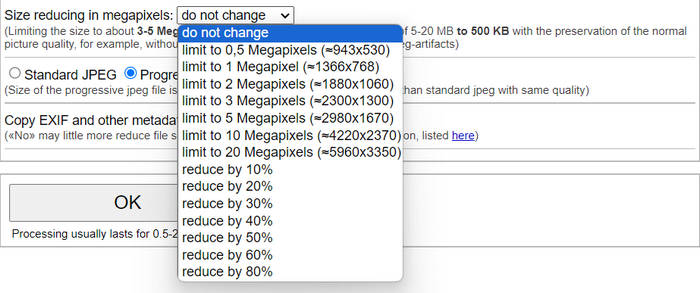
手順4. その後、Standard JPG か Progressive JPG のどちらかを選択します。

手順5. 設定が完了したら、OK ボタンをクリックするだけです。
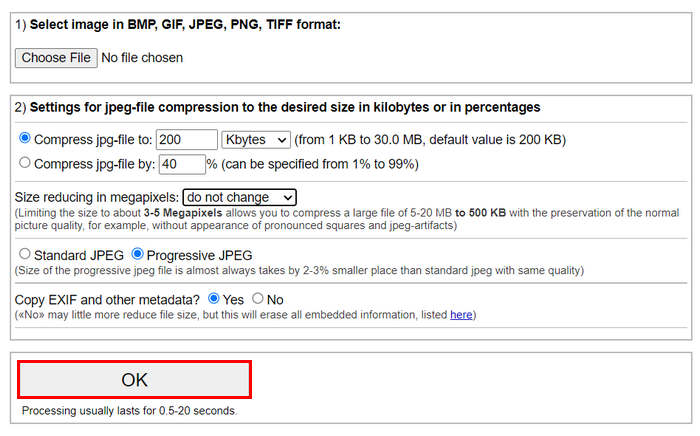
標準 JPG とプログレッシブ JPG のどちらを選択するかに関しては、プログレッシブ jpeg ファイルのサイズは、同じ品質の標準 jpeg ファイルよりも常に 2-3% 小さくなることに注意してください。
パート 5. メール用の写真の圧縮に関する FAQ
電子メール用の写真のサイズはどのくらいにすればよいですか?
メールで写真を送信する場合の理想的なサイズについては、制限はありませんが、一般的には最大 1024 x 768 ピクセルに写真のサイズを変更することをお勧めします。また、画像のサイズを 1 MB 未満に抑えると、添付ファイルの制限に関する問題を回避でき、受信者が画像をダウンロードして表示しやすくなります。
Gmail 用に画像を圧縮するにはどうすればいいですか?
Gmail 用に画像を圧縮する方法はいくつかありますが、最も簡単なのは、FVC の無料 画像圧縮ツール のようなオンライン圧縮ツールを使う方法です。使い方は、画像ファイルをアップロードするだけで、自動的に圧縮が行われます。
電子メールに最適な画像タイプは何ですか?
メールに最適な画像形式は、JPEG と PNG です。JPEG は、圧縮率が高く、ファイルサイズと画質のバランスが良いため、写真や色数の多い画像に広く使われています。PNG は透過が必要な画像や、文字・ロゴ・エッジのはっきりしたグラフィックなどに向いており、これらの要素の品質を高く保てますが、JPEG に比べてファイルサイズが大きくなる場合があります。
結論
メールのアップロード時間の遅延や送信失敗、添付ファイルサイズの制限を避けるためには、メール用に写真を圧縮する方法を理解しておくことが非常に重要です。本記事で詳しく紹介した方法に従えば、写真の添付ファイルを扱いやすいサイズに抑え、送受信をスピーディーに行えるようになります。
何を待っていますか? これら 3 つの簡単な方法で、今すぐ電子メールの添付ファイルを最適化しましょう。
-
 過度に圧縮された写真:簡単に修正する方法
 画像が過度に圧縮された場合の対処法を知りたいですか? この記事を読んで、この問題が発生する理由と、問題を解決する 2 つの方法を学びましょう。
-
 画像を 100KB にリサイズ: 効率的な圧縮のための 3 つのベストな方法
 画像のサイズを 100 KB に変更するのに役立つツールをお探しですか? この記事を読んで、画像を希望のファイル サイズに縮小する 3 つの方法を学んでください。
-
 Word で画像を圧縮する方法 [Windows および Mac]
 Word を画像圧縮に活用する方法を知りたいですか? このガイドでは、Word で画像をシームレスに圧縮する方法について説明します。
