


 ビデオコンバーター究極
 スクリーンレコーダー
 ビデオ修復
ビデオ修復画像から背景を削除する: Web とアプリケーション経由
画像から背景を削除することは、創造性を解き放つための極めて重要なツールであり、画像全体のビジュアルクオリティ向上にも大きく貢献します。プロ仕様の複雑なソフトを使わずに、もっと簡単に作業したいというニーズの高まりとともに、シームレスに背景を削除できるプロセスは、あらゆるユーザーにとって重要な関心事となっています。本記事では、画像の背景を削除するために利用できるさまざまな方法を取り上げ、ウェブベースのプラットフォームと、必須ツールとして機能する専用アプリの両方を掘り下げて紹介します。この記事を読み進めれば、あなたの用途に合った信頼できる便利なツールを見つけることができるでしょう。

パート 1. オンライン画像背景除去ツールトップ 5
FVCフリーバックグラウンドリムーバー
FVC は、会員登録やアプリのダウンロード、サブスクリプションなどを気にせず、誰でも無料で利用できるシンプルなインターフェースでよく知られています。さまざまなデバイスやプラットフォームを利用するユーザーに対応している点で、「アクセスしやすさ」がこのツールの中核となる特徴です。FVC Free Background Remover は、ウェブベースのツールを求めるユーザーのために特別に作られています。時間のないユーザー向けに設計されたこの使いやすいツールは、有料のソフトウェアを上回る機能を備えています。さらに、FVC Free Background Remover はセキュリティを重視しており、ユーザーが安心して画像を加工できる信頼性の高い安全な環境を提供します。以下では、FVC Free Background Remover の機能の詳細と、正しく使うための手順をステップごとに紹介します。
◆ AI 搭載リムーバー: このプログラムは人工知能を活用し、複雑なアルゴリズムで削除対象の領域を知的に検出・解析することで、写真から背景を簡単に取り除きます。この画像背景リムーバー AI は綿密にテストされており、常にほぼ完璧な結果を生み出します。AI 機能に加えて、写真を単色背景へ変換することもできるため、汎用性がさらに高まっています。
◆ 対応フォーマット: JPG、JPEG、PNG など複数の形式の入力画像に対応しており、出力画像は PNG 形式で生成されます。これにより、加工後の画像をデスクトップに書き出す際も、画質が劣化しない状態を保てます。
◆ 高品質な出力: 背景削除オプションを使用すると、より高品質な結果が得られます。背景を削除した後も元画像の画質を維持するため、加工後の画像も高いクオリティ基準を満たします。
◆ 充実した編集機能: この使いやすいアプリケーションには、トリミング、回転、反転といった編集機能が備わっており、簡単に画像を調整できます。小さな変更でありながら大きな違いを生むこれらの機能によって、加工した画像を細部まで確認しながら仕上げることができます。
ステップ 1. まず FVC Free Background Remover のサイトにアクセスし、画像をアップロードします。
ステップ 2. 「Upload Image」をクリックし、指定エリアに目的の画像ファイルをアップロードします。
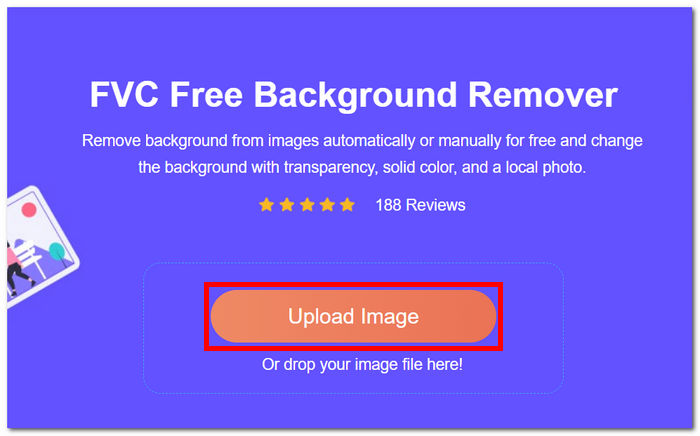
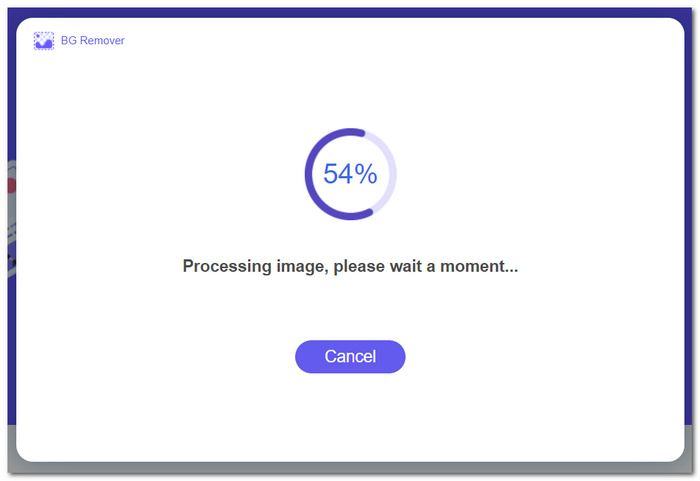
ステップ 3. 画像をアップロードすると、FVC の AI が自動的に画像を解析し、背景を削除します。
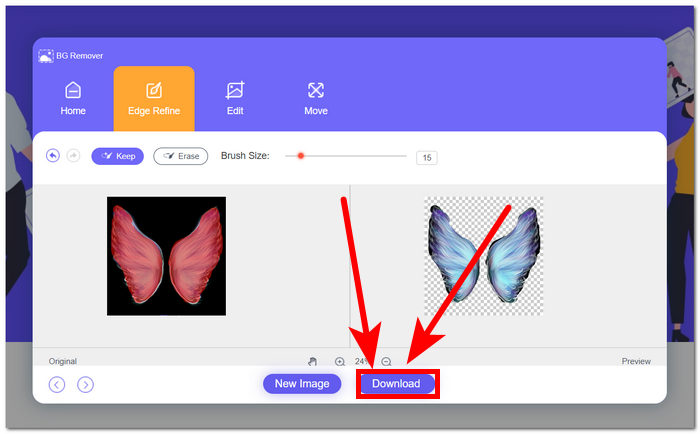
ステップ 4. 処理が完了したら、画面下部にある「Download」ボタンをクリックすることで、画像をデスクトップに保存できます。
過小評価されているにもかかわらず、この隠れた逸品は、Adobe Express と呼ばれる Adobe Image Background Remover に匹敵する結果でクリエイティブな興味を豊かにするシンプルなサービスを提供します。シンプルさと効率性を重視し、画像編集、特に画像の背景削除の分野で信頼できるパートナーであり続けます。
削除.bg
モバイル デバイスでも動作する Web ベースのツール、remove.bg で、これまでにないほど簡単に画像の背景を削除できます。この高品質の画像背景削除ツールでは、独創的な AI テクノロジーが主導権を握り、画像から背景を簡単に削除できます。このツールは効率性だけを追求したものではありません。編集方法を再定義し、クリエイティブ プロセスの楽しい側面にもっと時間を割けるようにする画期的なツールです。
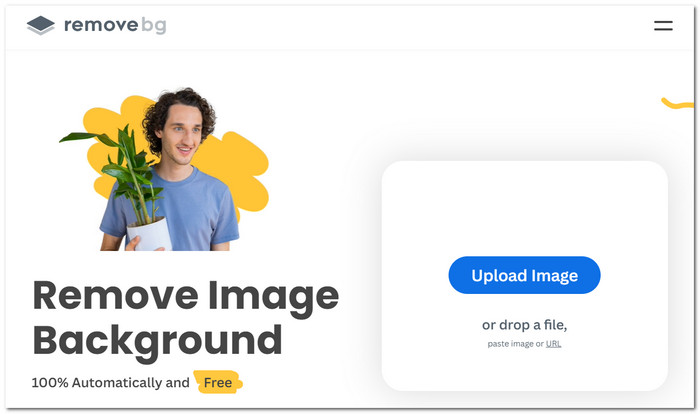
◆ マジックブラッシュツール。削除または復元したい部分の上をカーソルでなぞるだけで、シームレスに背景を処理できるマジックブラッシュツールの「魔法」のような体験が可能です。
◆ Magic AI。このツールでは、AI の力を最大限に活用でき、最先端技術により数秒で高度かつほぼ完璧な結果を実現します。
◆ アクセシビリティ。お好みのウェブブラウザやモバイルデバイスから利用でき、remove.bg を使えばワンクリックで簡単に背景を削除できます。さまざまなプラットフォームで編集作業が快適に行えるようになります。
長所
- 使いやすい。
- 高品質な画像結果が得られます。
- わかりやすいインターフェイス。
- ぼかし背景と単色背景機能が利用できます。
短所
- 調整は限定的です。
- 価格設定はわかりにくい場合があります。
- 結果が誤って処理されることがあります。
- 画像処理が完了するまでに時間がかかる場合があります。
背景を透明にする (PNG)、写真にきれいな白い背景を追加する、被写体を抽出または分離する、魅力的な切り抜きを作成するなど、remove.bg はさまざまな編集ニーズに応える包括的なソリューションを提供します。remove.bg によるテクノロジーと創造性のシームレスな統合により、背景の削除が時間のかかる作業ではなく、迅速かつ楽しいプロセスになる世界に足を踏み入れましょう。
写真室
Photo Room は、画像を簡単に変換できるように設計された多機能な背景除去アプリです。この革新的なツールを使用すると、背景色をシームレスに変更したり、選択したパーソナライズされた画像に完全に置き換えたりできます。複数の画像の背景除去は、他の背景除去と同じように機能します。違いは、サブスクリプション機能として画像をより速く処理することです。絵文字で創造性を吹き込む場合でも、テキストを追加してメッセージを伝える場合でも、Photo Room はカスタマイズを簡単にする直感的な機能を提供します。
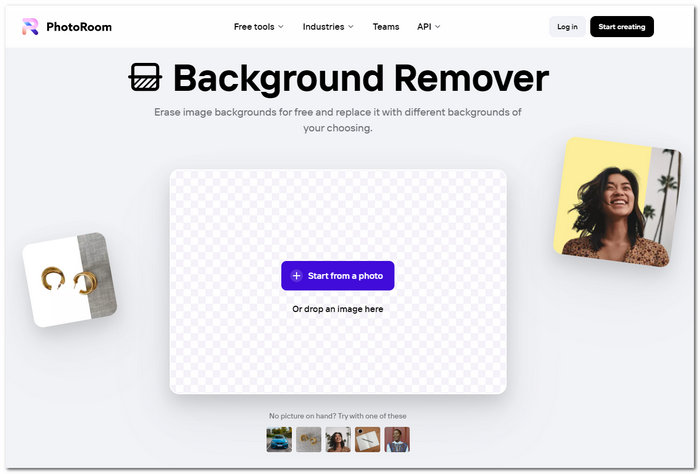
◆ 背景・テンプレートライブラリ。背景を単色や別画像に差し替えたい場合、豊富なテンプレートや背景素材から選ぶことができます。
◆ 柔軟な編集性。自分の用意した画像で背景を差し替えることもでき、画像にテキストを追加することも簡単です。マルチタスクに対応できるオンラインツールのひとつと言えるでしょう。
◆ AI カットアウト。AI が画像内の被写体を認識し、削除したい対象を自動でトレースして解析します。その結果、高い精度で背景を取り除くことができます。
長所
- 効果的なカットアウト機能。
- リアルな背景を提供します。
- テンプレートと背景のライブラリにアクセスします。
短所
- 無料版では機能が制限されています。
- インターネット接続が必要です。
- コントラストが低い領域で苦労します。
多様なテンプレートとカスタマイズ オプションにより、創造の自由が与えられ、ユーザーは独自のスタイルとビジョンを表現できます。Photo Room を使用すると、写真編集がダイナミックで直感的なプロセスに変わり、ユーザーの使いやすさと創造性が向上します。
除去.ai
Removal.ai は、人工知能によって動作する最先端の画像背景削除ツールで、画像の前景ピクセルをシームレスに切り出し、背景からきれいに分離します。このユーザーフレンドリーなソフトウェアは高速なだけでなく、画像の背景を簡単に透明にできる点も特徴です。3 秒以内で瞬時に背景を削除でき、透明、白、または好みの背景を選択することも可能です。プラットフォームの自動処理はリアルタイムで動作し、被写体を効率的に検出して、きわめてクリーンな切り抜き画像を生成します。
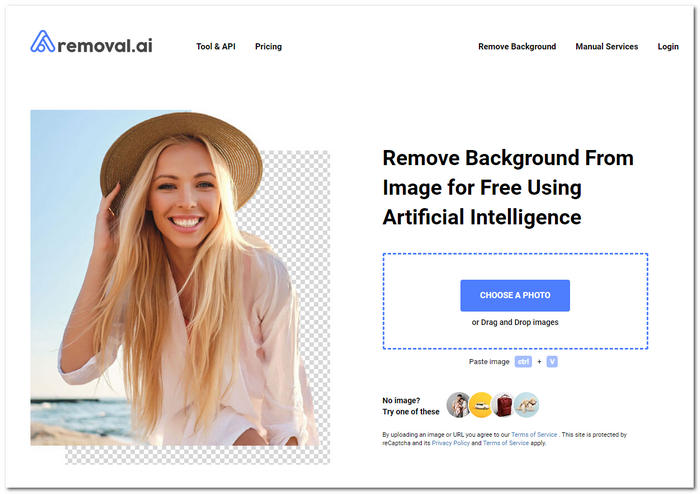
◆ ウェブベースツール。すべてのウェブブラウザからアクセスできるため、どのブラウザを使っていてもスムーズに利用できます。Chrome、Firefox、Safari など、どのブラウザでも世界中のユーザーが快適に使えるよう設計されています。
◆ AI 自動選択。ツールが画像内の被写体を自動的に認識して選択してくれるため、背景削除がより簡単になります。強力なアルゴリズムにより、被写体と背景を高精度に判別するため、手作業での選択にかかる時間と労力を大幅に削減できます。
◆ SNS 連携。ソーシャルメディアとのスムーズな連携により、発信力とリーチを拡大できます。アプリから直接接続して共有できるため、加工した画像を複数のSNSやユーザーへ簡単に送信できます。
長所
- テキスト ツールの機能。
- オブジェクトを削除するためのブラシ ツール。
- 画像強化ツール。
- 使いやすい Web ベースのツール。
短所
- イメージのリビジョンを制御できません。
- サインアップとサブスクリプションベースのツールが必要です。
- 無料版では機能と画像品質が制限されます。
Removal.ai は、単純な削除タスクにとどまらず、多機能な写真編集ツールをユーザーに提供します。このツールを使用すると、ユーザーは背景を変更またはまったく新しい背景を作成したり、テキストを追加したり、クリエイティブな要素を組み込んだりすることができ、包括的な編集エクスペリエンスが提供され、ユーザーの利便性に配慮しています。
消去.bg
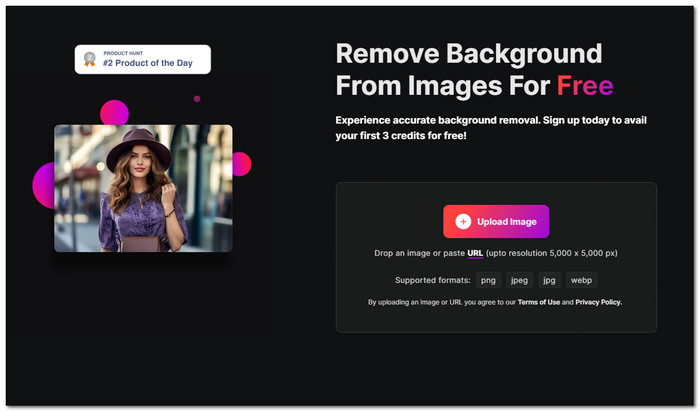
Erase.bg は、オンライン写真編集の分野で 10 年以上の経験を持つ熟練した Web ベースのツールであり、さまざまな画像補正を行う信頼できるサービスとして際立っています。痕跡を残さずに背景を削除および置換することを専門とする Erase.bg は、基本的なサービスを超えて、色補正、肌の色合いの調整、クリエイティブな効果、キャンバスの調整などのサービスを提供しています。豊富な経験により、スキルを磨き、常に素晴らしい結果を提供しています。
機能
◆ スマートリムーバーと編集ツール。背景リムーバーは AI を活用しており、高精度かつ自然な仕上がりを実現します。さらに、多彩な編集ツールを備えているため、画像を好みに合わせてクリエイティブにカスタマイズできます。
◆ プレミアム表示画像。AI が画像を解析し、背景を削除して差し替える際に最適な背景候補を提案してくれます。
◆ 高品質な結果。ツールで処理されるすべての画像において、期待どおりの高品質な仕上がりを提供します。「詳細検出」などの機能により、画像の細部が自動的に強調・最適化されます。
長所
- ナビゲートしやすいインターフェース。
- AI 搭載ツール。
- スマートな編集ツール。
- モバイルアプリが利用可能です。
短所
- 解像度制限があります。
- 一部の機能はサブスクリプションによりご利用いただけます。
- セキュリティ上の問題と懸念。
Erase.bg は、そのシンプルさと効率性で際立っており、手間のかからない背景削除ソリューションを求めるユーザーにとって理想的なツールです。複雑な写真編集スキルを持っていない人にとって、Erase.bg は従来の方法に代わる迅速で使いやすい代替手段を提供する画期的なツールとして登場し、特に、気を散らす背景を削除する際のスピードとシンプルさが高く評価されています。
パート2. 画像から背景を削除する4つのアプリ
iOS 16 カットアウト機能
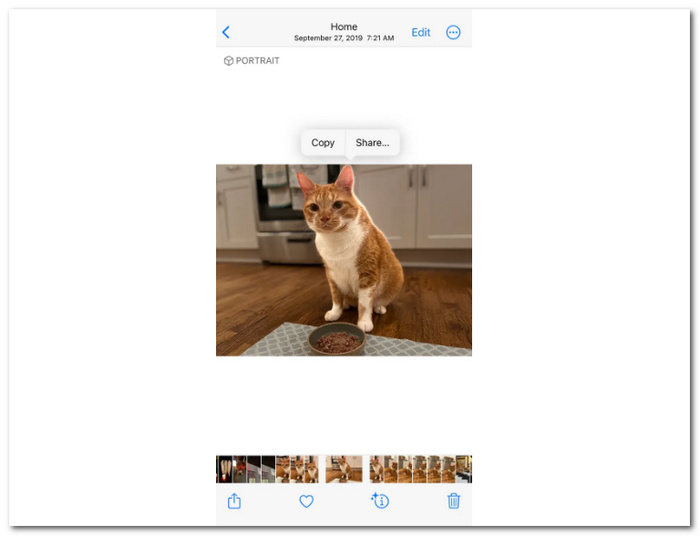
Apple の iOS 16 では、画期的な切り抜き機能が導入され、ユーザーが iOS デバイスで画像を操作する方法が変わりました。このアップデートでは、画像編集、特に画像の背景削除が大きく進歩し、写真から被写体をこれまでにない精度で正確に切り抜くための高度なツールが多数提供されます。iOS 16 の切り抜き機能により、ユーザーはシームレスで直感的なコントロールを期待でき、プロ並みの画像を簡単に作成できます。
機能
◆ 画像カットアウト。この iOS 機能を使えば、画像内の被写体を魔法のように選択して、背景から簡単に切り離すことができます。
◆ iPhone での写真背景削除。iPhone 上で、画像の背景を削除できます。
おすすめの用途
◆ 他のソースからダウンロードしたカメラロールの画像。
◆ 人物、動物、食べ物などの主題。
◆ iOSデバイスをお持ちの方。
長所
- 使いやすい機能です。
- 無料機能。
- インターネットに接続しなくても使用できます。
短所
- iOS 16以降でご利用いただけます。
iOS デバイスをお持ちの場合は、画像の背景を削除するには iOS デバイスの切り抜き機能で十分であるため、画像の背景を削除するアプリは必要ありません。一方、Android ユーザーは、これらの機能のために iOS デバイスを購入することにプレッシャーを感じるのをやめるべきです。切り抜き機能は Android デバイスでも利用できるからです。実際、Android が最初にこの機能を導入しました。デバイスの調査とソフトウェア ツールの更新が進めば、お使いのモバイル デバイスが切り抜き機能に対応しているかもしれません。デバイスを調べて調べてみてください。
Canvaモバイル
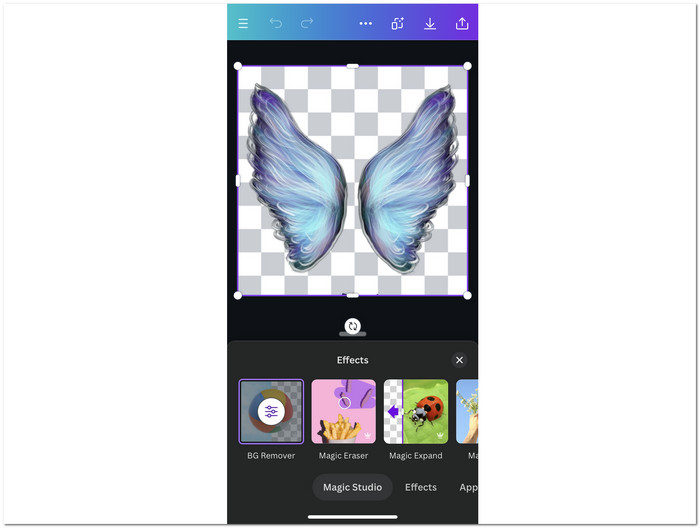
ソーシャル メディアや e コマースのダイナミックな領域では、視覚的なインパクトの重要性はいくら強調してもし過ぎることはありません。そのため、画像編集および画像背景除去で人気のソフトウェアである Canva には、デバイス間でツールの汎用性を確保するためのモバイル アプリがあります。写真がどれだけ完璧であっても、気が散る背景はその本質を薄めてしまいます。Canva モバイル背景除去は、かつては難しかった背景除去の作業を簡素化する画期的なツールです。このツールを使用すると、ユーザーは 1 回のクリックで画像を瞬時にレベルアップでき、製品、顔写真、ロゴをきれいな背景に簡単に目立たせて輝かせることができます。
機能
◆ モバイル用画像背景リムーバー。デスクトップ版と同等の出力品質を持ち、AI が画像を解析して自動的に処理します。
◆ 消しゴム・復元ツール。自動で背景を削除する機能に加え、AI が見逃しがちな被写体を手動で選択できるツールも用意されています。
◆ マジック消しゴム。AI が画像を解析し、削除すべき対象と残すべき部分を判断することで、選択した被写体を魔法のように取り除くことができます。
おすすめの用途
◆ モバイルデバイス上のあらゆる画像。
◆ 動物、風景、人物、食べ物などの題材。
◆ 個人、企業、専門家。
◆ ビジネス、学校の成果、専門的なプロジェクト。
長所
- 幅広い編集ツールで構成されています。
- AI統合技術を採用。
- 両方のバージョンで高度な背景除去。
短所
- 一部の機能はモバイルデバイスではご利用いただけません。
- サブスクリプションベースのアプリ。
Canva はユーザーフレンドリーなデザインに注力しており、編集経験が豊富でない人でも簡単にプロ並みの成果物を作成できます。これには、デスクトップよりもモバイル デバイスを好むユーザーに対応するためにモバイル アプリケーションを作成することも含まれます。
PicsArt モバイル
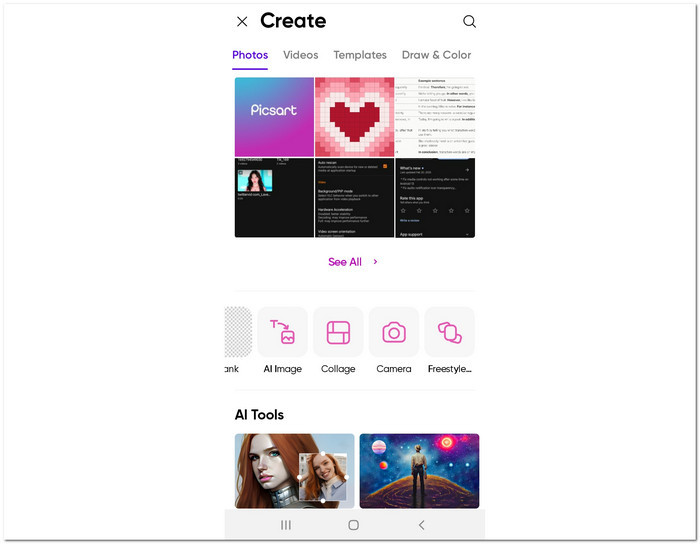
PicsArt Mobile では、画像の背景削除において正確性と効率性が組み合わされています。最先端の人工知能を使用したこの強力な背景削除機能により、画像の被写体を現在の背景から数秒で簡単に分離できます。PicsArt の AI は、主要な被写体を外科手術のような精度で見つけ、背景を迅速かつ正確に削除します。
機能
◆ モバイル画像エディター。高度な AI を活用して瞬時に背景を削除し、高い精度で結果を出します。デスクトップ版と同じクオリティの出力が得られる点も特徴です。
◆ AI 置き換えと AI 背景。AI が画像との相性を判断して、最適な背景に差し替えます。また、背景として使用できる画像を自動生成し、その中から選ぶことも可能です。
◆ ドローイングツール。背景削除だけでなく、お絵描き機能も備えたツールを探しているクリエイターには、PicsArt が有力な選択肢です。画像・動画編集に加え、有料のドローイングソフトのような描画機能も利用できます。
おすすめの用途
◆ 背景がぼやけていて気を散らすような画像。
◆ 人物、動物、食べ物、動くものなどの被写体。
◆ アーティスト、初心者、ビジネスマン、プロフェッショナル。
◆ 専門的なプロジェクトと学校ベースのプロジェクト。
長所
- 画像、ビデオ、描画アプリケーション ツール。
- 機能とツールに人工知能を採用します。
- 両方のバージョンで背景の削除と置き換えが可能です。
短所
- モバイルデバイスでは機能が制限されます。
- PicsArt ゴールド機能はサブスクリプションベースです。
PicsArt では、組み込みの背景除去機能を利用して写真の視覚的な物語を再構築し、デスクトップとモバイル デバイスの両方で編集ワークフローを改善してアイデアを刺激することができます。背景除去だけでなく、アプリケーションのインターフェイスを自由に探索してツールを最大限に活用してください。
ユーカムパーフェクト
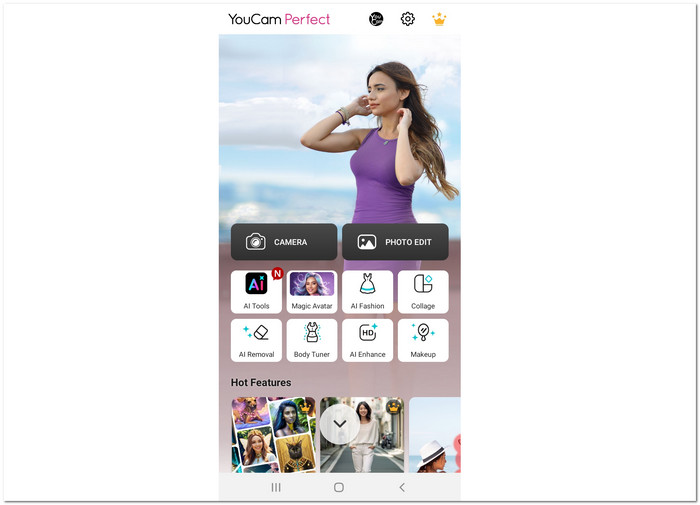
YouCam Perfect は、フィルター、アニメーション、ステッカー、フレームなど、さまざまな機能を備えた、優れた無料の写真編集アプリです。画像の背景を手動で消去するのに苦労する時代は終わりました。YouCam Perfect は、ワンクリックでこのプロセスを革新します。最先端の人工知能を搭載した「背景削除」ツールは、背景をすばやく識別して削除し、わずか数秒できれいな透明な背景を残します。
機能
◆ AI 強化。AI 技術で画像を自動的に補正し、SNS 投稿に適したピクセル単位の精度を実現します。高精度なアルゴリズムにより、デジタル空間で埋もれない、印象的な投稿を簡単に作成できます。
◆ AI 背景リムーバー。AI を使って、画像の背景を手間なく取り除きます。アプリ上でタップするだけで、AI が自動的に写真を処理し、数秒でクリーンで洗練された仕上がりに変えてくれます。
◆ 透過背景と PNG。YouCam Perfect の Background Remover を使えば、AI の精度で背景をシームレスに削除できるだけでなく、透過背景付きの PNG 形式で画像を書き出すこともできます。
おすすめの用途
◆ 肖像画、顔、体の画像。
◆ インフルエンサー、初心者、個人。
◆ 小規模プロジェクトや個人使用。
長所
- iOS と Android の両方のデバイスで利用できます。
- AI画像エンハンサー。
- 高度な画像背景除去ツール。
短所
- アプリ内にポップアップ広告が表示されます。
- 無料版では機能が制限されています。
- 有料機能アプリケーション。
結論として、YouCam Perfect は多用途で使いやすい写真編集ソリューションであり、iOS と Android の両方のデバイスで利用できるため、幅広いユーザーのニーズに応えます。このクロスプラットフォームのアクセシビリティにより、ユーザーは使用するデバイスに関係なく、背景除去などの優れた機能とツールをシームレスに活用できます。
背景消しゴム
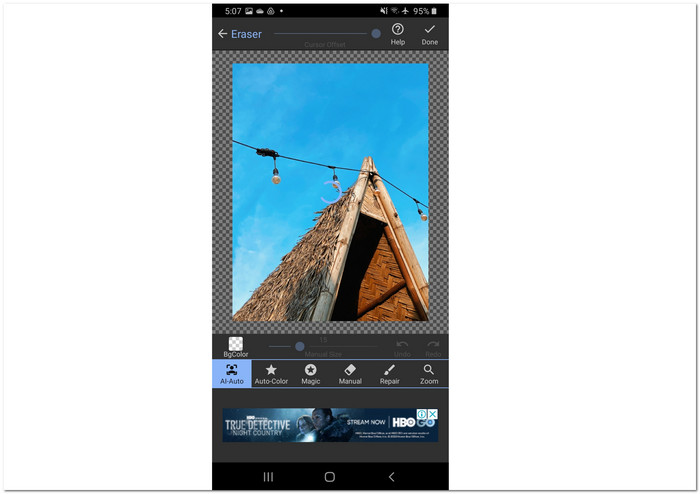
モバイル デバイスで利用できる Background Eraser アプリは、上記で紹介したアプリと比べると、典型的な背景除去アプリではありません。このアプリの核となるのは、シンプルさです。これは、一部のユーザーが、上記で紹介したアプリを複雑だと感じ、アプリ内に多くのツールや機能があり、ユーザー側で圧倒されてしまう可能性があるためです。
機能
◆ AI-Auto。デバイス内のあらゆる画像から、背景を直感的な操作で削除できます。AI が被写体と背景を自動的に検出することで、可能な限り洗練された自然な仕上がりを実現します。
◆ Magic。ユーザー自身が、画像内の被写体を直感的かつ簡単に検出・選択できる機能です。思いどおりの被写体を正確にフォーカスさせられるため、理想的なワンショットを作り上げることができます。
◆ Manual。従来の方法を好むユーザー向けに、手動で被写体を選択・消去することも可能です。自分の好みに合わせて、結果の精度を細かくコントロールできます。
おすすめの用途
◆ 初心者からベテランまで。
◆ 風景、景観、人物、動物、植物、食べ物、商品画像などの被写体。
◆ 個人的なプロジェクトと学校での成果。
長所
- iOS と Android の両方のデバイスで利用できます。
- AI画像エンハンサー。
- 高度な画像背景除去ツール。
短所
- アプリ内にポップアップ広告が表示されます。
- 無料版では機能が制限されています。
- 有料機能アプリケーション。
結論として、Background Eraser は多用途で使いやすい写真編集ソリューションであり、iOS と Android の両方のデバイスで利用できるため、幅広いユーザーのニーズに応えます。このクロスプラットフォームのアクセシビリティにより、ユーザーは使用するデバイスに関係なく、背景除去などの優れた機能とツールをシームレスに活用できます。
パート3. 画像背景除去に関するよくある質問
画像用の HD 背景除去ツールはありますか?
はい、さまざまなオンライン ツールやソフトウェアが画像の HD 背景除去機能を提供しており、ユーザーは背景から被写体を高精度で簡単に抽出できます。
画像の背景を削除すると、形式は PNG に変更されますか?
画像から背景を削除する場合、通常は結果を PNG 形式で保存します。PNG は透明性をサポートしており、削除された背景が保持され、被写体をさまざまなコンテキストにシームレスに統合できます。
iPhoneの画像背景を置き換えることはできますか?
はい、App Store で入手できるさまざまな写真編集アプリを使用して、iPhone の画像の背景を置き換えることができます。これらのアプリには、背景の削除や置き換えの機能が含まれていることがよくあります。
写真の背景を削除する必要があるのはなぜですか?
写真から背景を削除するのは、被写体を分離して、画像をさまざまな設定に配置したり、元の背景から気を散らすことなく視覚的に魅力的な構成を作成したりすることを容易にするためによく行われます。
写真の背景を除去するにはどの形式が適していますか?
写真の背景を削除する形式は、希望する結果に応じて選択します。PNG は透明度をサポートし、削除された背景を保持するため、一般的に好まれる形式ですが、特定の要件に応じて JPEG などの他の形式も使用できます。
結論
まとめると、画像から背景を削除するプロセスは大きく進化しており、現在ではウェブベースのツールやモバイルアプリによって、誰でも手軽かつ効率的に実行できるようになっています。本記事では、オンラインと専用アプリの両面から、さまざまなプラットフォームを紹介し、それぞれが持つ独自の機能や特長について解説しました。最終的には、自分の用途や作業環境にとって、どのツールがもっとも便利でアクセスしやすいかを基準に選ぶことが重要です。
-
 ピクセル化されたビデオを修正する方法: 原因と修正方法
 ピクセル化によってビデオが台無しにならないようにしてください。当社の専門的な戦略を使用してビデオのピクセル化を軽減する方法をご覧ください。ビデオをピクセル完璧な品質に高めます。
-
 ぼやけたビデオを修正する方法: 非常にクリアなビデオが待っています
 ぼやけたビデオを鮮明にするにはどうすればよいですか?ぼやけたビデオがコンテンツを鈍くさせないでください。プロのような映像を実現するための鮮明な表示のためのソリューションを見つけてください。
-
 5 100%iPadで再生されないビデオを修正するための実用的なソリューション
 あなたのビデオはiPadで再生されていませんか?この問題を解決するのに役立つ5つの解決策を次に示します。そうすれば、お気に入りのビデオを携帯電話で簡単に楽しむことができます。
