


 ビデオコンバーター究極
 スクリーンレコーダー
 ビデオ修復
ビデオ修復
 安全なダウンロード
最適なソリューション [オンライン & オフライン] を使用して、画像のノイズ除去を 1 秒もかからずに修正
画像ノイズは、写真を撮影する人にとって大きな問題となっており、それを修正するには画像ノイズ除去ツールが必要です。この欠陥はカメラのセンサーや内部要因によって引き起こされ、その結果、画像がザラつき、画質が十分でなくなってしまいます。ポストプロダクションの一環として、画像上のノイズを除去または軽減できるノイズ除去ツールが必要になります。まずはこの記事を読み進め、インターネット上で見つけた5つの写真ノイズ除去ツールをチェックしてみてください。これらを使えば、状況を悪化させることなく、すぐに問題を解決できるはずです。

パート 1. 写真の画像ノイズの原因
画像ノイズとは何かを知る前に、まず画像に 2 種類のノイズが発生していることを知っておく必要があります。これらは、内部ノイズと干渉ノイズです。しかし、これら 2 つは何であり、私たちが撮ったすべての写真で起こっている原因は何ですか?以下で重要な情報を説明しながら、さらに深く掘り下げていきましょう。
内部ノイズ
特にISOがプッシュされている低照度の状況では、キャプチャするすべての画像にノイズ除去が発生するのが一般的です.写真が過電圧になると、あらゆる波のゆらぎが反映された結果を見ることができます。電気、熱、センサー 照度レベルは、写真の内部ノイズの原因となる 3 つの要素です。
干渉ノイズ
このようなノイズは、パターンのように画像に重ねられているように見えます。内部ノイズとは異なり、干渉ノイズは時折発生します。通常は、画像を表示する領域に強い伝送がある場合に発生します。前述のパターンは、電子ノイズとして知られる伝送上の波長である可能性が最も高いです。
これらのノイズは回避できますか?はい、常にではありません。画像にノイズがあり、それを除去したい場合はどうしますか?あなたは何をするべきか?追加する次の情報は、写真のノイズを簡単に除去するために使用できる最適な画像デノイザーのリストです。ソフトウェアは、それぞれの Web ページからダウンロードするか、Web 上で使用できます。
パート 2. Web でダウンロードまたは使用できる画像デノイザー トップ 4 [有料および無料]
FVC無料画像アップスケーラー
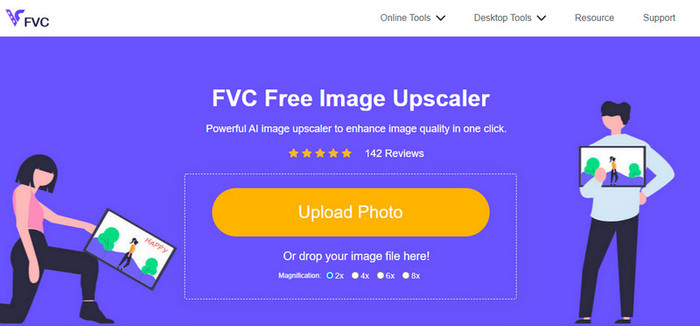
FVC Free Image Upscalerは、オンラインで画像のノイズを除去したいユーザーに最も好まれている解決策のひとつです。オンラインツールではあるものの、パフォーマンス面で心配する必要はありません。無料で使えるAI搭載型エディターの中でもトップクラスの1つだからです。ノイズ、ぼやけ、コントラストや明るさの問題、欠損ピクセルなど、画像のあらゆる欠点を補正できます。直感的なインターフェースのおかげで、初めて使う人でも、まるで以前から使い慣れていたかのように感じるでしょう。性能面においては、そのAI技術と優れた編集結果を上回るツールはほとんどありません。
今すぐこの Web ツールを使用して、最高の結果を得ることができます。
長所
- これは、あなたが必要とする完全な AI 搭載の画像エディターです。
- JPEG、PNG、BMP、SVG などの多くの写真形式の編集をサポートしています。
- アルゴリズムの欠陥を検出してすぐに修正できるため、微調整を行う必要はありません。
- このツールを使用してすべての写真のノイズを除去すると、満足のいく結果が得られます。
- アップロードする画質を比較する前後のペインがあります。
短所
- 画像設定を手動で微調整することはサポートされていません。
- ご利用にはインターネットが必要です。
AI 画像デノイザー
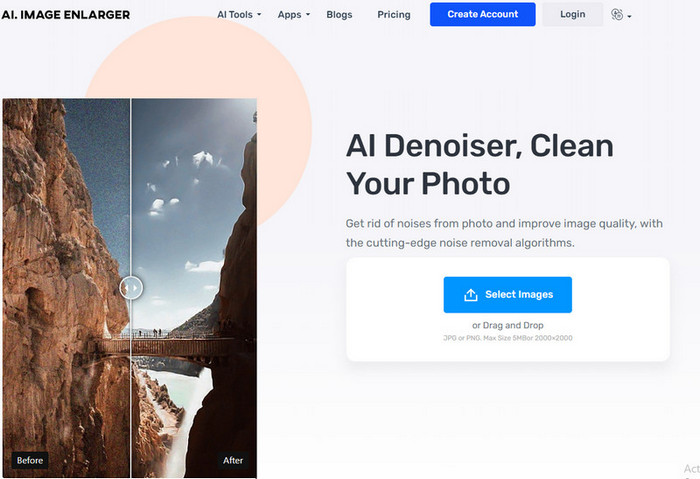
AI Image Denoiserは、ウェブ上で利用できる、もうひとつのAI搭載型画像ノイズ除去ツールです。このツールに画像をアップロードすると、画像の欠点をスムーズかつ簡単な手順で処理してくれます。最初に紹介したソフトと同様に、自動編集機能を採用しているため、ユーザー側で細かな設定を調整する必要はありません。使い勝手が良くAIの力も備えていますが、画像のノイズをさらに細かく調整できるような特別な機能はまだ多くありません。そのため、このツールを使うと決めた場合は、公式サイトにアクセスし、画像をアップロードして問題の修正を始めてください。
長所
- わかりやすいインターフェースをサポートしています。
- 新しいユーザーは、持っている写真のノイズ除去に問題はありません。
- それが提供する結果は、予想外に良好です。
短所
- 追加の機能や機能はありません。
- 画像のサイズとサイズには制限があります。
- ウェブサイト上の広告。
TopazLabs ノイズ除去 AI
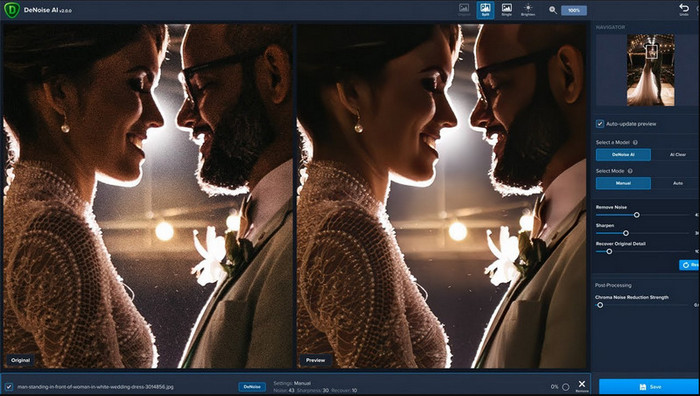
TopazLabs Denoise AIは、デスクトップにダウンロードして使える高性能な画像ノイズ除去ソフトです。他のオンラインソフト同様、このツールもAIによって動作します。画像のどこに問題があるのかを正確に見極め、可能な限り最高の画質と細部描写に強化してくれます。その高い効果によって、多くのユーザーがこのソフトをデスクトップに導入しており、得られる結果は非常に満足度が高いと評価されています。高度な画像編集機能を備えているため、このノイズ除去ソフトの能力をフルに活用するには、TopazLabsから有償版を購入する必要があります。
長所
- このソフトウェアはデスクトップに自由にダウンロードできます。
- 完璧な画像を作成するための専門的な編集機能と機能をサポートしています。
- アップロードした写真のノイズ除去をサポートする AI を備えています。
短所
- このツールは、初心者にとっては少し不快な場合があります。
- 価格は高くなります。
SoftOrbits 簡単な写真のノイズ除去
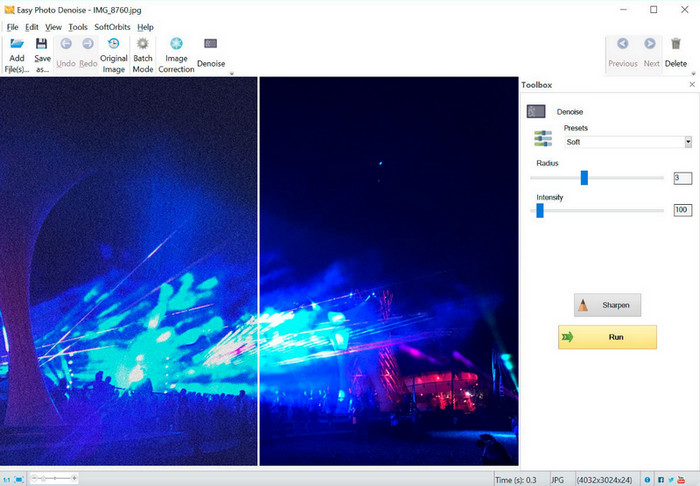
名前の通り、SoftOrbits Easy Photo Denoiseは、初心者でも簡単に画像からノイズを除去できる、扱いやすいツールのひとつです。他の3つのノイズ除去ツールとは異なり、このツールはAIを搭載していませんが、それでも十分に使いやすい仕様になっています。複雑なソフトとは違い、いくつかのパラメータを少し調整するだけで、すぐに画像上の結果を確認できます。このソフトをデスクトップにインストールしておけば、画像編集の専門知識がなくても問題ありません。使いやすいからといって無料というわけではありませんが、TopazLabsと比べると価格はかなり抑えめです。ただし、機能の深さという点では、他のプロフェッショナル向けエディターほど充実しているわけではありません。
長所
- 簡潔なインターフェースを備えているため、すぐに使いこなすことができます。
- ここに複数の画像をアップロードして編集できます。
- パラメータを自由に調整して、ノイズをすばやく除去します。
短所
- プリセットにはバグがあります。
- 深度機能はありません。
パート 3. Web で最高の画像ノイズ低減ソフトウェアを使用する方法
FVC Free Image Upscalerを使って画像ノイズを軽減する方法を説明するために、以下の手順を用意しました。これらのステップを順番どおりに実行して、写真のノイズ問題を解消してください。
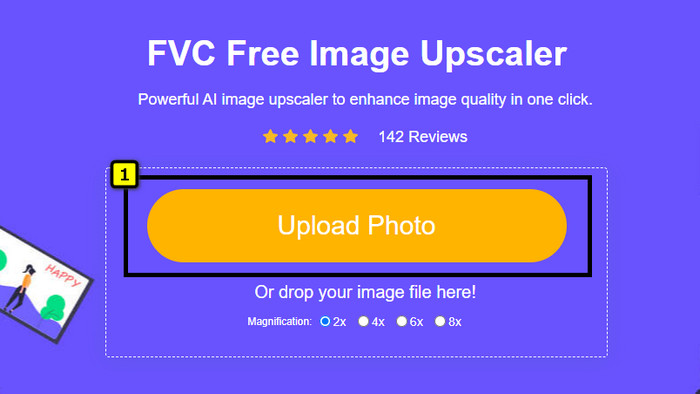
ステップ1. このリンクをクリックしてウェブツールを開くと、ブラウザで新しいタブが自動的に開きます。
ステップ2. Upload Imageを押して、アップスケーリングとノイズ除去を行いたい写真を追加します。
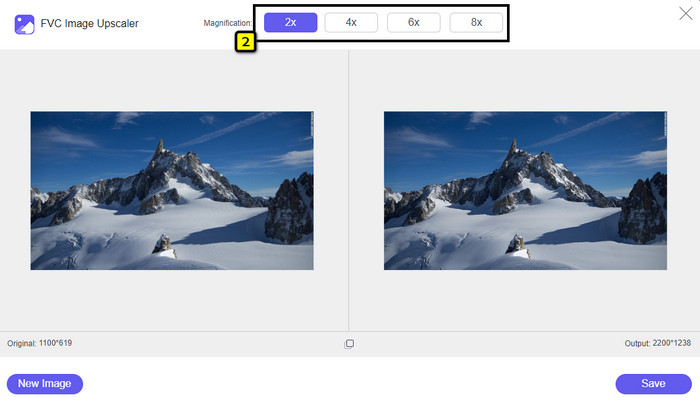
ステップ3. AIが自動的に画像をアップスケールします。画面上部で2x、4x、6x、8xなど、別の倍率を選択することもできます。
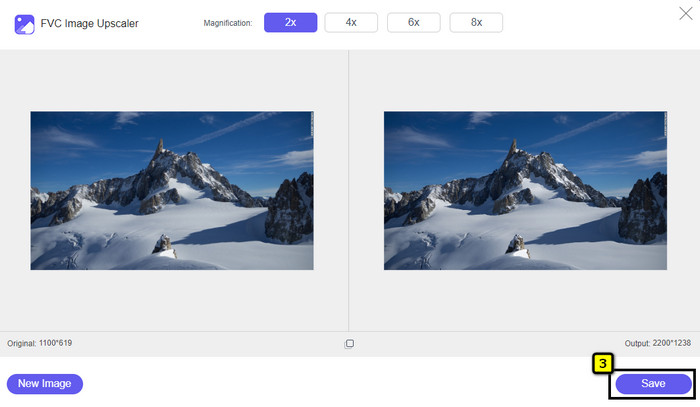
ステップ4. すべての処理が完了したら、Saveボタンをクリックして、ノイズのない写真をダウンロードします。
パート 4. イメージ デノイザーに関する FAQ
写真のノイズの原因は何ですか?
カメラが設定されているか、ISO が高く、カメラ センサーが小さく、シャッター スピードなどが高い場合、画像にノイズが発生する可能性があります。それは避けられますか?はい、標準のオプションまたは機器を使用する場合です。
画像のノイズを除去するために画像デノイザーが必要ですか?
はい、画像のノイズをキャンセルするには、信頼できる画像ノイズ除去器が必要です。最初に紹介したオンライン Web ツールを利用して、パート 3 で追加した手順に従うことができます。
画像を簡単にシャープにする方法を教えてください。
オンラインおよびオフラインで画像をシャープにする方法を知りたい場合は、このリンクをクリックして、どんな写真でも簡単にシャープにできるソフトの紹介をご覧ください。
結論
最後に、この記事をじっくり読んでいただくことで、画像ノイズ除去に関するあなたのニーズが満たされていれば幸いです。事実に基づき、数ある中から選りすぐりのツールのみを厳選して紹介しました。デスクトップにソフトをダウンロードしたくないユーザーは、代わりにFVC Free Image Upscalerを利用して、オンラインで手早く作業を完了させてください。
-
 画像のサイズを変更する方法 – Adobe 画像のサイズ変更 [オンラインおよびオフライン]
 アドビのサイズ変更画像を探している場合は、解決策があります。この投稿をよく読んで、PC で Adobe を使用して画像のサイズを変更する方法を学んでください。
-
 Facebookの写真のサイズを変更する方法[すばやく簡単な手順]
 Facebook に大きなサイズの画像をアップロードするのに問題がある場合は、解決策があります。 Facebook 用に写真のサイズを変更する方法については、この記事を最後までご覧ください。
-
 コンピューターに最適なオンラインおよびオフラインの写真リサイザーアプリ
 デスクトップに最適な写真リサイズ アプリケーションをお探しですか?試してみるべき最高のパフォーマンスのオンラインおよびオフラインの写真リサイズアプリをリストしました.
