


 ビデオコンバーター究極
 スクリーンレコーダー
 ビデオ修復
ビデオ修復品質を低下させることなくAMVをMOVに変換する方法を学ぶ
AMVは、S1 MP3およびMP4メディアプレーヤーで動画を再生するために使われる独自の動画形式です。この.amvファイル拡張子を持つ動画は、ポータブルメディアプレーヤーに収めるために、低解像度かつ高圧縮で保存されています。フォーマット自体は今も存在しますが、古い形式であるため、この形式に対応したメディアプレーヤーをスマートフォン向けに見つけるのは困難です。対応プレーヤーを探し回る代わりに、MOVのように現在広くサポートされている新しい形式へAMVファイルを変換してしまうのはいかがでしょうか。そこで、AMVをMOVに変換する最適な方法を知りたい方のために、ここから詳しく解説していきます。

パート1。AMVとMOVについての簡単な紹介
アクションメディアビデオまたはAMVのアイデアは、MP4をユニバーサルフォーマットとして置き換えることです。これは、このフォーマットの方が優れており、はるかに圧縮されているためです。また、この形式はAVI形式のより良いバージョンです。しかし、このフォーマットは、解像度の品質を向上させるための更新を受け取らないため、この新しい時代では無視されてきました。そして今、このフォーマットをモバイルデバイスに保存して再生すると、フォーマットがサポートされていないために再生できないことが予想されます。したがって、この形式でビデオを再生する場合は、AMV用のサードパーティのメディアプレーヤーをダウンロードする必要があります。 MOVですが、QuickTimeが開発するネイティブファイル形式であるため、この形式は多くのサポートを得ています。
パート2。究極のデスクトップソフトウェアでAMVをMOVに変換する
FVCビデオコンバーターアルティメット
プロ仕様の動画変換ソフトであるFVC Video Converter Ultimateを使えば、他の追随を許さないほど高品質な出力でAMVからMOVへ変換できます。このコンバーターはPC版とMac版が用意されており、どちらも同じ高度な機能を利用できます。さらに、高速変換とハードウェアアクセラレーションも、PCだけでなくMacでも利用可能です。多くのユーザーが、動画変換の問題を解決するための第一候補としてすでにこのソフトを選んでいます。なお、このツールを使用するにはFVCから購入する必要がありますが、何百ドルもかかるわけではなく、価格に見合う価値があります。では、このツール名が示すとおり「究極」の変換が実現できるかどうか、実際に試してみましょう。
FVC Video Converter Ultimateを使ってAMVをMOVに変換する手順:
ステップ1. 下のボタンをクリックしてFVC Video Converter Ultimateをデスクトップにダウンロードし、ダウンロード完了後にソフトをインストールします。
無料ダウンロードWindows 7 以降に対応安全なダウンロード
無料ダウンロードMacOS 10.7 以降に対応安全なダウンロード
ステップ2. ソフトを起動し、.amvファイルを読み込むには+アイコンをクリックします。フォルダーから変換したいファイルを探して選択し、開くをクリックして追加します。
![[アップロードを追加]をクリックします](/images/2021/11/click-add-upload.jpg)
ステップ3. 形式をMOVに変更するには、変換形式一括(Convert All to)をクリックしてMOVを選択するか、希望する出力形式を選択します。
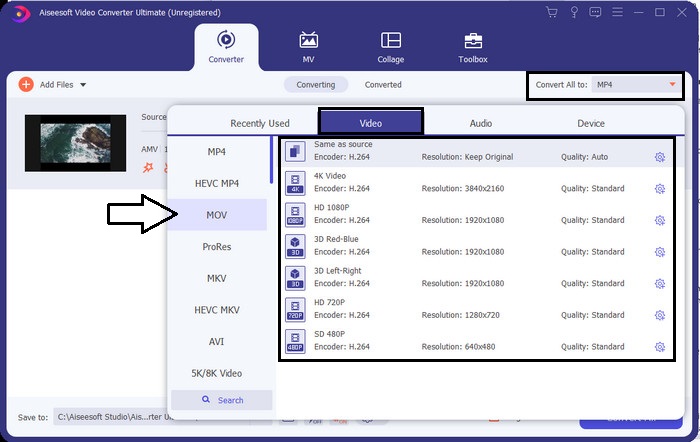
ステップ4. AMVファイルをMOVに変換するには、すべて変換(Convert All)をクリックして変換プロセスを開始します。
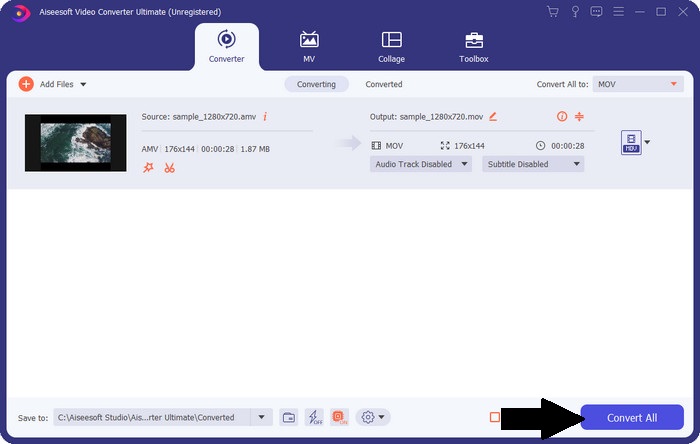
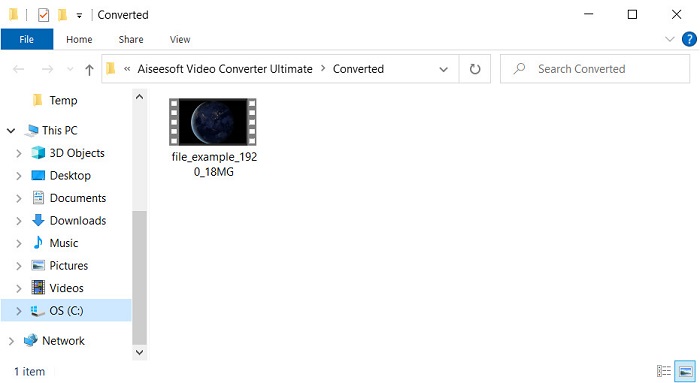
ステップ5. 変換にはわずかな時間しかかかりません。完了すると、先ほど作成した.movファイルが入ったフォルダーが自動的に表示されるので、そのファイルをクリックして、お使いの標準メディアプレーヤーで再生してください。
パート3。利用可能な2つのオンラインサービスコンバーターでAMVをMOVに変換する
1. ConvertFiles
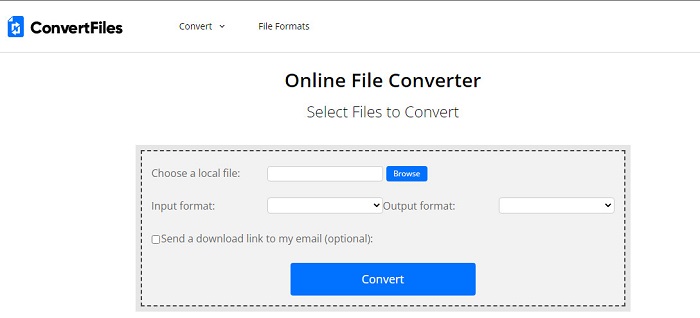
愛用のブラウザーからアクセスできるオンラインコンバーターの中でも、おすすめのひとつがConvertFilesです。このオンラインツールを使えば、簡単な操作で別の形式へ変換できます。また、対応する形式は限られていますが、必要な基本的なフォーマットは一通りそろっています。ただし、高速変換には対応していないため、変換後のファイルをダウンロードするまでに時間がかかるのが難点です。さらに、インターフェース上に広告が多く表示される点もあまり好ましくありません。とはいえ、無料のオンラインツールとしては十分な性能を発揮します。
ConvertFilesを使ってAMVをMOVに変換する手順:
ステップ1. お好みのブラウザーを開き、ConvertFilesを検索します。
ステップ2. サイトが開いたら、Browseをクリックしてフォルダーからファイルを選択します。次にOutput FormatでMOVを選択し、Convertをクリックします。
ステップ3. 変換が完了したら、青色でハイライト表示されているリンクをクリックしてファイルをPCにダウンロードします。
2.MConverter
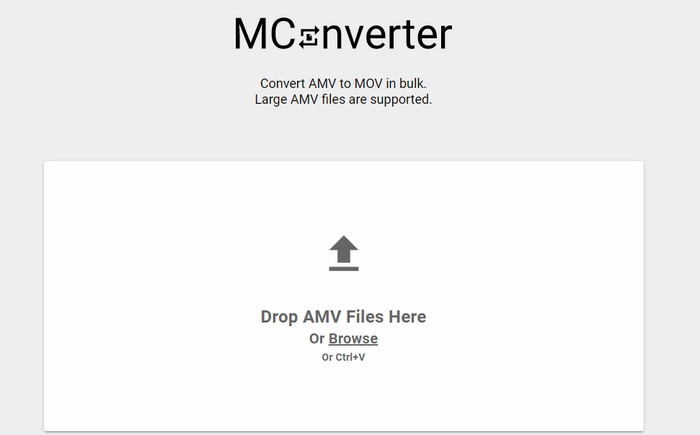
広告のないインターフェースで、落ち着いてAMVからMOVへ変換したい場合は、ブラウザー上で利用できるMConverterを試してみてください。このツールはFVC Video Converter Ultimateと同様にバッチ変換にも対応しているため、複数ファイルの変換を効率的に行えます。ただし、このオンラインツールにはファイルサイズが200MBまでという制限があります。そのため、長時間動画でファイルサイズが上限を超える場合には適していません。しかし、ConvertFilesよりも快適な変換をオンラインで体験したいなら、以下の手順を参考にしてください。
MConverterでAMVをMOVに変換する手順:
ステップ1. 検索エンジンでMConverterを検索し、サイトを開きます。
ステップ2. Uploadボタンをクリックしてファイルを追加し、しばらく待ってウェブツールの読み込みが完了したら、MOVを探してクリックします。MOV形式を選択すると、自動的に変換が開始されます。
ステップ3. Download Allをクリックして、変換されたファイルを保存します。
パート4。AMVとMOVに関するFAQ
MP4をAMVに変えることはできますか?
オンラインで素早くデータを転送したい場合、MP4をAMVに変換するという方法もあります。特に1時間以上の長尺動画なら、2つの形式を比較した場合、AMVの方がファイルサイズがかなり小さくなるため、.mp4ファイルを.amvに変換しておくことをおすすめします。
VLCはAMVをサポートしていますか?
幸いなことに、VLCメディアプレーヤーを使えば、この古い形式である.amvファイルも再生できます。しかし、VLCを上回る性能を持つメディアプレーヤーがあることをご存じでしょうか。もし興味があれば、こちらのリンクをクリックして、VLCの代替となるメディアプレーヤー5選をチェックしてみてください。
AMVをAVIに変更するにはどうすればよいですか?
AMVはAVIの改良版と言われることもありますが、画質・総合的なパフォーマンスという点では、古いAMVよりもAVIの方がはるかに優れています。さらにAVIは、ほぼすべてのプラットフォームで高い互換性を持っています。つまり、AMV動画をより高品質なかたちで、あらゆる環境で再生したいのであれば、AMVをAVIに変換する方法を身につけておくことが重要です。
結論
議論はここで終わらせなければなりません。 AMVファイルをディスクに保存したい場合でも、互換性の問題がそれを変換する必要がある理由の1つです。結局のところ、AMVは、このコンテナーがファイルを圧縮する方法のために、以前は人気があったと言われています。ただし、今日でも使用するには、新しい形式に変換することを検討する必要があります。さらに、ここで提供されるソリューションは効果的に変換されます。それでも、FVC Video Converter Ultimateは、他の2つのツールと比較して驚異的なパフォーマンスを発揮します。したがって、最高のツールを体験したい場合は、これをコンピューターにダウンロードして、上記の手順をコピーする必要があります。
-
 WindowsとMacでMOVをMP3に簡単に変換する4つの最良の方法
 MOVファイルからMP3オーディオファイルを抽出したい場合は、記事から目的のファイルを取得するための4つの最も効率的なMOVからMP3へのコンバーターについて詳しく知ることができます。
-
 MKVからMOVへ–MKVをMOVに変換する方法
 MacでMKVをMOVに変換するにはどうすればよいですか? iMovieはMKVを読み取ることができますか? MOV形式とはどういう意味ですか?この投稿では、無料のオンラインおよびプロのビデオコンバーターを使用してMKVをMOVに変換するのに役立つ2つの簡単な方法を説明しています。
-
 FLVからMOVへ– Mac / PC /オンライン無料でFLVをMOVに変換する方法
 FLVをMOVに変換する方法は? MacでFLVをMOVに変換するにはどうすればよいですか? YouTube FLVをオンラインでMOVに変換する無料の方法はありますか?この投稿では、FLVファイルをMOVに変更するための3つのFLVからMOVへのコンバーターを共有しています。
