


 ビデオコンバーター究極
 スクリーンレコーダー
 ビデオ修復
ビデオ修復品質を低下させることなくDVをMOVに変換するために使用される2つのコンバータ
DV ファイルは、編集や再生に最適な高品質のビデオを保存できるため、ほぼすべてのビデオカメラで最も一般的に使われているファイル形式です。iMovie で編集したり、QuickTime で再生したりするためにこの形式を使えるかどうか、気になっているかもしれません。しかし、この生の DV ファイルは古く、現在は非対応の形式であるため、そのままでは利用できません。とはいえ心配はいりません。Mac では DV ファイルを MOV などの対応形式に変換できます。この記事を読み進めながら、なぜ Mac でDV を MOV に変換する必要があるのかを、より深く理解していきましょう。

パート1。強力なオフラインコンバータを使用してMacでDVファイルをMOVに変換する
FVC Video Converter Ultimate は、Mac と Windows の両方で DV を MOV に変換する際に使用できる、非常に優れたツールです。このコンバーターを使えば、ほとんど手間をかけずにファイルを別の形式へ変換できます。また、できるだけ素早く形式変換を行いたいというユーザーも少なくありませんが、本ソフトならそのニーズにも十分応えられます。さらに、変換だけでなく、トリミング、結合、カットなど、さまざまな編集もここで行えます。この究極ツールの変換性能を体験したい方は、次の手順に従って操作してみてください。
便利な FVC Video Converter Ultimate を使って DV ファイルを MOV に変換する方法:
ステップ 1. DV コンバーターを Mac または PC にダウンロードし、インストール手順に従います。その後、「今すぐ開始」をクリックしてソフトを起動します。
無料ダウンロードWindows 7 以降に対応安全なダウンロード
無料ダウンロードMacOS 10.7 以降に対応安全なダウンロード
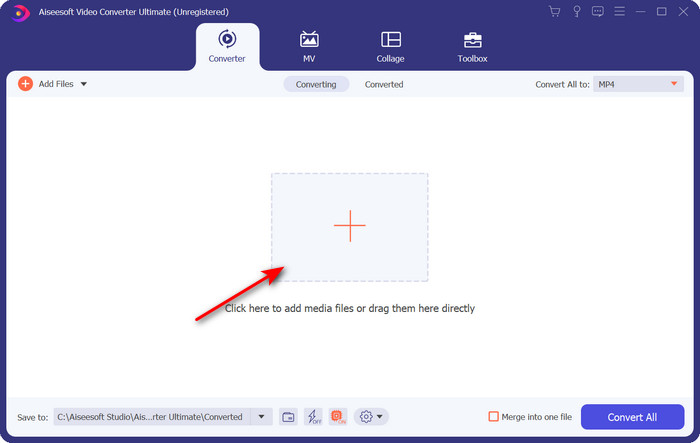
ステップ 2. 起動後、変換したいファイルをアップロードします。「+」ボタンをクリックするとフォルダが表示されるので、対象ファイルを探してから開くをクリックします。
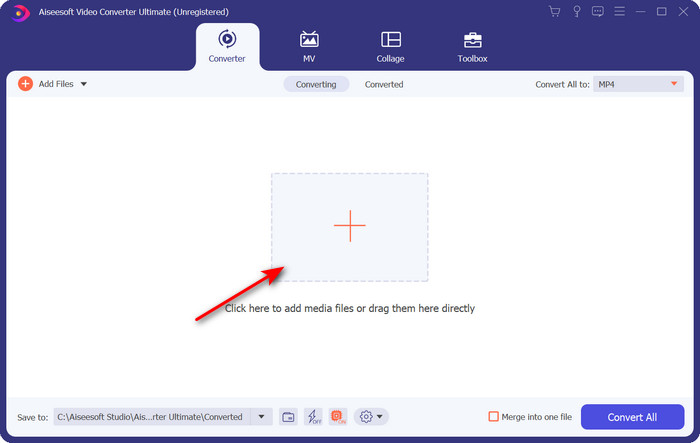
ステップ 3. 形式を選択するには、ドロップダウンボタンをクリックし、MOV形式と希望の解像度を選びます。出力の画質を高く設定することもできますが、その場合は元のファイルよりサイズが大きくなります。
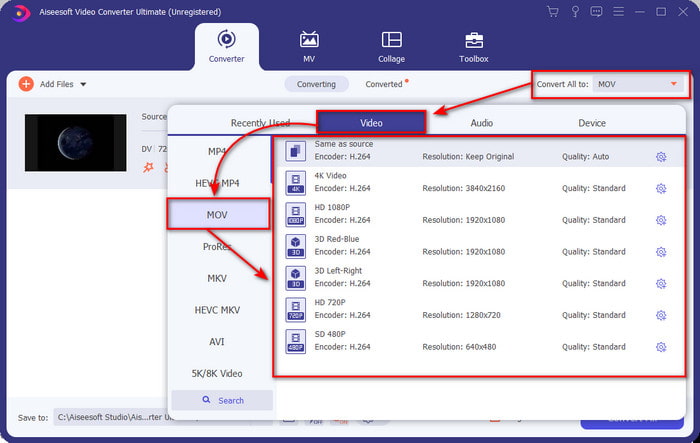
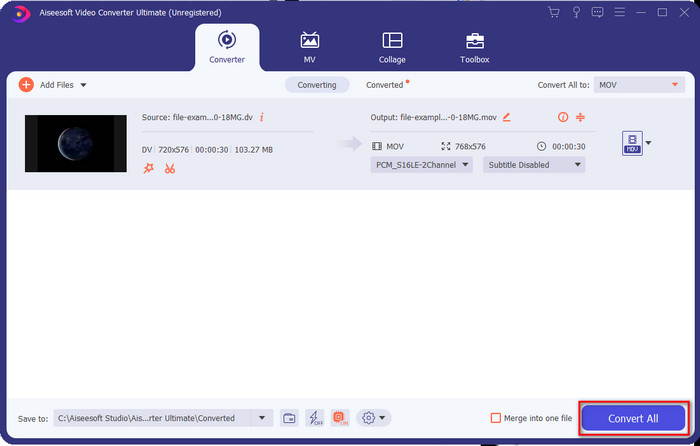
ステップ 4. すべて変換をクリックして DV から MOV への変換を開始し、そのまま一括ダウンロードします。
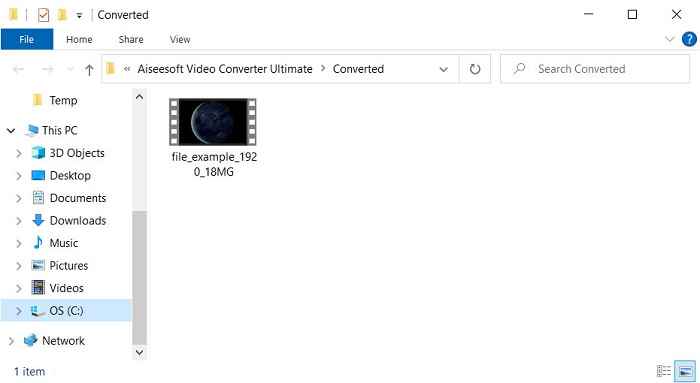
ステップ 5. 変換されたファイルの保存先フォルダが表示されます。これで、Mac 上でファイルを問題なく開いて視聴・編集できるようになります。
パート2。オンラインコンバータを使用して無料でDVをMOVに変換する
ブラウザ上で動画を変換したいですか?その場合は、FVC Free Video Converter Online を使ってDV を無料で MOV に変換する必要があります。このオンラインツールでは、FVC Video Converter Ultimate と同様に、変換だけでなく解像度、ビットレート、フレームレートなども変更可能です。ただし、無料のオンライン版で利用できる機能は、上で紹介したオフライン版コンバーターとは大きく異なります。とはいえ、簡単な変換を無料で行いたいのであれば、このオンラインコンバーターが最適でしょう。では、手短に使い方の手順に進みましょう。
役立つFVCFreeVideoConverterOnlineを使用してDVファイルをMOVに変換する方法。” /]ステップ 1. オンラインツールを開くには、このリンクをクリックします。新しいブラウザウィンドウが開きます。
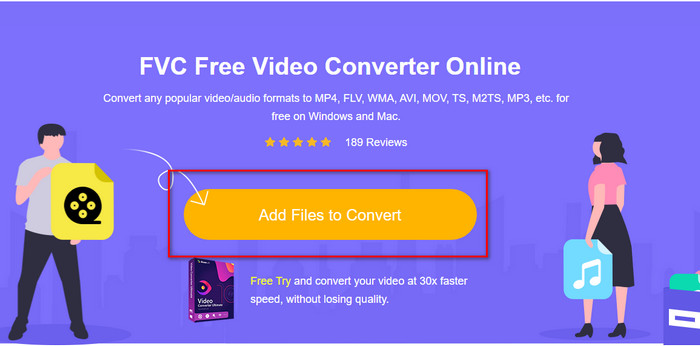
ステップ 2. 変換するファイルを追加をクリックしてオンラインコンバーターを起動し、フォルダから変換したい .dv ファイルを選択します。
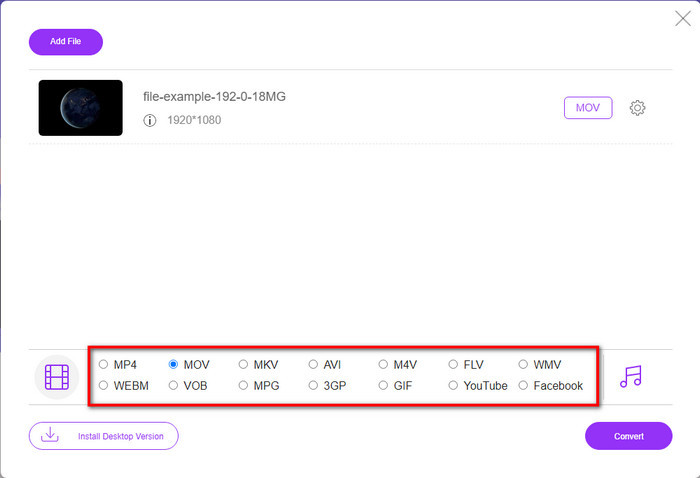
ステップ 3. 下のリストから MOV 形式、または他に希望する形式を選択します。
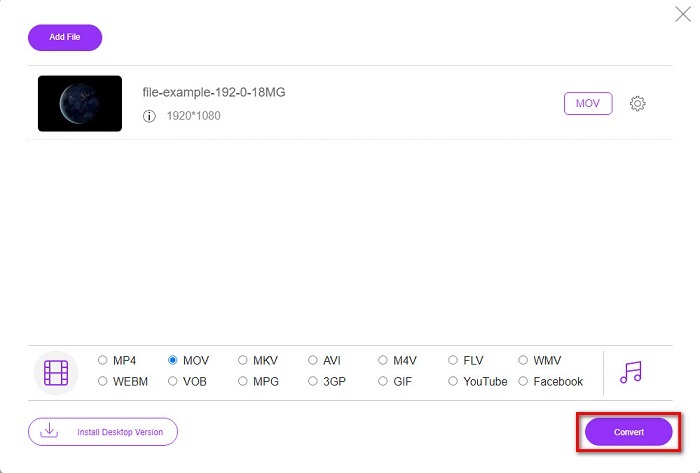
ステップ 4. 変換を開始するには、変換をクリックし、処理が完了するまで待ちます。
ステップ 5. 完了すると、変換されたファイルが入った新しいフォルダが画面に表示されます。
パート3。DV対MOV
DV形式は、MPEGと同じアルゴリズムを使用するため、ビデオとオーディオの保存に最適です。ただし、これは、以前のフレームレートの圧縮に依存しないため、MPEGとは大きく異なります。そのため、レート内圧縮に依存する代わりに、独立した圧縮を使用して再生をより迅速に編集します。その結果、DVファイルは1995年後半にすべてのカムコーダーの標準ビデオフォーマットとして導入されました。しかし、今日では、記録を保存するためにハードドライブ、SSD、およびメモリカードを使用するようになったため、テープベースのカムコーダーは少なくなります。
一方、MOV形式は、すべてのエディタで使用したり、メディアプレーヤーで再生したりできる高品質のメディアファイルを保存するためにAppleによって開発されました。この形式は、集合的なメディア要素を含むことができ、それぞれがビデオ、オーディオ、およびテキストのデータを収集できるため、多くの尊敬を集めています。 DVの場合と同様に、この形式が提供する圧縮はアルゴリズムに基づいています。
さらに、この形式は古くなっているため、MacアプリケーションにDVファイルを直接アップロードすることはできません。 .dvよりも優れたフォーマットがあります。ただし、ビデオがこの形式の場合は、DVからMOVへのコンバーターを使用してファイルを変換し、Quicktimeで再生したり、iMovieで編集したりできます。
パート4。DVからMOVへの変換に関するFAQ
MacでDVファイルを再生できないのはなぜですか?
この場合、多くの理由が異なる可能性があります。特に、ほとんどすべてのオペレーティングシステムとの互換性が低いDVファイルはそうです。しかし、私たちはあなたができない2つの考えられる理由をリストします、そして最初の理由はあなたが使っているメディアプレーヤーがこのフォーマットをサポートしていないということです。これは、互換性の理由と変換の解決策のために、ほとんどの形式で最も一般的な問題です。もう1つは、.dvファイルが壊れているか破損している可能性があることです。破損または破損しているため、ファイルは再生されません。
DVファイルはまだ理想的な形式ですか?
以前は、メディアファイルの記録と編集に理想的でしたが、現在、この形式は最適ではありません。主な理由は.dvよりも優れたフォーマットがあることであり、もう1つは互換性の理由です。
DVファイルを圧縮する方法は?
DV ファイルは圧縮されているとはいえ、動画の尺が長くなると容量(MB)が非常に大きくなってしまいます。そのため、転送しやすくし、保存容量を節約するには圧縮が不可欠です。DV ファイルやその他のメディアファイルを圧縮する方法を知りたい場合は、画質を落とさずに動画を圧縮する方法を解説したこの記事をお読みください。
結論
まとめると、DV ファイルはかつて音声と映像の記録において最適な形式でしたが、現在では後継となる形式がいくつも登場しています。特に Mac で動画を編集・再生したい場合、MOV と比べて DV は互換性が高いとは言えません。この形式はすでに時代遅れになりつつあるため、上で紹介したツールを使ってオンラインまたはオフラインで変換することを検討すべきです。総合的に見て、FVC Free Video Converter Online は、ウェブ上で見つかる無料ツールの中でも最も優れたものと言えるでしょう。無料で使えるだけでなく、そのパフォーマンスは他のオンラインツールとは一線を画します。しかし、驚異的なコンバーターである FVC Video Converter Ultimate にも目を向けるべきです。このツールは説明不要の実力を持ち、どんな変換の悩みにも間違いなく応えてくれます。あとは、どちらが自分に合っているかをあなた自身が選ぶだけです。
-
 簡単な手順とツールでAVIをMOVに変換する方法
 AVIを再生可能なMOVに変換する方法を知りたいですか?変換を成功させるための方法とヒントを知るには、この記事に従う必要があります。
-
 DivXを無料でMOVに変換する4つの方法[オンラインおよびオフライン]
 DivXの制限に苦労していますか、それともこの形式のビデオにアクセスするためのメディアプレーヤーがありませんか? MOV形式に変換する場合は、この記事を読み続けてギャップを埋めてください。
-
 無料のM4VからMOVへのコンバーター–M4VをMOVに変換する方法
 メディアプレーヤーがM4Vをサポートしていない場合、iPhoneで映画を見るのに苦労したことはありますか?この記事の主なトピックは、それをMOVビデオファイルに変換することです。
