


 ビデオコンバーター究極
 スクリーンレコーダー
 ビデオ修復
ビデオ修復MOV を WMV に変換する最高の使いやすいコンバーターをぜひお試しください!
Apple が開発した MOV ファイルは、WMV、MP4、AVI と並んで最も一般的なファイル形式の 1 つです。MOV ファイルは、QuickTime を利用することで Windows 上でも再生できます。そのため、MOV ファイルを変換したい場合は、WMV 形式への変換をおすすめします。Windows システムでは通常このファイル形式がよく再生されるからです。もしあなたがMOV を WMV に変換する方法を知りたいのであれば、本記事はまさに最適な内容です。

パート 1. 最高のオフライン コンバーターを使用して MOV を WMV に変換する
ファイル変換といえば、FVC Video Converter Ultimate 以上に優れたソフトはないと言ってよいでしょう。このコンバーターはオフラインツールで、MOV ファイルを WMV、AVI、MP4、M4V、WebM などに変換できます。さらに、編集、強化、結合、圧縮といった優れた機能も備えており、MOV ファイルを自在に加工できます。また、このファイルコンバーターには超高速変換を有効にする機能があり、MOV から WMV への変換をすばやく行えます。
FVC Video Converter Ultimate を使用して MOV を WMV に変換する方法:
ステップ 1. 下の無料ダウンロードアイコンをクリックして FVC Video Converter Ultimate をインストールします。このコンバーターは Windows と MacOS の両方でダウンロード可能です。インストール手順に従ってセットアップを完了し、アプリを起動します。
無料ダウンロードWindows 7 以降に対応安全なダウンロード
無料ダウンロードMacOS 10.7 以降に対応安全なダウンロード
ステップ 2. プログラムを起動すると、コンバーターの最初の画面が表示されます。ファイルを追加をクリックするか、+のアイコンに MOV ファイルをドラッグ&ドロップして、MOV ファイルを WMV ファイルに変換する準備をします。
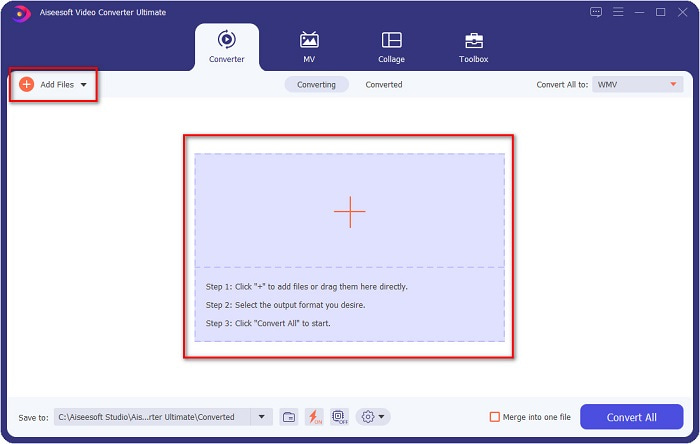
ステップ 3. 次に、変換形式を一括指定ボタンをクリックします。ファイル形式の一覧が表示されるので、その中から目的の形式を選択し、WMV をクリックします。
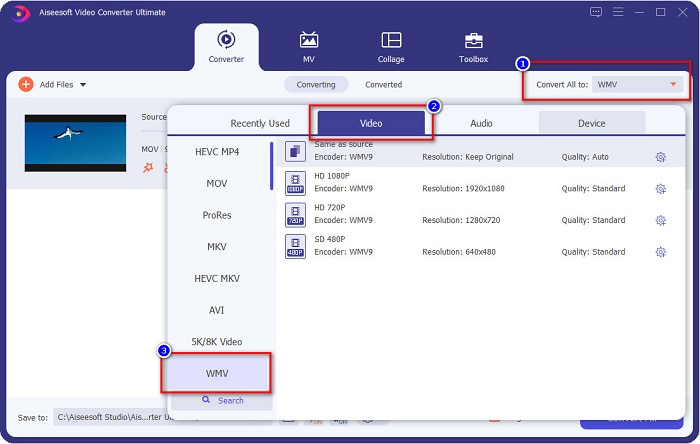
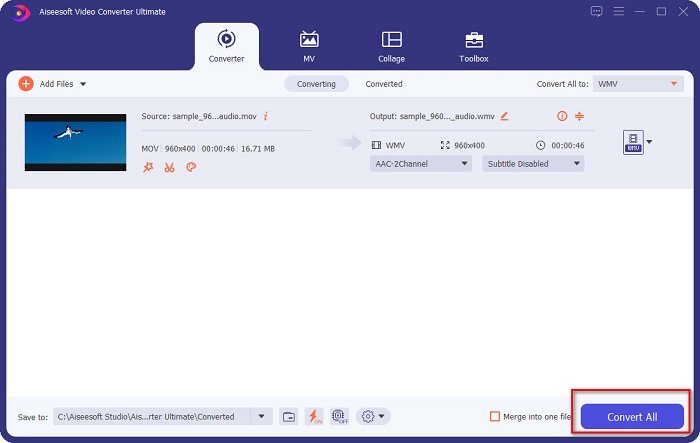
ステップ 4. WMV 形式を選択したら、右下にあるすべて変換ボタンにチェックを入れて変換を開始します。すると MOV から WMV への変換が始まります。あとは数秒待つだけで完了です。これらの簡単な手順で、MOV を WMV ファイルに楽に変換できます。
長所
- 超高速変換が可能なオプションがあります。
- ファイルを編集、拡張、および圧縮できます。
- MOV、WMV、AVI、MP4、M4V、VOB、MPG など、さまざまなファイル形式を変換できます。
短所
- その特別な機能にアクセスするには、まずアプリを購入する必要があります。
パート 2. フリーウェアを使用して MOC を WMV に変換する
MOV ファイルを WMV に変換する場合、デスクトップに既にあるフリーウェアを使用することもできます。現在利用可能な有名なフリーウェア コンバーターの 1 つは、VLC メディア プレーヤーをコンバーターとして使用するものです。 VLC メディア プレーヤーは、さまざまなメディア形式を再生できるマルチメディア プレーヤーです。さらに、このフリーウェアはファイルを変換することもできます。したがって、VLC を使用してフリーウェアで MOV を WMV に変換する場合は、以下の手順をお読みください。
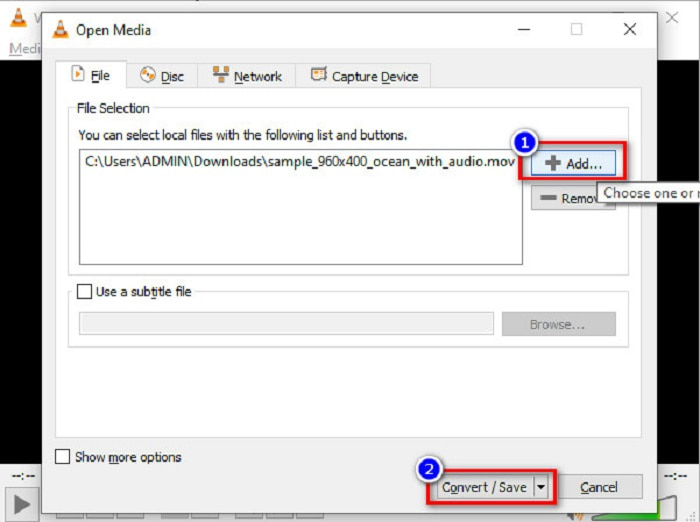
ステップ 1. VLC メディアプレーヤーを開き、ソフトウェア画面上部の メディア メニューをクリックして、変換 / 保存を選択します。
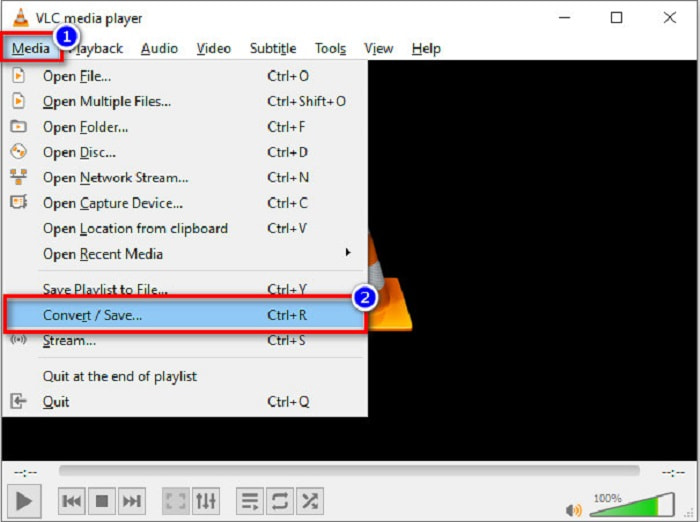
ステップ 2. 続いて、追加ボタンをクリックして MOV 形式のファイルを選択します。選択したファイル形式が一覧に表示されます。次に、変換 / 保存ボタンをクリックして次のステップへ進みます。
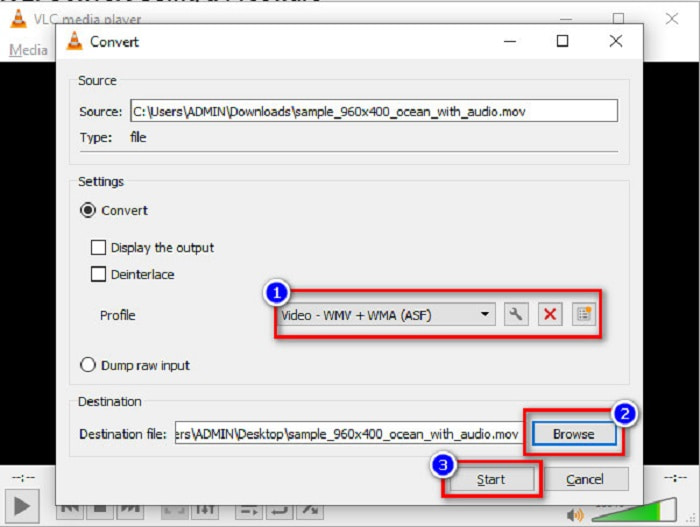
ステップ 3. 最後に、WMV を選択し、参照をクリックして保存先フォルダーを指定してから、開始ボタンをクリックし、変換を開始します。
パート 3. オンライン コンバーターを使用して MOV を WMV に変換する
MOV ファイルを WMV ファイルにオンラインで変換する方法をお探しなら、ぴったりのオンラインツールがあります。FVC Free Video Converter Online は、MOV ファイルを WMV、MP4、AVI、MPG などに変換できるオンラインコンバーターです。このコンバーターは操作が簡単で、ファイル変換に悩むことはありません。ただし、ウェブベースのコンバーターであるため、変換速度が遅くなる場合があります。それでも、MOV から WMV への動画変換に十分効率的なコンバーターであり、多くのユーザーに利用されています。
このオンライン コンバーターを使用して変換する手順は次のとおりです。
ステップ 1. まずブラウザーを開き、FVC Free Video Converter Online を検索します。
ステップ 2. ブラウザーでコンバーターを開いたら、ファイルを追加して変換をクリックします。するとコンバーターが起動し、その後パソコン内のファイルが表示されるので、変換したい MOV ファイルを選択します。
ファイルを一括変換するには、デスクトップ版をダウンロードしてください。
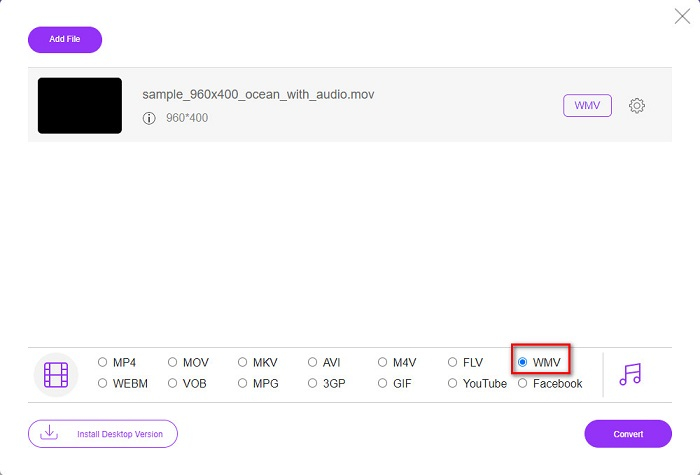
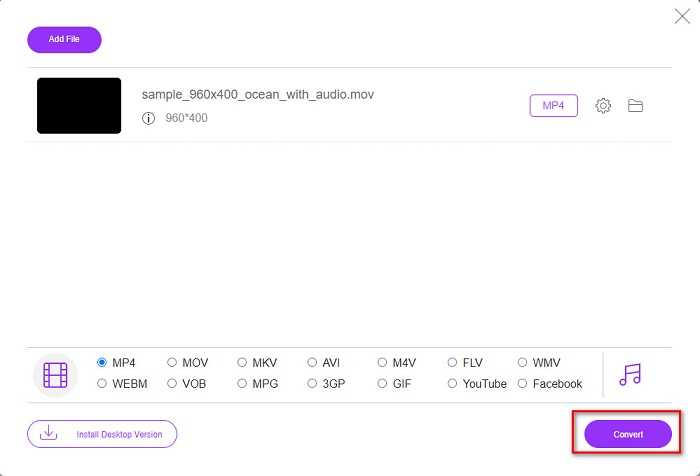
ステップ 3. ソフトウェアの 2 つ目の画面の下部に、ファイル形式の一覧が表示されます。そこで変換したいWMV 形式を選択します。
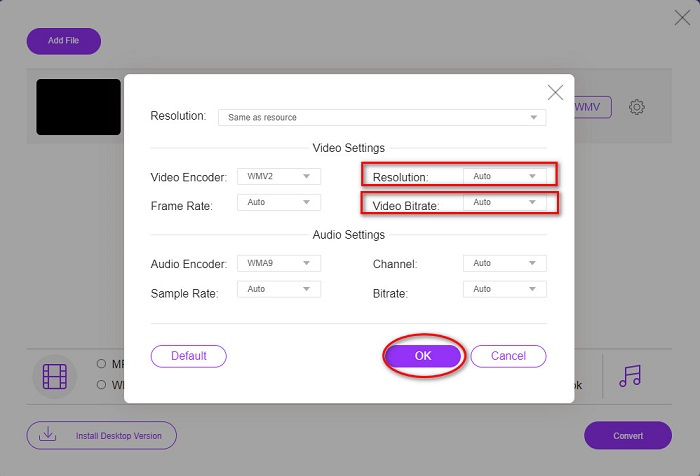
オプション。設定ボタンをクリックすると、ファイルの解像度やビデオビットレートを変更できます。調整が完了したらOKをクリックして設定を反映させます。
ステップ 4. WMV 形式を選択したら、変換ボタンをクリックして MOV ファイルを WMV ファイルへ変換します。最後に、変換が完了するまで待ちます。以上です。これだけ簡単に、MOV を WMV に変換できます。
パート 4. MOV ファイルと WMV ファイルの拡張知識
MOV は MacOS で広くサポートされているファイル形式です。Windows でも MOV ファイルを再生することはできますが、QuickTime のサポートが必要です。さらに、MOV ファイルは QuickTime ファイルフォーマットとして保存されます。QuickTime と Mac プラットフォームで主にサポートされているため、現在もっとも一般的なファイル形式の 1 つとなっています。一方、WMV(Windows Media Video) は、主に Windows システムを中心に、多くのデバイスでサポートされています。加えて、このファイル形式は圧縮技術を用いており、画質をほとんど損なわずにファイルサイズを小さくできます。
MOVとWMV
MOV形式は、映画、テレビ番組、短いビデオクリップ、またはホームムービーの保存に使用できます。実際には、1991年にAppleによって導入されたQuickTime File Format(QTFF)で保存されます。MOVファイルは、人々が高品質のビデオを保存したいときによく使用されます。
Microsoftによって作成されたWMVは、2000年代に最も一般的なビデオ形式の1つでした。 Webで表示したり、Windowsのさまざまなメディアプレーヤーで再生したりできます。また、WindowsMediaPlayerのデフォルトのビデオファイル形式でもあります。しかし、最近は他のフォーマットに引き継がれています。
パート 5. MOV を WMV に変換する方法に関する FAQ
MOV を WMV に変換すると、ファイルの品質に影響がありますか?
使用するコンバーターによっては、ファイルの品質が影響を受ける場合があります。高品質のピクセル ビデオをサポートできないコンバーターがあります。
QuickTime は WMV ファイルをサポートしていますか?
QuickTime プレーヤーでは WMV ファイルをサポートしていません。しかし、WMV ファイルを MOV、MP4、M4V など QuickTime がサポートする形式に変換することは可能です。WMV を MOV に変換する方法について詳しく知りたい場合は、このリンクをクリックしてください。
MOVファイルを圧縮できますか?
ZIP ファイルを使うことで、MOV ファイルやその他のファイルを圧縮できます。ただし、ZIP を使って MOV ファイルを圧縮しても、サイズが大きく減るわけではなく、数パーセント程度しか削減できないことが多いです。したがって、上で紹介したコンバーターを使って、より容量の小さいファイル形式へ変換することをおすすめします。
結論
上で紹介したように、さまざまな種類のコンバーターがあります。オンライン型、オフライン型、フリーソフトなど、用途に応じて選ぶことができます。これらのコンバーターはそれぞれ機能や特徴が異なりますが、その中でもFVC Video Converter Ultimate の利用をおすすめします。他のコンバーターよりも多機能であり、超高速かつ効率的に変換できるからです。このコンバーターが提供する優れた機能を体験するために、ぜひ今すぐダウンロードしてみてください。
-
 [無料 & オンライン] MOV を MP4 に変換する 4 つの方法
 MOV(Apple QuickTime Movie)ファイルをMP4に変換したいですか?この投稿では、Windows 10/8/7 / XPおよびMacOSXでMOVビデオファイルをMP4形式に変換する4つの無料の方法を共有しています。
-
 WindowsとMacでMOVをMP3に簡単に変換する4つの最良の方法
 MOVファイルからMP3オーディオファイルを抽出したい場合は、記事から目的のファイルを取得するための4つの最も効率的なMOVからMP3へのコンバーターについて詳しく知ることができます。
-
 Windows / MacでMOVファイルをFLVに変換する2つの簡単な方法
 MOVをFLVに無料で変換する方法は?これは、デスクトップとオンラインで、1セントも払わずにMOVファイルを数秒でFLVに変換するのに最適なビデオコンバーターです。

