


 ビデオコンバーター究極
 スクリーンレコーダー
 ビデオ修復
ビデオ修復最も熟練したツールを使用してVOBをMOVに変換する方法[無料で簡単]
In the case of a DVD, a VOB file is a movie data file that is typically kept in the VIDEO TS folder at the root of the DVD. It contains a large portion of the material recorded on a disc, which includes video and audio files and subtitles, DVD menus, and other navigational content. However, the QuickTime File Format (QTFF) is a multimedia container file format that can be used to save a MOV file. Media data, including video, audio, and text, can be stored on one or more tracks (subtitles). To save video files, MOV files are often utilized.If you have a second thought of his video format and need to know all the details about it or how to convert it to other video formats using different converters? This is the right article for you, presenting the best and easiest ways to convert VOB to MOV.

パート1。VOBとMOVとは何ですか?
DVDのデータの大部分は、デジタルビデオ、オーディオ、ナビゲーションコンテンツ、DVDメニュー、および字幕を含むこのファイル形式に含まれています。 VOBファイルはVIDEOTSフォルダーに保存され、DVDビデオのコアです。これは映画のデータです。 MP2、DTS、AC3、およびMPEG-2ビデオストリームはすべて、この場所から派生しています。 VOB形式で保存されたファイルは暗号化されている可能性があります。 VOBは、WMVに非常に適したビデオファイルの一種です。 VOBファイル拡張子はVOBファイルに使用されます。たとえば、VOB形式はMPEGプログラムストリーム形式に基づいていますが、民間部門での追加の制限と基準が含まれています。
Nevertheless, In the QuickTime framework of Mac, the MOV file extension indicates the QuickTime video format, developed by Apple. The Windows platform also supports this multimedia container's capacity to store several tracks, each one containing a specific sort of data (audio, video, subtitles). Video editing programs can benefit significantly from separating media data from media offsets, abstract data references, and track edit lists. For sharing movies and videos on the internet, the MOV video container is a popular choice.
| ファイル拡張子 | VOB | MOV |
| ファイルタイプ | DVDビデオオブジェクトファイル | Apple QuickTime Movie |
| によって開発された | 該当なし | 林檎 |
| 長所 | 高品質;それからDVDを作ることができます。 | 優れたビデオ品質。 Web放送に適しています。主要な要素の明確な分離 |
| 短所 | 2時間の映画で4.7GB、これは多くのスペースです | この形式は、他の一般的なストリーミング形式よりもファイルサイズが大きくなります。 |
パート2。VOBをMOVに変換する方法[Mac&Windows]
Starting with converting VOB to MOV offline, this best tool is the most reliable in restoring a wide range of formats. Video Converter Ultimate can convert VOB to MOV in the fastest way possible. Plus, you can change the quality output of the video before you upload the file. This converter also has different tools that can help you improve your video file to the next level. Since it supports a massive amount of video formats, you won't have to worry about converting unfamiliar video formats to your desired format. Now that you have learned about this best converter, you can now learn the procedures given below:
ステップ 1. まず、下の無料ダウンロードボタンをクリックしてダウンロードを開始します。ダウンロードが完了したら、Windows 版か Mac 版のどちらか好みの方のソフトを選んで入手できます。プログラムを実行する前に、パソコン上にインストールし、今すぐ開始をクリックして起動してください。
無料ダウンロードWindows 7 以降に対応安全なダウンロード
無料ダウンロードMacOS 10.7 以降に対応安全なダウンロード
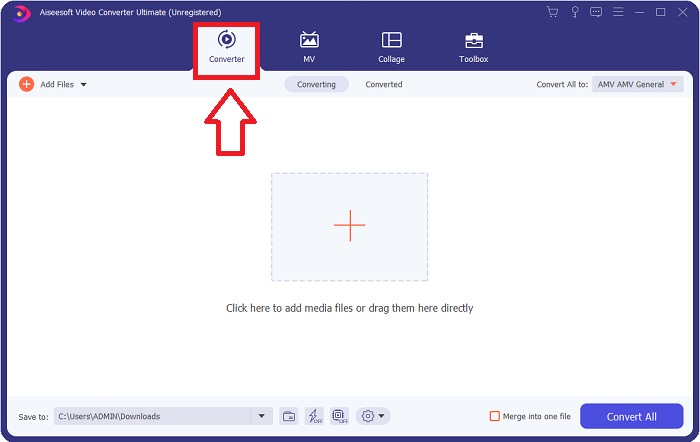
ステップ 2. ダウンロードしたアプリケーションを起動します。初回起動時には、変換インターフェースのウィンドウが表示されます。ここで動画ファイルを読み込み、変換を開始します。
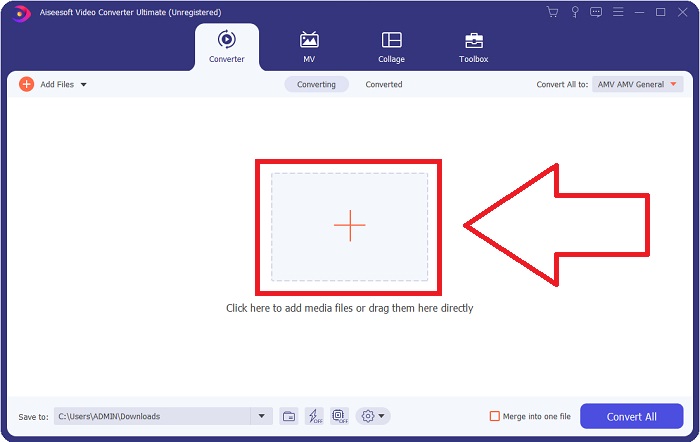
Step 3. Import your files into the converter to begin the conversion process. Drag and drop the video file you want to convert onto the + icon.
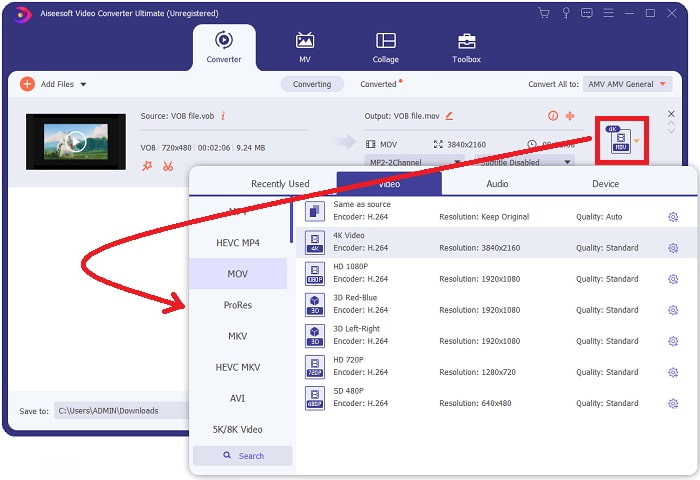
Step 4. Select a video format from the list in the upper-right corner of the screen. Locate and select the MOV file type from the drop-down menu. There are several video qualities options available once you've chosen an MOV format. However, if your preferred video output isn't listed, you can change the quality settings to suit your needs. You can alter the display's resolution, frame rate, and even audio quality by clicking the gear icon. To keep your changes, click the Create New button.
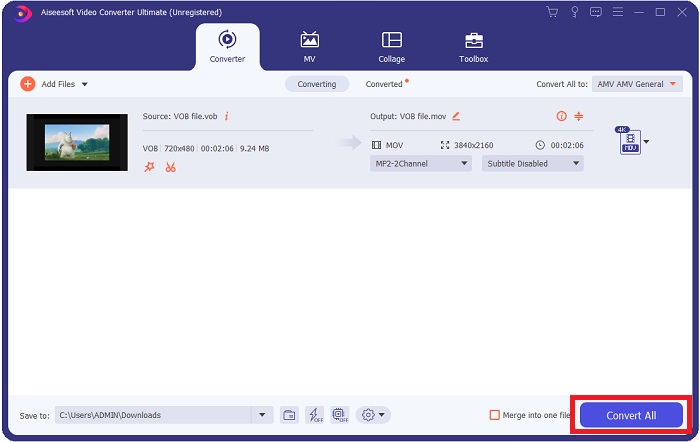
ステップ 5. 動画の編集が完了し、変換の準備ができたら、すべて変換をクリックして変換処理を開始し、パソコンに保存します。
パート3。VOBをMOVに変換する方法[オンライン]
If you don't have time to download the Video Converter Ultimate, you can also use this online version of the software. Free Video Converter Online is the best online web tool you can access on the internet that can convert many varieties of formats in a fast manner. Other than an online converter, this converter doesn't limit formats it can support. That's why it is recommended to use for some beginner users. To know more about this online web tool, here are the procedures given below.
Step 1. Navigate to the main website of this online converter by clicking on the link here.
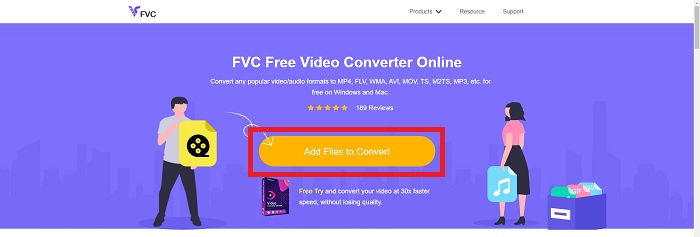
Step 2. If this is your first time using it, click the Add Files to Convert button to download the launcher for your computer. It will automatically launch when it has been downloaded once more. Select the file from your folder and click Open after it has been downloaded once again.
Step 3. Before the conversion process begins, select the MOV format from the category list of Video below by clicking on it.
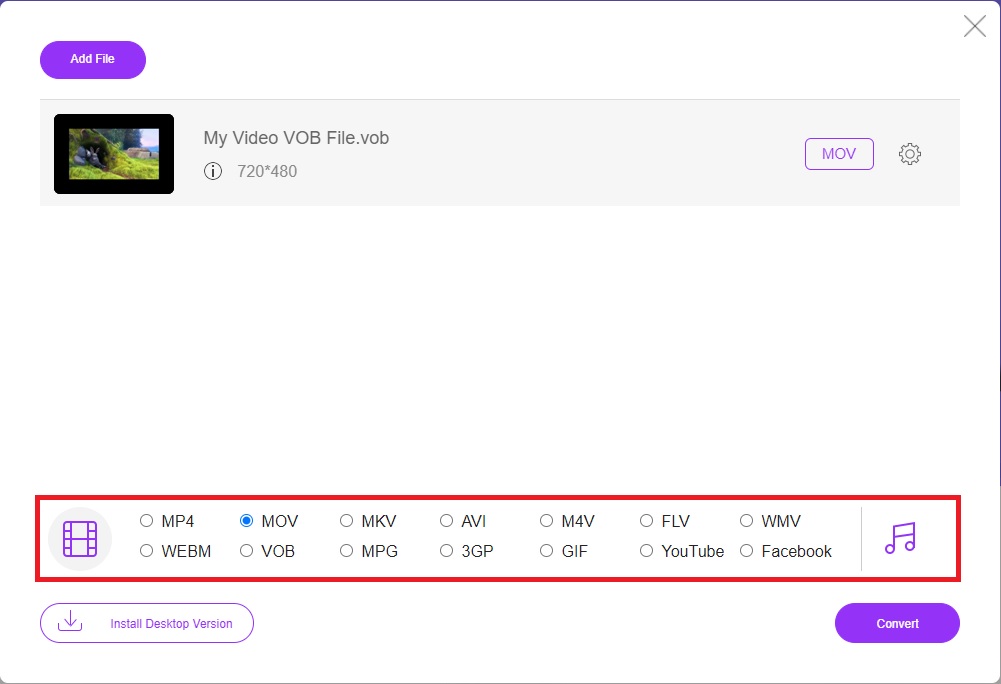
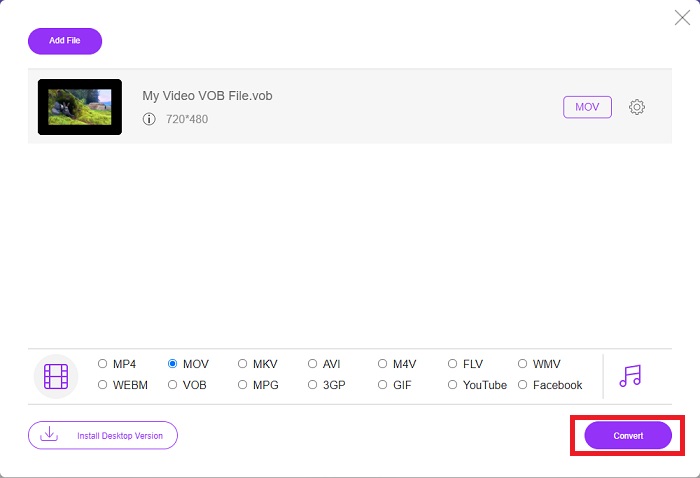
ステップ 4. 形式を選択したら、変換をクリックして、別の形式への変換を開始します。
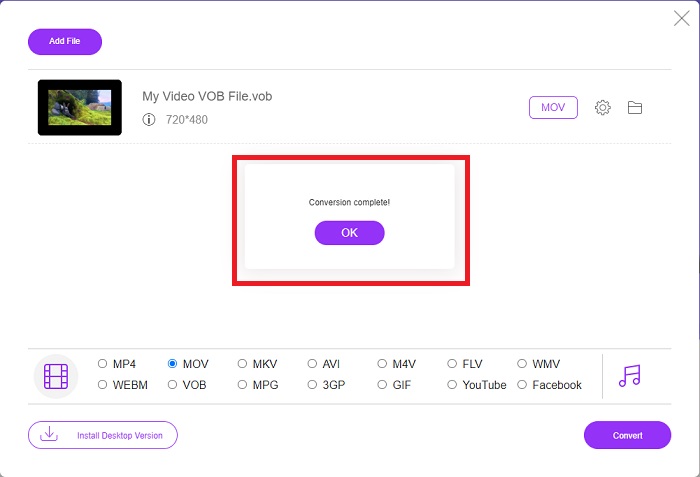
ステップ 5. 数分後、変換されたファイルが入ったフォルダーが表示されますので、それをクリックして再生を開始してください。
パート4。VOBからMOVへの変換に関するFAQ
なぜVOBファイルはとても大きいのですか?
There is no reason for the big downloads other than the videos themselves (including audio). Because the video codecs use variable bit length encoding, they are diverse in length. It's, therefore, possible to encode the same number of images into a variety of various file sizes. Click here to learn how to compress large VOB files.
VOBはDVDと同じですか?
ビデオオブジェクトの場合、DVD-VideoメディアはVOB(ビデオオブジェクトの略)を使用します。字幕、DVDメニュー、ナビゲーション情報はすべて、マルチフォーマットファイルであるVOBファイルに含めることができます。 VOBファイルの暗号化が可能です。
MOVファイルには何が含まれていますか?
MOVファイルを利用して、ビデオ、オーディオ、タイムコード、テキストなど、さまざまな形式のメディアを保存および同期することができます。特定のコンテンツをエンコードするために使用できるさまざまなコーデックがあります。圧縮に関しては、MOVファイルは通常MPEG-4コーデックを使用します。
結論
Overall, it is clear to state the differences between the software or online converter given above, and they always have flaws and good qualities in using them. But if you choose to use a very professional-wise and user-friendly converter, the software Video Converter Ultimate is the best recommended to use. As the article said about this video converter, they are nothing compared to another competitor in achieving the standard this software has brought. They can't get to the level of how excellent this software is.
-
 元の品質でQuickTimeMOVファイルを再生するための8つの最高のMOVプレーヤー
 WindowsとMacの両方で利用できる8つの最高のMOVプレーヤーの詳細をご覧ください。元の品質でMOVファイルを再生するために必要な適切なものを選択できます。
-
 MKVからMOVへ–MKVをMOVに変換する方法
 MacでMKVをMOVに変換するにはどうすればよいですか? iMovieはMKVを読み取ることができますか? MOV形式とはどういう意味ですか?この投稿では、無料のオンラインおよびプロのビデオコンバーターを使用してMKVをMOVに変換するのに役立つ2つの簡単な方法を説明しています。
-
 FLVからMOVへ– Mac / PC /オンライン無料でFLVをMOVに変換する方法
 FLVをMOVに変換する方法は? MacでFLVをMOVに変換するにはどうすればよいですか? YouTube FLVをオンラインでMOVに変換する無料の方法はありますか?この投稿では、FLVファイルをMOVに変更するための3つのFLVからMOVへのコンバーターを共有しています。
