


 ビデオコンバーター究極
 スクリーンレコーダー
 ビデオ修復
ビデオ修復
 安全なダウンロード
MPG から MP3: オーディオ ファイルの変換と強化に関する包括的なガイド
The MPG video format is frequently utilized for the storage of films and other forms of video content. On certain occasions, it may be desirable to extract the audio component from a file in the MPG format and subsequently preserve it in the form of an MP3 file. An MPG to MP3 converter is a useful tool in this context.
熟練したコンバータを利用することで、MPG ファイルを MP3 形式に簡単に変換できるため、さまざまなデバイスで好みのオーディオ コンテンツを楽しむことができます。このタスクの達成に役立つコンバータが無料と有料の両方で複数存在します。プログラムは、オンラインまたはオフライン アクセスの好みに基づいてユーザーに合わせて分類されました。参考までに、以下にそれらを示します。

パート 1. Video Converter Ultimate を使用して MPG を MP3 に、または MP3 を MPG に変換します
Converting from MPG to MP3 is only one of the many video formats that can be converted with Video Converter Ultimate. In addition, the program can convert high-definition videos in seconds without sacrificing quality, and it offers batch conversion, history management, and parameter tweaking. When it comes to converting videos to other formats, FVC Video Converter Ultimate is the best option available.
ステップ1. プログラムを入手
Get FVC Video Converter Ultimate and install it on your computer. Simply hit the Free Download button below. Start up the app and then import the MPG using the Add Files button.
無料ダウンロードWindows 7 以降に対応安全なダウンロード
無料ダウンロードMacOS 10.7 以降に対応安全なダウンロード
Step 2. Select output format
From the Profile option's dropdown menu, choose MP3 as the desired output format. The audio file's settings can be modified if desired.
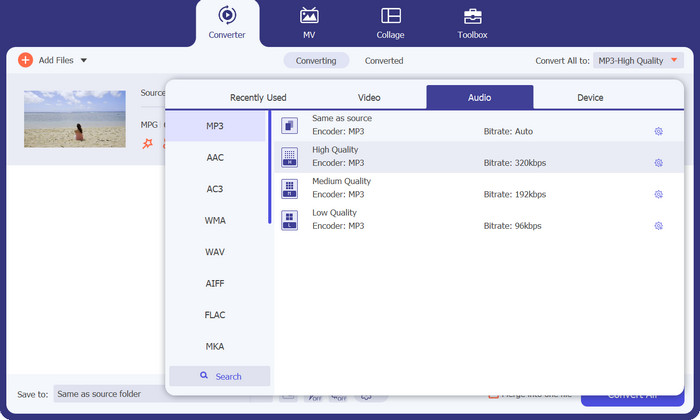
Step 3. Convert to MP3
Specify a file location on your computer to save the converted file. Commence the process of conversion. Now, tick on the Convert All button. Kindly wait for the transformation to finish.
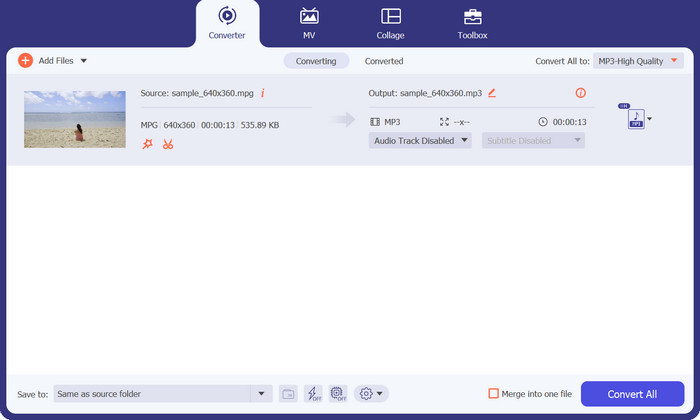
長所
- 品質を維持しながら変換速度が速い。
- トリミング、トリミング、字幕の追加など。
- バッチ変換をサポートしています。
短所
- すべての機能にアクセスするには、有料のサブスクリプションが必要です。
パート 2. 無料の MP3 コンバーターをオンラインで MPG から MP3、または MP3 から MPG に変換する
Another MPG converter to MP3 app to help you convert MPG to MP3 or MP3 to MPG is the Free MP3 Converter Online. The app is completely free, and there are no limitations. The tool allows users to convert audio files to well-known audio formats like MP3, AAC, AC3, WMA, WAV, and more without any hidden fees or charges. The tool also provides a watermark-free output in many choices of audio format, and it can be as fast as your uploading and downloading speed on the internet. To convert MPG to MP3 online for free, follow these steps:
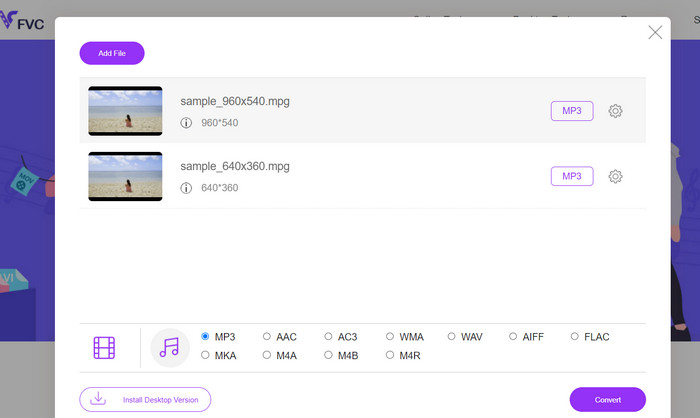
Step 1. Go to the official site for Free MP3 Converter Online using any browser on your computer. To add your music file, click the Add Files to Convert button and select your desired music file.
Step 2. After uploading a music file, you will see all the audio formats available. Choose MP3 from the profile menu.
Step 3. To commence the conversion process, hit the Convert button. Wait until the change is done.
長所
- パラメータ調整をサポートします。
- 品質を損なうことなく高品質オーディオをトランスコードします。
- 隠れた料金や手数料はありません。
短所
- 良好なインターネット接続が必要です。
- 大きな音声ファイルではアップロード時間が遅くなります。
パート 3. VLC を使用して MPG を MP3 に変換する
VLC Media Player は、事実上あらゆるオーディオ ファイルやビデオ ファイルを開くことができる無料のオープンソース メディア プレーヤーです。また、非常に多用途です。一方、メディア ファイルの再生に優れているだけでなく、ユーザーがメディア ファイルをある形式から別の形式に変換できる機能も組み込まれています。
VLC を使用してファイルを変換する場合、ユーザーは可能な限り最高のオーディオ品質を達成するために、ビット レート、チャンネル、サンプル レートなどの多くの設定を変更できます。この多用途性により、MP3 ファイルの出力を調整してさまざまなコンテキストで使用できるようにすることができます。
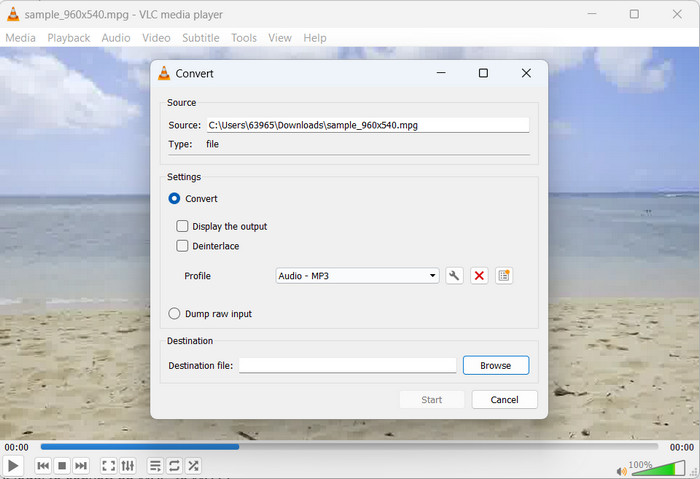
Step 1. First, launch the VLC media player and click on Media in the top left-hand corner.
Step 2. Next, select Convert/Save from the dropdown menu. Then, click Add and select the MPG file you want to convert.
Step 3. Tick Convert/Save at the bottom of the page. Choose Audio-MP3 from the dropdown under the Profile section. Lastly, select the location where you want to save the converted file and click Start. That is how you extract MP3 from MPG with VLC.
長所
- 複数のプラットフォームで利用できます。
- 高度なオーディオおよびビデオ コーデックを使用します。
- カスタム設定を提供します。
短所
- いくつかの出力形式のみをサポートします。
- 編集機能が制限されています。
Further Reading:
3 Best Ways to Quickly Convert MPG to MP4
Tips and Tricks on How to Convert MKV Files to MP3 [2023]
パート 4. MP3 と MPG の変換に関する FAQ
MPG を MP3 に変換することは合法ですか?
あなたの質問に答えると、MPG ファイルを MP3 に変換することは、非営利的な使用であれば合法です。ただし、変換されたオーディオを共有または販売したい場合は、適切な許可またはライセンスが必要です。
出力 MP3 ファイルの音質に影響を与える要因は何ですか?
生成される MP3 ファイルの聴覚忠実度は、ビット レート、サンプリング周波数、チャネル モードなどのいくつかの要因によって決まりますが、これらに限定されません。出力ファイルのオーディオ品質を向上するには、サンプリング周波数とビット レートを上げることができます。
変換された MP3 ファイルに適切なビットレートを選択するにはどうすればよいですか?
MP3 ファイルの音質とファイル サイズは、ビット レートによって決まります。ビット レートは通常、キロビット/秒 (kbps) で表されます。ビット レートの増加は、ファイル サイズが大きくなるという犠牲は伴いますが、オーディオの忠実度の向上と正の相関関係があります。
結論
The conversion of MPG to MP3 offers a practical solution for improving audio compatibility and achieving uninterrupted playback across various devices. By adhering to the techniques delineated in this manual, one can seamlessly transform their MPG files into the extensively accepted MP3 format.
-
 Mac / Windows / OnlineでMPGをMOVに変換する3つの簡単な方法
 MPGファイルを変換して、後でiOS、iPod、iPad、またはMacに転送しますか?この記事は、ステップを使用してMPGをMOVに変換する方法を理解するのに役立ちます。
-
 WindowsとMacで複数のMPGビデオファイルを1つに結合する方法
 複数のMPGクリップを1つのファイルに結合することはあなたにとって問題かもしれません。この記事では、コンピューター上でMPGビデオをマージする方法について詳しく学ぶことができます。
-
 どんなオーディオも簡単にカットできる 5 つの MP3 カッター [2023 年更新]
 オーディオをトリミングするためにMP3カッターが必要ですか?その場合は、オーディオを簡単にカットできる信頼できるツールを提供しているので、この記事を読んでください。
