


 ビデオコンバーター究極
 スクリーンレコーダー
 ビデオ修復
ビデオ修復
 安全なダウンロード
主要な M4A から MP3 へのコンバーター ソフトウェア プログラム: 2023 年のベスト
M4A から MP3 コンバーターの魅惑的な世界について話し始める準備はできていますか?さて、席に着いて、心を揺さぶられる準備をしてください。これらの気の利いたツールは魔法のシェイプシフターのようなもので、M4A ファイルを普遍的な互換性のある MP3 形式に簡単に変換します。これは、デバイスやプラットフォームを越えて移動できるパスポートを音楽に与えるようなもので、互換性の問題が発生することなく、誰もがあなたの曲に耳を傾けることができます。
ですから、テクノロジーに精通したオーディオマニアであっても、ただどんなデバイスでも音楽を思いきり楽しみたいだけの人であっても、これらのコンバーターがしっかりサポートしてくれます。さあ、メロディーとビートが境界を越えて自在に行き交う、魅力的な音声変換の世界に飛び込みましょう。一緒にM4A から MP3 コンバーターの謎を解き明かしていきましょう。

パート 1. M4A から MP3 コンバーターの比較
ここでは、3 つの人気のある M4A から MP3 コンバーター、Video Converter Ultimate、Free Audio Converter Online、File Converter モバイル アプリを包括的に比較します。
| ビデオコンバーター究極 | 無料オーディオコンバーターオンライン | ファイルコンバーター | |
| プラットホーム | Windows/Mac | Webベース | モバイル(iOS/Android) |
| 使いやすさ | ユーザーフレンドリーなインターフェース | シンプルで直感的 | ユーザーフレンドリーなインターフェース |
| 変換速度 | 速い | インターネットの速度に依存します | 速い |
| サポートされている入力形式 | M4A、MP3、WAV、FLAC など | M4A、MP3、WAV、FLAC など | M4A、MP3、WAV、FLAC など |
| 出力フォーマット | 高品質の出力 | インターネットの速度に依存します | 高品質の出力 |
| バッチ変換 | はい | 番号 | はい |
| 料金 | 有料ソフトウェア | 自由 | アプリ内購入のあるフリーミアム モデル |
| 可用性 | 限定試用版あり | オンラインで利用可能 | アプリストアで利用可能 |
パート 2. Windows および Mac 用の M4A から MP3 コンバーター
Video Converter Ultimate は、M4A ファイルを優れた速度と品質で MP3 に難なく変換できる、最高水準の M4A から MP3 コンバーターの一つです。わかりやすいインターフェースにより、変換作業は非常に簡単で、M4A や MP3 以外にも幅広い音声フォーマットに対応しています。バッチ変換機能により、複数ファイルを一度に変換して時間を節約できます。さらに、動画変換や編集など、多彩なクリエイティブ機能も備えています。
主な機能
◆ GPU アクセラレーション: GPU アクセラレーション テクノロジを使用して、コンピュータのグラフィック カードのパワーを活用します。 Video Converter Ultimate は GPU を利用して変換プロセスを加速し、処理時間を大幅に短縮し、より高速な結果を提供します。
◆ カスタマイズ可能な設定: カスタマイズ可能な設定を使用して、変換プロセスを完全に制御します。ビットレート、解像度、フレームレート、オーディオ品質などのパラメータを調整して、好みに合わせて出力を正確に調整します。
◆ メディア プレーヤーとマネージャー: Video Converter Ultimate インターフェイス内で、変換されたファイルをシームレスに再生できます。さまざまな形式をサポートする内蔵メディア プレーヤーが含まれています。さらに、ファイルの整理、プレイリストの作成、メタデータの追加など、メディア ライブラリを簡単に管理できます。
◆ 高度な編集ツール: Video Converter Ultimate は、変換機能に加えて、マルチメディア プロジェクトを強化するための高度な編集ツールを提供します。ビデオを正確にトリミング、クロップ、マージ、エフェクトを追加して、クリエイティブなビジョンを実現します。
長所
- M4A から MP3 への変換中にメタデータを保持します。
- マルチチャンネルオーディオの整合性を維持します。
- ロスレス変換オプションを提供します。
- ビットレートと品質設定を広範囲に制御できます。
短所
- この M4A MP3 コンバーターには、DRM 制限を削除する機能がありません。
ステップ 1.M4A から MP3 変換用の最高のオーディオコンバーターを起動
まず、下記からお使いの OS に対応した無料ダウンロードボタンをクリックします。M4A から MP3 コンバーターのダウンロードが完了したら、ファイルをダブルクリックしてインストールを開始します。
無料ダウンロードWindows 7 以降対応安全なダウンロード
無料ダウンロードMacOS 10.7 以降対応安全なダウンロード
ステップ 2.M4A オーディオファイルを読み込む
ソフトウェアが起動したら、画面中央にあるプラスボタンをクリックします。そこからパソコン内のフォルダを開き、MP3 に変換したい M4A ファイルを選択します。
ステップ 3.出力形式として MP3 を選択
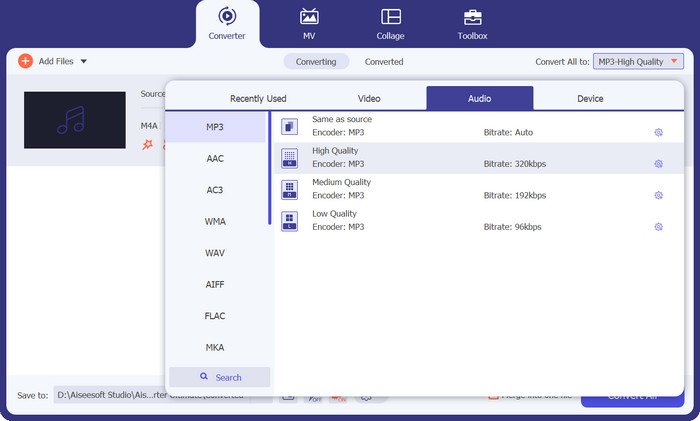
ファイルが読み込まれたら、出力タブに進みます。次に、音声パネルからMP3を選択してください。サンプリングレートを調整することで、出力品質を変更することもできます。
ステップ 4. ファイル変換
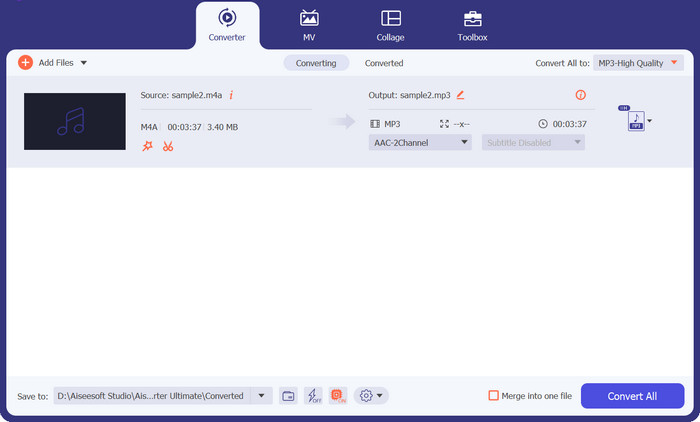
出力設定が決まったら、右側にある すべて変換 ボタンをクリックします。オーディオファイルのサイズによっては、変換処理に時間がかかる場合があります。完了後、ファイルをクリックすることで、変換されたオーディオを再生できます。
パート 3. M4A から MP3 へのオンラインコンバーター
この無料の M4A から MP3 コンバーターはカスタマイズ可能な設定を提供し、M4A から MP3 への変換を微調整できます。ビットレート、サンプルレート、チャンネルモードなどのパラメータを調整して、希望の出力品質とファイルサイズを実現します。 Free Audio Converter Online のバッチ変換機能により、リアルタイム時間が節約されます。複数の M4A ファイルを一度にアップロードし、一度に MP3 に変換できるため、手動で変換を繰り返す必要がなくなります。
さらに、Free Audio Converter Online では、変換後の MP3 ファイルの ID3 タグを編集する便利な機能も提供しています。曲名、アーティスト名、アルバム情報などを簡単に編集できるため、音楽ライブラリを常に整理された状態に保てます。
長所
- ソフトウェアをインストールする必要がなくなります。
- ユーザーフレンドリーなインターフェースを誇ります。
- この M4A から MP3 へのオンライン コンバーターはプライバシーとセキュリティを優先します。
短所
- 安定したインターネット接続が必要です。
- サーバーの容量による処理速度の制限。
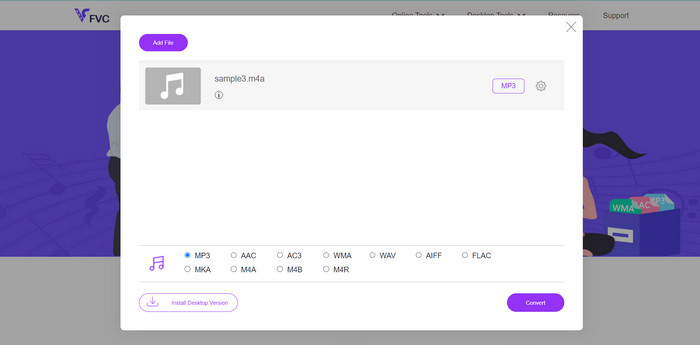
ステップ 1. パソコンで利用可能な任意のブラウザを使って Free Video Converter Online のページにアクセスします。その後、「Add Files to Convert」をクリックして、M4A ファイルをアップロードします。この操作でファイルブラウザが開き、変換したい音声ファイルを選択してアップロードできます。
ステップ 2. ここで最終的な形式としてMP3を選択し、必要であれば音質を好みに合わせて調整します。
ステップ 3. 最後にConvertボタンを押して変換を開始します。数秒ほど待てば、変換処理が完了します。
パート4. AndroidおよびiOS用のM4AからMP3へのコンバーターアプリ
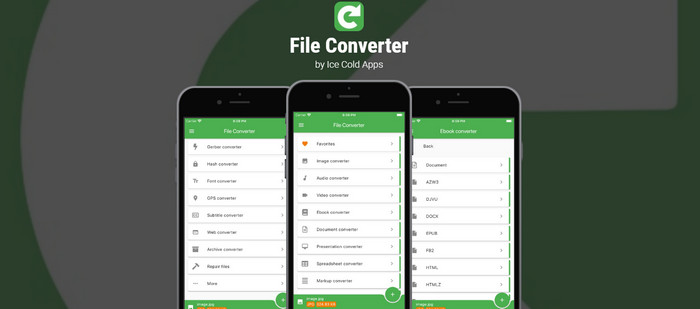
File Converter は、さまざまな機能を手のひらにもたらす強力なモバイル アプリです。このアプリを使用すると、さまざまなファイル形式を簡単に変換できます。 File Converter は、ドキュメントから画像、オーディオ ファイルからビデオまで、幅広い形式をサポートしており、ファイルを簡単に変換できます。変換プロセスを簡素化するユーザーフレンドリーなインターフェイスを提供し、あらゆるレベルのユーザーがアクセスできるようにします。
さらに、File Converter はバッチ変換をサポートしているため、複数のファイルを同時に変換できます。仕事、娯楽、個人的な使用のいずれの目的でファイルを変換する必要がある場合でも、File Converter はプロセスを合理化し、ファイルを効果的に管理できる多用途ツールです。
長所
- インターネット接続なしで変換するオフライン変換をサポートしています。
- アプリにはファイル管理機能が含まれています。
- テクノロジーに詳しくない人でも、アプリを簡単に操作できます。
短所
- 広告が含まれています。
- 複雑な変換の処理には時間がかかります。
ステップ1.ダウンロードとインストール
まず、デバイスの各アプリ ストア (Android の場合は Google Play ストア、iOS の場合は App Store) から File Converter アプリをダウンロードしてインストールします。その後、デバイスで File Converter アプリを開いて変換プロセスを開始します。
ステップ 2.M4A ファイルを選択
MP3 に変換したい M4A ファイルを選択します。デバイスのストレージまたはアプリ内でファイル マネージャーを参照して、M4A ファイルを見つけることができます。
ステップ 3.出力形式を選択
M4A ファイルを選択すると、出力形式の選択を求められます。この場合は、希望する出力形式としてMP3を選択してください。
ステップ 4.変換を開始
出力形式を選択し、設定を調整したら、start conversionボタンをタップして変換を開始します。
さらに詳しく読む:
M4A を MP4 に手軽に変換できるベストツール(オンライン & オフライン)
パート 5. M4A から MP3 コンバーターに関する FAQ
M4A から MP3 へのコンバーターは、お気に入りの曲を古いオーディオ形式から抜け出すことができますか?
絶対! M4A から MP3 へのコンバーターが役に立ち、大切な曲をより広くサポートされている形式に変換して引き続き楽しむことができます。
M4A ファイルを MP3 に変換すると、曲のボーカルの明瞭さが向上しますか?
変換自体はボーカルの明瞭さを直接強化するものではありませんが、元の M4A ファイルにクリアなボーカルが含まれている場合、MP3 ファイルは良好な音質を提供し、ボーカルの詳細を保持できます。
M4A ファイルを MP3 に変換すると、音楽はイヤーワームの影響を受けなくなりますか?
残念ながら、M4A から MP3 への変換ではイヤーワームを防ぐことはできません。ただし、変換プロセス中に新しい曲を発見して、キャッチーな曲から気を紛らわせる可能性があります。
M4A から MP3 へのコンバーターは、オーディオ ファイルから魔法のようにバックグラウンド ノイズを除去できますか?
一部のコンバーターはノイズ低減機能を備えていますが、変換プロセスだけではバックグラウンドノイズを除去できません。ノイズを効果的に除去するには、専門的なオーディオ編集ソフトウェアが必要になる場合があります。
M4A から MP3 へのコンバーターを使用して、ヘッドフォンで仮想コンサート体験を作成できますか?
M4A から MP3 へのコンバーターは形式の変換に重点を置いており、仮想コンサート体験を作成するように設計されていません。ただし、高品質のヘッドフォンや仮想サラウンド サウンド テクノロジーを使用すると、リスニング体験を向上させることができます。
結論
まとめると、M4A から MP3 コンバーターは、音声ファイルをフォーマット間で変換し、互換性と汎用性を確保するうえで実用的なソリューションです。特別な魔法の力があるわけではありませんが、M4A ファイルを広く対応している MP3 形式に変換する作業をシンプルにしてくれます。これにより、ユーザーは形式の制限に縛られることなく、さまざまなデバイスでお気に入りの音楽を楽しめるようになり、リスニング体験が向上します。
-
 オーディオブックの汎用性を高めるために M4B と MP3 を変換する方法
 信頼性の高い MP3 および M4B コンバーターを使用して、あらゆるプラットフォームでお気に入りのオーディオブックを楽しむ利便性を体験してください。
-
 M4AをWAVに変換する方法に関するガイドライン[PCおよびMac]
 詳細な手順と選択可能なさまざまなツールを使用して、M4AをWAVに変換する方法について詳しく知ることができます。
-
 使用を検討すべき優れた MP4 から MP3 への変換ツール
 最高評価の MP4 から MP3 へのコンバーターを使用して、オーディオの多用途性の力を解き放ちます。シームレスな変換、卓越した音質、超高速処理を体験してください。
